

I tried same XTREAM account on MOL2... can go back on the 09/23, 5h30am (3 days back)

on MOL3: 09/25 6pm (1 day back)

So, this is clearly an issue with MOL3’s programming 
"Looking on the bright side you can however use singl-view epg for catchup/replay "
"
yep... It's a world of constant workarounds.I cannot complain!
Posts by ericko777
-
-
Do you know if this EPG inconsistency in MOL3 (where single-channel EPG shows full 7 days back/forward but the grid view is limited to 24h on XC connection) is something the developers are planning to fix in future updates? Or is it a permanent limitation of XC mode in MOL3?
-
- Model: Z11 PRO (FW: 11.3.5)
- Firmware version: MOL3 : (FW12.1.10)
- MYTVOnline 3
- Box connected with: Wifi 500Mbps
- using XTREAM connection
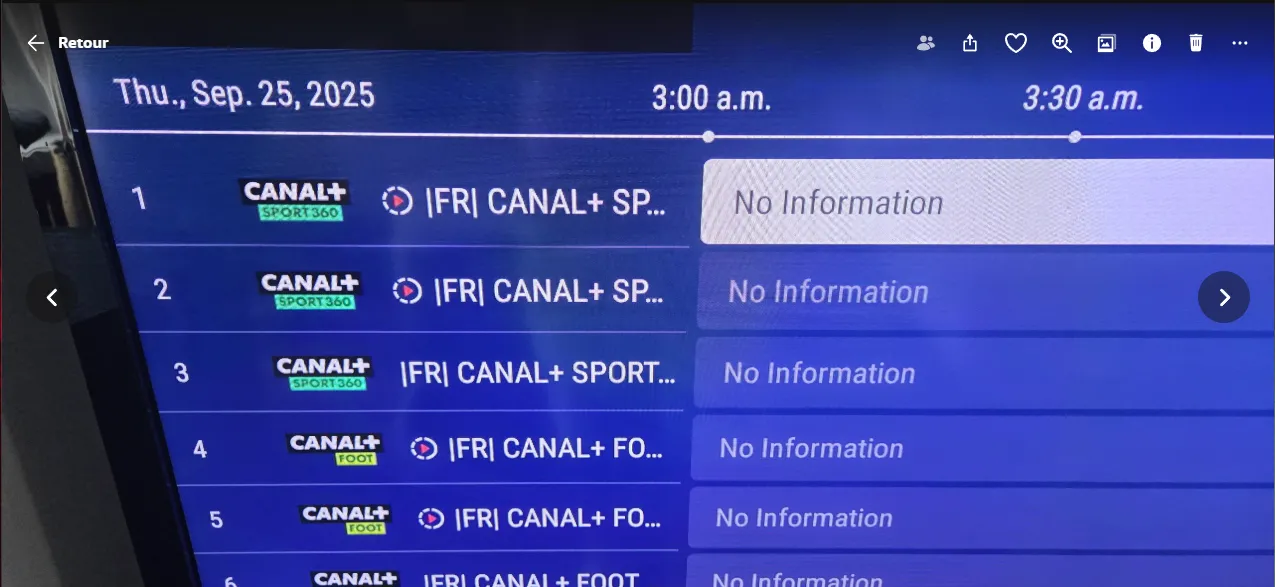
Forcing EPG to be downloaded, I got only 24hrs of backload on EPG... some says that XTREAM connection is limited to that
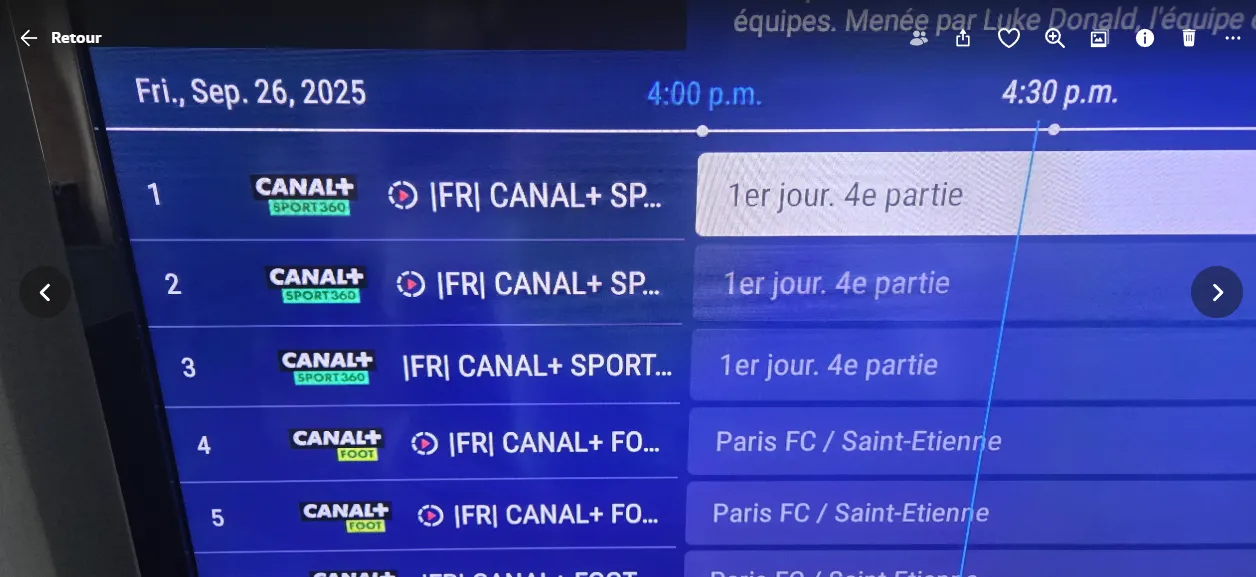
As we can see... nothing shown before 24hrs backlog
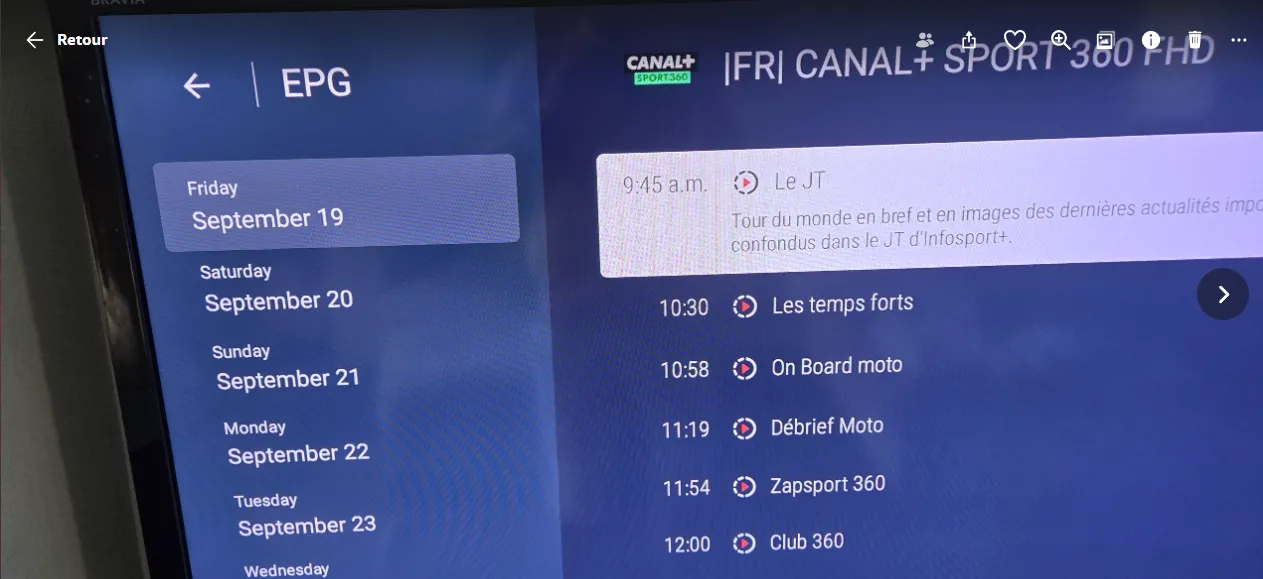
But can someone explain to me WHY I do EPG on a single channel, I have 7 days of EPG backlog and & 7 days in future?
If the information is there on a single channel, why can it be retreive on all channels??? It doesnt make sense
-

- Model: Z11 PRO (FW: 11.3.5)
- Firmware version: Brand new out of the box, so the very latest MOL3 : (FW12.1.10)
- MYTVOnline 3
- Box connected with: Wifi 500Mbps
- using MacAddress
I red in another post that with MOL3, when I use a Stalker connection, I can just change the MAC Address to my other Formuler and voilà!
Scenario:
1- Z10 Pro with MOL2... connecting sucessfully on a server with a Stalker connection using only URL1 ( and formuler native MAC Address1)
2- Disconnect my connection to the server. Shut down formuler Z10.
3- On my Z11 Pro with MOL3... configure Stalker connection with URL1 and force MAC to MAC Address1
Error: Connect failed. Your account blocked. Contact Your service provider. Your device is not active "MAC Address1". Code: 1012
What didn't I understand? What did I miss?
Eric
-
Same here.... :-/
Login in stalker mode in MTOL2 on my Formuler Z8 and Z10 ... no problem
I just bought a Z11 Pro and the connection gives me an error:
Failed to Connect – Check portal URL – Server Returned HTTP 403 – Code: 1005-400
Can someone explain me Why Z10/MTOL2 was working... Z11/MTOL3 not?
Here a possible FIX: Lets us be able to install MTOL2 on Z11 Pro!!
Im pissed! 1 year of same complain... no fix! Come on Formuler
Ah yeah... I tried Hard Resert, alternate DNS... nothing works -
Behavior is simple
1-play a VOD or Serie
2-press Pause during it play
3- wait 5min (maybe less)
4- press play
Bug: it will stop within less then a minute
-
So? What about it?
Some problem here for so many months with VOD or Series. MTO2 can handle few minutes pause. It will end what is on when resume by play it again.
Why there is nothing new since 2003?
-

casting the app to another screen is not supported
Yes.. that's why im asking why?
-
its been a year .... any update about that?
-
Why "External Display not Supported" when I tried to play my phone on my TV HDMI or with Smart View on my TV ?
-
Ill try to ask... thx
-
Hello, I’ve had an annoying issue on a new server which won’t allow me to hide excess channel categories which I don’t require on TV Groups section.
"TV Groups" section contain around 320 groups of channels and I want to hide some but when I go to edit groups in connections it loads but times out with “empty group” error message.
It works well for "VOD Groups" and "Series Groups" on that server. ** Note that this behavior (on TV Groups) works very well on my other server. So I suspect that the FW does not manage the 320 groups on edit function of that server.
Can somebody please help me solve this issue.
Current Firmware: v10.10.49
Current IPTV Versioon: v10.10.51
Current Service: v10.10.44
Current Tuner: v10.10.37
Current Storage: v10.10.21
Formuler Z10 Pro MAX -
Hi 175n !
Its work but....
My Denon remote use volume button as a 2 steps behavior... 1 press... +/- 0.5 Volume... keep pressing... +/- 1.0 Volume
When I keep the button press on the BT1 (FW: 0.5.3d), it react as a +/- 0.5 Volume behavior because le ms time between automatic press button coded isn't enough fast.
see my video: https://youtube.com/shorts/Q3Hp43ZPNWE
Its there any ways to improve that?
THX
Eric
-
Hi,
Im using my GTV-BT1 remote and I set my volume control to my DENON AV Receiver
The bug is that, when I kept pressed volume button, the sound move (up or down) to slow. So, instead of getting up or down by +/- 5 (for a faster signal) ... its move only +/- 0.5
It there anyways you could lower the signal delay between 2 sounds command with the button volume is kept pressed?
Thank guys, awesome job!

Eric
-

Timestamp happen when you stop the movie and not pause, use stop instead of pause and then standby.
Agree.. but in a perfect world, as soon as pause is hit, timestand could be written same way as stop behavior.. I didnt say that it was showstopper, but a nice to have
-
Formuler Z10 Pro and MTOL2 at lastest firmware
behavior:
I paused the movie after one hour (doest matter for how long) and push the Stand-By (Power) button that turn my formuler Z10 Pro to stand-by mode.
When I press the power button, MTOL2 get back on the movie but cannot resume from where I turned it off.
Enhancement Request:
Whenever a movie or a serie is playing or on pause, as soon as Power button is pressed, timestamp of the movie or a serie played should be written some where for resume it at the right right time when I get back on.
I kown when I exit a movie or a serie, timestamp will be written somewhere for resuming it after. So as soon as I press Power button, same behavior should happen.
Thanks coders!
Eric
-

Hello,
My formuler z10 se works very fine whithout nordvpn. But, when i turn on this vpn, i have a black screen or error 401, i have tried to uninstall nordvpn, to change everything into the settings of this apps, but always nothing work!! Could you hep me?
for my IPTV server... only "dedicated IP server" and "obfuscated server" from NordVPN works
-
I realized that there was 2 problems in my problem:
1- Cannot control Bluetooth volume with remote because remote is set to control Sound System. However, just you ask, I can control volume from my bluetooth headphone (tested!). Its doesnt control the Formuler Hardware, but Headphone hardware. Its a acceptable by pass.
My opinion: put an option like: "Priority Bluetooth Sound Control" toggle ON/OFF
2- Cannot ear sound from passtrought sound (Digitial Dolby, DTS, etc.) in my bluetooth headphone. However, Youtube seem work. (stereo sound maybe). Its there any possility to toggle on/off Passthrough sound? That option was there on Formuler Z8 Pro and isnt there on the Z10 Pro Max
-
Hi guys,
got a Formuler Z10 Pro Max with lastest FW.
Im trying to watch a movie, but sound source is Dolby Digital 5.1 and doesnt seem to be reconize by my bluetooth headphone and/or bluetooth transmitter.
I didnt find anyways to disable passthrough on my Formuler. Even if I turn off "Sound system" into sound option, it doesnt do anything.
Everything is fine with LIVE TV or Youtube when sound source is in stereo.
Any suggestion?
How come ON/OFF switch on sound passthrought was there in my formuler Z8 Pro but isnt there on Z10 Pro Max?
Eric
-
Actually... the behavior is the same on all APP.
As long as my remote control my sound from my external system sound, it doesnt control Formuler hardware sound anymore.
is that answering your question?
-
Im using a Formuler Z10 Pro Max with a GTV-BT1 remote.
into the Formuler Remote APP, GTV-BT1, Setup Volume Control is set to my sound system.
That is working well.
Here my problem... at evening, I ask often to my kids to used bluetooth headphone.
So, Ive successfully connected our bluetooth headphone to the Formuler.
When I move into Main menu, I ear the clicking... so Its working!
The problem come from MTO2. I cannot ear sound for Live TV, Movies or Series. Because sound is SET to my Sound System, volume plus or minus doesnt do anything to the bluetooth sound volume
My enhancement request ...As soon as there is a Bluetooth sound device connected, remote must control BLUETOOTH volume and nothing else
is it possible?
My work around... remove, from Formuler Remote APP, sound system control everytime Im using bluetooth headphone. Annoying!
Thnank guys!
Eric
-
Fixed...
Formatted with RUFUS into NTFS format
-
Lastest official update...
Box: Z10 Pro Max
My timeshift is set on USB Key (I see it in the parameter)
TimeShift is ON
but PAUSE and PLAY arent available on live TV ... and nothing nothing happen when I push PLAY/PAUSE button
Anyone have that problem?
-
Latest GTV-BT1 firmware
Actual behavior:
Volume is set to control my sound system. When I press volume (up or down) key, it does what it suppose to do. But, when I held down the key, volume get (up or down) only once and that it.
Enhancement Request:
when the volume key is held down (up or down), repeat volume (up or down) action every X ms. My sound system volume goes from 0 to 100. I often have to ajuste volume 10 to 20 steps depending of the scene. (Dialog, action, etc...)
thx guys!

-
Done! Awesome job coders!!
-
wow! Programmers... you are the best!!
Working perfectly for sound via Sound System!
Good job!
-
All my sound output goes through my sound system.
If we could remap volume buttons with custom command (TV volume or Sound System volume), it would be nice.
I know, right now, I can toggle from TV to STB, but my need is to control my sound from my TV ou my Sound System with I am set to STB on the remote.
and I will say again... NEED MORE CODE!
With learning IR, I could manage the situation by learning the code. But Im limited with the BT1
Would be nice if the formuler remote program could learn the CODE from IR1 control and stored it into the sotfware and used on the BT1 after. -
Please ADD more TV and Sound System CODE
or a way to add more...
got an ONKYO sound system... wanted to control volume with the remote.... it doesnt work! :-/
-
Hi...
My Formuler Z10 Pro max is connected to my SONY TV, then, output sound from TV to Sound System through S/PDIF cable.
am I the only one who can't control the volume of the sound from the Formuler Z10 Pro Max remote when it is a Dolby Digital source ?
The only way it to be controled it from my sound system directly
Had the same problem with Formuler Z8 Pro
why is it like this?
-
I thing I find the problem... it was coming from the VPN.
By default, the VPN program (NordVPN) connect on P2P server. I changed it to "Obfuscated" and seem that my bandwidth is more constant.
Ill let you know if I learn more... thx guys!
-
Thx guy for you answer...
I'm using a VPN to be sure that isn't come from internet provider. With NordVPN, I'm getting 120mpbs with VPN on.. so, not that
I bought a new router with a QOS just for that. Set formuler Z8 pro on the highest priority.
And of course, set a fixed IP to the Mac address.
And yes, I've set the buffer to 10sec.
you had good idea, but I've done it all and still the same problem.
Like I've said.. strange that I can got 20MB/s that filled the buffer then it drop to 200kb/s and never going high and it ended by buffering.(sorry for my bad English 😅)
I asked to the programmer why not be able to set a buffer to 60 sec or more. They doesn't seem to see my point of doing that.
what could tell the server: ok, send me full datas then.. stop... and it didn't ask for more... my only answer is the buffer and the way it is manage.
-
- Model: Formuler Z8 Pro
- Retail Box or Provider Box: Retail Box
- Firmware version: 1.4.91
- MYTVOnline 2 version: 7.11.1
- Connection with provider: Stalker portal - ID/Mac registration
- Box connected with: Ethernet (120Mbps tested)
- Did you factory reset your device? and when?: no
- What issue(s) are you having? (As you can see on the screenshot attached, on Live TV, as soon as I change channel, I've got a maximum on the bandwidth (around 5MB/s.. sometime it could go higher like 100MB/s). It stays like that for around 7 sec then slows down (1.2MB/s). I see on screen that in the first 7 sec, the buffer get filled. But as soon it was filled, the speed decrease and the buffer empties. The problem is that its begun to buffering after that. Sometime, speed got down to 300-500KB/s and Live TV doesnt work anymore. Always buffering. So I as myself, how come I can get 5MB/s without problem but at the end, I got a buffering problem du to a slows receptions ?? Im pretty sur there is something in the code that is stopping the speed or a missing command saying to the server: buffer is almost empty, seen my more datas!
- What was you expecting to happen? im not a coder, so... first I tough that a bigger buffer could help.... then I realise that the problem happened after the buffer got filled. So, the right behavior should be: when it get half, send some code to push on server valve for more datas. I tought it was from the server but logically, if server can send 5MB/s at the beginning, why couldnt send it after few minutes? So my only answer was because box doesnt ask for it!
- What happened instead? I think i has answered that question
- How can we reproduce the issue you are having? yes...every that, every channel, every time of day
- What have you tried if anything to rectify the issue? reboot device. Don't know what to do more.
-
still the same here
-
-
BE ABLE TO SET A TV SERIES / VOD BUFFER on USB KEY the size we want
Here is the problem. Sometime, at night, IPTV server get really busy and watching a 4K VOD is almost impossible without buffering at every 5 sec.
An easy way to fix that could be a way to set a VOD buffering on the USB key. So, I will just have to PAUSE the 4K VOD, wait 5min for the VOD to buffering (like a timeshift) and start it again. See my point?
I had the same problem, at night, with 4K LIVE TV, but since you implement a TimeShift, that isnt an issue anymore. So that is way the same thing on VOD is an awesome idea!
Maybe add, when we pause the movie, the same feature as you done on TimeShift... Gray color, the movie on the TimeShift, blue color, where I am on the movie lenght.
See my point?
-
DISPLAY AN IMAGE TO AJUST IMAGE SETTING
Here my suggestion:
Main menu: Setting -> Display -> Image Settings
That menu is used to adjust Brightness, Contrast, etc.. of the Display but without an image to ajust the calibration, its kinda hard to adjust it right.
My enhancement request will be to have access to a high quality image by default (and possibility to use my own jpeg from a usb if I want). Then, when I will select Brightness, I will see all the complete image and I will be able set my adjustement. Same with other settings in the menu.
See my point?
Another way could bring Image Settings to MOL2 with I watch a Live TV or a Movie.
My point is we need to see someting to adjust an image