

Posts by MajorTom

    Make sure that your external hard drive is formatted as removable storage on GTV.

    If not, please follow the instruction below to see if it helps.

    • Home > Settings > Device Preferences > Storage > Device storage > choose the external hard drive > Erase&format as removable storage > try to set the timeshift location

    Thanks,

    I simply don’t know what to do. I « ejected » both my USB keys (USB.3 and USB.2). As a result : they can’t be used anymore. The GTV considers that USB.3 has been « safely ejected » and doesn’t allow to do anything (I’ve formatted it again with my PC before inserting it in the GTV without any success). USB.2 is recognized but is not considered as « connected ». A nightmare.

    Hello,

    Thanks for the update.

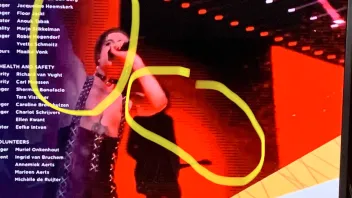
    The image quality seems to be better than before in general, but horizontal stripes still suddenly appear on images with large solid areas (it occurs more on FHD channels, than HD ones, with screen resolution 4K 60hz or 4K 50hz ; it never occurred with the Formuler Z8).

    Another strange problem : the scandisk key USB.3 256 go I used with a Formuler Z8 is not recognized although it has been formatted. I must use an old USB.2 key for timeshift.

    Hello, 


    I have a Formuler Z8 which works great for MOL2 and the very few streaming apps compatible.  


    I’ve just bought a Formuler GTV for the possibility of using Google TV apps in addition to MOL2. But I am very disappointed. :frowning_face:


    The image is horrible, not clear. There are even some weird lines in areas of solid color (screenshots below). 


    What is the problem? Can the device be defective? Or is it only a matter of software or image settings on the GTV? 


    Thank you!

    (TV Samsung 4K, Internet ethernet 370 mbps)