

Read before update.
"WARNING: Install and use at your own risk. Software cannot be rolled back after installation."
If goes bad its your problem!
Read before update.
"WARNING: Install and use at your own risk. Software cannot be rolled back after installation."
If goes bad its your problem!

Supports DVB-T2/T/C
(T,C) DVB-T & DVB-C Terrestrial and Cable
So on my understanding,
The Formuler USB-T2 stick the device itself supports (T,C) DVB-T & DVB-C Terrestrial and Cable.
But Formuler IPTV Boxes (On my case Formuler Z7+) and MyTvonline (MOL) only handles the DVB-T terrestrial channels even if the device has DVB-T or DVB-C.
Is this correct ?

If it's the formuler one, then i was told is was terrestrial only..
Ok, but still doesn't answer to my question.
What is (T,C) on the Formuler USB-T2 stick, is the T for terrestrial and the C for cable ?
If it is terrestrial only why the (T,C) ?
Hi all,
What is (T,C) on the Formuler USB-T2 stick ?
Is the T for terrestrial and the C for cable ?
Best regards,
ARAmos
Tested with Firmware v1.2.71 and MOL1 v1.9.71 and it seams solved for now.

i had almost same issue until i registered the mac adress with my iptv subscriber so try and register your mac adress with yout iptv provider
i think it has something to do with epg because if i didnt use epg it didnt crash for me
Orcman, where do I disable the EPG on my service configuration?
Are you running the official latest update or the beta?
Firmware: v1.2.60 IPTV: v1.9.62
How are you connected?
RJ45 cable with fixed mac address (some bullshit invented here on the forum to make work better, no difference at all but ok it's psychological).
Also I'm using one USB3.0 Gigabit Ethernet adapter (RTL8152/RTL8153) as per Formuler supported devices.
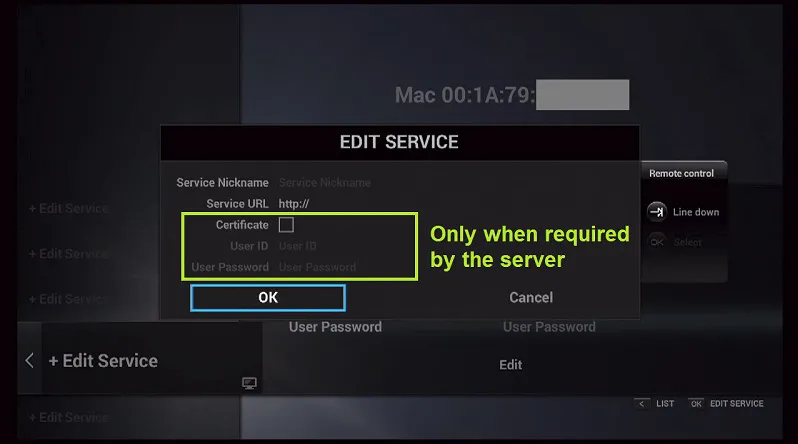
Connect with service User ID/User password. No m3u list.
How large is your EPG?
No idea. Large in Mb ? Amount of TV/Radio channels available EPG ? How do I check this?
How large is your playlist?
What is the playlist? Amount of TV/Radio channels available on my list?
Have you noticed your EPG has been loading the whole time while you were recording?
It was working perfect 5 days ago.
Hi all,
Since last MYTVOnline update, MYTVOnline is cashing each 30 seconds.
I also use the app Perfectplayer tha I bought from Playstore and it works perfect.
This is what I have done so far trying to solve the problem but nothing have worked:
- Delete cache from MYTVOnline.
- Uninstall MYTVOnline e install it again.
- Factory reset Formuler Z7+.
- Just missing using the hammer on it.
Any ideas?
Best regards,
ARAmos

This is nonsense what you write! Think little bit what you saying....
Aren't they?
Miss the time when it only took 20 seconds to boot. Now 2 minutes if all goes well!
The buffering they said
No will not. Stop saying that, someone made this up that changing to static IP is the cure for buffering.
Buffering problems are is 99% IPTV provider side.
Static IP maybe solve drops on your internal/house network.

once you have ticked manual ip reboot router and device
This will solve what?
Tiukgirl,
As getsoutalive, explained, someone made this up that changing to static IP is the cure for buffering.
Those wo state that have solved buffering problems by changing to static IP it is just pure coincidence. The problem for buffering is on the side of IPTV Provider and must important on the side of the Internet Service Provider.
I have one Formuler Z7+, and In addition to the MyTVOnline Application, there is nothing special on Formuler Box. You can buy more cheap one and get the same result or better.
PS:
I have static IP and I have buffering all the time.
Just got the confirmation from Formuler Support.
There isn't a DVB-C tuner that works with Formuler 
Solution, go for other brand like WeTek
Hello,
Thanks for reaching out to Formuler Support.As you mentioned, currently the USB tuner is working only for DVB-T, and as drivers development is mandatory for our receivers, we do not have any brand or models to recommend which is compatible with our receivers.
Sorry for the inconvenience and not giving you a final solution.
Should you have other inquiries, please fell free to reply to this ticket.
Thanks.
Formuler z7+ as support for USB3.0 Gigabit Ethernet adapter based on chips RTL8152/RTL8153. I have the one on the attached image and it works perfect.
So no drive support for USB Tuner Stick DVB-C device that uses some chip ?
Does anyone one figured out a USB Tuner Stick that support DVB-C that works on on Formuler Z7+ ?
If it is compatible with MyTvOnline will be perfect.
But if just work on Formuler Z7+ with any other aplication will be perfect also
Hi all,
MyTvonline is able to record live Tv, and I don't have a problem with it works perfect with my external HDD.
My IPTV provider, have enable time shift for some channels. I'm able to access a time shift from 4 hours ago and play it without any issues.
MyTvonline doesn't record time shift just live Tv. At least I have tryied to press the record button on the remote but nothing appens.
Is there any way to record a small video from a time shift with MyTvonline?
I have already try some screen recorders but no sucess.
Best regards,
ARamos
Hi all MYTVOnline users,
I will like to know more about MYTVOnline features and icons meaning/description/functionality. Since I don't have and I don't find a full detailed manual for Formuler Z7+ and MYTVOnline I will ask some questions here.
Can anyone explain the meaning/description/functionality for each icon on the attached image?
(1) - Subtitles
(2) - ?????
(3) - Stream codecs
(4) - Stream resulotion SD, HD, FHD etc.
(5) - ?????
(6) - Buffer????
Best regards,
ARAmos
I have upgraded to last Z7+ firmware and MYTVOnline last version and still this button does nothing.
It is supposed to do anything? How it works?
Hi SAM,
Software Version: v1.2.16 ; Software Revision: r13015.
I don't have a Full HD TV, it is a old TV and is HD Ready Only. On the attached video I'm not able to see all the picture since it is broadcasted on HD, so I need a feet to screen option but dosn't work.
Hi all,
My IPTV provider also uses "xstream codes" and I have tons of buffering.
@DroidBug
Can you send me a PM with the provider that has been successful I will like to test it also?
Hi all Z7+ user,
When I press the "V.FORMAT" button on the remote it walks trough the options for resolution available "Fit On; Original; Pan Scan; Combined" but dosn't afect the display it is always on the sam resolution.
Does the "V.FORMAT" button on the remote do anything?
Regards,
ARAmos
Hi all,
Formuler have USB TV Tuner available but for DVB-T/DVB-T2.
I'm lookinf for one USB TV Tuner but DVB-C "Cable" that works with Formuler Z7+ and MYTVOnline.
Does this exists? Does anyone have one working?
The quality its great for the price. Don't expect a rubberized fancy premium remote, this is not that.
The keyboard does work on MYTVOnline and all the other apps where you need to imput text.
It cost around 8€ to 9€

The big question is.
The IPTV provider service have modifyed your Retail Box to a Provider Box without permission or consent of the owner since the box wasn't bought from him.
You give up from this IPTV provider service and get a new one. You ask for the PIN to restore the Box to Retail Box and for some reason he dosn't want to give you the code.
This is very wrong Formuler feature, bad intentions people exists everywhere. Formuler users can get little expensive paperweight unless there is a way to revert this without the PIN code.
How do you solve this?
Hi have an M3 2.4G Wireless Remote Control Keyboard Air Mouse that works great on Formuler Z7+
It doesn't have all the original Formuler remote keys directly mapped for MYTVOnline but overall its 90%. If you want you can do IR copy from the original Formuler remote and map to a specific key.
On my M3 remote since I don't usually use the MYTVOnline specific keys I have mapped my TV remote this way I have 2 in 1. If I need some special modification I use the original remote.
It is a Retail Box, I didn't have any idea that your IPTV provider could modify your Formuler Z7+ from a Retail to a Provider Box without permission or my consent.It is back to provider box.
Problem solved.
He forgot to say in first post if this is portal box or retail! If provider Box and i think it is, then you know what happen, please contact then your provider. On retail Box you can add 5 portals like droidbug already wrote.
It is a Retail Box, I didn't have any idea that your IPTV provider could modify your Formuler Z7+ from a Retail to a Provider Box without permission or my consent.
It is back to provider box.
Problem solved.
Hi all Formuler users,
I have bought a Formuler Z7+ on a web store that sales Formuler Z7+ Retail Box.
Later I have joined to a IPTV provider service.
On the first month with this IPTV provider service, the Formuler Z7+ did have the original Pink interface, but on the second month still with the same IPTV provider service, the interface from my Formuler Z7+ was complete changed to grayed black textured.
I have questioned my IPTV provider about this change, and they told me, they have launched one update and converted my Formuler Z7+ to a Provider Box without my permission or consent.
I din't bought the Formuler Z7+ from this IPTV provider service, also I didn't know this was possible for they interact this way.
I have requested to convert my Formuler Z7+ back to Retail Box, and it is back again to a Retail Box.
I think it is dangerous this option for the IPTV provider service to be able to convert your Retail Box to a Provider Box without permission or consent since I didn't bought the Box from them.
So my question is:
How can I block the IPTV provider service from modify my Formuler Z7+ from Retail Box to a Provider Box?
Hi all Formuler users,
Does anyone knows how to factory reset Formuler Z7+?
On this last update I don't find option: Settings >> System >> Factory Reset
Best regards,
ARAamos
Hi all Formuler users,
Since the last update of my Formuler Z7+ I'm no longer find the option to add two IPTV providers on MYTVOnline application.
Where can I find this option on MYTVOnline?
Best Regards,
ARAmos
Hi all Formuler Z7+ users,
Since the last Formuler Z7+ update, my Formuler Z7+ takes a long time to start up, and it reboots during this process. Bebore this las update it took 30 seconds and no reboot.
Also it dosn't display all the icons on the launher screen, it display the (+) sign instead of the application icons. But if I press the (+) sign it opens the correct application.
I have done a video showing the behaviour:
I have alredy set to factory defaults two times, and the behaviour is the same.
Am I missing something here?
Any ideas how to solve this?
If you could programm all keys for TV, what would you use to control your STB then?
It's easier than you think.
I have the Air mouse on the image below. It works just great it is Air mouse and also have a keybooard on the back.
When you press the (TV) button once you enter on TV remote, and all buttons work for the TV and you can programm all buttons to replace the TV remote.
Press (TV) button again and you enter on BOX remote, all buttons work now for the BOX. I'm using it with Formuler Z7+ without any problem at all, of course is not compatible with Mytvonline.
I'm hable to control my TV and the Formuler with the same remote. See this video for full details how it works
So NIGHTSHADE, not so dificult 
Maybe some one can pass the idea to Formuler for future upgrade and remote replacement.
Only 2 keys can be can be programmed!
What is the porpuse on that? Makes no sense at all. You should be ablle to programm all keys so you can use only one remote and get rid of the TV remote.
Getting disappointed.
Hi all,
I'm trying to program the Formuler Z7+ Remote using the IR learning where the instrucions are printed on the back of the STB Remote.
1 - Press and Hold (TV) for 5 seconds. The LED goes from blinking to solid and STB RCU enters Learning Mode.
2 - Press the key to be programmed on this RCU. Led begins blinking slowly. Key is ready to accept programming.
I have no problems with step one, the remotes enter on Learning Mode. But once step 2 once I press any button I want to programm the LED goes of instead of begining blinking.
Here is a small video from my experience: https://youtu.be/hrhx73ttngI
Any idea what I'm doing wrong?
