


Sorry for late response, but i have tried everything i think, and now i give up. I'm going back to my PC which is currently running Kodi with Linux ios. It's so much more stable with both sound and picture, then Formuler just has to take care of the TV. Thank you for all the help, but unfortunately it wasn't very successful. But now everything works as it should, unfortunately i have to use an extra remote, but it's worth it now that it sounds as it should. Kind regards Thore
Posts by 2469
-
-
Hello again, I'll be back when I find a longer HDMI cable that supports ARC and 5.1 sound, and get help getting behind the TV as it's 65". Thanks a lot for now.

-
Hi and thank you for all the help you give me. I'll fix that as soon as I get some time then I'll probably have to tear up some of my connections as you might see in the picture. I currently only have an HDMI up to the TV, so I'll have to rewire everything and get a slightly longer HDMI cable to see if your idea works. Take care and a happy new year to you from Sweden
-
Hi and thank you very much, it's an 8 year old Yamaha HTR-3071 that's still going strong. I'm not quite sure what you mean, do you mean I should connect from Formuler(DVR?)->TV, and then TV->Receiver(AVR)?
-
Can your avr play dts?
Is your avr connected with a hdmi cable? Hdmi let's dts thrue.
If your avr is connected with a optical cable it's logical. Dts can only via hdmi if avr supported.
Not via a optical cable. That can max dolby 5.1 passthrough so far i know.
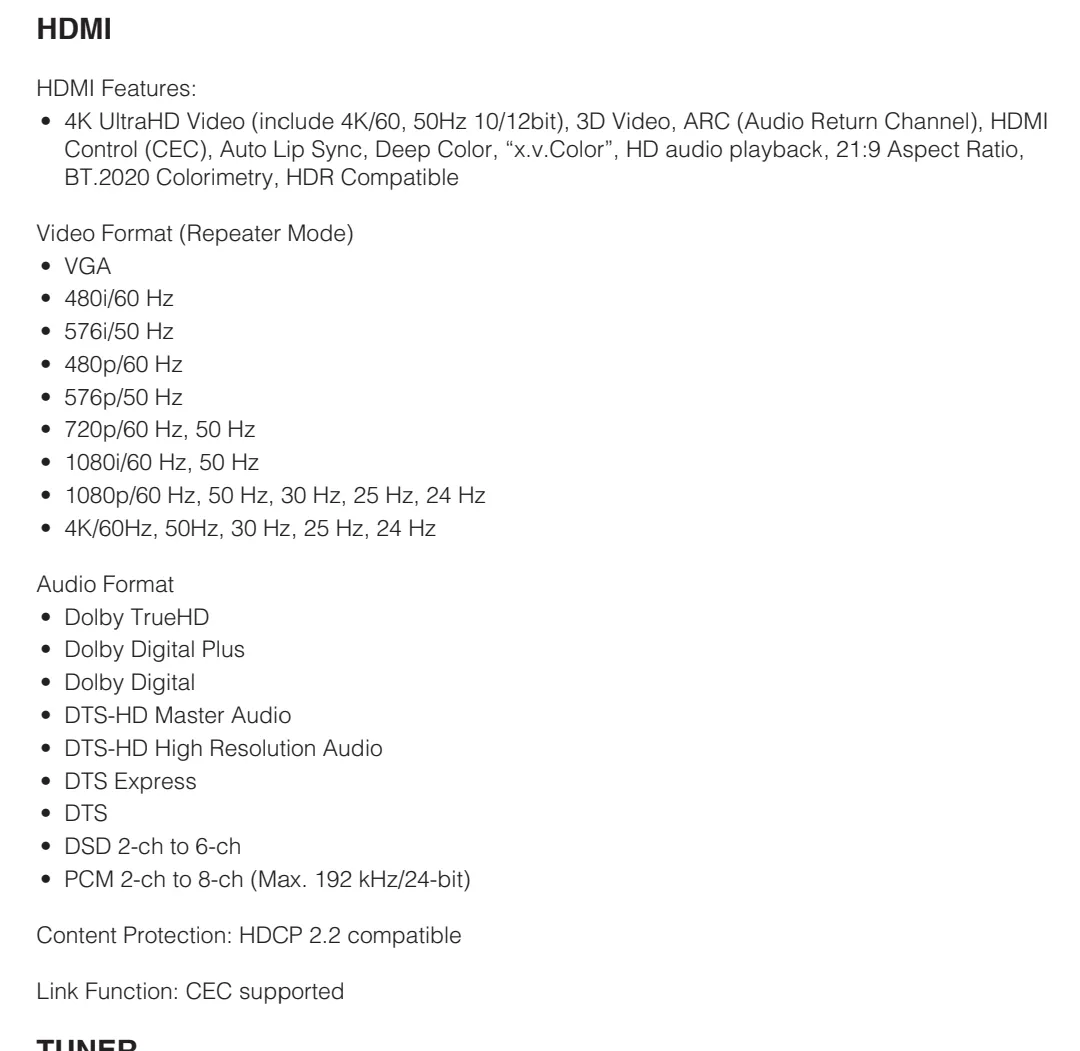
Hello again, yes it can. I attache a picture of what it can play. And what i know there is no optical connection on the Formuler Z11 Pro. My stuff is connected like this: Formuler->AVR->tv all with HDMI cables that comes with the products.
-
Display More
In formuler android settings you need only set sounds to automatic. But it should be standard.
Now have a look when playing a movie with steps above in kodi.
And you installed audio optimizer and ran it from market right?
edit: Ofcourse you have, otherwise you didn't have dolby 5.1 in mol3 or you installed it with codec popup in mol3.
Hello and thanks that you help a 55 year old man😀. I have done exactly as you described, but when i play a DTS movie, it says in the audioinfo on Kodi it is DTS audio. But my AVR says "Decoder off", so something is not correct from Kodi.😭
-
And work it out for you my friend?
Trying right now, but i am not sure what settings i need to set in Formuler...
-

Use Kodi backup add-on it works very well. Just install, map a destination path (use NAS). I had issues when selecting 1 complete zip file but saving separate files (it provides the option) works perfect for backup and restores. I also did not enable "compress archives".
Make sure under "File Selection" in the config add-on to select all, add-on data, config files, database, etc.
Hello and thanks for your eeply. I have used the addon and can tell you that it cost me a whole day to get back again. It just make some backups and not a 1:1 replica. And i have done exactly as you describe.
-
Hello everyone and happy new year, I have got myself a Formuler z11 Pro where I have installed Kodi addon which I am very used to but then on a Linux OS. My two problems now are that I cannot find on the internet how to get into the .kodi folder so that I can download a complete copy in case something happens. Problem two, I cannot find how to get a direct address to my trailers that I have in my tv show folders. In them I have my nfo files which I have put the address to the trailer, and i have tried things like this: http://192.168.1.62/android/.kodi/…how-trailer.mkv. My files are stored on a local network on a NAS. Is there anyone here who can help me. Kind regards Thore from Sweden
-
Display More
If i play a mkv movie from my nas with kodi i see dolby atmos.
You can check it if you play movie and press ok button, then go to the right, cogwheel, audiosettings, there you see which audiostream plays.
And if play movie. Press ok button press on right side in the i (info).button. i see nothing then then only (no info) and if i press back button one time then appears a bar omm bottom with h.265 4k vision dolby-hd etc.
Please check it.
Maby is 2.0 selected at your audio.
Ahaa.. thanks. I will try it and see if it works. Happy new year
-
I kodi options you can change op the left side rhe options to expert.
And then in settings at system section switch under passthrough the switches on. Only one needs to be off!
Exactly, but i wrote that i have done that so the question is why i have 5.1 via MOL3 and not from Kodi? Thanks for your reply.
-
Hello, i have a Formuler Z11 Pro connected to a Yamaha AVR there the TV is connected to as well. I get 5.1 audio from MOL3 but not from Kodi, and i have passthrough enabled in Kodi. And i have run the Audio Optimizer ro. Anyone with same issues? Best regards Thore from Sweden