Posts by kg1

    i would like to know for sure why it does not reach the same speed as PC or a PS5.

    In a nut shell......

    Probably asking to much of a $30 SBC (Single Board Computer)

    Haven't peeked around this board so not sure what board it's using, but typically........

    These boards are based on a SoC (System on a Chip)

    They do not have dedicated controllers like a PC would have a dedicated

    Ethernet controller where as this board would have the Ethernet controller

    built into the SoC

    I'm sure the SoC ethernet controller is a "gigabit" controller but.....

    The data has to get from the Ethernet port on the bus to the SoC controller via the Bus

    Not sure what bus this board has on it, but let's assume it's a single lane PCIe V2 bus.

    The theoretical maximum through put on PCIe V2 (single lane) would be around 500mps

    Which would mean 1gig data through put would be saturating the bus around 500mps.

    Also depends on what other devices are on the bus and active. Like the USB ports etc.

    Moving to newer boards might get you something like a PCIe V3 bus, They keep improving

    them while maintaining price points. Maybe the next gen Z10? has upgraded bus, like PCIe V3

    which would get you up to the 1gig bus through put.

    I'm sure your issue is bus related.

    PC's have dedicated ethernet controllers and faster multi-lane buses.

    Thanks for your waiting.

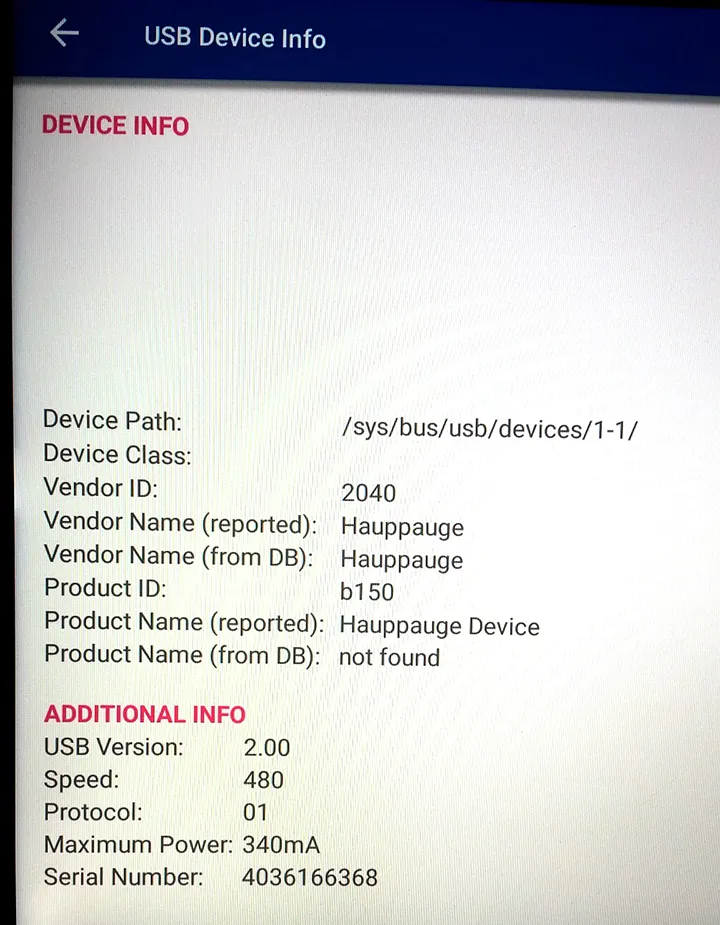
    You can use the 955Q tuner(2040:B150) in the latest BETA firmware.

    If you would like to test the BETA, please follow the instructions below:

    1. Open the Software Update app
    2. Press 0227 on the remote
    3. Download and install the available BETA software
    4. Test the issue again and let us know the result.

    Thanks

    Thanks for the heads up.

    Since everything is working with the older tuner I got, I'm going to

    wait until the Beta gets released to an update and then I'll give the newer hardware a spin.

    Ordered a "A681" directly from Geniatech in China. Only A681 I could find listed anywhere.

    Received today and they sent me the A681B version from China.

    So it appears it is NOT possible to use the MyGica tuner any longer since it

    is not available to purchase any longer.

    The MyGica A681 tuner should be removed from the list of compatible tuners

    since it is no longer compatible.

    So that leaves the 955Q which is also no longer compatible.

    So there are NO compatible tuners that you can currently purchase.

    The only choice is to find used tuners from like Ebay, that's what I ended up doing.

    Or maybe state that only "Older" revisions of the hardware are compatible. Why send

    people down this road when the current available hardware DOES NOT work.

    Or update/compile the kernel/drivers to enable use of the newer hardware.

    Tried with multiple USB 2.5" HD's of diff HD brands (Samsung and WD) and USB powered 3.0 enclosures, also tried adding USB powered hub too.

    Easiest to just leave on home screen and all works great. Don't really need any power saving modes on these units.

    I've given up messing with the USB/Standby issue since works fine from home screen just putting it out there

    in case it helps the OP

    I had issues recording from standby mode.

    Sometimes my USB drive dropped and wouldn't come back from standby mode and recording would fail.

    I've solved that by leaving the unit on the home screen and not going into standby.

    Bought a used 955Q on Ebay and it is a older unit with the Product ID: b123 production date 5018

    Plug and Play, fired right up scanned channels, good to go.

    Still have a A681 coming from China to try too.

    But, I'd say the Z8 pro is "not compatible" with any new tuners that you can

    buy.

    You need to find older used equipment, at least until the newer drivers

    and kernel get complied into the Z8 Pro.

    So....

    Listed Compatible tuners. A681 and 955Q

    Bought the A681B not realizing the "B" version not compatible.

    Bought the 955Q but it's not compatible due to Z8 pro only works with

    old version of hardware which really means not compatible.

    So still trying to get this to work with a tuner.

    Can't buy a 955Q because doesn't work with newer versions.

    Having trouble finding a A681 since units available are all A681B

    Only thing I can find is a A681 available from China but is sold by GeniatechGeniatech/Mygica

    only takes 4-6 weeks to get. Not sure if the A681 is being made any more.

    Calling the Z8 compatible with these 2 tuners is a stretch at best.

    The A681B does work with app store app but not MOL2

    So just using that for now until the A681 comes in from China and

    I'll try that one.

    Quote

    The Z8 Pro "DOES NOT" work with the 955Q. Maybe older hardware/software used to, but

    not on the newer hardware/software.

    Got it.

    like I said. Doesn't work unless you can find old, new stock.

    "The 955Q Doesn't appear to work with the new hardware revision." Not that hard to say.

    Quote

    Complain to Hauppauge


    I'll email them in the morning.

    GregOG1983

    The MyGica A681B with the PadTV HD app works great. Plugin tuner, fire up the app, scan channels and

    good to go. The interface is a little ruff, but works good. Thanks for the info.

    Not to beat a dead horse but.....

    The Z8 Pro "DOES NOT" work with the 955Q. Maybe older hardware/software used to, but

    not on the newer hardware/software.

    Since I got the MyGica A681B and not the A681 i'm going to try and find a A681 although

    everywhere I look everybody only has the A681B. Even if it says A681 closer inspection

    shows it's a A681B Do they even make the A681 anymore?

    I'll try to find one and see if I can get the A681 to work.

    Really wanted to get a tuner to work with the MOL2 but so far no luck.

    Apparently something has changed with the 955Q or the Z8.

    Neither myself or the OP where able to get the 955Q to work. Both these

    posts are very current within the last month +/-

    Looks like older versions of software/hardware used to work with the

    955Q but doesn't any longer.

    175n

    I'll toss the A681B since not supported.

    I've tried everything I can with the 955Q.

    When I plug it in it does get recognized as a USB device at the OS level viewed via a command prompt, but doesn't appear to load a driver.

    Here's the pics of my 955Q wild guess that this is a newer unit "0721" guessing that means produced 7th week of 2021 ?

    175n


    I have a z8 pro and now have bought and tried both the compatible tuners MyGica A681 and the 955Q and can not

    get either one to work.

    I don't want to buy a CC, just bought the z8 and trying to use one of it's features that's supposed to work.

    There's not a whole lot to try to get it to work. power off/on, remove insert. Nothing no terrestrial window.

    Through a command prompt I can see the tuners disconnecting and connecting via USB but doesn't look

    like there's any driver support for either tuner built in via kernel or module. Just connects/Recognized via USB and then nothing.

    From above someone seems to have working and another just like me, nothing.

    What else can I try to get the tuner feature working? Does it really work?

    All software/firmware updated. maybe only works with older software version? Maybe someone

    forgot to compile into kernel on new software?

    Maybe feature should be removed from z8 pro feature list if doesn't work?

    Any ideas? Besides buying CC, this is a advertised feature for the z8 pro would really like to get working.

    >> For this issue, try to insert the USB into another USB port.

    Z8 only has USB 3.0 and USB 2.0 port. I have a USB tuner coming too.


    Thanks, I'll mess around with it.

    I'd like to be able to turn off having the unit automatically go into Standby mode

    if left on at the home screen.

    Not really necessary to go into a power saving mode with these units.

    The issue is my USB drive seems to have issues coming back from standby mode.

    Doesn't seem to wake every time and I have to pull USB and plug back in.

    So sometimes recordings work and sometimes they fail if unit comes back from

    standby mode. So I'd rather just leave at home screen and leave the unit on.

    I've tried to add a powered USB hub also thinking might be some type

    of power issue, but didn't help.

    Is there any way to change the power saving mode to not go into standby?

    Command prompt or other way?