

Why don't you program one of the colored buttons on the remote to take you straight to VOD or SERIES it serves the same purpose.
Posts by dzataba
-
-

With the recent launch of the Z12, Is the Z11 Pro Max dead as there has not been any firmware update for about a year?
Apologies if I have missed any. all I do is check on the box and press 1339/ red button for beta’s
Thanks
Same here I have been thinking about this for sometime now. Indeed it seems Z11 series does not exist and abandoned in terms of software updates.
SAM is that the case or we have become casualty because of formuler's new 'baby' Z12 ultra.?
-

So when I download a service on mytvonline stops at 60 percent than doesnt show mo groups channels and than kick me out to home screen I never had this problem past week its been a problem their something wrong with the app mytvonline 3?
You not alone I have been having the same problem. MOL3 was taking forever to connect to my stalker or mac address connection. It never went pass the home page. I did a factory reset and my restore always kick me out at 60%. I changed to entering the url for a fresh install, I was still kicked out at 60%. I thought the problem was with my z11 pro max. I had a second z11 promax on that one too it stopped at 60%. I changed the mac address of the box it still knocked me out at 60% of the add portal. I contacted my provider to change my url and got kicked out at the same 60%.
Finally I had to change from stalker/mac address to xc before I could successfully add and connect to my providers server. I don't understand why two Z11 pro max boxes cannot connect to a provider. I wonder if anyone connecting by mac address has a solution to this issue. It's frustrating.
-

How many providers do you have? Or how many channels your provider has?
I have 2 providers with about 30,000 live tv channels in total for both and with one Mac address and the other XC connections.
-
Hi, @ F_Peter or SAM Z pro max mol3 keeps circling and will not open to stream and will revert back to home screen. Sometimes it connects to the last channel watch briefly for about 5 seconds and switch back to home screen. I have done a factory/ hard reset of the box but the problem persist. I have also uninstall MOL3 and the problem still persist. Anyone with the same issue and suggestions to fix this will be appreciated.
I just sent logs to developers with tracking # 000000188753C should the need arise.
-
Run away from cloud flare my friend
-
Yes both stalker and the xc from different providers are working in the same mol3 box.
-

And you use two different subs. from two dfferent provider or same sub for two portals from same provider? What exactly?
Hi Sam, I use 2 different subs from 2 different providers and different protocols that is stalker and XC but all in a z11 promax.
After reading your earlier post I was able to rectify the problem. I traced the problem to the dns of my router. When I changed the dns on the box it didn't resolve my problem because my entire network dns was still cloudflare. I did a network reset and changed my dns from cloudflare when your post stated that they were blocking some providers. Thank you Sam
-
I have same issues when I bought a new z11 pro max to replace a faulty similar box. In the old box sub from two providers worked fine one as stalker and the other xc. The stalker connection worked flawlessly but xc connection won't work. The box tells me there's no internet connection even though the stalker connection is working in the same box. I have contacted the provider of the xc connection and he says the problem is not from his end. My setup and everything has not changed except replacing z11 pro max box with a new one. This is frustrating. The funny side is xc connection has loaded all the channels and continue to do daily content refresh but I can't watch a single channel from that . If you select a channel the screen continues to spin and then give no internet connection and same box that says no internet connection has a stalker connection that works. I think the problem is from the mol3 and not a provider issue.
-
Hello everyone, I had a Z11 pro max with 2 providers in Mac and XC in the same box with no issues until the video or pictures started showing on and off. I tried reset and every trick in the book which didn't work and I suspected it to be a hardware issue. I just a new Z11 pro max to replace the faulty one. After setup the Mac sub worked fine but the XC sub live tv won't work and I get no internet connection but VOD and Series play alright. I contacted my provider for the XC sub and he say the problem is at my end. I have this setup mac and xc on same box for more than 3 year with Nord VPN in the router with no issues at all. I have tried changing dns from quad9 to cloud flare no success. I installed tivimate on the box for the xc account didn't work. It's only the live tv section of the xc that gives me no internet connection. A change from wired to wifi didn't solve my problem. Help is need here guys any form of suggestions will be appreciated
-

I had no problems when using my Firestick. Don’t know why using a Formuler box needs to be so problematic.
Dicky1 as a newbie to formuler devices I will urge you to be patient as you familiarize yourself with the device. As soon as you understand your device you will love it. On the question of sound do increase the volume on the formuler device to max after a reset and then use the tv remote to do the up or down. Also turn on Automatic Volume Adjustment on your TV if it has one. I hope this helps.
-
Hi SAM what do we have to do to get epg working on XC API? That answer so far has not been clear. Those of us on XC API don't have even a day's epg no matter what I do. For me one day epg does not come up. It's always no information what is the Formuler Engineers doing about it. Pls SAM can tell us what the situation or way forward regarding EPG on XC api.
-
Display More
1. Download latest Android apk version from Nord VPN Homepage on your Z11 stick.
2. Connect with box and use TV file commander for install.
3. Through install process there will appear following message:
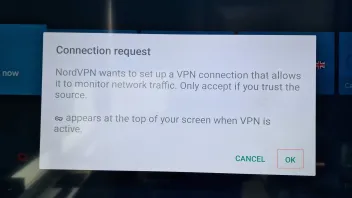
Press Ok.
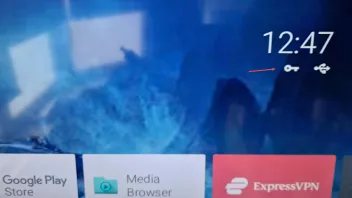
The key will be shown when VPN active.
Hi Sam in my case my nord VPN is through my router that all devices connected are connected to nord VPN. I do not have to download the nord app from the market store. My problem is that my Z8 , Z8 pro and Z11 pro max are all connected to this same router while the Z8, Z8 pro show the key icon the Z11 pro max does not show the key icon. Sam what am I doing wrong? Please advice. I don't have to download the VPN app because nord VPN is active in the router
-

When NordVPN is enabled on both of my Z11 Pro Max devices(latest version), I do not see the VPN key on the top right of the TV screen, however when I enable TorGuard VPN I can see the VPN key, anyone any idea why the key is not visible when NordVPN is enabled?
Yes you are right I have the same problem with Nordvpn on Z11 pro max I complained about this in an earlier post and couldn't get a fix. The strange the thing is that I have a Z8 and Z8 pro you see the key icon displayed when connected to nordvpn through a router or the nord app. I wish the developers would take a look at this and solve this problem.
-
fenixx5458 I don't know if this could help explain your issue. Did you purchase the device from where you live? I remember Sam advising that if you are in Europe you cannot purchase a formuler device meant for North America and vice versa. He was saying formuler devices are limited to certain defined geographical areas. If the afore mentioned is the case that might explain your issues. I may be wrong. If am wrong please ignore my post.
Sam can you through light on this issue? Is the issue because of power plug difference or formuler devices can be used everywhere irrespective of where you purchase it from.
-
Hi, the z11 pro max does not show the key to indicate that you are connected to VPN. I have a similar set up z11 pro max with nord VPN. I previously had a z8 pro and there was no problem with the key showing at the top right corner of the the screen.I raised this issue earlier on when z11 series came onto the scene. This my fix on checking am connected to VPN. Download and instal analiti speed test from the market place. Always do speed test and analiti will display what you are connected to a VPN server or your ISP. My VPN connection is from my router am not using the nord VPN app. Also make sure you are properly connected every time you want to use mo3. Sometimes a simple restart of box will reconnect you. Hope this helps.
-

Try changing the server first. Sometimes some servers will not open the stream especially if its stalker connection. Anytime I have a server down I switch to different server if it doesn't work I change to another one and it opens the stream. Am positive this is not formuler issue
-
 Display More
Hi,
I had a z10 pro before and it worked perfectly however we have now bought a z11 pro max and a z11 pro with the new mytvonline 3 and they seem to have the same problem.
when I am in mytvonline 3 it takes 5-15 seconds to change channels and it takes forever to load the VOD library.
There seems to be some problem with EPG because when I go in and clear all the EPG information and then restart the box, everything works super well and the box changes channels in 1 second, same with the vod
& series, library after clear it loads in no time.However, I have to clear the EPG information every day otherwise the same problem arises.
This doesn't happen with my Z10 Pro and myTVonline 2.
My friend has the same problem with his Z11 Pro so this is not a problem that is just with me.
is this a know bug that will be fixed or can i change or do somthing to get it to work withoute clearing all epg everyday?i use stalker portal with mac id
firmware version v11.1.41
mytvonline 3 version 11.1.63
tracking id CA421DI have the same issue with Z11 pro max and it happens only stalker Mac id protocol. It's my hope that the issue would be fixed sooner.
-

If the VPN is on the router there is no way for the Formuler device to know about it. Therefore no key icon.
Am sorry 175n both z8 and z8 pro show key icon when connected to the same network it's only z11 pro max which does not give any indication (key icon) that it connected to a vpn. Anyways thank you for taking time to respond I appreciate it
-
Uninstall the VPN app from your Z11. Reinstall it and make sure to allow VPN permissions when prompted.
Thank you for the prompt response from 175n and daisy I appreciate it a lot. It seems I was misunderstood. My VPN connection is from my router so everything connected so I don't use any vpn app as there's no need for that. I started using formuler z8, z8 pro and replaced it with z11 pro max this year. It is only the z11 pro max that does not have VPN key icon on home screen. I just want to be sure that anytime am connected is through VPN and it's the key icon that I use to check that is why am raising this issue. I no longer use the z8 and z8 pro because I think the z 11 pro max is better than the others in my opinion.
-
Hi guys I will be grateful for help to fix this issue. My MOL3 takes about a minute to zap between channels. In Live TV when I change to another channel it takes about 30sec to 1 minute to connect to the channel. What I have observed is signal bar is grayed out meaning no connection. I don't know why this happens on the Z 11 pro max bcos when I connect the same service by the same protocol and network on the Z 8 pro it works flawlessly zapping is instant no problem. Initially I thought it was a provider issue we tried all tricks and it didn't solve it. I will be happy for any help to fix this. Am connected by stalker mac/I'd, have the latest firmware, network wired/ethernet
-
Not seeing this VPN key icon in MYTVOnline 3 ?
VPN icon appear on the Home screen ?
Hi daisy I still don't see the vpn key icon on the home screen of the my Z11 pro max. I reconnected my Z8 pro to the same network and the vpn key icon appeared on the home but not the Z11 pro max connected to the same network. Has any one experienced this and how it can be fixed.
-
Hi, guys the key icon that indicate that vpn connection seems to be missing in MOL3 in my Z11 pro max. Is that case case with MOL3 in the Z11 pro max or it has to be activated manually. Any guidance on this will be appreciated guys. Thank you
-

Yes you can. I remember sometime ago Sam said Formuler can have as many as 10 providers or lines installed on one box. I have had 5 providers at the same time in a Z8 pro. Right now I just have 2 different providers on my Z 11 pro max. So it is done just install it and you are good to go.
-
Hi guys Z8 & Z8 pro had a feature with the green button that make it possible to set up a reminder for a Live Tv broadcast. Formuler will switch over to the programmed channel when it starts. Z 11 pro max green button is now wishlist where can I find the reminder button for scheduling a Live Tv broadcast from the EPG?
-
Hi guys can someone help me how to access PQ Settings on a Z11 pro max? I tried the method for Z8 pro and it didn't work.