Posts by z11pronotmax

    I am not using VPN,my provider has built in VPN in its server!

    Well that's wonderful and all but redundant... Your provider can have a vpn with the incorrect protocol and that protocol sometimes see harmful traffic and blocks it because iptv providers are constantly being attacked by who knows whom...

    Wireguard blocks many stuff, that's why your channels get blocked for 5-10min sometimes and you switch to another channels in the same provider and it works without error... Meaning that live channel link will be blocked for a bit. Open VPN UDP is recommended on this cases, your case, because it uses 2 ports, so when it blocks the live channel link, the traffic will go through the other port, meaning you get small drop instead of network error or the freeze of dead...

    Now random freezes are another story but that's not what you are complaining so...

    If it was me i would tell your provider to put his vpn well you guess and buy a dedicated vpn myself so i can change protocol when i want, but that's just me...If you can contact your provider asking what vpn protocol he's using and if he can change it to open vpn that would be wonderful...

    I expressed myself badly I wanted to say that it is my 6 box of the brand and I never had a problem.

    but tell me how I should proceed to send you a short video of the problem it's not the apps that bug it's all the apps even kodi and even after factory reset it's the same

    Well if that's the case i have to apologize.

    Ok, first things first, you bought it in November 2022 and only now you're getting that behavior? And which version of ROM and MOL3 do you have now? You have to explain how that behavior started because from what you're saying now it sounds like it worked fine and then the issue appeared suddenly? Wasn't it good when you bought it?! meaning did it came with that problem?

    And you say you don't have an invoice? I'm not aware of the warranty needs but i'm pretty sure the invoice is needed somewhere along the process...

    And after factory reset you can't power off the device through the menus? You can't start MOL3 and add a portal to test vod (without installing anything else or changing settings)? Because to test if it's RAM issue factory reset alone don't do anything if you are going to install everything like you had before.

    Or you can just install Kodi after factory reset, add Samba/NFS server or just install youtube addon and watch a video... Don't even install MOL3 at first...because if you install kodi or plex and you are able to stream it's not RAM...

    And are you using ethernet or wifi? Change cables, check power supply... Before RAM those are the most common issues you need to fix...

    Lighting up ffs,no need to slaughter the guy

    Bro, the issue he's relating i had it on several devices with other apps and even on Z11 once, everything stops, and you can only restart by cutting the power off. The next restarts you probably lost your favorites or more, on my case i lost favorites and pinned groups, so i did what they say here, reset MOL3 and it was solved, it was after the last BETA update. After that everything is working fine...

    If resetting MOL3 didn't fix it you need to reset android to factory defaults, but on my case i didn't need to do it...Saying it's a RAM issue? Maybe...probably run out of RAM and blocked...but RAM is fine.The best way to test if your RAM is fine is installing KODI and stream from it because it uses RAM to cache...It's not because iptv is freezing or giving frame by frame...lol...that happens all the time on every device i have...sometimes just switching channel when you see it and problem solved, if you let it there maybe it will recover, maybe not...my dad always leave the channel freezing, i tell him to switch back and forward once freeze starts, he doesn't listen and sometimes the device recovers, others it will freeze forever or worst - reboot!!!!

    Don't tell me no one had the sound problem where the image freezes and sound keeps popping loud...That's not RAM!! Or device issue, that's in most cases a software related issue aka ROM incompatibility of some kind, bad codecs mostly...Formuler Devs or better explained any device DEVS just need to find the best tweaks and settings to make their customers free of those bugs,but they will come for everyone...

    I never returned a device just because i had iptv freezes or bad sound, or HDMI interference...I mean...90% of time isn't the device's fault. You will know when the device has RAM issues, because it won't start at all...

    Returning devices because iptv is freezing, i mean i clap because i know once returned the dealer will probably sell the device anyways but refurbished with lower price and i for once want to know their name (dealer) so i can buy one of those formulers myself...depending on dealer's country and stuff...

    Are you using split tunneling? And if yes make sure you are enabling vpn for MOL3 and not disabling it. Some vpn apps make you enable the apps that will connect without vpn, others make you enable the apps that will use vpn...

    It's a parody, every time i switch vpn apps i always need to read the fine lines LOL

    That's the only reason i see for not getting the vpn key on MOL3. If you are not using split tunneling then vpn is probably not connecting at all...It says connected but...check with a speedtest app!!!

    LOL, what kind of vpn do you have? Mine always autostarts and connects seconds after turning on my Z11, then i just need to open MOL3. That's not hard...

    Anyways, there is an app (not sure if it will work on Android 11 because it shows a message of compatibility issues, works on 10 though with the same compatibility message) called "AutoStart - No root", it does what you want, it auotstarts more than one app and has delay settings...

    Come on dude, 6 formulers? Your dealer changed your formuler z11 6 times because you think you have RAM problems only because you have freezes and sometimes you want to turn it off and it doesn't let you?

    I mean, i had those problems on every android box, nvidia shield, mi box s... FFS we learn with them, on my case it was never a RAM issue. When it's RAM you have Kodi to see if you have free RAM or you are using it all because you have tons of open apps...Either way, can be iptv provider issues, MOL3 issues (it's on BETA ffs), can be isp blocking IPTV, can be VPN blocking IPTV (it happens, don't lauugh...), can be your own internet connection...So many stuff... And the box not turning off is because like anyother device it can run out of memory and you just need to cut the power and turn it on again and see what kind of app is eating your memory... If it's MOL, just reset...

    To know if your device has RAM problems there are other ways, just reset your box (if you have one now), reset everything, then install Kodi and if you have lan SMB, NFS or plex server just test it there. Build and advancedsettings.xml with big cache size and then you will see if you have RAM problems...

    Now when you have IPTV freezing there are "n" reasons and RAM isn't on the TOP5 or even TOP 10. I'm almost sure it's not RAM!!! lol

    And you say it happens in the live tv streaming? Not on VOD? Can you watch a movie on VOD? If you can then it's not RAM because guess what? VOD also relays on RAM, everything you stream, from disney+ app to netflix app to plex app relays on RAM...I would be more kind to accept an internal storage issue than RAM...

    Your dealer is a saint, got you 6 new formulers...i mea^n, give me their contact... i want to buy them stuff :grinning_face_with_smiling_eyes:

    If i remember corretcly, on Nord VPN split tunneling you select the apps you don't want to use vpn, so let MOL3 selected. Now i'm using expressvpn as for me it connects much faster than nordvpn, the only problem is it has way less servers available...

    Each vpn app their own, but all of them on the split tunneling section(if the option exists) will say what you need to do, just read everything with attention...

    Yes, Nordvpn split tunneling will allow your apps to connect to the internet without using VPN. This is obviously a security risk, but as most of us use a vpn not because we want or need security, but just to avoid ISP blocking IPTV and other stuff it's probably a good way to have both worlds...

    Enabling Lan access in Nord VPN (another security risk) and only MOL3 through Split tunneling is the way to go, then you connect network storage and it's available in every app including MOL3 and then you can do time-shift and recording through LAN while keeping MOL3 with a dedicated vpn address, meaning all other apps will be able to connect to the internet without vpn (not all aps, every vpn app has it's own split tunneling capabilities, nordvpn is not the best because you can't disable several system apps from connecting through vpn, only apps like MOL3, kodi, plex, etc, apps you installed...). Expressvpn shows more system apps in their split tunneling for example...

    I agree with SAM, it sounds like your provider is probably exhausted. But probably your ISP too? I mean, i had problems with my ISP on the weekend at night it was a mess, constantly drops, low speed and it turns out it was because there was too many people online doing heavy tasks at the same time on my zone and ISP provider couldn't handle it...Changed ISP to another and problem solved, at least for now lol

    I had this problem with french vpn servers. I think it has to do with the ISP provider used by each vpn server inside the same company. I mean expressvpn uses ISP "x" on Dutch and France but on Spain it's another ISP, so usually some countries are very stressed at night while others are mostly safe. Usually you can see them with several speed testing apps... Some ISP can probably be stressed at those hours...You just need to find a good one and stay there... I had those issues on Nordvpn in french and dutch servers, all over the place no matter which server i choose, channels won't open, stuttering, connection issues, once i've changed country to Luxembourg or Spain for example problem solved... Spain servers for example are very bad in the morning, good in the afternoon and mostly good at night, depends...Forget about French and Dutch servers at night, everyone is there specially on UCL day...

    Today, starting around ~15h if you choose UK or Dutch server, even French you will have those problems. you can be lucky, but...to be safe just choose some country next to you like Belgium, Austria, Switzerland, Czech, even Germany servers at night are mostly free of those problems...

    After more testing i can confirm 2 things i wrongly said it wasn't working...

    Timsehift and recording are working with network storage. turns out you have to enable Lan Network on your VPN app, then it connects and starts recording and timeshift.

    I have one question regarding timeshift. The timeshift recordings will automatically be deleted by formuler or do i have to go to the hdd and delete it myself?

    Something weird happened to me with this new update.

    2 Random reboots, on one of them i lost favorites and pinned groups, then i did new favorites and pinned groups again and in the next one i didn't lost anything, but it's the first time i get random reboots...

    Another thing is channels are again taking a bit more time to load, not like before the first beta update but still...

    Vod is working fine, curious, all my history on VOD wasn't lost after those random reboots, neither favorites shows and movies, weird...but as this is BETA i guess i'm going to see some weird stuff!! lol

    I did a backup just in case. More testing needed. I've asked my provider to give me more connections so i can test the same provider in playlist, xc and stalker mode. Will test it today to see where is more stable!!!

    Both of those options mentioned were already available before this BETA

    The first one i knew about it, the other one never saw it, but i probably forgot to go to that section since before the last beta update possibly.

    Anyways, i've tested a bit more, now i can clearly say i'm not seeing any differences from enabling and disabling both of those settings, so i decided to let it be and revert to the default...

    Other thing i noticed is now when you open the app for the first time, the first channel don't get AFR, but if you change to other channel it will change AFR right away, maybe a bug brought by the nice intro logo? Not sure, anyways, just need to change channel quickly, no big deal...

    Nice update, need to test it at night but i've notice 2 new things In Developer settings > Vendor > Video:

    1 <enable Playback Performance Mode (experimental)> is now enabled by default

    2 New setting called <playback with less reserved buffers> - disabled by default


    Not sure what they do, but when i disable the <enable Playback Performance Mode (experimental)> setting it automatically enables the <playback with less reserved buffers>.

    I see some differences in video playback but i'm not sure which one is best, they are very little, but there is some differences i can spot vs last firmware version, mainly when <enable Playback Performance Mode (experimental)> is disabled

    Not sure if disabling both is a good idea but it seems on my end to be the closest in terms of video playback as before this update. But i can't be sure of any, just did a quick test, will see at night what this new settings are all about...

    I appreciate any tips to get the best video playback experience possible. Meaning, i don't want to reserve less buffers or enable a video EXPERIMENTAL performance mode that degrades video quality maybe?? Not sure!!

    I've bought a z11 pro because i just wanted gigabit and MOL3, but if formuler don't release more Z11 versions or new boxes with MOL3 (maybe a hybrid one or ATV) i will probably order a z11 pro max or another pro, not sure yet...waiting on budget and on the next updates because some urgent stuff need to be solved and not all are MOL3 related!!

    Which file manager app are you using? I recommend X-plore!!!

    Anyways, i believe in Android 11 some apps need extra permissions to be enabled, go to settings > apps > file manager app > permissions > Files and Media "Allow all the time" if available and disable "Remove permissions if app isn't used". Then in the file manager app find a way to enable hidden files.

    Attention that due to Android 11 security stuff some folders are really unavailable like the ones in internal storage > Android > Data. For those files to be available you need to wait for formuler devs to insert a file manager app that can allow it and it needs to be pre-installed to have root permissions...

    I think you need to change the first 3 groups of the MAC address from 00:1E:B8:xx:xx:xx to 00:1A:79:xx:xx:xx, but i'm not sure it affects when you login via xcapi...

    The other thing you could do is installing a vpn and/or changing country IP until it works...

    Or ask your provider to give you a new MAC with login details, probably the MAC your provider have from your accounts are 00:1E:B8:xx:xx:xx and it should start with 00:1A:79:xx:xx:xx...

    It happens with other known VPN's like Nord, PIA, etc... It depends on the country IP and protocol used. For me, i find that the best country IP's are the closest to you in terms of "ms". Don't choose more than ~50ms and better to use the faster protocol like openvpn, even knowing wireguard is probably the safest one, problem is those android apps are a crap when implementing wireguard.

    The best is using a router with wireguard just for formuler and let it connect to the router without the buggy android vpn apps...

    But if it's just to trick your ISP just use openvpn, it's more stable, not fastest in terms of speed because wireguard is the future, but in terms of android, openvpn is more stable...

    PS: I used to own a expressvpn account back in the days before the buyout and that auto setting was critical because it changed protocols while connected and the drops i was getting turns out it was caused by the auto setting. Changing it to openvpn udp solved it...

    This sounds like api issue...Not on the plex media server case, because plex team already updated api level on their app, so for PMS it might be Android 11 permissions and security policies might affect it also. Nvidia Shield also had a lot of this issues with Android 11 update but nvidia team solved almost every security issue. You need to give Formuler devs a bit of time to find a workaround that solves this Android 11 mess...

    Now, the other apps you say you better ask app developers to update their apps to reflect all the security changes introduced in Android 11, 12, etc.

    I would use mol 3, I tried tivimate too but that caused trouble with my box. Tivimate is a much better app with more options though.

    Tivimate has more stuff,i can give you that, but it's not better, actually it's worst. only thing tivimate has that i miss in MOL3 is the studio mode up to 4 channels at the same time (can be more - not sure) and the ability to use software decoders which gives a better sound in some cases. Other than that i prefer MOL3 interface any day of the week LOL And VOD on MOL3 is another level when compared with tivimate LOL You can say tivimate is a little tiny bit more stable than MOL3 in the present, but MOL3 will surpass it and we all know what tivimate new versions can bring LOL

    i Have try all countries but non works

    401 error sounds like provider is blocking vpn geo location. You need to either keep using your isp IP address without vpn if that works or ask your provider to allow every expressvpn IP or choose one country and keep it there...

    Sometimes someone with the same provider is probably using the same VPN ip address, it can happen, that's why you should first ask your iptv provider that you don't want restrictions...

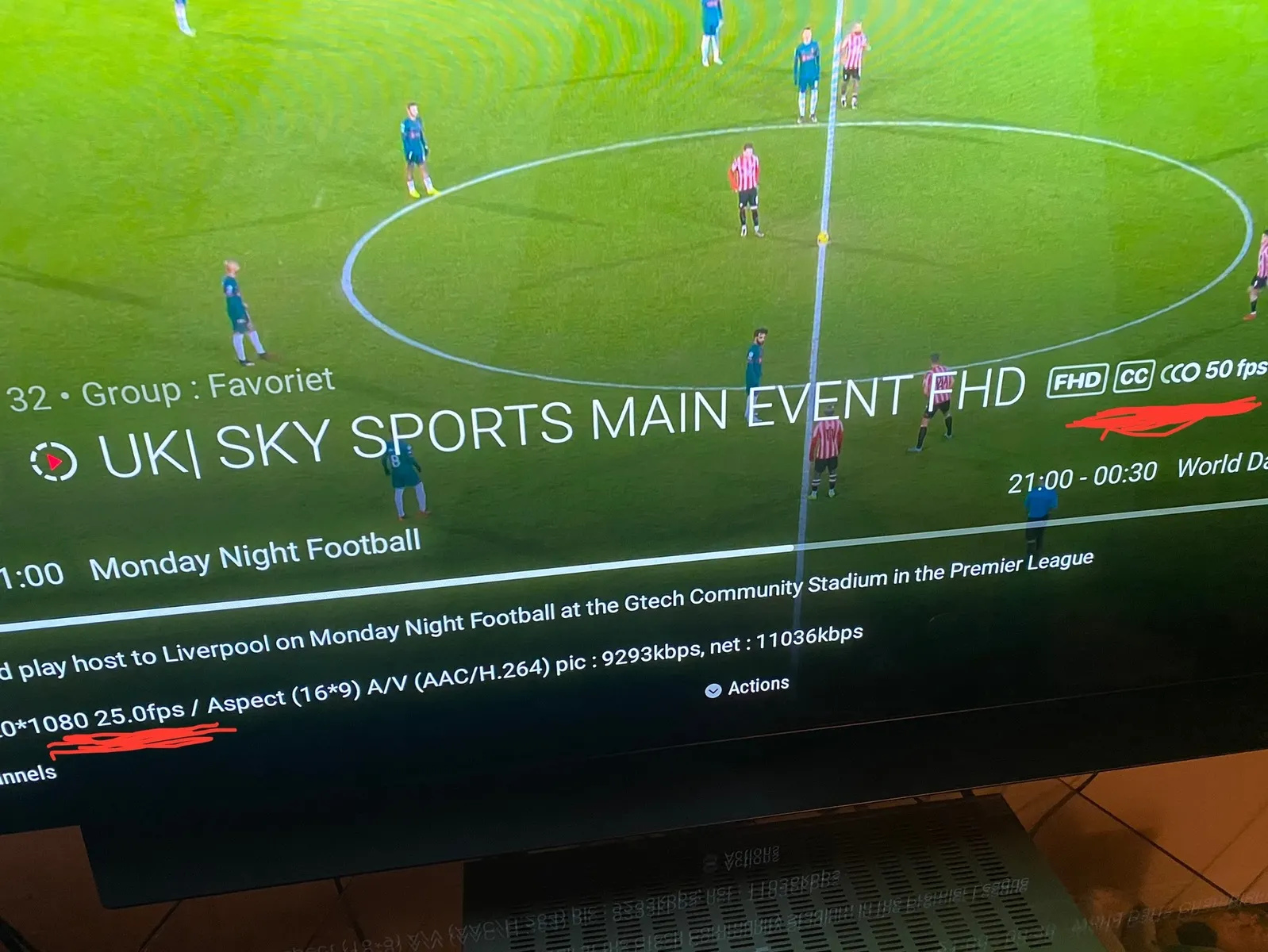
    Just the info that comes by the info button

    Nice catch, ok, i have the same info 1920x1080 25fps, but it must be generic, i wouldn't pay too much attention to that info, the one that says 50FPS is probably the one you should take into account. Either way the correct way for playing 25/50fps streams is at 50HZ refresh rate and if you don't see any problems it's because everything is working fine. My streams are always smoooth at 50fps played at 50HZ. Everything works as expected on that regard...

    Contradicting frame rate! You can see it if you blow it up a bit. I assume it’s 25 fps but still a bit confusing. It’s a Formuler z11 pro max using my tv online 3. Is it possible to get this straightened out? Or just a provider issue?

    What's the problem? You know that 25fps material will always play better at 50HZ right? Now i have that channel and that specific channel on my provider has 3 streams and luckily i get the 50fps one because MOL3 probably chooses the best out of 3 accordingly with your internet connection probably.

    Frame rate wise, MOL3 always change 25fps or 50fps to 50HZ. Now what you are seeing in the description is a bit odd, i can't see that...is that any OSD extra info?

    Same TV?

    My tv does every refresh rate, but always go to 1080p50hZ for both 25/50fps material on formuler no matter the iptv app used. VOD is usually 23,976 or 24 and MOL3 gives both refresh rates correctly, also works in kodi but with a twist because on Kodi always change resolution to the best, so it will change to 4k no matter source resolution. MOL3 respects source resolution.

    Make sure in MOL3 you have auto frame rate enabled in settings for both vod and live tv