Posts by sirocco30
-
-
-
Hello,
The MTV 4 beta was released on April 14th, and while I understand that finalizing it takes time, could we at least get an approximate date for the official version ?
Thanks for the reply. -
Me too. Also when i fully shutdown box.
And boot later and or the next morning the box again and i start mytvonline4 i starts with homescreen. And not LIVE what i setup in settings.
It's the same thing for me sometimes.
-
 Display More
I am in Belgium and speak French, I know that the channels are at 25/50Hz

You have the autoframerate option in the Mytvonline settings that you can activate so that the channels (and movies/series) sync to the correct frequency.
The problem when you set your box to 50Hz is that it feels a bit less smooth in the menus compared to automatic 60Hz...
The revision of the chip and the HDMI port is no longer the same as on the Z11; you absolutely need to have the extended HDMI option activated in both the TV settings and the soundbar if you want to keep your box connected to it.
On your Philips TV, you need to activate the ultra HD HDMI option to "optimal" according to the manual :
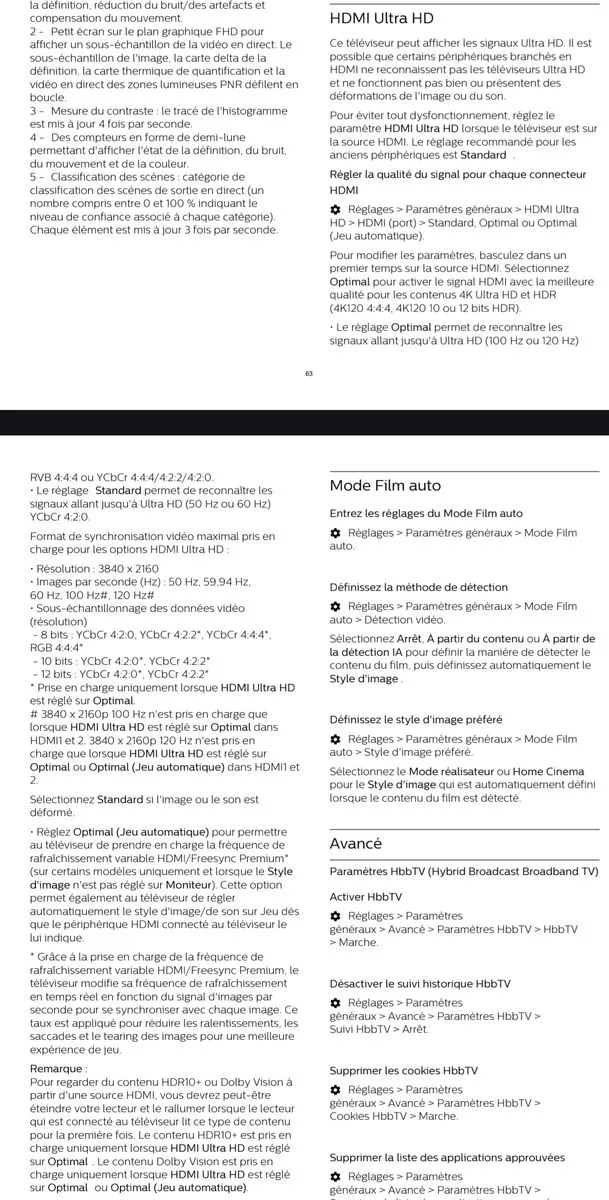
For your soundbar, I haven't yet checked which menu to go into.
The ideal would be to test directly on the TV and leave your soundbar connected solely to the eARC port of the TV to see if you experience the same phenomenon.
In any case, the latest generation devices do not support passthrough of audio formats or HD audio formats, so theoretically, there’s no benefit to connecting your box to the soundbar.
The black screens during frequency changes and video format shifts will be even shorter when connecting directly to the TV.Thanks a lot, i will have a look
-
The TV is a Philips 650 OLED 806, the soundbar is a Polk Magnific AX SR 7.1.2, and the Z12 is connected to the soundbar with a certified HDMI 2.1 cable.
Before the Z12, in the same setup, I had a Z11 without ever having this resolution problem.
In France the Tv resolution is 50Hz
-
The image resolution on my Z12 is very erratic. I want to set it to 4K 50Hz, I'm in France, but the very next day it switches to a different resolution every time. How can I fix this? I had this issue with MOL3 and I thought MOL4 would, but it doesn't. (See the example in the photos below where the automatic resolution is 480p 60Hz and the desired resolution is 4K 50Hz.)
-
Personnally, i find Mol 4 less intuitive, and some of the steps involved aren't obvious in order to get a result that suits everyone.
-
-
The screen resolution still fanciful...
Impossible to lock onto a desired resolution...
Is it possible to hope for a solution...? -
That's what i get....
No 50Hz -
I can see the channels but with the resolution in 4K60Hz and in Europe the resolution is in 4K50Hz.
I would like to get it in 50Hz but the Z12 switch automatically in 60Hz.
The last upgrade didn't fix it. -
Hello,
I updated but the problem persists.
Can i hope for a solution possibly with a fix...? -
My TV is a Philips 65OLED806 I baught it 4 years ago
-
The problem is that when I give a resolution 4K50Hz, after one or two days, the resolution change automatically to 4K60Hz with my Z12 Ultra.
I heard that some people had the same problem with the Z11 Pro.
How to fix it...? -
-
-

I've found Then just press the Home button and it takes place...
-
Hello,
I have just purchased the Z11 pro BT edition and when I turn it on for the first time, after the Formuler logo, the Z11 remains stuck on the image of the remote control to configure.
I press the OK and menu buttons on the Bluetooth remote control, the LEDs react but the image remains blocked on the remote control with the circle rotating in a loop...
Nothing is happening...
What to do...?
Thanks -
I got the message above when i tried to watch channels in 4K, HDR, etc...?
Black screen on my Z11
An idea...?
Thanks -
Sorry for my carelessness but I had left my identifiers on a friend's device and the double connection caused these problems of cuts and rollbacks
-
Thank you very much, very useful to replace the android keyboard that does not have accents.
-
Is it possible to have Gboard on the Z8 as it is installed on the Z10 Pro max...? Thanks
-
You may have the same problem as me, the image freezes and jumps back a few seconds. I think it may be a compatibility issue between the supplier and the Z10 pro max because on the Z8 no problem and everything is fine with the same conditions. It's really very annoying with a box supposed to be more efficient.
-
Go 3 steps further, remote and accessories....
-
Thank you for telling me what's going on after....
-
New rollback on my Z10 Pro Max tracking # :BF8C46
Thank you
-
I'm using the 1920x1080 25.0 fps/aspect (16*9) A/V (DD/H.264) pic: 9491kbps, net:11404kbps
Not AFR but i tried already with AFR et not -
I don't see how to send a sequence over 3 minutes when I don't know the exact moment when the problem will occur... ???
-
May be a compatibility issue depending on the provider's feed since the Z8 with the same settings no problem but on the Z10 Pro Max it's not good
-
yes i did
I tried both, wifi, ethernet
-
The connection
-
-
On the video, you can notice at 27 seconds a rollback lasting 10 seconds. At 1.18 an image freeze, at 1.59 another freeze. At 2.47 you have another rollback lasting 7 seconds. Well, it even happens sometimes more frequently. Thanks for your help. https://streamable.com/p68wwa
-
No, I don't use my subscription on the Z8 and Z10 Pro Max simultaneously, I know that and I would get banned but I use it in XC codes one after the other on the devices. I will make a video soon to illustrate my point. Merci The same thing happend's with a friend of mine with the Z10 Pro max.
-
Thank you, I followed all these recommendations but the problem persists with rollbacks, I don't know what to do
-
I tried with the Z8 which I still have, same subscription, same configuration, same TV, freezes on the Z10 Pro Max but not on the Z8.
-
I find it, thank you
-
Thanks Sam I set the buffer to 10 seconds but I still have less frequent freezes and no rollback. Is there anything else to do...?
-
On my Z10 Pro Max, it happens to have freezes with a slight backward movement, do you know why and how to fix it?