Posts by adrilang

    Hello, I am curious, is the beta stable enough to use? Or are there still major problems? I am curious. And I understand that it is a beta.

    Honestly, I’ve used it from the start and haven’t had any major issues.

    There’s a few quirks which are to be completely expected but overall I think it’s been fine.

    It’s worth noting that people experience difference things depending on their use case.

    One additional thing I’ve found and has been persistent for sometime.

    Bluetooth connection is quite weak on Z12. At least for me.

    I almost need to have the box on show for wireless headphones or earbuds to work suitably without disruption.

    Additionally, there is often no sound using these devices. I have to restart a couple of times for sound to start working. Bluetooth shows devices are connected with audible tone and the word “connected” but no sound.

    for comparison, I also have Z11 and there is zero issues of this nature from what I experience.

    Issue is genuinely only on Z12

    I’m curious to know if any others experience this?

    Hello all. I’ve been using BETA since the start and for the most part it’s been working fine for me.

    Still when refreshing live TV, movies or series, after the action is completed, it returns the user to the MTOL4 Home Screen?

    it would be great if this small thing can be resolved for final release.

    Very frustrating having to keep going in and out of menus.

    Still some things to check out but for now that’s what I’m seeing.

    I have found this issue to be tied directly to internet issues. When my device began to go into an infinite loop by crashing and trying to reopen MOL4, I unplugged my ethernet cable and this error began. I then accessed my WIFI and the error disappeared. I did this several times in a row between ethernet unplugged, leaving the box with no internet connection and the error continued.

    I know you are convinced your WIFI was working, but is it possible your ISP was offline briefly?

    Hi, thanks for your detailed information, very much appreciated.

    I can’t say for sure it’s not network related other than the issue is not present when I use MTOL3 on Z11 nor was ever an issue with MTOL3 on Z12.

    It isn’t always present on MTOL4, maybe 70% of the time.

    I turned on earlier and didn’t receive the error so it is plausible a network error, however if that’s the case I expect MTOL4 is trying to connect too fast for the network to catchup. Remember this only occurs on power up, not from standby.

    If I power up Z11 and Z12 at the same time, z11 never shows the error so without me knowing the full internals of MTOL4 it is plausible there’s a slight delay from one version to the other?

    I’m sure it’ll correct eventually (with formuler team reviewing all bugs)

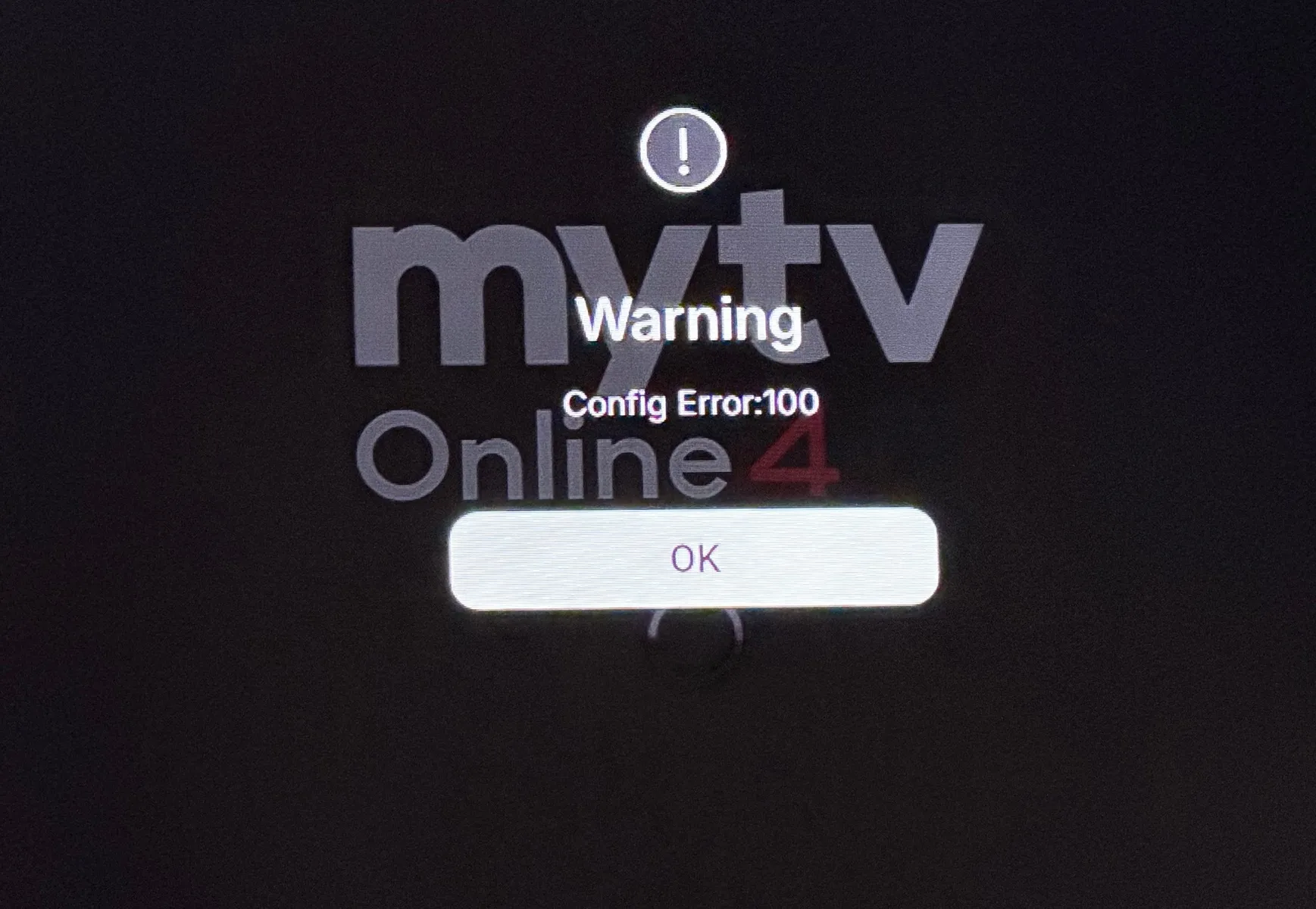
    In the past couple of weeks, I’ve started to receive Config Error 100 when I boot the box from power off.

    Mytvonline 4 is set to auto start on boot.

    I’m not using a config in the general terms.

    I thought it might have been a migration of portal issue between MTOL3 and MTOL4 so I manually inputted portal details again and still the same issue.

    I check WiFi connection and all is good.

    Checked the same via MTOL3 on Z11 Pro Max and the issue is not present. this is strictly isolated to MTOL4 in my case.

    When I press OK to the warning message, it does away and starts at Formuler Home Screen. When I select MTOL4 manually, it works no issue at all.

    When I select none as the startup app, the issue does not occur.

    I expect error 100 is network related, so MTOL4 is trying to connect too fast for the network to catchup, so I wonder, in MTOL3 is there some sort of 10 second delay compared to MTOL4 and I ask because as I mentioned, the same situation is not present on MTOL3.

    Here’s the error message:


    If I’m in live TV channels and then press menu > More > Gameday

    If I press back button to exit, it takes you to Home Screen and not back to Live TV section

    If I’m in selection, Schedule or Recordings, pressing back button does take me back to live TV.

    In the same menus as above, if you select exit, it will exit Mytvonline4. That might be intended but people could think it means exit menu?

    I notice when you manually refresh contents from content manager or TV / VOD listings, when complete it returns you to MTOL Home Screen even if you are set to Live.


    And also when you select to refresh manually it doesn’t tell you “Refresh Start” like in MTOL3. So you might be unsure if it works until you receive a popup to complete when content pulled through.

    Is it possible to bring back the color themes for the User Interface? For example Tv Guide change from blue to black?


    And is it possible that, when you start watching, in stead of the Home Screen, start watching in the last section that you where watching the last time?

    If you want to start on live TV for example, change your initial start to Live TV instead of Home.

    If I’m thinking about the same thing you refer to…

    To change, on a live channel, press menu button

    Select your profile and then settings

    From the menu that appears, now select Start Screen and pick Live.


    If that’s not what you mean and you want MTOL to load on boot, on the Formuler Home Screen go settings (gear icon) then launcher settings and select Mytvonline as the startup app.

    Either way both options above covered. I hope this helps answer your question

    Could you provide more details on how to reproduce the issue? I tried pressing the back button in VOD groups but it is working as expected.

    If possible, please provide a vide of the issue. You can upload the video to streamable.com and send me the link to the video.

    I think I know what he means with the bug.

    When in a series or VOD category, if you keep pressing back button as to exit VOD it keeps you in the menu or so to speak.

    You need to select menu button to select and go back to live TV now.

    On MTOL3, pressing back button a few times, it used to take you back to Live TV which was nice

    Hi Sam and Formuler team, I hope you’re doing well.

    can you advise if the update server is down at the moment?

    Trying to update / install MTOL3 at setup on z12 and update fails.

    Mytvonline3 app is also not showing in Market.


    Updated Z mini OK though.

    They’re not falling behind at all, actually ahead of the game in many ways.

    There is a way to login with just username and password for the end user and no need to provide DNS. The way for this is usually advised if providers reach out to the Formuler team in the forum.

    Please always do research or ask questions, people are always here to help.

    To be honest I’ve also been experiencing issues with the iOS MTOL+


    Intermittent issues with live tv across two providers.


    Most of the time I can’t watch anything on VOD or Series either.


    Works perfectly fine on other platforms.


    Mine doesn’t say Playback Error all I get is:


    An error occurred : - 1

    I’ve refreshed subs and everything but doesn’t make a difference most of the time.


    For now I’ve had to change to another mobile app but I’m hopeful to return to MTOL+ again soon.

    Someone mentioned previously they noticed an issue with using Bluetooth headphones in that, when connected there’s no sound and when disconnected sound perfectly fine.

    Initially mine had been working fine when the person posted but it seems to have suddenly stopped working and now I’m experiencing exactly the same problem.

    Earphones are of course paired via Bluetooth to the box, no issues with it suggesting they arent paired and given there’s no sound coming from the tv during this time it’s fair to say paring was successful.

    As soon as I disconnect the headphones, sound returned.

    This is the same outside of MTOL3 as I tested it with YouTube etc.

    I’m running all the latest Formuler released versions of the Android and MTOL.

    Many thanks.

    Just to make sure that I'm not just being an idiot, could someone please explain exactly how to use local timeshift when I am watching a channel.

    it has to be me as I've used numerous and different brands of usb SSD, usb sticks and SD cards all formatted with Rufus and I cannot for the life of me to get local timeshift to work.

    Thank you.

    Apologies if you’ve mentioned already but if nots


    Check these.


    Formuler Home Screen > settings > device preference > storage


    Check your USB is being seen


    If so…..


    Back to mytvonline


    Menu button (3lines) > Settings > DVR Options


    Enable Timeshift and also review where to point storage

    I asked this here, but no response yet. Isn't that supposed to be what IR Control does? I'm confused about this and also don't understand what the point of fixing the main vol+- keys to the box's function as opposed to avr or tv is. Only use case I can see is for people that use headphones connected to the z12 - fine, so let the remaining 90% of us edit what the keys do and make it useful to us.

    (edit: I noticed there's a new version which makes some updates to the remote app. I haven't tested to see if IR learning of vol keys now works, but one can hope.)

    From the start and within the remote app you are able to decide which device you want those buttons to control….

    Either I’m missing something or no one has either noticed or tried to do it?

    You can setup either IR TV option of which you’d press and hold TV STB button to switch from Bluetooth to IR.

    If you don’t want to use IR in that way, you can setup either TV volume from the other menu, select your TV and it should control your TV volume using the top buttons.

    The side buttons come in to play I think only when you want to independently control the soundbar for example. But I think you can only use one or the other and not both together as options.

    On my TV, within sound settings, I can select the device the TV volume adjusts such as TV Speaker, Bluetooth Device, SPDIF etc.

    so I expect if I set my tv sound setting to adjust the device and set the tv in the Formuler remote app, it should work as expected?

    I haven’t tried it but for me that would be the logic. I appreciate though not everyone will have such options so it could be a trial and error situation to strike the balance for you.

    Unsure if I explained all of that correctly but hopefully you get the idea.

    Personally I keep the main volume buttons on the top for box volume and the side button for soundbar volume. Best of both worlds


    I have noticed one thing, minor and doesn’t affect anything but worth noting.

    I set my express VPN to auto connect on boot

    The box recognises the vpn connects and shows the notification, it then shows VPN Disconnected notification straight after but the VPN is actually still connected as shown by the key indicator and also me manually checking.

    The same happens if I manually disconnect and then reconnect the VPN as a test. Notification shows connected, VPN shows connected and indicator by the key icon but if I open MTOL3, immediately the notification for VPN disconnected appears yet it is actually connected.


    I hope that made sense

    Can someone explain what 'match content framerate' in display settings does? Can't work it out. Want to get proper frame rate in plex, bur read the option in plex doesn't work well. Is it to do with this option on at the same time maybe?

    I assume this works like AFR for VOD but relative to Live TV?

    I could be wrong about that of course but with the option on or off I haven’t yet noticed a different but I’m sure it will become more apparent if the option is for something else.

    it could also be to handle stutter between players like Kodi, VLC etc?

    for those who would like to know where the option is for testing, it’s in (Formuler) Display Settings

    It was in reference to it's performance in MYTV3. I've posted a short youtube clip if you search Formuler Z12 Ultra Testing Results where you'll see it takes almost 40 seconds to bring up the list of other categories in MYTV3 and shift back again to the channel list.

    In the same context as Sam replied, I too haven’t experienced this issue.

    Maybe if not done so already (I haven’t read all posts) but you could backup your MTOL3 setup, uninstall Mytvonline and reinstall it from Market app, restore settings and see if that cures your issue.

    I’ve already received my Z12 Ultra, and within an hour I had reported it for return on principle. Who on earth thought it was a good idea to put the volume buttons on the side? The main volume buttons only work with your own system in IR mode. Nobody wants to change the box volume. Nobody! The device itself is fine, nothing more, but the remote is a complete joke.

    I’m a little confused by your experience here because I don’t seem to have an issue?

    Box sound is perfectly fine so I don’t see why there is such hate towards it.

    I’ve used the remote app to sync my soundbar with the side buttons if I chose to use that instead of box sound?

    I expect the option for both choices is by design and it’s not a bad design really.

    Why such importance to control device volume from the main buttons on the keypad? I’m genuinely interested in the perspective here.

    Are you sure you got 7 days forward and 7 days backward on a z11 pm? This would be short of a miracle, as in mol3 grid epg is limited to 24 hours.It is however true for the z10 promax on xc connection!

    Btw you can use catch up also from the single view epg,in most cases more then 10 days:smiling_face:

    Right back when this topic first became a focal point, I recall I had a sub that did show 5 days ahead but my main sub would only show 24 hours.

    It was weird because it only lasted a few days and since then both subs now only show 24 hours ahead.


    Anyway this isn’t the group chat for this but thought I’d mention.

    Without Formuler sharing their thoughts on why it’s happening all we can do is speculate but certainly I have seen more than 24 hours epg in main grid but it didn’t last long.

    it wouldn’t surprise me if some people experience a farther epg on occasions.

    I’m using XC connection throughout.

    Results with mine have been extremely disappointing to date. Noticable delays in Mytv3 just to change categories and flash time is quicker on a Z8. I'm waiting on the first software update to fix these launch issues but it's not great with it being released in this state. The Z11 Pro Max outperforms it in every way currently.

    Certainly not a comprehensive review lol 😂

    think it would be better to provide better context than to say Z11 outperforms in every way.