


ok, but how do I set up VPN on the Formuler?
Posts by okn
-
-
Hi and good day,
About VPN I'm reading this:
”A VPN (Virtual Private Network) should always be used in connection with your IPTV subscription. Whenever using any of the free or paid IPTV services presented here, your private information is vulnerable to hijacking and worse if not protected.”
For us - we just want some streaming tv, not VOD.
Also we do have access to all channels which we need (almost).
So is VPN a good idea?
Does the encrypting not even slow down the traffic?/
with best regards, Omar KN, Stockholm, Sweden
-
Hi and good day,
My question:
For scheduling recording (of future episodes) is it necessary the Formuler Z7+ to be active (switched on)?or necessary to have set/ chosen the MYTVOnline app beforehand/ activated it?

/
with best regards, Omar KN, Stockholm, Sweden
-
Hi and good day,
Apart from the fact that all channels are gone, nothing to be seen, I discovered the following :
(”Connection Issue” Please check your internet connection or portal url.)
- - - - - - - - - - - - - - - - - - - - - - - - - - - - - -
Update Info Error
Firmware Info Error (network)(-1)
IPTV Info Error (network)(-1)
Current Firmware v1.2.98
- - - - - - - - - - - - - - - - - - - - - - - - - - - - - -
Should I maybe update the firmware?!
But no need for the latest Beta.
(like going to software update > punching in some mysterious code?
/
Any assistance would be greatly appreciated!
With best regards,
Omar KN
-

It sounds like a stupid explanation from your provider. Hope you find a better supplier. / Yga from Sweden
Any suggestion?
Please use my private email: omneusr /at/ outlook /dot/ com
-
Thank you Sam,
Today it is suddenly working again !
Our service provider only says/ writes that they don't support MyTVOnline app on Formuler, and they recommend another app to download (if this even possible with the 7Z+).*But we have been using MyTVOnline app since 2019 without any problems.*
What's your take on this?
/
with best regards, Omar KN, Stockholm, Sweden
-

…and the box is online (test with YouTube app)…
Strange - (yesterday at least the box was online - with YouTube), but not today.
Nothing was changed to the box settings or else.
So today I saved our WiFi for the box - but no more internet/ YouTube.
How can this change from one day to another, without us doing anything?/
with best regards, Omar KN, Stockholm, Sweden
-
Hi and good day,
Today we got the error message
”Connection Issue” Please check your internet connection or portal url.
- - -
But via the YouTube app on the Formuler-Z7+ we can watch videos, so Internet connection should not be the issue.
Also the portal url is unchanged.
I read Connecting Problems
should I set a static IP for the Z7+ where? in the router - not sure if this is possible.
/
Any assistance would be greatly appreciated!
With best regards,
Omar KN
-
Thank you so far.
Maybe it's still possible to order channels in Favourites list (so that latest added end up at the bottom.)/
okn
-

Press OK then < which takes you to groups select the group then press< again select group > goes to channels LONG OK opens edit move up down or delete
Thank you for coming back.
We get the ”Edit Groups” context menu (see image).
There is no result of LONG OK, except for the tick marking.
Also the Favourite group is dimmed out, nothing can be done there./
Any assistance would be greatly appreciated!
With best regards,
Omar KN
-
Hi and good day,
When I find a new channel and set it as a ’Favourite ’ → this channel is then stuffed somewhere in between the existing favourite channels, f ex #7.
Consequently all channels numbers greater #7 increase by 1.Question:
Is there a way with the Formuler-Z7+ to place a new favourite channel AT THE END of the existing channel list ?/
with best regards, Omar KN, Stockholm, Sweden
-
Strange situation:
I’m recording a prg, which when I check afterwards it is there (f.ex. 29min, ≈ 350 MB )
So I watch the start of it 2min, and all seems fine.
The day before yesterday *all recordings* just disappeared from the USB (xFAT) stick, which I hadn’t touched at all. I had seen those recoding were in the playlist the night before - then “No Recordings.”
So today I wanted to copy the last recording (mentioned above) to the computer, so I wouldn’t lose it.
(USB stick is only removed or set in when the Formuler is SWITCHED OFF)
When opeing the USB (xFAT) on the desktop I get this list (with Size in 1st column):
9,2 MB………...DE ZDF.ts (which was not ZDF, but Geet!)
Zero bytes…..DE ZDF.ts.ix
Zero bytes…..DE ZDF.ts.m3u
Zero bytes…..Geet_.ts
16 KB…..……..Geet_.ts.ix
29 bytes……..Geet_.ts.m3u
Zero bytes…..Neuseeland – Gletscher, Vulkane und Kiwis_.ts
11 KB…..……..Neuseeland – Gletscher, Vulkane und Kiwis_.ts.ix
68 bytes……..Neuseeland – Gletscher, Vulkane und Kiwis_.ts.m3u
As can be seen the titles are still there, only one workable recording of (only) 9.2 MB.
Now strangely this bit of video of 9.2 MB corresponds to the part of the video which I had played on the Formuler just before detaching the USB.
When putting back the USB into the Formuler, even the listing was gone! “No Recordings”
and it is now impossible to record on this USB stick.
Then
When putting back the USB into the desktop, the listing is still there!
So what is going on here, the Formuler is buggy!?!
PS: I have formatted some USBs with NTFS, but I think the same is happening on those, I'll come with an update for those ASAP…
-
So this is my situation here when recording from the IPTV (Formuler Z7+)
I’m defintely not thinking to use recordings for anything but private viewing, either directly on the Formuler Z7+ or later on the iMac.
As for now I’m using various USB sticks of 32 and 64GB, ExFat.
The Problem:
Sometimes recordings are alright,
but othertimes it happens that the first recording of for example 500MB is all I can put on the stick, ”memory full (or no space available)”, and when checking on the iMac the USB stick definitely seems to be full, but only 1 recording.
No idea when this happens or why.
I’m afraid this may also happen with a larger harddisk?!
Has anyone from this forum ever heard of such a case of disappointment?
/
with best regards, Omar KN, Stockholm, Sweden
-
Hi and good day,
pistons32: Yes I did ntfs - thank you!
abeardedhippy: Actually I found the Settings > Storage > Eject on the Z7+, *however* I don't seem to have a button for the final eject command!Screendump1: Formuler-7Z+-UI-Storage

Screendump2: Formuler-7Z+-Remote
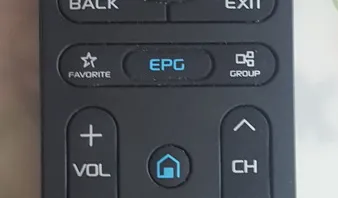
/
with best regards,
Omar K N
-
You mean an iptv app which I would find on Google Playstore? … some you could recommend?
-
Hi and good day,
Scenario:
So let's say the Formuler device is on, and I realise there is not enough space on it, and I therefore unplug the USB-stick to replace it with another one.
Is this ok?

- - - - - - - - - - - - - - - - - - - - - - - - - - - - - -
Although USB drives are said to be hot-swappable, it is probably better to ”ensure that your USB device isn’t in-use before unplugging it – some USB sticks may have lights on them that blink while they’re being used.”
QUESTION1a
But on the Formuler how to use the Safely Remove Hardware option?
QUESTION1b
Anyway is there a way to eject USB Flash Drive before unplugging it?
(source: https://www.howtogeek.com/118546/htg-exp…ove-usb-sticks/)
/
with best regards,
Omar K N
-
Hi and good day SAM,
Actually they write that they DO have problems with their servers, I only don't get it how this would influence the ability to record, when the service was still on.
Anyways, I reformatted the USB-stick with NTFS ( How to format Micro SD card, USB flash drive, pen drive, hard drive or SSD for use with Z and S Boxes. ) , we'll see if this helps when the servers are online again.
/
with best regards,
Omar K N
-
-
> Install -> update-> restart and use the box, nothing more.
Sorry I cannot see anywhere in the preferences/ settings "install", can you be more specific ?
The only settings I have is from the MYTVOnline app./
with best regards,
Omar K N
-
Hi and good day,
Recording to a USB-stick did work alright until a few days ago, but not any more!
Error message (for all channels so it seems): ”Cannot record stream.”
Also we cannot enter the 'Playlist' for recent recordings: So Formuler has stopped reading the USB.
What can be done at this stage: Factory reset?/
with best regards,
Omar K N