

The audio on this box and MOL3 is a lot worse than what you get on the Z8. Endless problems with audio sync as well, it's a real shame because it really lets the rest of the box down
Posts by Tpj
-
-
Have the devs had a look into a fix for this issue? Any updates on the situation at all?
-
Yeah it’s connected to a denon amplifier, the tv is connected via Arc
Edit: Forgot to mention also that pausing the movie or stopping starting it will sometimes improve the problem, but this means after a pause I’ll often have to adjust the sync all over again having got it right
Also downloading kodi and using it for the video player the audio is then in perfect sync on the same files. I would much rather use the MOL 3 built in player though . For one, using kodi through mol3 the videos do not resume from where you left off. -
Still having this issue with the sync. Have to manually adjust the audio sync every time I watch vod and it’s always a different delay, sometimes it’s ahead and sometimes it’s behind.
-
I’m having a lot of lip sync issues with my z11 pro max connected to my denon amp at the moment. I know there is the option to adjust the audio delay which does work, but I’m having to constantly adjust it all the time. When going from live tv to vod, vod to series or even between channels. Have been using a Z8 for years previous to this and I never had these kind of issues, it’s the same provider all along so I’m wondering if it’s a z11 issue? Driving me mad
-
Yeah I have this problem as well, it’s very annoying. I’ve now programmed a mute shortcut to the BT remote to get around this
-

Yes all settings on my Samsung tv are enabled correctly as my shield is able to pass through truehd to Sonos arc via the tvs earc port.
Tried multiple times factory resetting the z11 box and configuring the settings but still kodi doesn’t play Dolby truehd as pass through option, so I’m scratching my head at it now
In player settings - video have you disabled ‘sync playback to display’? It won’t pass through if this is turned on
-

Hello ,
Using MOL3 the true HD Atmos signals is not possible for the moment, also DTS-HD signals (Master Audio)
I hope devs will fix this issue soon...
Only using external player like Kodi should works but you need version from the Play store , it seems Kodi from the market Formuler is also not working for Atmos.
You can test on your side and keep us informed.
The marketplace place version does infact work, I’m using this version on my system
-
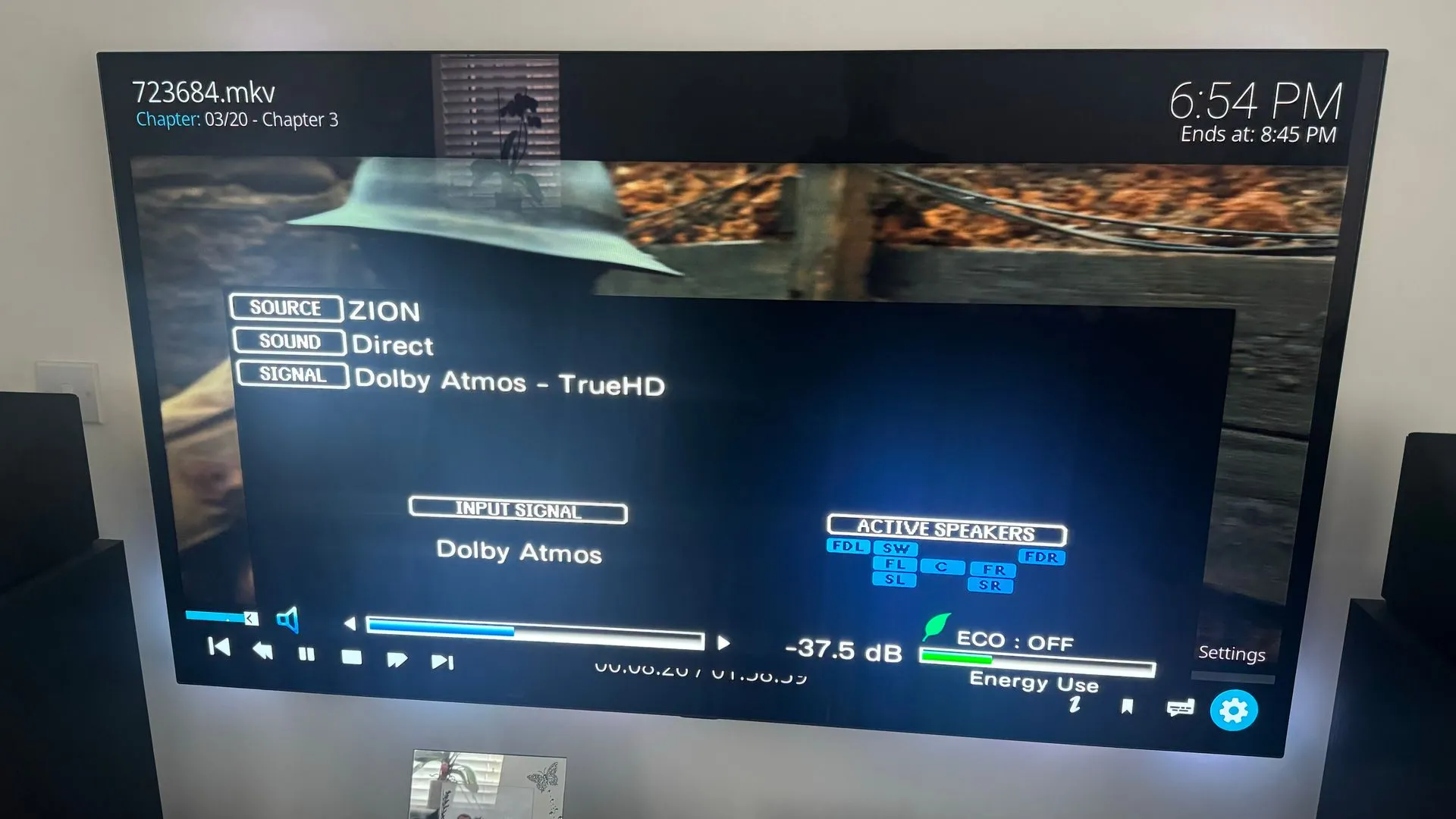
I can confirm this actually works on my setup as well! Using the exact same settigns as Myst13, Kodi as player and amp on direct mode. Same video as before. SAM please can you ask the devs to have another look at? The hardware is definately capable of doing this
edit: amp doest need to be on direct, its working in all modes using kodi. Problem is though the video is not as smooth as with using MOL3 and sound is out of sync
-
I’ve been getting an issue with the z11 pro max , where it doesn’t automatically connect to the WiFi on startup . Usually seems to be when the box has been off for a while. I have the box configured to power off completely instead of going into standby. Wifi shows as no network connected. If I go into WiFi settings it shows my saved network and if I press connect it then connects fine. Currently running the latest official firmware.
Does anyone else have this issue?
I should add that there are other WiFi networks in the area which are not being shown immediately when you go into WiFi settings. After pressing connect it’s like it awakens the WiFi and they then will appear -
It’s interesting that you were able to get truehd working using an external player. I’ve tried to install kodi and mx player but I’m not able to pass though 7.1 audio with either of them on my box.
You mention nothing was changed in developer options. Does that mean pass through mode has not been turned on?
Which amp is it you have? Is the amp showing all 7.1 channels are being received ?
SAM have you had any feedback from the devs on this? Would like to know if this is something that they can fix in future or if it some sort of android 11 limitation.
-

Hello SAM ,
About Dolby HD and DTS HD passthrough issue with MOL3 , is there any improvement with this new software update ?
I see nothing in the changelog ...
Thanks .
Doesn’t seem to be, tested it my end and still no pass through unfortunately. Hopefully this can be fixed in the next one
-

Thanks for testing too. Is only True HD affected or also some other codec?
It seemed to be only trueHD at first but I’ve now noticed that on DTS 7.1 audio tracks although the amp is reporting DTS it’s actually showing a 5.1 DTS input on the amp.
When I plug the Z8 pro back in and test these files the DTS 7.1 displays as DTS X: Master.
So there is problems with both TrueHD and DTS X Master audio. If I find any more that are not working I will update
Update : this also seems to be the case for DTS-HD which passes through on the z8 but not working on the Z11 -
Please try also this config: Box (Surround Sound active) -> TV (activated passthrough in Audio setting) -> over HDMI ARC to AVR.
I’ve tested this just now with the box connected directly to the Tv and the tv connected to the amp via arc.
TrueHD is not passed though in this configuration either on my setup.
DTS 7.1 and DD+ Amos files are working fine in both configurations, but TrueHD is being sent through as PCM -
If there is anything I can do to help test, I would be definately willing to do that.
My current setup is Z11 > AVR (denon AVR-X3500H) > TV (LG OLED65C8) via HDMI, arc
Content is a movie 4k version of 1916 whch has both 5.1 and true Hd audio tracks.
Pressing info it says 3840*1600 23.976fps H.265/English, TrueHD, 7.1
I have chosen the 7.1 track with the remote
Surround sound is enabled in the settings same as in the picture dedelere has posted, the sliders are showing as enabled but seem greyed out and cannot be changed to off. Have tried with HDCP 1.4 and 2.2 which makes no difference.
In developer options HDMI Rx Audio format is set to RAW
One thing I've noticed is if you turn on passthough mode in developer options this turns off hdmi output auto, adaptive sink to EDID and visa versa
Audio optimiser the latest version is installed from the market place.
What ever I do TrueHd is not passed though to the Amp. This does seem like a firmware issue of some sort as it is working fine with the Z8 pro
-
I also have this problem, I can’t get pass through of truehd to work on my denon amp. Have just upgraded from a Z8 pro which was working fine. I’ve turned on raw and pass through in developer mode but it’s still not working and I’m only getting pcm audio.
Is there any thing else I need to do?This seems like a common problem. Is this something that can be fixed in a future firmware update?
Would I be better off returning the z11 and getting a different formuler box? -
I have disabled Cec for now, but it’s been working fine for over a year and it was a useful feature for me. I’d like to try and get it working again.
Any one know if I have access to the files on the box is there some way I could save the favourites?
-
My Z8 has developed a strange issue on the latest update. The box is on standby power mode and when it’s off, showing the red power lights it’s started randomly turning off the TV.
It’s connected through a denon AVR and both this and the TV are being turned off. If I unplug the Z8 it stops. I’ve disabled CEC on the Z8 now which has stopped the problem but I’ve been using Cec with no problems for ages and was working great before.
Is there any way I can backup all my favourites on MOL2 so I can wipe the box and see if this fixes it ?
-
Not sure if this is possible but would be great for the z8 to be able to pass Dolby atmos to the amp
-
Please could you consider adding a screensaver feature? I'm always coming down to find my daughter's movie or series has finished and its been left on the VOD screen. I've got an OLED display and haveing a static image displayed like this for any length of time is really not good.
A screen saver or display turning off after a certain period of innactivity in the menus, for me would be an awesome feature!
-
Finally managed to sort out this problem, I had to delete and re add the account.
lost all my favourites which wasn’t great but epg is finally working properly -
I’m having an issue with my EPG offset where lt keeps drifting out by one hour and I have to keep adjusting the offset.
Usually by putting it on UTC and going +1 hr or going back to 0 and clearing epg data sorts it out, but I have to keep doing this.
Today I’m not able to correct the problem as certain channels are synchronised but others are not.
I’ve checked using different IPTV apps and it displays properly in them so think this could be a mtvol2 issue?I’ve also had issue where pressing the ok button displays the correct information but pressing the epg button does not