

When watching movie or serie.
And want to set the delay.
Subtitle Delay = Ondertitel vertraging
Audio Delay = Audio vertraging
Without capitol. Exactly like here above.
When watching movie or serie.
And want to set the delay.
Subtitle Delay = Ondertitel vertraging
Audio Delay = Audio vertraging
Without capitol. Exactly like here above.

In MOL3, there is a string which has been left untranslated in the Dutch language. I've made a screenshot which I'll attach to this post. A suggestion for a correct translation would be:
Druk OK om toe te passen. Bekijk de details in het menu Meldingen.It's the message that appears if users refresh their content from the Content Manager / Content Sources menu.
Like I said, this applies to all boxes on MOL3; kindly queue this as an issue to be resolved in a future update. Prioritise as you see fit.
Correction:
Druk op OK om toe te passen. Bekijk de details in het menu meldingen.

Could someone check Dutch wrong strings, post here the English and Dutch version and if possible also screenshot from each, so we can forward it to Formuler? Thank you.
Will do tomorrow


hi guys
Had a few months without problems on my now most used Z11 PM. Recently (the last few days) got issues: some providers vods and series '0', but back after 1 or 2 content updates ; since a few days one of my providers gets 'refresh failed' after content update, no known problems according the provider (comes back after some reboots) ; yesterday red light stayed on and I had to cut cable (this didn't happen for months) ; just now got kicked out of MOL3 while watching a vod (MOL3 restarted) ; FYI: XCAPI, Nord VPN ; I just sent the file report: 1921D79.
Are this known issues and/or can something be done?
Have it too. Throwed out of mol3.
When i start an app it hangs sometimes. Mol3 restart automatic.
But got my z12 now.
It's time to reset the z11 i think. When i want it, i do it.
Installed some apps and removed them or updatet them. Maby that can created an error.
Just reset it When It's needed.
Same as with a phone.
Goodday

I have to think they will be doing an update of sorts before christmas it might not cover all the glitches and updates people want but i think it would be good for some to be resolved. It'll be an early christmas present from formuler to their customers.
They do a lot of fixes and improvemts in the update. It must be tested on there side. Count on a big update. And that are a lot of fixes and many of time of work in it from the developers.
They don't fix 1 thing and direct bring out an update. They collect data from users and working on it.
Please be patient.

Hello since update ios26 on iPhone the app mytvonline the source charges until 45% then it closes
Remove app , restart tablet/phone and install again? Did you try that already?
SAM

Hi, I have a Formuler Zx. It was working fine. I wanted to turn it on, but only the logo appears and stays there. I tried to reset it manually, but it didn't work. Are there any other options? Thank you.
If it won't start anymore.
The only option you have is to try a different power adapter with same specs!
Or the manual reset function.
Don't know exactly, but you can find it in articles or on google.
While booting device keep pushing red button i thought and when logo appear push on 1.
Then it should reset.
Try it couple times. Won't work always for first time.
If problem exist. Buy z11 or z12.
Or a cheaper one like the Formuler gtv or so.
1
Usb always with computer laptop formatting as ntfs and 64 cluster size.
If not work wel, try other usb drive.
2 Always connect box with utp cable is advice.
Try to do make static ipadress with your wifi and turn off ipv6.

There are quite a few things that still need to be fixed. Will there be an update at some point?
There will be an update ofcourse, i read/heard that there is no date yet from sam. But i hope it will be in this month.

HI everyone. I would like to turn off the PIP on the Z12.
I have 3 servers, but do not like the PIP
Any thing i can turn off to not activate the PIP?
Thank you, Mark7
Google says:
Steps to turn off PiP
Druk OK om toe te passen. Bekijk de details in het menu Meldingen.
Meldingen = meldingen
Without capital.
Also in Contentmanager, contentsources, edit portal.
"Bijwerking" needs to be: Bijwerken

I mentioned it above sonos beam gen 2 , bought it this summer on fb market for a good price, I will add the subwoofer later if I find one for a good price.
I had an eye also on that one. 500 euro.
And a time back with heavy discount 349 euro. Wish i bought it. Is the sound really good?
I would never pay for that, a good sound bar with a subwoofer is enough for me.
500 max.
What kind of soundbar you have.
with atmos i think?

Thank you Lucky13
I don't have much time left to return the device, so need it fixed soon 😭
If you can't wait, just sent it back.
See formuler forum whem update is arrived and then order Z12 again? Maby is that an option for you.

How do I then use that function?
You post in Z12 thread so you use a Z12.
Go to Formuler remote app.
Choose gtv-bt3 temote (the 1st)
You see screen with your remote and battery etc.
Push to left
Click setup hotkey
Select the last with the 5 dots.
Select single tap
Search for "mouse".
Click ok
Push home button and when you push now on remote on the 5 dots button the mouse appear.
And with up left right bottom you can use the mouse on remote
Any news regarding update to finally add Deinterlacing?
Thanks.
Not so far i know unfortunately

Does the remote have a mouse button?
Yes,
Go to Formuler remote app.
Select your remote, there you can setup a button for a mouse.
I chose the one with the 5 dots button for the mouse.

Can we have a reaction / solution please this problem is very serious please
I believe the developers read it already a lot of times and i think they are very busy with a big update with a lot of bug fixes including this one.
We shall wait on the first beta and or original version.

Hi,
Thanks for your reply ! I have only one provider on my Z11, and each movie proposed in suggestion is found without any difficulty in normal search. The issues only happens when trying to open a movie/serie from the recommendation list...
I see, thank you.
Will test it today again. How are you connected? With mac id or xc api (url, username and password)
Sonos Beam (Gen 2) with Z11 PRO MAX
I want the Sonos arc ultra. But a good 1000 euro, no thanks.😂
Display MoreHi everyone !
Everything runs smoothly in my MOL3 except for 1 small issue, I thought I would try my luck here with you guy's. Sorry if the problem has already been posted/solved, but I could not find it.
In the VOD section, when in a movie description, I get proposed recommendations. If I select one, instead of going into the recommended movie description, I end up on the search page displaying a not found message. Same happens for all recommended movies, same goes also for the series.
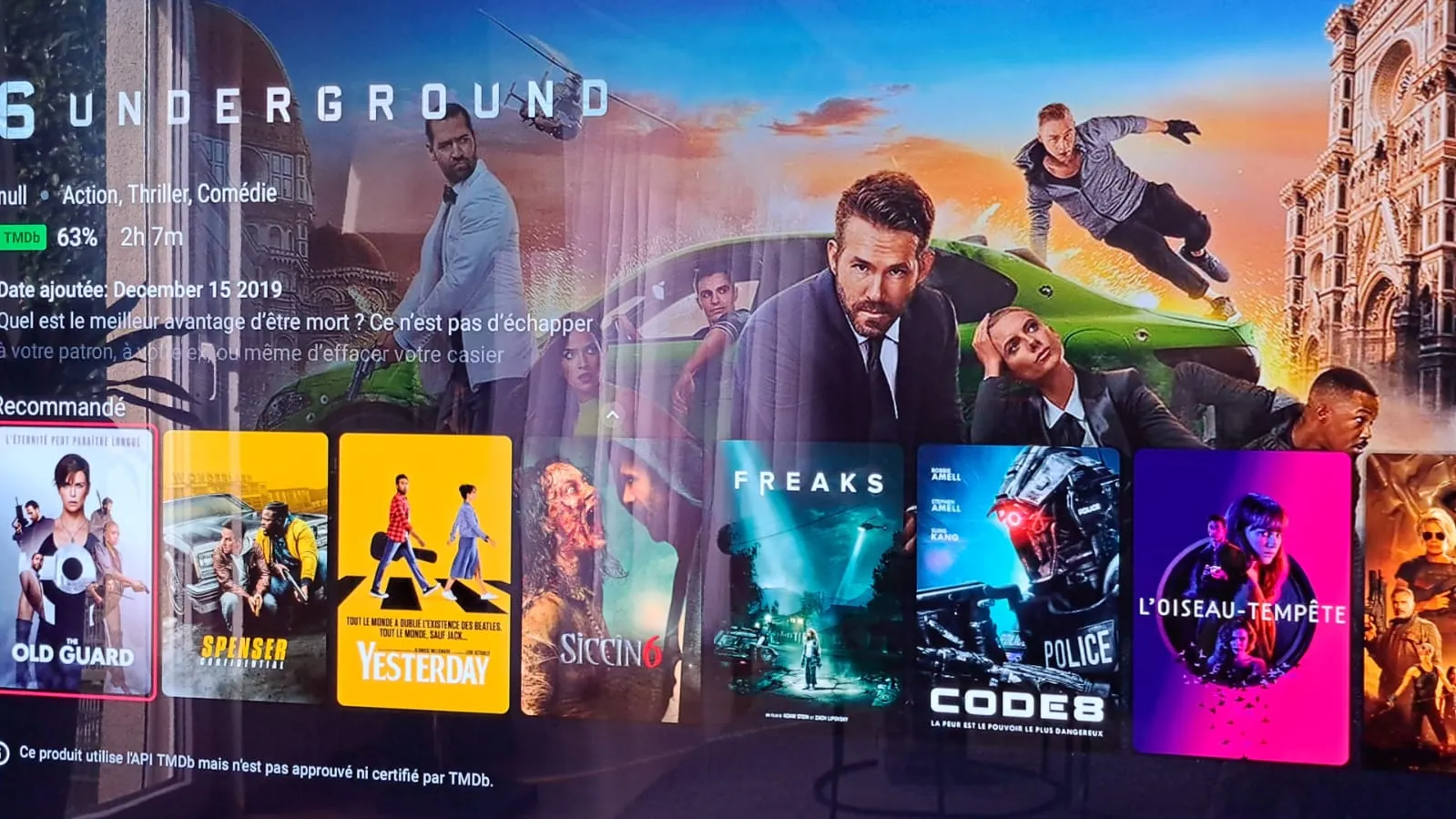
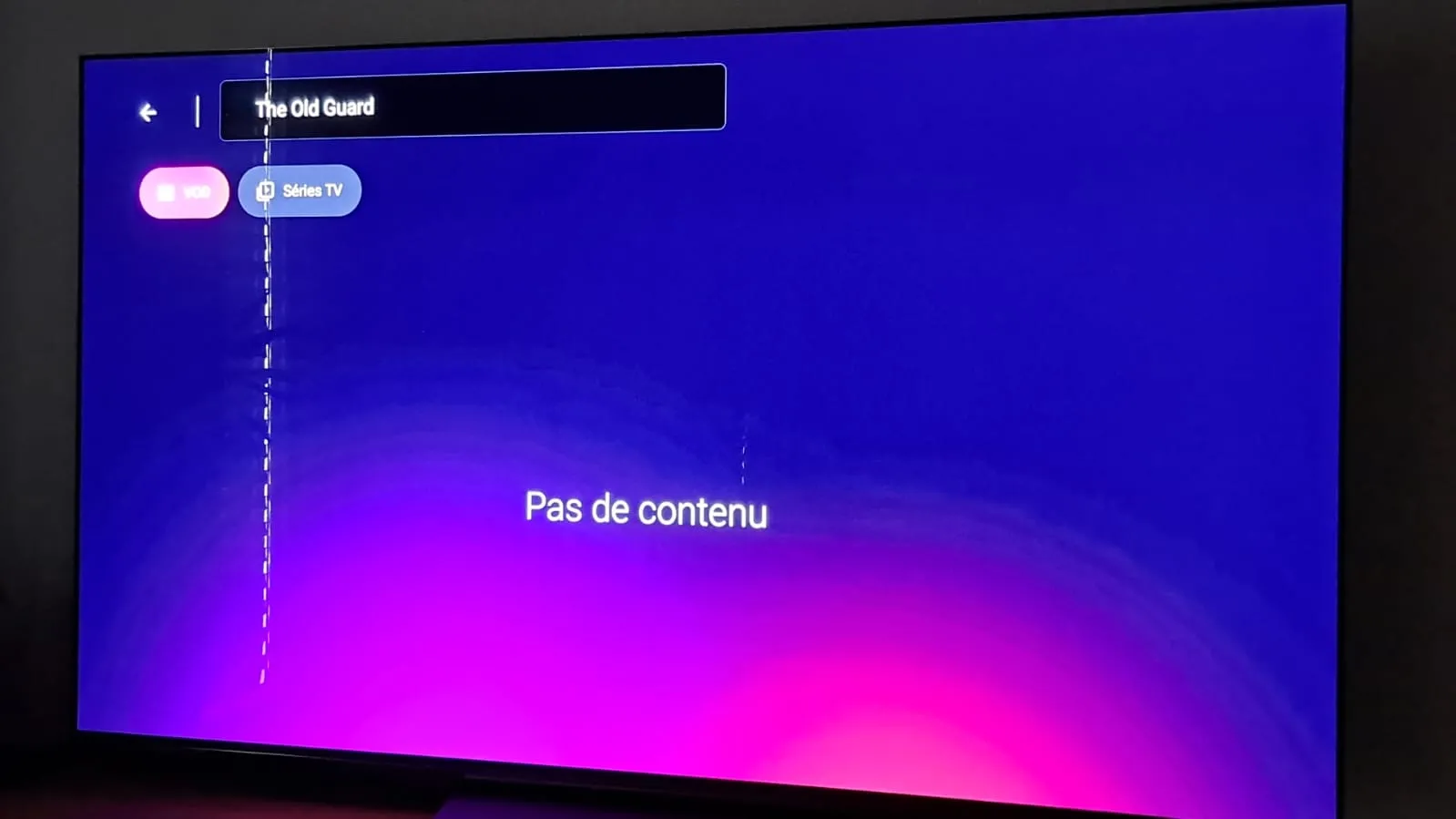
Search works normally though.
Any idea on what's failing here ?
Many thanks in advance.
I have 4 providers. So i have a big movie collection.
And if i go to recommend section, i can click on movie and it search on all my 4 providers.
If mol3 finds the movie i can play it on my z12.
So also on z11.
Did you search normally too that movie also as test?
If it won't find it, then also your provider hasn't that movie in his database.
 Display More
If I download with same EPG , Tivimate + MYTVONLINE 3,
My provider sends me a message = YOUR EPG URL IS NOT WORKING !!!
I must wait 24 hours or use a VPN !!!
FOLLOWS ME = MY IP IS BLOCKED FOR 24 HOURS !!!
OR AM I WRONG ????
HE sends me a message back = I DO NOT BLOCK IP's !!!
why is only THE EPG ready for DOWNLOAD, If i wait 24 hours or use VPN !!!
SEEMS TO ME = BLOCKING MY IP !!!!!
Wrong thread my friend.
Which box you use?
Say to your provider that you use a vpn.
And don't use m3u.
I advice xtream codes.
Url with a username and password.
Then you can also catchup, and have more functions with that.
Ask on forum how to.

LOl went upstairs to try it and as mysteriously as the problem appeared it is gone and everything is working fine???? Thanks for suggestions
So far so good.
Display MoreBoth those settings are on and still nothing appears in network storage i have numerous things on the same network that other devices see while the z12 doesn't see any it seems.
i do have a nord vpn problem though as sometimes it just says connecting and i have to reboot to get it to actually connect the vpn also stops working and i don't realise until i go into the app and then it says connecting which is where i have to reboot to get it to connect.
i assume this will be solved in the fw update at some point.
thanks for your help Lucky
yes i've just had to reboot again so its a nord vpn issue imo
if i try to connect to nord vpn it can connect but it can also just hang on the connecting screen and never connect
i then lose all internet connection and a reboot has to performed once i do that i get my internet connection back.
I am only connected via ethernet
I'm going to leave nord vpn off and will see if that helps.
First try:
Did you turn off in nordvpn the "post-quantum encryption"? (In settings)
If yes, you can choose protocol automatic and reboot device.
2nd try:
And then if problem exist, change protocol to nordwhisperer and reboot box again.
Let me know my friend.
Yesterday before diner i setup a recording. Serie of 45 minutes.
Hdmi cec is always off.
I saw it started recording. So i only turn off tv and box stays on. went downstairs for diner.
Came back and recording was stopped after 4 minutes.
Next time i leave tv on and check again.

I'll contact the provider. Thanks for the feedback!
Maby also a good advice.
Let remove all the countries you don't watch ny your provider!
Only in your subscription the countries you watch. Less load and a better overwatch over country list.
thanks for the reply
i use nord vpn where in the nord app do i see if local network is detectable ?
My nas doesn't appear in network storage not sure what i'm doing wrong
Open nordvpn app, settings and you should see something like: local network detection, and set it on. But i believe it's already on.
And check if system dns in same section is checked on.

Is anyone running a Sonos system with their Z12 Ultra
I don't have a sonos. Maby in future, cause my tv already have atmos.
If your question is about how to connect?
Look behind your tv at all the hdmi ports.
At 1 hdmi port mosty is written arc. Put it that port a hdmi to your sonos.
Put your box in other hdmi port on your tv.
Standard is in android sound settings the set to automatically. That's okay.
In formuler remote app you need to setup your brand of tv with the remote.
If everything is okay and you put your tv volume louder, your soundbar should go louder.
If i forgot a step, anyone else will help.
Hopefully is that your question.
I know sonos or bose isn't in the database. 99% sonos i thought.

My Z12 doesn't reboot on his own, works like charms.
Had it yesterday first time. Watching movie with nas over network 1gigabit with kodi.
I want too close kodi but remote didn't work anymore, black screen and after 3 minutes it was rebooting itselfs.
My first time i saw it.
 Display More
Well put my Smarter TV in my Formuler and wasn’t better
Installed Smarter in My Roku Tv no more lagging but can’t make a favorite list
So the box is the problem
Will try to plug with etheret cable tomorrow to see if Wifi board is dying
Does anyone know a app that can work with my Roku remote to build a favorite list?
Thanks for all who commented
Hope its not the box that isnt supported anymore!
Always use minimal a cat 5e or cat 6 ethernet cable.
Display MoreI'd like to connect my z12 to my synology nas to record
i goto network storage select add server
my nas is the DS923
the network path is //192.168.x.xxx/volume1/IPTV Recordings
user xxxx
password xxxx
I assume the problem is the network path my ip address for my nas is correct its what comes after the ip address that i believe is the problem
To find out what i need to add after the ip address i've gone to my shared folder on my nas and selected path and it shows as volume1/iIPTV Recordings so thats what i've put
hopefully someone can point out what i'm doing wrong.
thanks
If i go to network storage i and wait 4 seconds or so.
I see my nas appear. I click on it and need only add name and username en password.
Path is already good.
If you use vpn, check on z12 at vpn app that local network is detectable

Just tryed and didn´t work.
But it´s nice that i can lunch it with the colour keys.
Thank you, Lucky!
Best regards,
Too bad.
I had also app that didn’t show up in apps section. also not as favorite.
I did could it setup to lauch with a colo key. There the app was showing up? Strange and not at the app section 🤷🏻♂️

Hi I did I got a free trial and I don’t get anything on my tvonline but Netflix why is that
Fill in your free trial url and username and password en then you got your iptv
Display MoreProbably a question thats asked a multitude of times
can you add the formuler z12 as a drive on a PC ?
I see plex server isn't available for the z12 and there is no smb option in the settings
I can use file manager+ where i can send files to my nas but i can't find anywhere to make the formuler z12 appear in my network.
thanks
No, not possible.

How can I update to a new version, any Tutorial?. I have tried everything, I will check it out what my version is. Thanks.
You can't, only due buy new box.
Many apps this time are build for Android 5, 7 or 9 or higher due security reasons.
My advice: Formuler z11 or z12. Or a formuler gtv it's more cheaper than z11 or z12.
But it's your choice.
Using Nord VPN provider said try turning it off no changes! Provider is looking on is side doesnt seam to see the problem !
Will try smarter todayThough had touch a setting in the box
Thanks
Your iptv provider needs to know that you use a vpn.
So tell them you use a vpn.
Close mytvonline good if you test it on the box. If you have one connection or 2 boxes with same account it wil be laggy.
One box/app at the time to play iptv, or you have a 2 connection subscription, but i don't think so.
Hi Lucky!
Thank very much for your reply.
I will try it and feedback to you.
Beste regards.
Great my friend.
Hi!
I just managed to get a working Netflix app for the GTV.
The issue is that the app is not showed in the downloads app´s icon and i can´t chose as favorite.
Can someone help?
Best regards.
Go to Formuler remote.
Choose the color button.
And add netflix to a color button. There you should see the netflix icon.
Had the same with an app last week. Couldn't it add to favorites or desktop. But i found icon in Formuler remote add the color function to open app.
Just try it my friend


