


Here is a tutorial of how to "change" (more simulating) your Z8 MAC/ID address.
Sorry, my english is not perfect. French native speaker here.
-- DISCLAMER --
I will NOT give any portal name/url, this is not allowed.
If any portal name or url is given through the thread, Admin`s or any other Moderator will delete the related answer.
Neither the manufacturer, forum, nor me are responsible for damage you can make on YOUR box. If you screw things up, it's YOUR fault.
You will not get any staff support from forum or manufacturer in this case! it`s just user to user tutorial.
-- COMPATIBILITY --
This has been tested on the last version (and beta) of the Z8 and MOL2 software. (v 7.6.5)
I don't know if the software will work with the MOL1 software.
-- WHAT'S WORKING --
- Live TV
- Backup TV
- VOD (movies)
- VOD (series) (not tested on ALL providers)
- Series is working with my provider, if your provider use different way to show series data, it could not work exactly like you want.
-- WHAT'S NOT WORKING (YET) --
- Radio channels
- I still have to develop this.
-- KNOWN BUG --
None for now, i guess. If you experience bugs, please tell me.
-- PREREQUISITES --
1) Install this (LINK) , Google Play removed a lot of PHP server these time, so the app is unavilaible on GPlay. Why ? I don't know.
It's a PHP server, you don't need root to make this working.
It can start the server at boot time too.
2) Install this (LINK)
This is a FTP server, you will need this to transfert file in the INTERNAL memory of the Z8 Box.
3) Markdown the IP of the Z8 Box. Method works with wifi/ethernet.
Just take his IPv4 local adress.
Example of local address : 192.168.0.X or 192.168.1.X or 10.0.X.X
4) Install FileZilla (HERE) avilaible for Windows/MacOS/Linux.
Please don't install bloatware proposed by the installer.
-- TUTORIAL TIME --
-- STEP 01 --
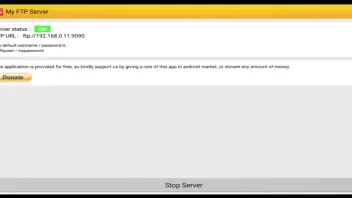
Open My FTP server, on the very bottom, click on Start Server.
You should see Server status on "ON" in green.
The default username/password is myftpuser / mypassword
-- SETP 02 --
Open FileZilla and fill :
Host : <Z8 local IP>
User : myftpuser
Pass : mypassword
Port : 9090
Accept the unsecured coonnection.
You will get the internal storage of the Z8.
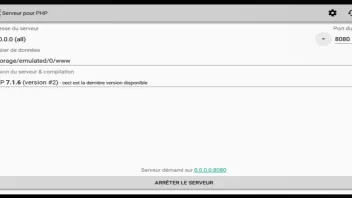
3) Start the PHP server App, accept storage permission, and install the 7.x.x PHP version.
Chosse the server adress to 127.0.0.1 (lo) OR 0.0.0.0 (all) OR <local IP of Z8> (eth1)
If you choose 127.0.0.1 (lo) : Only your box can contact the server, this is useful if you don't want
anyone on your network to get access to your PHP server locally in the same network. You won't
be able to troubleshoot outside your Z8 if any problem occurs.
If you choose 0.0.0.0 (all)/<local IP of Z8> (eth1), you can access to the PHP server with all your devices. This is cool if you want to troubleshoot what's going on if it is not working.
Of course none of the three option goes beyond your home connection (unless if you opened your device on the Internet)
Choose a server port of your choice, i will stick with the 8080 one.
Go to the settings, and check "Start at boot".
Then click on "start server" at the very bottom on the screen.
-- STEP 03 --
Download the content of this repository. This is the "gateway" of all the request that MOL2 will make to contact your portal.
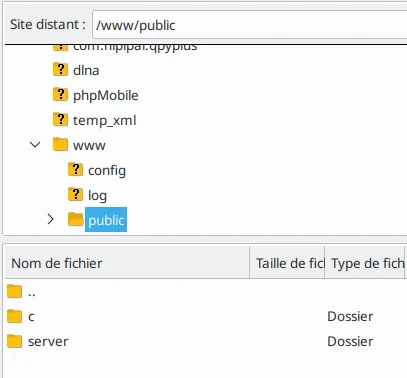
Go to the www directory in FileZilla and go to the public directory.
Delete all content in it.
It should be empty.
Then, transfert the whole "c" directory and "server" directory.
It should be like this :
-- STEP 4 --
Go the MOL2 and add a new Portal (NOT M3u Link!)
For the portal name enter whatever you want.
For the URL this is :
http://localhost:8080/c/?portal=<1>&port=<2>&mac=<3>&foo=foo
Here is some exmplaination on the <1>, <2>, <3> (and foo)
For the <1> you must enter his url, without "http://" prefix.
For the <2> you must enter the port, between 1 and 65535.
For the <3> you must enter the mac you want to simulate it starts with 00:1A:79: ...
The "&foo=foo" is recommanded, this is unused, but make sure that this isn't a used parameter. It avoid having garbage wrote in file while the very first request made by MOL2 is processed.
To be sure of maximum compatibility, just use this ONLY and ONLY if you plan to use other MAC
than the one of the Z8 Box, you are doing this stuff on.
-- STEP 5 --
Enjoy, I guess.
-- END OF TUTORIAL --
If you have any questions, feel free to ask here (still without PORTAL NAME OR URL) or start a private conversation.
Please DON'T distribute this software outside the given Github link. This will make sure nobody will modify the code for bad behaviour.
-- CONTACT --
Only discord : loic2665#7158
-- --
Hope you liked the tutorial, please put a "thanks" icon to give the thread better visibility for anyone who would like to use/find this tutorial more easely.
If you can optimize / add function to the code, please use github to make a pull request and maybe we could make this usefull and keep it updated with future version of MOL2.