
RCU Pairing not working

We asking all new users to read the articles below, before creating their first posting or thread.

  • 4. Instruction Articles

    • Please note, in this forum are only English threads and postings allowed, without any exception!

      Please follow the forum rules, thank you for your understanding.

  • Hello everyone,

    I am experiencing an issue with my Formuler GTV, and despite several attempts, I have not been able to resolve it.

    The device stopped booting properly and was permanently stuck on the Android TV logo.
    I therefore performed a factory reset following the official procedure described on the Formuler website.

    Since this reset, during startup, I am asked to pair the remote control, but unfortunately, this step cannot be completed.

    When I follow the pairing procedure (pressing OK + Menu simultaneously):

    • nothing happens,
    • no confirmation message appears,
    • the pairing process does not start.

    I have already tried all the solutions suggested on the forum, including:

    • removing the batteries,
    • inserting new batteries,
    • holding the buttons longer,
    • repeating the procedure multiple times,
      but without success.

    However, I noticed something unusual:

    • when I press the OK or Menu button individually, the remote’s LED lights up in white,
    • when I press OK + Menu at the same time, the LED does not light up at all.

    This makes me think there could be an issue with the remote control itself or with the pairing mode after the factory reset.

    Has anyone experienced this issue before or found a solution?
    Thank you in advance for your help.
  • White is already paired?

    With other device? Tv or so? disconnect from tv.


    And or if you are in setup pair menu. Do first 0(zero) and ok button together for 2-3 seconds. Remote should be reset.

    Then hold ok and menu and see what happen at pairing modus.


    Goodluck my friend

  • Hello,
    Thank you for your reply, but I believe this will not be possible.
    My remote control is IR (infrared) only and does not support Bluetooth, so pairing is not possible.

    After the factory reset, when I start the Formuler device, it forces me to pair a RCU.
    I would like to know if there is any way to skip or bypass this pairing screen so I can continue the setup using an IR RCU.

    Thank you in advance for your help.

  • Hello,
    Thank you for your reply, but I believe this will not be possible.
    My remote control is IR (infrared) only and does not support Bluetooth, so pairing is not possible.

    After the factory reset, when I start the Formuler device, it forces me to pair a RCU.
    I would like to know if there is any way to skip or bypass this pairing screen so I can continue the setup using an IR RCU.

    Thank you in advance for your help.

    Youn posted in gtv thread.

    Gtv has a bluetooth remote. If you have other remote delivered it's not good. You can't bypass pairing mode. If you have a gtv buy a formuler bt1 remote.

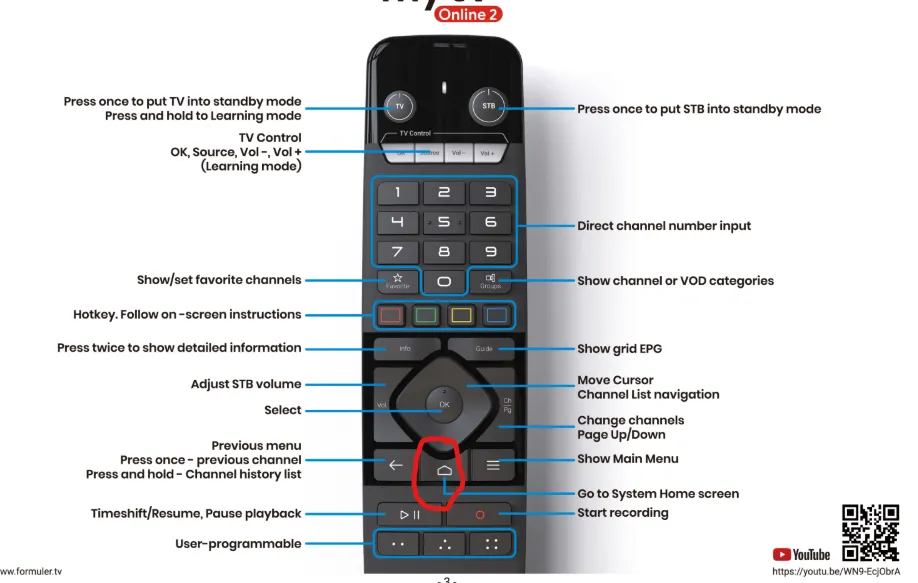
    You should have the one i attached as image.

  • I found the solution

    if you don’t want to pair a RCU, you just need to press the “Go to system Home Screen” button.


    Great found my friend,

    But standard at the gtv belong a bt1 remote.

    Just curious, did you bought it from official seller? Because the gtv was rhe first with the bluetooth remote i added as image. But if you are happy with the "standard ir" remote it's okay.