

The channels are not showing info about the program but it is displayed in the EPG. So EPG is populated but no information on the channel currently being viewed. It means you have to go to Guide every time to find out the info.

Channel List No Information
-
- Z11 Pro MAX
- MYTVOnline3
-
bigbadger51 -
November 20, 2022 at 9:05 AM -
Closed
We asking all new users to read the articles below, before creating their first posting or thread.
- 4. Instruction Articles
Please note, in this forum are only English threads and postings allowed, without any exception!
Please follow the forum rules, thank you for your understanding.
-
-
- Official Post
Hit on Refresh Contents once if nothing change then delete the epg data and let populate again.
-
Hi, i have the exact same issue.
No Refresh, EPG Clear could solve it.
It still says „no information“.
Only when i go to single EPG it works.
The Provider is not the Problem. EPG Works with my „old“ Z10 pro Formuler Box.
I let him double check and its all fine.
Is it the Software of the Z11 Pro/ pro Max?
Badger, is your Problem solved?
-
The channels are not showing info about the program but it is displayed in the EPG. So EPG is populated but no information on the channel currently being viewed. It means you have to go to Guide every time to find out the info.
did you fix the problem? If yes, how?
 thanks.
 -
Exactly same, When I click on guide, I see the epg correctly, but on the channels list, I see (no information)
Each time I need to click on guide to see it. -

Exactly same, When I click on guide, I see the epg correctly, but on the channels list, I see (no information)
Each time I need to click on guide to see it.Seems to be a early software problem with the z11‘s ….

-
- Official Post
Exactly same, When I click on guide, I see the epg correctly, but on the channels list, I see (no information)
Each time I need to click on guide to see it.
Hi, i have the exact same issue.
No Refresh, EPG Clear could solve it.
It still says „no information“.
Only when i go to single EPG it works.
The Provider is not the Problem. EPG Works with my „old“ Z10 pro Formuler Box.
These two could be different issues according to your observations. We need to know the type of both portals (XC/Stalker/M3U), logs, and video of the issue. You'll be able to check the type of the portal in Content Manager > Content Sources > check the tag under the portal name.
samm1608 Do you get the channel information correctly on both grid EPG and single EPG but it doesn't show on the channel list only?
gr0ggi If you're connecting to a stalker portal, please let the device run for a couple hours without refreshing and check back if grid EPG is provided.
Please send logs right after the issue reappears following the next instructions: How to send logs
You can upload the Image/Video file here: https://streamable.com/ > Upload file > Copy link > Paste the link with your reply.
-
I have exactly the same issue on mytvonline2. Clear EPG cache, reload from provider and nothing change. The informations appears only on EPG
-

These two could be different issues according to your observations. We need to know the type of both portals (XC/Stalker/M3U), logs, and video of the issue. You'll be able to check the type of the portal in Content Manager > Content Sources > check the tag under the portal name.
samm1608 Do you get the channel information correctly on both grid EPG and single EPG but it doesn't show on the channel list only?
gr0ggi If you're connecting to a stalker portal, please let the device run for a couple hours without refreshing and check back if grid EPG is provided.
Please send logs right after the issue reappears following the next instructions: How to send logs
You can upload the Image/Video file here: https://streamable.com/ > Upload file > Copy link > Paste the link with your reply.
Yes, the EPG are correct when I click on Guide.
It just doesnt show on the channel list... there it is (no information) -
Display More
Hi, i have the exact same issue.
No Refresh, EPG Clear could solve it.
It still says „no information“.
Only when i go to single EPG it works.
The Provider is not the Problem. EPG Works with my „old“ Z10 pro Formuler Box.
I let him double check and its all fine.
Is it the Software of the Z11 Pro/ pro Max?
Badger, is your Problem solved?
Nope still same issue - must be TVOL3 or Z11
-

Hit on Refresh Contents once if nothing change then delete the epg data and let populate again.
Did all that and still the same. Happens on all Z11ProMax setup from scratch
-
These two could be different issues according to your observations. We need to know the type of both portals (XC/Stalker/M3U), logs, and video of the issue. You'll be able to check the type of the portal in Content Manager > Content Sources > check the tag under the portal name.
samm1608 Do you get the channel information correctly on both grid EPG and single EPG but it doesn't show on the channel list only?
gr0ggi If you're connecting to a stalker portal, please let the device run for a couple hours without refreshing and check back if grid EPG is provided.
Please send logs right after the issue reappears following the next instructions: How to send logs
You can upload the Image/Video file here: https://streamable.com/ > Upload file > Copy link > Paste the link with your reply.
The issue never reappears - it like it out of the box. I have done several boxes left overnight no difference.
-
Tried on Mac address and tried with username and password but no for me too
-
- Official Post
Thanks for confirming. Please provide a video that shows the exact issue for further investigation. You can upload the Image/Video file here: https://streamable.com/ > Upload file > Copy link > Paste the link with your reply.
Also send logs right after the issue reappears following the next instructions: How to send logs
-
Thanks for confirming. Please provide a video that shows the exact issue for further investigation. You can upload the Image/Video file here: https://streamable.com/ > Upload file > Copy link > Paste the link with your reply.
Also send logs right after the issue reappears following the next instructions: How to send logs
I will post a pic of the issue. As I said before it doesn't reappear - it never appears
-
Thanks for confirming. Please provide a video that shows the exact issue for further investigation. You can upload the Image/Video file here: https://streamable.com/ > Upload file > Copy link > Paste the link with your reply.
Also send logs right after the issue reappears following the next instructions: How to send logs
https://streamable.com/p3fu5v https://streamable.com/9w7suw https://streamable.com/qtjnm2 https://streamable.com/n5onew https://streamable.com/4th0u0 https://streamable.com/u3cf9p https://streamable.com/0t0hcj
-
- Official Post
I checked the picture you attached.
Channel list related issues are fixed in the Beta version.
Please update to the Beta version and check again - FW: v11.1.40 / MYTVOnline3: v11.1.59
-

I checked the picture you attached.
Channel list related issues are fixed in the Beta version.
Please update to the Beta version and check again - FW: v11.1.40 / MYTVOnline3: v11.1.59
Thank you - not an easy solution for systems already installed.
-
I'm a newbie and I'm experiencing the same issue on both of my Z11 Pro max units.
-

I'm a newbie and I'm experiencing the same issue on both of my Z11 Pro max
yeah.
I have already updatet to Beta FW and new MTVO Version and it still says „no information“
Even after resetting multiple times. Deleting EPG and Refreshing multiple times AND waiting for hours with TV running (WorldCup…).
It is a Formuler Box or MyTvOnline3 issue with the new Z11 …
-
yeah.
I have already updatet to Beta FW and new MTVO Version and it still says „no information“
Even after resetting multiple times. Deleting EPG and Refreshing multiple times AND waiting for hours with TV running (WorldCup…).
It is a Formuler Box or MyTvOnline3 issue with the new Z11 …
I updated to beta, and updated EPG and I now have EPG information. still no channel EPG but I can live with that until the final comes out. now I'll see if I can help with the beta issues I encounter.
-
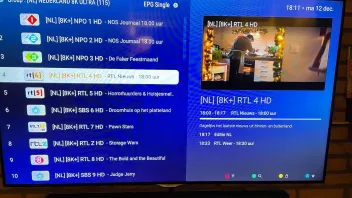

Hello i had the same issue. but if you switch off time from system also called automatic time and adjust the time by yourself and select time zone coordinated world time. and then restart the stream and update the epg the issue is solved for this moment. i have a working EPG and also info at the channels.
-
- Official Post

i had the same issue. but if you switch off time from system also called automatic time and adjust the time by yourself and select time zone coordinated world time. and then restart the stream and update the epg the issue is solved for this moment. i have a working EPG and also info at the channels.
The official software was released.
Several issues related to the channel list have been resolved in the new software.
Please check after updating the software
-
Even with the latest version, I see all info regarding programs in the guide overview, not in the channel views. Tried above described work around, didn’t work for me. Medion75 what do mean with restarting the stream?
-
installed the update this morning and still " No information" on EPG across 2 providers.
-
The official software was released.
Several issues related to the channel list have been resolved in the new software.
Please check after updating the software
The issue of EPG no information in list channels persist.
The issue of custom caption not working persist. -
After the update the epg and info at the channels isn't still working. As i can see it has to do with the time when i put epg offset on zero then it is working fine only the epg is 1 hour to late. when i set epg offset minus one hour then there is no info at the channels only the channels with teleshopping are showing info but epg is working good
It works fine with me when i change under settings time and date, i switch off automatic time, then i choose zone coordinated time 00:00, i adjust the right time for me manual, and then i go back to mol3 and i restart stream and update the epg and voila it works fine. epg offset must be none otherwise it is still not working
-
Hi,
Your solutions worked for me, it has to do with offset.I put offset to 0
I change my time to +4 (for example Dubai) then I adjusted the time to fit my time... now it is showing and correctly. -
I have the same problem.."no information" on all channels.. reset it and still doesn't work. Also tried turning off automatic time which didn't work either..
-
I don't understand why you have to write the same thing every day and several times? Believe me, nothing will change because you all write the same problems, please be patient and everything will be fixed in time... Remember the junior model Z10 Pro Max, there were problems too and they were fixed... give the developers time...

And I am sure that since there is nothing left until the new year, the developers will please you and will not leave without your favorite TV...
-

I don't understand why you have to write the same thing every day and several times? Believe me, nothing will change because you all write the same problems, please be patient and everything will be fixed in time... Remember the junior model Z10 Pro Max, there were problems too and they were fixed... give the developers time...
And I am sure that since there is nothing left until the new year, the developers will please you and will not leave without your favorite TV.
they HAD plenty of time before they released this new product.
I can not understand why such a big company releases a new Product with such a bug in the software.
It is not just a little problem that no one cares about. EPG is VERY important for most of the MTVO Users. For me as well.
+ they already released „bug fixes“ or „workarounds“ which do not work for most of the users.
For me, that is unacceptable.
Of course i will wait, until the Problem is solved. But only because i have no choice….
Maybe ill buy back my Z10.
-
The problem seems resolved with the latest FW Update / new MTVO Update.
Thank you…! Finally i can see the Information on what i am watching.
Anyone else the same?…
