Posts by Steve62

    Good job my friend, well done.

    Thanks Lucky13

    Still dealing with the following issues ever since I bought Z11 in April 2025

    • z11 will not turn on and record programmed recording when in standby mode. Works flawlessly when in power off mode
    • Z11 will not shut off after programmed recording is finished (recording is programmed for every day 6 to 7 pm)
    • Z11 will automatically shut off every day somewhere between 11.45 pm and 12.30 am. I assume it is the delayed shut off from the recording
    • When we have a power outage during the day (rural Alberta), Z11 will turn on for recording at programmed time, but then displaying an emergency message and shut off after 10 sec countdown. If you don’t pay attention, you don’t get the recording. That’s annoying.

    • I brought up these issues (not the last one) here several times but never got a workable fix. SAM ‘s advice to switch from standby to power off mode at least gave me the desired recording. So, I am grateful for that.

    • Have a great day!

    My Z11 always connected automatically to my WiFi network when powered on. 3 days ago my Starlink router got stuck in a reboot. I had to do a factory reset on it and then connect the Z11 back to my WiFi network.

    But now, whenever I turn off my Z11 (power off) and restart it, it won’t connect automatically to my WiFi network. I disconnected and reconnected the WiFi several times. Every other device in my household does work as expected, only Z11 doesn’t. Does anyone have an idea what else I could do? Thank you in advance!

    Thanks SAM, will do.

    BTW, my previous assumption was correct: Recording works only reliably in „power off“ mode. Z11 will turn on at programmed time. But as said earlier, Z11 will not turn off after recording is finished but Z11 will turn off randomly 5.5 hours after the recording has finished. I assumed, Z11 shuts down with a delay after recording is finished.

    And I got confirmation. It happened again yesterday but this time I caught the message displayed on the screen: „Recording has finished, Z11 will shut down in xx seconds“. Obviously Z11/MOL3 identifies that recording has finished only 5-6 hours after the recording actually has finished.

    That’s quite annoying. Imagine a household appliance or a car having so many unidentified SW issues which even don’t get fixed but customers are provided with a new model, here Z12, which probably comes with other burdens. It’s a kind of that Formuler throws an „unfinished“ product into the market, gets paid for that product and then it’s up to the customers to identify flaws and continue the necessary testing which lead to improvements which only will be implemented in a new model which the customer then is supposed to buy…As a former Quality and Continuous Improvement Manager I don’t consider that very customer orientated behavior.

    BTW, yesterday‘s scheduled recording failed bc obviously Z11 isn’t programmed to identify time changes. We changed to Day Light Saving time during Saturday night but Z11 started the recording still at Summer Time, so 1 hour to early.

    As reported in different threads, I had set my CEC to “shut off TV when Formuler is turned off”. Worked perfectly, but Formuler would also turn on the TV whenever a scheduled recording would start. That’s nowhere in the CEC settings. It would only happen with recordings , Formuler never started TV whenever turned on manually. I had to turn off CEC, it’s useless now.

    Recordings wouldn’t work with Formuler set to Standby, I had to shut off Formuler all the time with “POWER OFF”. So, Standby mode is useless for me as well.

    I don’t have those problems, but

    - my TV turns on when a scheduled recording starts, although there’s no CEC setting to turn on TV when Z11 starts recording (TV doesn’t turn on when I start Z11 manually). Could only eliminate that problem when I turned off CEC completely. It’s now useless to me.

    - Z11 doesn’t turn off after a recording is finished

    - Z11 will shut down after 6.5 hours of use without me doing anything. I think that this is also related to the CEC setting and that Z11 all of a sudden notices that the recording has finished (5.5 hours ago) and therefore shuts down.

    Hi SAM,

    Please find enclosed 2 screenshots. First shot is the minimized appearance on the TV I mentioned earlier. Z11 turned on for recording, TV was off during recording. When recording finished (Z11 doesn’t shut down after recordings are finished 🤔), I turned on TV and got this minimized screen.

    I shut off Z11 (TV stayed on) and turned Z11 back on. I received a normal TV screen (see second uploaded picture). That was the first time that it happened again after our initial conversation.

    Other flaws from Z11:

    - it doesn’t shut off when a recording is finished

    - it turns on TV when it it starts for a recording although this isn’t part of the CEC settings (you can select in CEC settings between “TV off when shut down Z11” and “wake up/turn off Z11 when turning off TV”. There’s no option to select for “turn on TV when Z11 starts”. Also: it only starts the TV when Z11 starts for recording, TV never starts when you turn on Z11 for regular Live TV/VOD. (It stopped doing it when I disabled CEC completely, but what’s the point to have CEC settings, if they don’t work accurately?)

    - recording doesn’t work reliably when Z11 is set to standby (see previous conversation). Ever since I set Z11 to “Power Off”, recording works reliably.

    - when you get a power outage (pretty common here in Alberta) and you turn on Z11 after that power outage for the first time, Z11 delivers a message that it will shut down after x seconds. If you don’t cancel that, it will shut down and you have to restart Z11. That behavior does negatively impact scheduled recordings, because when Z11 starts for recording after a power outage, it will automatically shut down iaw the before described behavior and you will miss your recording. I am not sure what the intention of this automatic “shut off when restarted after power loss” is but it appears to be counter productive.

    Thanks for your time and thoughts on that.

    SAM

    Update: recordings works fine now ever since I resetted the box and switched to power off from standby

    Still no solution for

    - when box turns on for recording, it turns on TV although this isn’t set in settings. That’s annoying and costly when your TV runs all evening when you’re not at home.

    - Z11 doesn’t shut off after the end of the programmed recording. Again, that’s annoying and costly. You have TV and Z11 running all evening/night when you’re not at home.

    - Z11 turns on TV (as said above) but there will only be a PiP screen of the Z11 start page on the TV screen. You have to shut down Z11 and restart it to get to the regular screen.

    Thanks for your thoughts on this. Do I have to open a new thread?

    SAM, a brief update:

    - made „power off“ the standard mode

    - made Mol3 the start up app

    - recording works for 4 times in a row now

    - one day we had a power outage for a few seconds. That resulted in Z11 not starting the recording. I started the recording manually, but obviously as soon as Z11 updated date and time, it stopped my manually started recording and started the programmed recording

    - when Z11 is turned off, it is supposed to turn off the TV. That works, but interestingly about every second day Z11 will turn on the TV when Z11 starts recording. I didn’t plan for that in „settings“ and it’s annoying when the TV is on while you’re not at home.

    - although Mol3 is set at the start up app, it won’t open it always when you turn on Z11 but will stop on the start page with all apps. It’s a hit and miss

    - Z11 will also not shut off most of the time after recording is finished. Also a hit and miss.

    Any thoughts? TIA

    Set the Power Method to power off and not standby, hdmi cec setting to turn the box on with TV. Switch to right active HDMI port manages your TV, so it would be also good to power off and on once the Tv too (power cut). Use original HDMI Cable from Box.

    Please allow a remark. If you let the box to be turned on/off when you turn on/off TV, you’ll run into trouble when you record shows/movies etc. and accidentally turn off TV as it will shut off the box as well and stop the recording. Learned it the hard way…

    Check this older post, procedure is almost same.

    SAM
    November 10, 2019 at 3:54 PM


    There is no ideal or perfect answer for this abort, it could be some interrupt with provider stream or network.

    Thanks SAM . I’ll try and keep you posted

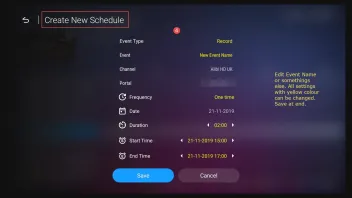
    Is this issue only on one channel and does it start always at same time? If yes, you can bypass epg and create manually schedule, start/duration/end.

    I only record on this one channel and only this particular news show. I deleted the weekly recording schedule and scheduled the recording just for Thursday (yesterday) and today. It started recording with a delay of 12 minutes and endet the recording way before the end of the show. It was supposed to record 67 min but recorded only 24.

    May I asked, how would I create a manual schedule? TIA

    SAM Time and date seem to be alright again but recording is a hit and miss. Z11 will turn on and off at the scheduled time, but one day it records, the next it doesn’t.

    I noticed the following: my EPG is set to “alternate and update every 3 hours”, also keep EPG for 7 days. But, when I look into the source content manager (edit), the EPG did last update on September 22nd, so 2 days ago, while it’s supposed to update every 3 hours. Why is that?

    The EPG for the concerned channels where I want to record from will show an accurate EPG for one day, for the next day it will show one show only for 24 hours, for the next day it will show again an accurate EPG.

    I have the feeling, that Z11 gets triggered to turn on and off at the right time but can’t find the recording which it is supposed to record due to the inaccurate EPG. Yesterday it didn’t record the show although the EPG showed an accurate program. I contacted the provider already but so far they didn’t find/improve anything.

    Any thoughts? TIA

    Nice, it works now. What is with the date and time , also correct?

    I don`t think that they do it, maybe temporarily issue or some changes from them, not to forget also the Provider in the middle. Keep eye next days on it.

    Date and time update within about 5 seconds after Z11 is turned on. I am currently running it with Stand by. When I see that his is working/recording as expected, I will proceed and try Power Off. I always was under the impression that Z11 needs to be in Stand by in order to start a recording and that Power Off would not start a recording. I also am unsure whether you have to shut down Z11 on the TV channel you want the recording to be happening or whether it doesn’t matter on what channel you shut off and Z11 will switch to the “to be recorded channel” anyways.

    As said above, the EPG for the concerned 2 channels is working again. My conspiracy theory was probably unjustified. But, these 2 channels also belong to the broadcaster’s channels where the time shift option disappeared suddenly 4 weeks ago. We shouldn’t overlook that these Live TV broadcasters make their money from advertisers and recording and time shift allow the audience to skip the ad sections. So, they might be looking for ways to prevent recording and time shift.

    Thanks again for your support and I’ll keep you posted whether it works as expected.

    From reading an earlier post I think your using XC protocol. Go into content manager/content source/navigate to top info bar and select edit/scroll down to EPG update interval and choose 3 hour and then press update, and exit out.

    Thanks. My EPG settings are normally “alternative, 3 hours”. Sometimes, when I notice that the EPG will not update despite these settings, I set it to default and then “clear and update” EPG. Then I go back to alternative and again clear and update EpG. Normally, that solves the problem and EPG is back on track. This time it didn’t work. I did it several times without success. The disturbing thing was that it only didn’t update the 2 channels I take recordings from. But, after about 12 hours in after the factory reset, it finally worked and EPG also for these 2 channels is back on track.

    Ok understand, before i tell now something is wrong with OS or hardware, please do factory reset of the device but this way.

    Please note, all settings from MOL3 and favorites are then deleted too. Do Backup first from MOL3 on USB Stick and then disconnect all devices from Box before doing Factory reset.

    External Content www.youtube.com
    Content embedded from external sources will not be displayed without your consent.
    Through the activation of external content, you agree that personal data may be transferred to third party platforms. We have provided more information on this in our privacy policy.

    Thank you SAM . I did as recommended and it recorded the show yesterday. I have to monitor it further and keep you posted.

    But briefly after the recording I noticed that the EPG for this exact TV Live program no longer refreshed. It will show “big brother” for 24 hours in the EPG although a diverse program is running. This wrong EPG now prevents me from setting the schedule for recording. I switched from alternate EPG to default, I cleared and refreshed EPG manually, no change. All other TV Live programs have an accurate EPG, even the ones of the same broadcaster in a different city (I watch record Global News Edmonton, where the problems with EPG occur, Global News Calgary or Toronto are just fine). None of the Global News Channels allow time shift anymore. Is there a chance that the broadcaster actively sabotages streaming?

    SAM

    I switched time/date to manual and shut off Z11 with power off at 7.56 pm. Z11 immediately switched back to on (Formuler Home screen) and showed 7.56 am. It stayed on am until 8.00 am. Then I started MOL and it would stay on am time although we’re at 8 pm.

    I checked the time in „preferences“. It was still set to manual but time was showing 8.00 am. I corrected the time back to 8.00 pm and shut off (power off) Z11. It started and showed again 8.00 am. I shut off Z11 several times (power off and stand by). It will always start up with am time, although I adjusted the time to pm before shut off.

    Thanks Sam.

    Box is mainly in Stand by. It has been ever since I got it in April and it worked fine since about 4 weeks ago. No, I don’t cut power. My Starlink doesn’t use power save or anything similar. I didn’t try a different provider yet and I haven’t changed from Stalker to XC API…

    But what I did notice is that the Z11 doesn’t update the time correctly. When I started Z11 and checked whether it had recorded the show today, I noticed that the time would say 6.15 am, when I opened the guide, it would show me the content at 6.15 am, although it was 6.15 pm. It wouldn’t update the time for the next 20 minutes, only when I restarted Z11 it would update the time and immediately started recording (obviously only the rest of the show). Why does it seem to have problems with the time? I tried both formats (12/24), same thing.

    Hello SAM

    I did everything you recommended. I then programmed a random show for recording. It worked. I then programmed my news show. Recording worked. (Sunday)

    I then programmed the recording of the news show for the entire week. On Monday and Tuesday, Z11 would turn on and shut off at programmed time, but it didn’t record anything.

    On Wednesday and Thursday, Z11 would turn on at the programmed time, but wouldn’t shut off at the programmed time. But it did record the news show on both days.

    On Friday, Z11 would turn on and shut off at programmed time, but it didn’t record anything.

    On Saturday, Z11 would turn on at the programmed time, but wouldn’t shut off at the programmed time. But it did record the news show.

    Today, Sunday again, Z11 would turn on and shut off at programmed time, but it didn’t record anything.

    So, in summary, for 3 out of 7 days your advice got me recordings, but the Z11 would not shut off after the recording, which seems to be wrong as well.

    I am out of solutions. Any suggestions from your side? TIA

    I have changed the scheduled recording: went from weekly (every day) to weekly with the exception of Sunday and scheduled Sunday separately.

    Result: it doesn’t record any of the scheduled recordings. Z11 will turn at the scheduled time but want record. When I then press “manually recording” the recording starts immediately and is flawless.

    Any thoughts?

    Hello, it finally seems to be working. In the "DVR Options" menu, I enabled the "Extra Recording Time" to 1 minute then disabled the option and enabled then disabled the "Timeshift" option. Play/Pause now works as well as recording to my network SSD. It's strange but everything works, so that's good!

    From your description it sounds like that you now have

    - extra recording time disabled

    - time shift option also disabled


    And now time shift works for you? Or did I miss a step?

    Maybe some interrupt from Provider at this time, restart or similar.

    Every Sunday right at 6 pm? That’ll be a nice coincidence. As far as I know that subject was already a bigger issue at MOL2? Normally, when a scheduled recording is not conducted, MOL3 wants to start the recording when I turn Z11 on. In addition, then there should have been fragments of the recording. I even had it several times that a recording was conducted as scheduled, for different reasons I went from “standby” to “power off”, restarted Z11 and as soon as I went into MOL3, it would come up with the message “recording will start in 60 seconds” although it had already recorded the show. Something seems to be really off here.

    I have set a news show for recording every day of the week. For two weeks in a row the recording failed on the Sunday. The first time I wasn’t sure whether the Z11 had turned on but yesterday (Sunday) I saw that Z11 turned on at 5.59 pm and shut down at 7.01 pm, exactly as programmed. But, when I looked at the recordings, the show had not been recorded. I then looked at “scheduled” and the Sunday evening recording was still scheduled. Any advice? As I said, it did record the day before and the EPG has the info of the show available. TIA

    I recently noticed that my recordings disappear. I record the news every evening at 6 pm (as Timeshift doesn’t work anymore). During the recording we got a power outage. When power came back, recording continued but it overwrote the already existing part of the recorded news. another time, recording was already finished and I wanted to watch the recording. Instead of pressing the menu button to get to the recordings, I accidentally pressed the record button. Formuler started recording, I stopped it and then went into the recording menu. My original news recording was gone, only the 20 seconds of accidental recording was still there. Any thoughts on that? TIA

    Unfortunately, that wasn’t the solution to my problem. My external storage is active (I can record) and Timeshift works on several other programs/channels but not on all and strangely enough, it doesn’t work on channels it worked before. The most interesting thing is: Timeshift worked well on a channel, then it started to jump backwards/forward and repeat sections several times, all of a sudden it would work perfect again for 2 weeks, then it completely stopped with the message “not supported”. Provider is no real help…

    Yes, backup MOL3 first and save backup file on usb stick, then disconnect all USB devices from the box and do factory reset.

    I did all that and I noticed that after the factory reset some channels would work in Timeshift while several others won’t. I then restored my backup data and did recheck whether the channels I checked before (after factory reset) work with Timeshift and the ones that didn’t also still don’t work. I got the same results: some channels work with Timeshift, others won’t. So it looks like that it is a channel provider problem and not a SW problem. Any thoughts?

    Try with some usb stick formatted with NTFS to see if it works then.

    Hey SAM, thanks for the suggestion. I tried a newly formatted USB stick, unfortunately the same result. My provider recommends to reset Z11 to factory settings and reconnect. But I would lose all favorite/group lists in Live TV and all my already marked VOD favorites. Can I use the backup function and then restore it after factory reset? What’s your opinion on the factory reset? TIA

    Hello,

    For at least the last 3 days I notice that timeshift doesn’t work anymore. I always get the message „not supported“. I tried different channels and it’s the same on every channel. I use a 2 TB portable storage Seagate. The programs I scheduled for recording get recorded.

    I unplugged the the external storage, rebooted the Z11, rebooted Z11 again, shut it down, plugged in external storage, started and then rebooted Z11 again. Seagate is shown as external storage for timeshift but still get the message „not supported“. I deleted all content on the external storage, still get „timeshift not supported“, no matter which channel/program I select. Does anyone have any ideas? Thank you!

    Sorry, if the box indicates that it lost the internet/wifi connection (between router and box), you blame that on the service provider? How does the service provider cut the in-house internet connection? How does the service provider distinguish between live tv and VOD? Please explain. Or does it indicate that the message “lost internet/wifi connection” from Z11 is inaccurate because it didn’t lose internet/wifi connection but the provider cut the stream? Thanks.

    Happened to me last week several times on my Z11. Ran for 4 months without problems. Haven’t changed the location of router or z11 but all of a sudden get the message “lost wifi connection”. Checked all my other devices, internet/wifi just working fine. Reboot Z11, 3 minutes later same message. After that it didn’t happen again (so far).

    It should play fine with build in player.

    Mostly provider problem.

    But you can try vlc or mx player yes.

    Good afternoon, I read a lot of these comments recently “mostly a provider problem” although the post starters indicate that the problem isn’t existing when they use a box other than Z11. I do find that disturbing. Using the same provider flawlessly on another box clearly makes it a Z11 problem. I also often see “did you try VLC, xyz, etc”. I personally bought a Z11 with MOL3 to be sorrow free and not to overcome Z11 problems by integrating other apps. To use other apps or a different provider to verify the problem is fine. But if the post indicates that this troubleshooting had been tried already, Formuler Z11 should own the problem. Now, go ahead and hit me.

    Short addition to my first description: I also changed buffer time from short to long and activated AFR for Live and VOD. I disabled the AFR settings now and rebooted the Z11 and also my Starlink several times. I am still on long buffer. Last night the problem for VOD seemed to be fixed, to be confirmed further.

    Timeshift still a problem. All of a sudden it will repeat a certain section of about 5 seconds several time or it will alternately jump forward and backwards or will change to slow motion (even on live program). Not sure wether this is a problem of that specific channel as I haven’t reproduced it on other channels.

    For the last 1 - 1.5 weeks my VODs starts freezing/buffering all the time. VOD ran perfectly when I bought everything in April and now it’s a sh$tshow. Sometimes it helps to completely reboot Z11 but not always. Live TV/Timeshift also sucks. It will jump forward, then backwards even several times that you watch the same sequence up to 5 times. My Mbps is larger than 200 (e. g. 268) but watching TV/VOD sucks. And it wasn’t like this before the software update…Any advice? Thanks in advance!

    Hello,

    When I open the “jump menu” on Live TV, VOD and while watching recordings, it offers me Auto, 10 s, 30 s, 1 min, 3 min, 5 min, 10 min jumps. When I open the the “jump menu” while watching via Cloud Timeshift, it offers me only Auto, 1 min, 3 min, 5 min and 10 min. Why is there the difference when using timeshift? It’s a kind of annoying and inconvenient that you don’t have all the options. Also, when jumping on Timeshift, for several consecutive 1 min jumps, you always have to activate the timeline with one click, then click for a jump, then click again for activating the timeline and then click again for next jump. When I watch Live TV, VOD or recordings, you only have to activate the timeline once and then can do all consecutive time jumps. Why is there the a difference? TIA