

I have set a news show for recording every day of the week. For two weeks in a row the recording failed on the Sunday. The first time I wasn’t sure whether the Z11 had turned on but yesterday (Sunday) I saw that Z11 turned on at 5.59 pm and shut down at 7.01 pm, exactly as programmed. But, when I looked at the recordings, the show had not been recorded. I then looked at “scheduled” and the Sunday evening recording was still scheduled. Any advice? As I said, it did record the day before and the EPG has the info of the show available. TIA

Programmed recording failed
-
- Z11 Pro MAX
- MYTVOnline3
-
Steve62 -
August 25, 2025 at 9:20 PM
We asking all new users to read the articles below, before creating their first posting or thread.
- 4. Instruction Articles
Please note, in this forum are only English threads and postings allowed, without any exception!
Please follow the forum rules, thank you for your understanding.
-
-
- Official Post
Maybe some interrupt from Provider at this time, restart or similar.
-

Maybe some interrupt from Provider at this time, restart or similar.
Every Sunday right at 6 pm? That’ll be a nice coincidence. As far as I know that subject was already a bigger issue at MOL2? Normally, when a scheduled recording is not conducted, MOL3 wants to start the recording when I turn Z11 on. In addition, then there should have been fragments of the recording. I even had it several times that a recording was conducted as scheduled, for different reasons I went from “standby” to “power off”, restarted Z11 and as soon as I went into MOL3, it would come up with the message “recording will start in 60 seconds” although it had already recorded the show. Something seems to be really off here.
-
MOL3 wants to start the recording when I turn Z11 on.
I've seen this same performance with a job I have scheduled for 5 days.
-
I have changed the scheduled recording: went from weekly (every day) to weekly with the exception of Sunday and scheduled Sunday separately.
Result: it doesn’t record any of the scheduled recordings. Z11 will turn at the scheduled time but want record. When I then press “manually recording” the recording starts immediately and is flawless.
Any thoughts?
-
- Official Post
Please do following even if i would recommend first FR.
Reinstall MOL3, format the Recording device again on PC with NTFS, connect with the box and restart once, go to MOL3 and set all needed under MOL3->Settings->DVR. This time set also earlier start of recording (Start and Finish to 3 Min.)
Because you Reinstalled MOL3, now set again Scheduled recording.
Go now to To Power Mod and set from standby to power off, test again with turned off Box if everything start and record properly..
Question: Is some Other USB Devices connected too or SD Card, if yes please disconnect this.
-
Not sure if this is applicable to my question. I have Max Pro 11. I have HD connected that has been formatted NTFS. My issues seems to be intermittent. As above it records fine if I hit record now. Sometimes the recording works fine. The first one today was but the second one only recorded 9 minutes. Quite often on the EPG there is "the play triangle in red". Again, sometimes if I click on it, the program plays and I don't think it is from HD, as it doesn't show up on the list of recordings. However. quite often, as today, it says cant play this recording now?? Any light anyone could shine on this would be greatly appreciated.
Thanks
-

Not sure if this is applicable to my question. I have Max Pro 11. I have HD connected that has been formatted NTFS. My issues seems to be intermittent. As above it records fine if I hit record now. Sometimes the recording works fine. The first one today was but the second one only recorded 9 minutes. Quite often on the EPG there is "the play triangle in red". Again, sometimes if I click on it, the program plays and I don't think it is from HD, as it doesn't show up on the list of recordings. However. quite often, as today, it says cant play this recording now?? Any light anyone could shine on this would be greatly appreciated.
Thanks
Regarding your first part of your post, I have seen the same issue randomly. Sometimes the external hard drive doesn't connect at boot and the recordings fail. This has happened with different enclosures containing different drives and also recording to a NAS. I normally pull the power plug (from Formuler "off") to reset the hardware. Sometimes the recording process just stops. A few days ago I was watching while recording a show and I saw the recording light just disappear. I'm not sure if it's MOL3, Android, or the Formuler hardware. Did the same on occasion with my Z8. But I wish Formuler would issue an update to their part of the package. You know, replace old stale bugs with minty-fresh new ones!

The "Play" icon means the channel should be available to play on demand from the EPG. This is called "Catch Up". I have only had one provider where this worked very well, but that was several years ago. On occasion it does work, but more than a little flaky. Sometimes even if it plays, it will exit partway though. I've given up using it. It's a provider feature, not a MOL one. My current provider no longer even shows the icon. I think it's being abandoned because of the additional storage required on the provider's side. One less feature, one less problem.
"Parts left out cost nothing and create no service problems." ~ Bunkie Knudsen, General Motors

-
With my recording problem, had the wifi just stop. No warnings. No errors. Just disconnected. Of course recording was bad. But never any error messages. May need to be Ethernet only to record.
Am surprised there is no watchdog timer to reconnect Wi-Fi when it disconnects.
-
Thanks for Feedback provels
-
Display More
Please do following even if i would recommend first FR.
Reinstall MOL3, format the Recording device again on PC with NTFS, connect with the box and restart once, go to MOL3 and set all needed under MOL3->Settings->DVR. This time set also earlier start of recording (Start and Finish to 3 Min.)
Because you Reinstalled MOL3, now set again Scheduled recording.
Go now to To Power Mod and set from standby to power off, test again with turned off Box if everything start and record properly..
Question: Is some Other USB Devices connected too or SD Card, if yes please disconnect this.
Hello SAM
I did everything you recommended. I then programmed a random show for recording. It worked. I then programmed my news show. Recording worked. (Sunday)
I then programmed the recording of the news show for the entire week. On Monday and Tuesday, Z11 would turn on and shut off at programmed time, but it didn’t record anything.
On Wednesday and Thursday, Z11 would turn on at the programmed time, but wouldn’t shut off at the programmed time. But it did record the news show on both days.
On Friday, Z11 would turn on and shut off at programmed time, but it didn’t record anything.
On Saturday, Z11 would turn on at the programmed time, but wouldn’t shut off at the programmed time. But it did record the news show.
Today, Sunday again, Z11 would turn on and shut off at programmed time, but it didn’t record anything.
So, in summary, for 3 out of 7 days your advice got me recordings, but the Z11 would not shut off after the recording, which seems to be wrong as well.
I am out of solutions. Any suggestions from your side? TIA
-
- Official Post
Do you cut power in the week for box and TV?
Is the box in Power Off modus?
Does your router use power save and set like this? For such Boxes always wrong, should be deactivated..
Did you try other Provider? No other sub, i mean completely new provider with 10 days sub or similar.
Changed protocol from Stalker to XC API and vice versa?
One thing more: When i know scheduled recording is in the morning, before shut down i always tap two times on home button and close all active apps and tasks in background (Doesn`t affect scheduled recording). Power Off Modus is active, no standby.
I guess, each time when your box doesn`t shutdown or do not record until end, something happens. It could be stream cut with x possible reasons, the box can not end the task because of interrupt etc. But check first the 5 steps i posted at beginning.
-
Display More
Do you cut power in the week for box and TV?
Is the box in Power Off modus?
Does your router use power save and set like this? For such Boxes always wrong, should be deactivated..
Did you try other Provider? No other sub, i mean completely new provider with 10 days sub or similar.
Changed protocol from Stalker to XC API and vice versa?
One thing more: When i know scheduled recording is in the morning, before shut down i always tap two times on home button and close all active apps and tasks in background (Doesn`t affect scheduled recording). Power Off Modus is active, no standby.
I guess, each time when your box doesn`t shutdown or do not record until end, something happens. It could be stream cut with x possible reasons, the box can not end the task because of interrupt etc. But check first the 5 steps i posted at beginning.
Thanks Sam.
Box is mainly in Stand by. It has been ever since I got it in April and it worked fine since about 4 weeks ago. No, I don’t cut power. My Starlink doesn’t use power save or anything similar. I didn’t try a different provider yet and I haven’t changed from Stalker to XC API…
But what I did notice is that the Z11 doesn’t update the time correctly. When I started Z11 and checked whether it had recorded the show today, I noticed that the time would say 6.15 am, when I opened the guide, it would show me the content at 6.15 am, although it was 6.15 pm. It wouldn’t update the time for the next 20 minutes, only when I restarted Z11 it would update the time and immediately started recording (obviously only the rest of the show). Why does it seem to have problems with the time? I tried both formats (12/24), same thing.
-
- Official Post
Box is mainly in Stand by
Try power off method please.
But what I did notice is that the Z11 doesn’t update the time correctly. When I started Z11 and checked whether it had recorded the show today, I noticed that the time would say 6.15 am, when I opened the guide, it would show me the content at 6.15 am, although it was 6.15 pm. It wouldn’t update the time for the next 20 minutes, only when I restarted Z11 it would update the time and immediately started recording (obviously only the rest of the show). Why does it seem to have problems with the time? I tried both formats (12/24), same thing.
Ok, that is interesting, i don`t know if starlink is source of the issue but you can set the date and time manually.
-
Recording is sketchy at best, maybe 80% or a bit more. That's all.
-
Try power off method please.
Ok, that is interesting, i don`t know if starlink is source of the issue but you can set the date and time manually.
Thanks Sam.
I’ll try power off for rest of the week.
I switched time/date to manual. Let’s see what it does. I’ll keep you posted.
-
I switched time/date to manual and shut off Z11 with power off at 7.56 pm. Z11 immediately switched back to on (Formuler Home screen) and showed 7.56 am. It stayed on am until 8.00 am. Then I started MOL and it would stay on am time although we’re at 8 pm.
I checked the time in „preferences“. It was still set to manual but time was showing 8.00 am. I corrected the time back to 8.00 pm and shut off (power off) Z11. It started and showed again 8.00 am. I shut off Z11 several times (power off and stand by). It will always start up with am time, although I adjusted the time to pm before shut off.
-
- Official Post
Ok understand, before i tell now something is wrong with OS or hardware, please do factory reset of the device but this way.
Please note, all settings from MOL3 and favorites are then deleted too. Do Backup first from MOL3 on USB Stick and then disconnect all devices from Box before doing Factory reset.
External Content www.youtube.comContent embedded from external sources will not be displayed without your consent.Through the activation of external content, you agree that personal data may be transferred to third party platforms. We have provided more information on this in our privacy policy. -
I've seen all those issues you've listed in your posts #3 and #11. In my experience, failure to set the time automatically means the box is having trouble getting DNS so it can find a time server. There should really be no reason to set the time manually. My old Z8 would always display "7:00 PM" when it had a DNS problem. My Z11 seems to display a random time when it has a problem. I run my own DNS now so I haven't had problems with that, but I've tested the Z11 by disconnecting the ethernet. DNS may also be the reason it's not recording randomly, meaning it can't find the provider (or possibly has lost its network connection). I would recommend a wired connection if possible. And experiment with the Private DNS server settings. I don't use them, but maybe someone else can recommend the best one or search the forum. Don't use Starlink so no help there.
There's a T-shirt I've seen that says:
It's not DNS.
It can't be DNS.
It was DNS.
I do know if my box is warm-booted, the USB hard drive will not mount. It has to be started from power off. I don't use standby because the drive stays powered on and I want the drive off.
That said, I admire your analytical skills.

EDIT - OK, jumping into the DNS rabbit hole...
What IP address does Starlink provide? - Starlink Help Center
"The IP address 206.214.239.194 indicates that Starlink is not connected to our Point of Presence (PoP) and therefore unable to receive its allocated IP address. The default 206.214.239.194 address is expected when Starlink is not connected to the PoP.
In addition, when the Starlink is in the process of connecting to the network, a default DNS server of 34.145.127.1 will be provided. Once the Starlink has verified connectivity with the Starlink network, then the DNS server will update to the DNS servers (usually 8.8.8.8 and 1.1.1.1)."
Content Filtering - Starlink Help Center
"Under the hood, the Content Filtering feature works by setting a custom DNS server provided by Cloudflare (Cloudflare for Families). When Content Filtering is enabled, your router uses one of Cloudflare's DNS servers to help prevent access to specific categories of websites."
Maybe the answer. Or not...

-
Ok understand, before i tell now something is wrong with OS or hardware, please do factory reset of the device but this way.
Please note, all settings from MOL3 and favorites are then deleted too. Do Backup first from MOL3 on USB Stick and then disconnect all devices from Box before doing Factory reset.
External Content www.youtube.comContent embedded from external sources will not be displayed without your consent.Through the activation of external content, you agree that personal data may be transferred to third party platforms. We have provided more information on this in our privacy policy.Thank you SAM . I did as recommended and it recorded the show yesterday. I have to monitor it further and keep you posted.
But briefly after the recording I noticed that the EPG for this exact TV Live program no longer refreshed. It will show “big brother” for 24 hours in the EPG although a diverse program is running. This wrong EPG now prevents me from setting the schedule for recording. I switched from alternate EPG to default, I cleared and refreshed EPG manually, no change. All other TV Live programs have an accurate EPG, even the ones of the same broadcaster in a different city (I watch record Global News Edmonton, where the problems with EPG occur, Global News Calgary or Toronto are just fine). None of the Global News Channels allow time shift anymore. Is there a chance that the broadcaster actively sabotages streaming?
-
Thank you SAM . I did as recommended and it recorded the show yesterday. I have to monitor it further and keep you posted.
But briefly after the recording I noticed that the EPG for this exact TV Live program no longer refreshed. It will show “big brother” for 24 hours in the EPG although a diverse program is running. This wrong EPG now prevents me from setting the schedule for recording. I switched from alternate EPG to default, I cleared and refreshed EPG manually, no change. All other TV Live programs have an accurate EPG, even the ones of the same broadcaster in a different city (I watch record Global News Edmonton, where the problems with EPG occur, Global News Calgary or Toronto are just fine). None of the Global News Channels allow time shift anymore. Is there a chance that the broadcaster actively sabotages streaming?
From reading an earlier post I think your using XC protocol. Go into content manager/content source/navigate to top info bar and select edit/scroll down to EPG update interval and choose 3 hour and then press update, and exit out.
-
- Official Post
Nice, it works now. What is with the date and time , also correct?
But briefly after the recording I noticed that the EPG for this exact TV Live program no longer refreshed. It will show “big brother” for 24 hours in the EPG although a diverse program is running. This wrong EPG now prevents me from setting the schedule for recording. I switched from alternate EPG to default, I cleared and refreshed EPG manually, no change. All other TV Live programs have an accurate EPG, even the ones of the same broadcaster in a different city (I watch record Global News Edmonton, where the problems with EPG occur, Global News Calgary or Toronto are just fine). None of the Global News Channels allow time shift anymore. Is there a chance that the broadcaster actively sabotages streaming?
I don`t think that they do it, maybe temporarily issue or some changes from them, not to forget also the Provider in the middle. Keep eye next days on it.
-

From reading an earlier post I think your using XC protocol. Go into content manager/content source/navigate to top info bar and select edit/scroll down to EPG update interval and choose 3 hour and then press update, and exit out.
Thanks. My EPG settings are normally “alternative, 3 hours”. Sometimes, when I notice that the EPG will not update despite these settings, I set it to default and then “clear and update” EPG. Then I go back to alternative and again clear and update EpG. Normally, that solves the problem and EPG is back on track. This time it didn’t work. I did it several times without success. The disturbing thing was that it only didn’t update the 2 channels I take recordings from. But, after about 12 hours in after the factory reset, it finally worked and EPG also for these 2 channels is back on track.
-
Nice, it works now. What is with the date and time , also correct?
I don`t think that they do it, maybe temporarily issue or some changes from them, not to forget also the Provider in the middle. Keep eye next days on it.
Date and time update within about 5 seconds after Z11 is turned on. I am currently running it with Stand by. When I see that his is working/recording as expected, I will proceed and try Power Off. I always was under the impression that Z11 needs to be in Stand by in order to start a recording and that Power Off would not start a recording. I also am unsure whether you have to shut down Z11 on the TV channel you want the recording to be happening or whether it doesn’t matter on what channel you shut off and Z11 will switch to the “to be recorded channel” anyways.
As said above, the EPG for the concerned 2 channels is working again. My conspiracy theory was probably unjustified. But, these 2 channels also belong to the broadcaster’s channels where the time shift option disappeared suddenly 4 weeks ago. We shouldn’t overlook that these Live TV broadcasters make their money from advertisers and recording and time shift allow the audience to skip the ad sections. So, they might be looking for ways to prevent recording and time shift.
Thanks again for your support and I’ll keep you posted whether it works as expected.
-
SAM Time and date seem to be alright again but recording is a hit and miss. Z11 will turn on and off at the scheduled time, but one day it records, the next it doesn’t.
I noticed the following: my EPG is set to “alternate and update every 3 hours”, also keep EPG for 7 days. But, when I look into the source content manager (edit), the EPG did last update on September 22nd, so 2 days ago, while it’s supposed to update every 3 hours. Why is that?The EPG for the concerned channels where I want to record from will show an accurate EPG for one day, for the next day it will show one show only for 24 hours, for the next day it will show again an accurate EPG.
I have the feeling, that Z11 gets triggered to turn on and off at the right time but can’t find the recording which it is supposed to record due to the inaccurate EPG. Yesterday it didn’t record the show although the EPG showed an accurate program. I contacted the provider already but so far they didn’t find/improve anything.Any thoughts? TIA
-
- Official Post
Is this issue only on one channel and does it start always at same time? If yes, you can bypass epg and create manually schedule, start/duration/end.
-
Is this issue only on one channel and does it start always at same time? If yes, you can bypass epg and create manually schedule, start/duration/end.
I only record on this one channel and only this particular news show. I deleted the weekly recording schedule and scheduled the recording just for Thursday (yesterday) and today. It started recording with a delay of 12 minutes and endet the recording way before the end of the show. It was supposed to record 67 min but recorded only 24.
May I asked, how would I create a manual schedule? TIA
-
- Official Post
Check this older post, procedure is almost same.
PostRE: Scheduled Recording Questions
How to with scheduled recording with 11 days in future.
1. Open EPG- Select channel for recording
- (1) Press (today is 10.11) exactly 11x times on blue button to get 21.11.
- (2) Select "No Information"
- (3) Press "record"

2. Edit scheduled recording
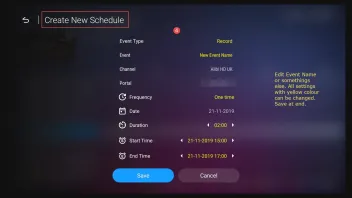
3. Set Daily or Weekly if you need.

4. Check in MOL2 -> Menu -> Schedule, your scheduled recording.

5. If needed you can there edit your scheduled recording again.
 SAM
SAMNovember 10, 2019 at 3:54 PM QuoteIt started recording with a delay of 12 minutes and endet the recording way before the end of the show. It was supposed to record 67 min but recorded only 24.
There is no ideal or perfect answer for this abort, it could be some interrupt with provider stream or network.
-
Check this older post, procedure is almost same.
PostRE: Scheduled Recording Questions
How to with scheduled recording with 11 days in future.
1. Open EPG- Select channel for recording
- (1) Press (today is 10.11) exactly 11x times on blue button to get 21.11.
- (2) Select "No Information"
- (3) Press "record"
2. Edit scheduled recording
3. Set Daily or Weekly if you need.
4. Check in MOL2 -> Menu -> Schedule, your scheduled recording.
5. If needed you can there edit your scheduled recording again.
SAMNovember 10, 2019 at 3:54 PM There is no ideal or perfect answer for this abort, it could be some interrupt with provider stream or network.
Thanks SAM . I’ll try and keep you posted
-
SAM, a brief update:
- made „power off“ the standard mode
- made Mol3 the start up app
- recording works for 4 times in a row now
- one day we had a power outage for a few seconds. That resulted in Z11 not starting the recording. I started the recording manually, but obviously as soon as Z11 updated date and time, it stopped my manually started recording and started the programmed recording
- when Z11 is turned off, it is supposed to turn off the TV. That works, but interestingly about every second day Z11 will turn on the TV when Z11 starts recording. I didn’t plan for that in „settings“ and it’s annoying when the TV is on while you’re not at home.
- although Mol3 is set at the start up app, it won’t open it always when you turn on Z11 but will stop on the start page with all apps. It’s a hit and miss
- Z11 will also not shut off most of the time after recording is finished. Also a hit and miss.
Any thoughts? TIA
-
Update: recordings works fine now ever since I resetted the box and switched to power off from standby
Still no solution for
- when box turns on for recording, it turns on TV although this isn’t set in settings. That’s annoying and costly when your TV runs all evening when you’re not at home.
- Z11 doesn’t shut off after the end of the programmed recording. Again, that’s annoying and costly. You have TV and Z11 running all evening/night when you’re not at home.
- Z11 turns on TV (as said above) but there will only be a PiP screen of the Z11 start page on the TV screen. You have to shut down Z11 and restart it to get to the regular screen.
Thanks for your thoughts on this. Do I have to open a new thread?
-
- Official Post
1 and 2 deactivate CEC Settings on the Box.
3. Not understand exactly why only a PiP screen of the Z11 start page on the TV screen is shown. Don`t you think it is TV that doe this?
-
3. Not understand exactly why only a PiP screen of the Z11 start page on the TV screen is shown. Don`t you think it is TV that doe this?
I don’t think so. I don’t turn off the TV, just restart Z11 and it will return to normal…
-
- Official Post
Then please when this happen next time, upload screenshot from screen.
-
Hi SAM,
Please find enclosed 2 screenshots. First shot is the minimized appearance on the TV I mentioned earlier. Z11 turned on for recording, TV was off during recording. When recording finished (Z11 doesn’t shut down after recordings are finished 🤔), I turned on TV and got this minimized screen.
I shut off Z11 (TV stayed on) and turned Z11 back on. I received a normal TV screen (see second uploaded picture). That was the first time that it happened again after our initial conversation.
Other flaws from Z11:
- it doesn’t shut off when a recording is finished
- it turns on TV when it it starts for a recording although this isn’t part of the CEC settings (you can select in CEC settings between “TV off when shut down Z11” and “wake up/turn off Z11 when turning off TV”. There’s no option to select for “turn on TV when Z11 starts”. Also: it only starts the TV when Z11 starts for recording, TV never starts when you turn on Z11 for regular Live TV/VOD. (It stopped doing it when I disabled CEC completely, but what’s the point to have CEC settings, if they don’t work accurately?)
- recording doesn’t work reliably when Z11 is set to standby (see previous conversation). Ever since I set Z11 to “Power Off”, recording works reliably.
- when you get a power outage (pretty common here in Alberta) and you turn on Z11 after that power outage for the first time, Z11 delivers a message that it will shut down after x seconds. If you don’t cancel that, it will shut down and you have to restart Z11. That behavior does negatively impact scheduled recordings, because when Z11 starts for recording after a power outage, it will automatically shut down iaw the before described behavior and you will miss your recording. I am not sure what the intention of this automatic “shut off when restarted after power loss” is but it appears to be counter productive.
Thanks for your time and thoughts on that.
-
- Official Post
This is very specific issue, never seen before (picture one). At this point i would suggest to open Ticket on Formuler Support Site (Helpdesk) and forward last posted text and pictures.
-
Thanks SAM, will do.
BTW, my previous assumption was correct: Recording works only reliably in „power off“ mode. Z11 will turn on at programmed time. But as said earlier, Z11 will not turn off after recording is finished but Z11 will turn off randomly 5.5 hours after the recording has finished. I assumed, Z11 shuts down with a delay after recording is finished.
And I got confirmation. It happened again yesterday but this time I caught the message displayed on the screen: „Recording has finished, Z11 will shut down in xx seconds“. Obviously Z11/MOL3 identifies that recording has finished only 5-6 hours after the recording actually has finished.
That’s quite annoying. Imagine a household appliance or a car having so many unidentified SW issues which even don’t get fixed but customers are provided with a new model, here Z12, which probably comes with other burdens. It’s a kind of that Formuler throws an „unfinished“ product into the market, gets paid for that product and then it’s up to the customers to identify flaws and continue the necessary testing which lead to improvements which only will be implemented in a new model which the customer then is supposed to buy…As a former Quality and Continuous Improvement Manager I don’t consider that very customer orientated behavior.BTW, yesterday‘s scheduled recording failed bc obviously Z11 isn’t programmed to identify time changes. We changed to Day Light Saving time during Saturday night but Z11 started the recording still at Summer Time, so 1 hour to early.