Z8 MOL2 Timeshift issues after July update

We asking all new users to read the articles below, before creating their first posting or thread.

  • 4. Instruction Articles

    • Please note, in this forum are only English threads and postings allowed, without any exception!

      Please follow the forum rules, thank you for your understanding.

  • Z8 was working fine/brilliantly with recording and timeshift prior to latest update. LOVED THE BOX :smiling_face:

    After the update timeshift plays for maybe 20 seconds then loops back to the start, then plays a further 20 seconds before jumping to live and then the audio becomes out of sync. The only way to correct it is to change channel.

    If i pause during a recording it wont time shift anymore and ends up ending the recording

    These things worked fine for me prior to latest update.

    The only thing ive changed is to update.

    Using LAN I also have an issue now whereby if i leave mytv app to go to the home screen i lose network connection. If i unplug the LAN cable and reconnect it fixes. Again this wasnt an issue before.

    Ive tried a factory data reset and its the same issue.

    Any ideas?:thinking_face:

  • After the update timeshift plays for maybe 20 seconds then loops back to the start,

    Known issue. Will be resolved in a hotfix soon.


    Using LAN I also have an issue now whereby if i leave mytv app to go to the home screen i lose network connection.

    Unknown issue. Doesn't appear to be related to the new update.

    What method are you using to determine that the LAN connection has dropped after going to the home screen?

    Unsolicited PMs for support will be ignored.

    Duplicate support requests to the forums and helpdesk will be ignored.

  • Thanks for the reply!

    When I exit to the home screen if I attempt to open the market it says no network connection. When I try to go back into mol2 the screen is blank on every channel. Try to reconnect portal and I get an error message..

    I can reconnect after removing as Nd reseating LAN cable or rebooting STB

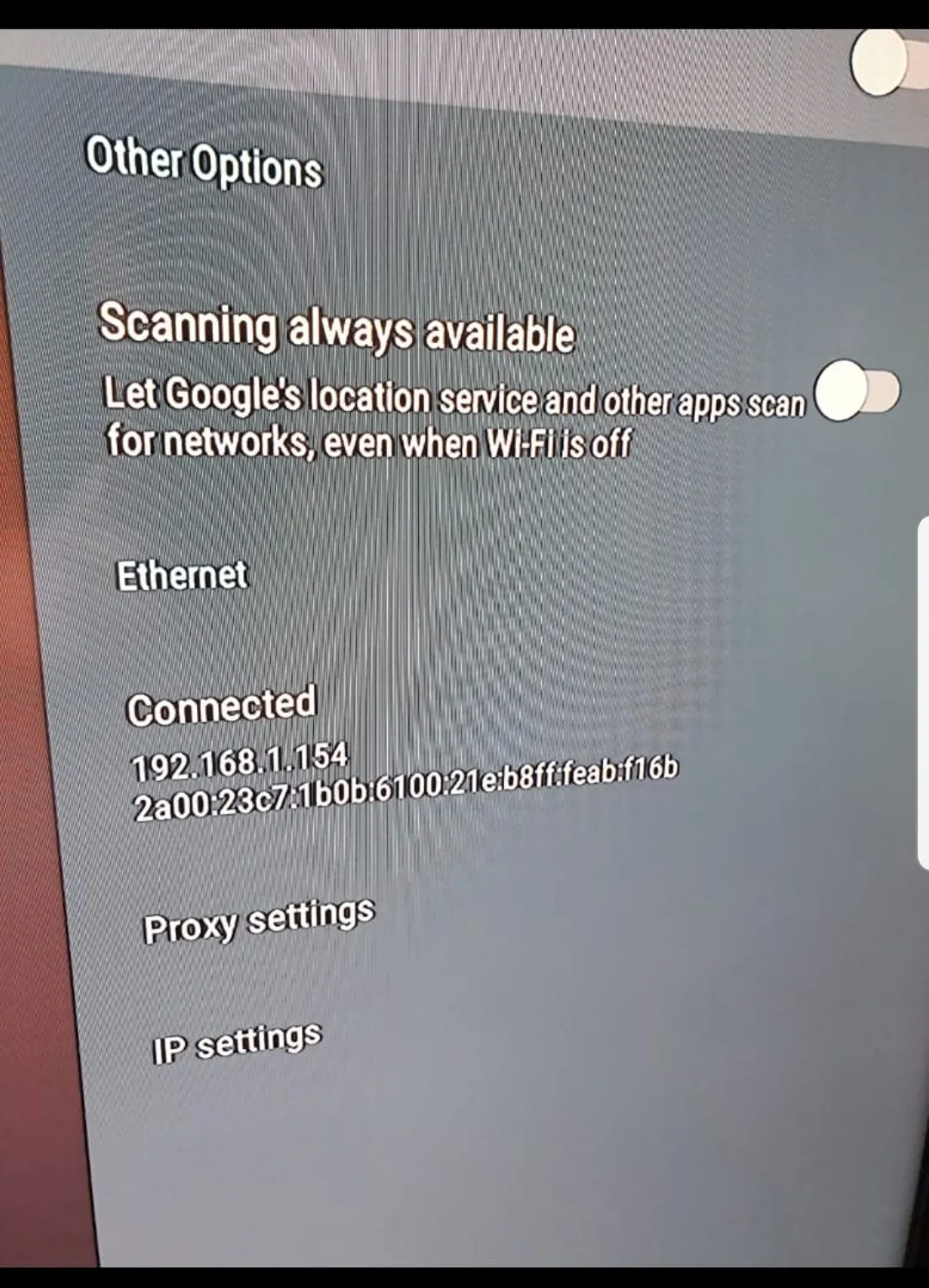
  • This one? This is as the error occured.

    I left it alone for a few minutes and it restored connection at which point you only see IP address

    Re-verify the firmware version you are using and post the version number.

    Turn off IPv6 LAN side on your router and/or turn off IPv6 in Formuler Z8 Android Settings.

    Is there a specific reason you have turned on IPv6? If there isn't turn it off and leave it off.

  • Based on the image you posted, your device is getting an IPv6 address from somewhere.

    The IPv6 address should not appear in the network menu if you have switched off IPv6 in the Android Settings.

    Please try the below:

    Open the Android Settings, scroll down to IPv6, toggle it ON. Reboot the device. After that, toggle IPv6 OFF. Reboot the device.

    Finally post a picture of your Android Settings > Network menu again.

    But I cant seen to disable it on the router...?

    Why? Because you don't know how? or because there is no option to turn it off?

    Post the brand/make/model of the router you are using. Is the router supplied by your ISP?

    Unsolicited PMs for support will be ignored.

    Duplicate support requests to the forums and helpdesk will be ignored.