

New App on Formuler Z11

We asking all new users to read the articles below, before creating their first posting or thread.

  • 4. Instruction Articles

    • Please note, in this forum are only English threads and postings allowed, without any exception!

      Please follow the forum rules, thank you for your understanding.

  • I just built my first Android app and tested it on the Z11 – works perfectly! 🙂 It's a simple app that displays a clock on the screen, which you can customize.
    Now I’ve uploaded it to the Play Store for testing. I’ve enabled form factors for both Android TV and Android XR.

    However, I can’t select any of my Formuler boxes for testing – they don’t appear as available test devices.
    The app runs fine on all Android devices I have, but these boxes don’t show up in the internal testing or compatibility list.

    Anyone know what might be causing this, or what I need to change to make them available?


    Join on Android

    https://play.google.com/store/apps/details?id=com.richnerapps.kloqtv


    Join on the web
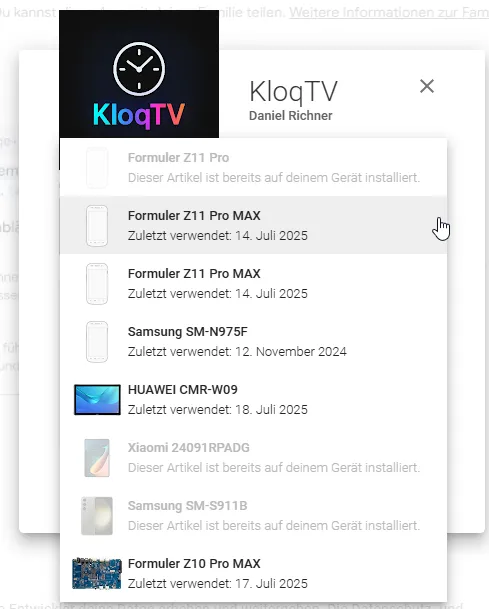
    Sign in - Google Accounts

  • I wasn't able to select my Formuler boxes until now – but they finally show up! 😊
    Since I'm now in closed testing, I need 12 testers. Would anyone be willing to help?
    I’d just need the email address linked to your Google account, and I’ll send you an invitation to join the test. You’d then have access to the app for 14 days.

    I’d really appreciate it if some testers could step forward!

    At almost 50 years old, I’ve built my first Android app, and I think it would be super cool to fully launch it on the Play Store.

    I’ll send the invitation from "richi207 (a) gmx (.) ch".
    The app is called KloqTV and runs on about 20,000 devices (Android TV / smartphone / tablet).

    I’m a private individual and have no financial interests in this app. I built it simply because I wanted to learn — and by now it’s become a little passion project.
    The app doesn’t do much, it’s not fancy, but it does exactly what I wanted it to do.

    If you’d like to help as a tester, please send me a private message with the email address you use in the Play Store.

    Thank you!

  • iceman It's in closed testing, you need an invitation. I just need the email address linked to your Google account, and I’ll send you an invitation to join the test. You’d then have access to the app for 14 days.


    Still looking for testers 😔
    Unfortunately, I don’t have enough yet – I need at least 12 testers to move forward.

    The app should work on most Android TVs, phones, and tablets, and you'll get 14 days of access through the closed test.

    If you'd like to help (or know someone who might), I’d really appreciate your support!
    Just send me a message with the email address linked to your Google Play account, and I’ll send you the invitation.

    Thank you so much in advance! 🙏
    Every tester helps me take one step closer to publishing my first Android app! 💪

  • I remember some time ago there was many people asking for such option, join and test, so richi can finish the app and activate on gplay for all.

  • iceman Thanks for your feedback and for testing the app!
    If you have a moment, could you try pressing "Start / Apply" after setting your preferences, and see if it sticks?
    On my end, the settings are retained — but I’ll definitely keep an eye on this for the next update.

    At the moment, I’m waiting to gather 12 testers to complete the closed testing phase.
    Unless any major issues pop up (which seems unlikely), I’ll hold off on updates for now.

    When you publish your first app, Google tends to look at things more closely, so I want to make sure everything’s solid before moving forward.

  • Hi, Richi

    I installed your app on android Xiami box and its still working!

    On my Formuler Z11promax it isnt,in some mysterious way it disappeared?

    Can you please send me another invitation to test to the Google e-mail address i have sent you in private message

  • Hi henkie

    You had it installed on the Formuler, and now it's gone?
    The invitation applies to all devices linked to your Google account — any device connected to the email you provided.

    The best way is to use the first link I sent you. From there, you should also be able to select additional devices for installation.

    Interestingly, my Formuler box only shows up on my PC (windows) as well — I can’t select it from my phone either.
    Unfortunately, I have no control over how or where Google displays your devices.

  • richi207 just did as you suggested -use the first link you sent me-and now its installed on my FormulerZ11PM,my Sony Bravia tv ans Xiaomi android box:thumbs_up::thumbs_up:

  • iceman Thanks for your feedback and for testing the app!
    If you have a moment, could you try pressing "Start / Apply" after setting your preferences, and see if it sticks?
    On my end, the settings are retained — but I’ll definitely keep an eye on this for the next update.

    At the moment, I’m waiting to gather 12 testers to complete the closed testing phase.
    Unless any major issues pop up (which seems unlikely), I’ll hold off on updates for now.

    When you publish your first app, Google tends to look at things more closely, so I want to make sure everything’s solid before moving forward.

    Ok. I´, going to do it now.

  • It shows up after the restart, but it appears on the wrong side that i chose.

    Crazy! iceman thank you for the imput. I will have a look on that on next update.

    The next update will come once the closed testing phase is complete and the open testing begins.
    Right now, the code is really stable and solid, so it should easily pass Google's review.

    I’m still missing a few testers though.


    I’ll be on vacation soon with limited access to the internet. 😕

  • New release is out! Hollydays are rainy... update soon in play store.

    • Buttons have been redesigned
    • Menu readability has been improved
    • Nudge pad has been fixed and enhanced
    • Clock settings saving has been reworked and now separates analog and digital

    Need still some testers.

  • New release is out! Hollydays are rainy... update soon in play store.

    • Buttons have been redesigned
    • Menu readability has been improved
    • Nudge pad has been fixed and enhanced
    • Clock settings saving has been reworked and now separates analog and digital

    Need still some testers.

    Very nice improvements,help the man out by sending him a p.m to test and get the app in playstore:smiling_face_with_sunglasses:

  • I've released another update. I think it's a good idea to make these improvements now, while the app isn’t publicly available yet and the user base is still small and manageable.

    Auto-restart after app updates:
    Previously, the clock had to be restarted manually after each app update – this now happens automatically. I've linked this functionality to the existing "Start on system boot" toggle. When enabled, the clock will now automatically relaunch not only after device reboots, but also after app updates – using the last saved settings. This ensures consistent behavior without adding extra switches to the UI.

    Clock can now be moved off-screen:
    In "free positioning" mode, the clock can now be placed anywhere – even partially off-screen. I added the necessary option to support this.

    Blue title bar removed:
    I’ve redesigned the app to remove the blue title bar in the main menu. This gives the interface a cleaner look, and the logo stands out more clearly. It also improves usability on devices like tablets or smartphones – not just TVs. (In fact, I’ve started running the clock on my own tablet, and I really like how it looks there.)

    Updated core files:
    I’ve also updated the app’s core files to align with the latest Android standards. This improves long-term compatibility and makes the app more future-proof.
    The app still runs on Android 8+, but it’s now technically prepared for Android 15.

  • Bad news, on next update I will have a look at that. THX iceman for the input.

    iceman

    Edit 1: On my second box, the update also installed successfully, but the position wasn’t saved either. Size, appearance, etc. are correct, but instead of staying in the bottom right, it reset to the default top left. Strange – I’ll have to look into what’s causing that. It did start automatically again after the update, just like on your side, but unfortunately in the wrong position.


    Edit 2: I've already built a fix for that, and it will be included in the next update. I'll wait until tomorrow before releasing another update so I’m not pushing them out too rapidly. I’ve moved the save point for the settings to a more reliable part of the app. Instead of saving only when the app is closed, the settings (including X/Y position, size, color, etc.) are now saved as soon as you leave or minimize the settings app (onPause instead of onStop). This ensures that the very last state is saved immediately, no matter what the system does with the app afterward. Hopefully, that’s the root of the issue.

    Edited 2 times, last by richi207 (July 31, 2025 at 7:21 PM).

  • New update is out:

    I've moved the point at which the settings are saved to a more reliable stage in the app's lifecycle. Instead of saving only when the app is closed, settings (including X/Y position, size, color, etc.) are now saved as soon as you leave or minimize the settings screen (onPause instead of onStop). This ensures that the very latest state is saved immediately – no matter what the system does with the app afterward.

    I’ve also reduced the minimum size value for the digital clock from 20 to 10. The analog clock still has a minimum of 20 to prevent it from becoming accidentally too small to use. The allowed size range switches automatically depending on whether you're using the analog or digital clock.

    That’s it for now — time to pack and head off on vacation 😊
    I’ll be back in about two weeks.

  • Hi iceman ,
    I just checked the update behavior again. On one of my boxes, everything worked perfectly. On the other, the clock position was reset to the default (top left) again.

    However, when I opened the app and clicked “Apply,” the clock immediately jumped back to the correct position.
    I investigated a bit and it seems like the device's cache still held on to some old data.
    A reboot of the device actually worked wonders.

    At first, I thought the clock wouldn’t start automatically after reboot, but after about 15 seconds, it appeared — and at the correct position.

    Have you tried rebooting your device already?
    Thanks a lot!

  • I had to release another update — it should be online soon. The size adjustment for the analog clock wasn’t working properly anymore.
    Previously, I had only modified the minimum size value to allow the clock to be made smaller, but apparently that caused some issues.

    Anyway, I’ve now fixed it: You can now adjust the clock size reliably using plus and minus buttons, and the current size is also shown as a numeric value.

  • Hi iceman ,
    I just checked the update behavior again. On one of my boxes, everything worked perfectly. On the other, the clock position was reset to the default (top left) again.

    However, when I opened the app and clicked “Apply,” the clock immediately jumped back to the correct position.
    I investigated a bit and it seems like the device's cache still held on to some old data.
    A reboot of the device actually worked wonders.

    At first, I thought the clock wouldn’t start automatically after reboot, but after about 15 seconds, it appeared — and at the correct position.

    Have you tried rebooting your device already?
    Thanks a lot!

    Hi! Yes, i tried that a couple of times and it keeps showing up on the wrong side.

    My box is a Formuler Z10 Pro Max. I also have a GTV and i will check if the issue is present on that one.

    Best regards.

  • THX iceman

    Today is the last chance to apply as a tester before my vacation – I still need at least four more people. After my holiday, you’ll be able to apply again and gain access to the app.

    Once I’m back, I’ll take another detailed look at the "free movement" feature. I plan to add long-press functionality and fine-tune the controls for a smoother experience.

    So don’t miss this opportunity to become a tester now – I’d really appreciate it! 😊

  • New Update:

    • Free positioning reworked: The control for free positioning has been completely reworked. It now responds correctly to your Android TV remote’s D-Pad. Short presses move the clock step by step, while long presses allow smooth continuous movement.
    • Remote shortcut (turn clock on/off via color buttons): I tested this function and it would technically work, but it requires additional permissions. Because of some concerns, I removed it again. What do you think about it?
    • ClockService stabilized: I fundamentally reworked the ClockService to make it more robust. This should fix the issues where the clock disappeared after a few days or lost its position. The app now reliably saves and restores all settings, even if the service is unexpectedly stopped and restarted by the system.
      → One user reported that the position was lost when switching the clock on and off. Has anyone else experienced this?

    I will upload the update today, and it should gradually roll out. If you encounter issues, try uninstalling and reinstalling the app.
    Hopefully I didn’t forget anything important.
    P.S.: My holidays were relaxing and enjoyable – now I’m back! 😊

  • So, now it’s just a matter of waiting until Monday – then I can apply for production access for the app at Google. Let’s see how the process goes and whether the app will officially receive Beta status.

    Planned updates for Sunday:

    • Optimize autostart and make another attempt to ensure it works reliably on all devices (including keeping the correct position after a reboot, which didn’t work on two devices for one tester).

    Being reviewed:

    • Screen burn-in protection (so far I haven’t noticed this issue)
    • Button color (better visibility)
    • Option to display the date
    • Option to display the battery status (not relevant for TV devices)

    Not yet implemented (but I can look into it if requested):

    • Shortcut button to toggle the clock on/off
    • Free movement of the clock using finger or mouse
  • So, now it’s just a matter of waiting until Monday – then I can apply for production access for the app at Google. Let’s see how the process goes and whether the app will officially receive Beta status.

    Planned updates for Sunday:

    • Optimize autostart and make another attempt to ensure it works reliably on all devices (including keeping the correct position after a reboot, which didn’t work on two devices for one tester).

    Being reviewed:

    • Screen burn-in protection (so far I haven’t noticed this issue)
    • Button color (better visibility)
    • Option to display the date
    • Option to display the battery status (not relevant for TV devices)

    Not yet implemented (but I can look into it if requested):

    • Shortcut button to toggle the clock on/off
    • Free movement of the clock using finger or mouse

    If I press the OK button on my remote I can see also the time and date without this app🙂

  • If I press the OK button on my remote I can see also the time and date without this app🙂

    Hi,dont you mean info butto instead of OK button (in mol3))?

  • So, now it’s just a matter of waiting until Monday – then I can apply for production access for the app at Google. Let’s see how the process goes and whether the app will officially receive Beta status.

    Planned updates for Sunday:

    • Optimize autostart and make another attempt to ensure it works reliably on all devices (including keeping the correct position after a reboot, which didn’t work on two devices for one tester).

    Being reviewed:

    • Screen burn-in protection (so far I haven’t noticed this issue)
    • Button color (better visibility)
    • Option to display the date
    • Option to display the battery status (not relevant for TV devices)

    Not yet implemented (but I can look into it if requested):

    • Shortcut button to toggle the clock on/off
    • Free movement of the clock using finger or mouse

    Hi,

    I see as main advantage of your app,that you have a clock in screen display,during watching VOD&tv series,that you can not open with the info button on rcu,ability to turn clock on/off would be a nice addition.

  • Last update before I apply for production access on Google Play:
    On Monday evening I’ll be able to submit the request. It may take up to 7 days to receive an answer from Google. I might also have to answer a few more questions or upload additional videos. Since this is my first app, it seems that the review process is stricter than for “old hands.”

    A big thank you to all testers! 🙏

    Improved Autostart and Position Saving:
    Autostart has been optimized and should now work reliably on all devices – including correctly restoring the clock’s position after a reboot (which previously did not work on two devices for one tester).

    Enhanced TV Navigation:
    Navigating the settings menu with the TV remote now feels much smoother. All option fields (e.g., for position and color) now receive the same clear yellow focus ring as the other switches and buttons.

    Date Display:
    A new option allows you to display the current date directly below the time – handy for having all important information at a glance.

    Battery Status Display (for mobile devices):
    On devices that are not detected as Android TVs (e.g., tablets), a new option shows the current battery level below the time. On Android TVs this option is automatically hidden to keep the interface clean.

    Burn-In Protection (Pixel Shifting):
    A new “Burn-In Protection (Pixel Shifting)” option has been added to the settings menu. When enabled, the clock shifts by a few random pixels every minute. The movement is barely noticeable, but highly effective in preventing burn-in on OLED screens.

    Updated Instructions:
    The in-app instructions have been revised to explain the new features and ensure all descriptions are up to date.

    Not yet implemented (but can be considered if requested):

    • Shortcut button to toggle the clock on/off (requires additional permissions, currently on hold)
    • Free movement of the clock using finger or mouse
