I couldn't find anywhere to download the latest firmware image for this player.
The built-in software update app failed on all my attempts to upgrade the system online.
What can I do now? I signed up, hoping to get an answer.
Please help, guys.
We asking all new users to read the articles below, before creating their first posting or thread.
Please note, in this forum are only English threads and postings allowed, without any exception!
Please follow the forum rules, thank you for your understanding.
I couldn't find anywhere to download the latest firmware image for this player.
The built-in software update app failed on all my attempts to upgrade the system online.
What can I do now? I signed up, hoping to get an answer.
Please help, guys.
My friend, in the Formula Z12 Ultra app store there's an app called MytvOnline3 for DW. Judging by the picture, it's not installed; it's been uninstalled. You need to install it.
Sent you a message. Please check your inbox.
I couldn't find anywhere to download the latest firmware image for this player.
The built-in software update app failed on all my attempts to upgrade the system online.
What can I do now? I signed up, hoping to get an answer.
Please help, guys.
Goodday my my friend,
Mytvonline3 can you download via the software updater. If not maby there is a server problem and or the update server is blocked by your internet service provider.
Try making wifi hotspot from your phone. Connect with wifi with box to your phone and try software update again.
Or try first at ethernet settings in android settings changing to quad9 dns.
Settings > Network & Internet > Private DNS > Private DNS provider hostname > Quad9
Goodluck my friend.
I have a question. Is it possible to watch 4k on apps like Disney plus or Amazon? On Formuler z12 ultra?
Yes, my tv supports 4k, dolby vision, dolby atmos and if i watch as example with Disney Plus the Titanic on the Z12 Ultra it shows dolby vision, dolby atmos and 4K.
See images.
I hope i helped you out.
Goodday my friend
Yes, my tv supports 4k, dolby vision, dolby atmos and if i watch as example with Disney Plus the Titanic on the Z12 Ultra it shows dolby vision, dolby atmos and 4K.
See images.
I hope i helped you out.
Goodday my friend
Amazing. 🤩 but I heard there is till problem with Netflix is that correct? In Netflix only like 720 p or something like that. Can you confirm this?
I can confirm yes.
Netflix is so stupid to don't give formuler boxes license.
So it won't work. It's due Netflix, not formuler.
In the market app you can download netflix and control it with a mouse and keyboard or so. And yes is 720p. Not hd.
But it's not a big problem. The last 15+ years all tv's are with netflix on it.
And all almost all people bought the last 15+ years a smarttv so has netflix.😃
Yes you are right
I do enjoy it more on a Formuler but I can at least do their apps. Thank you ![]()
Yes you are right
I do enjoy it more on a Formuler but I can at least do their apps. Thank you
Skyshowtime and disney+ works for me great in 4K or dolby atmos and dolby vision my friend.
Bonjour,
What do you mean by picture misaligned?
Aspect Ratio?
You can alter this by pressing red button on your remote(just above info button)
Bonjour,
What do you mean by picture misaligned?
Aspect Ratio?
You can alter this by pressing red button on your remote(just above info button)
Yes, and change aspect ratio to original.
Or what for you is the best shkop
I made a short video; you can clearly see that the image is shifted to the left. I have to restart each time for it to return to normal.
https://www.youtube.com/watch?v=PVMeEBnGsiU
I made a short video; you can clearly see that the image is shifted to the left. I have to restart each time for it to return to normal.
On your tv the "ZOOM" function is active. Deactivate zoom in image settings from your tv settings.
Or change the "screen position" on your box! (Simple way)
Go to settings like in your movie, sound and image, screen position, zoom out screen couple times, mostly till 92 or 90%.
Goodluck my friend.
P.s: if you figured it out, please delete your youtube video from youtube😉
Hello. I can't find the VPN tab anywhere in the settings. I wanted to set it so that the VPN turns on automatically after a restart.
Display MoreOn your tv the "ZOOM" function is active. Deactivate zoom in image settings from your tv settings.
Or change the "screen position" on your box! (Simple way)
Go to settings like in your movie, sound and image, screen position, zoom out screen couple times, mostly till 92 or 90%.
Goodluck my friend.
P.s: if you figured it out, please delete your youtube video from youtube😉
Still no solution, I'm hoping for an update to the Formuler Z12 Ultra....![]()
Still no solution, I'm hoping for an update to the Formuler Z12 Ultra....
Zoom out function in screen position didn't work out for you?
Zoom out till you see a black edge on your screen. Then zoom back in till the black edge is barely gone...
Then it should be fine.
Zoom out function in screen position didn't work out for you?
Zoom out till you see a black edge on your screen. Then zoom back in till the black edge is barely gone...
Then it should be fine.
It's not working, and even if it did, would I have to do this every time the Formuler wakes up from sleep?
That's not normal.![]()
It's not working, and even if it did, would I have to do this every time the Formuler wakes up from sleep?
That's not normal.
No it should be saved.
Check with your tv remote (not formuler remote) in your tv settings at screen/image setting or so that aspect ratio is original or 16:9
And search for a zoom/scanning option in your tv settings! Turn that off or on. Zoom function can also have other name on your tv. Play with the zoom/scanning options.
I have a lg tv, and turned "scanning" in screen settings From automatic to ON.
At some tv's it needs to be off and or automatic. So search that option and play with it. Then it should be solved.
Which brand tv do you have?
Same problem for me with LG TV G4 model…
Very bad product
, z11pro was better !
and still no update !
Any news on the updates?
Even if its one update to fix a few problems like epg and restarting MOL3 in middle of data entry...
Same problem for me with LG TV G4 model…
Very bad product
, z11pro was better !
and still no update !
I have a lg tv, and turned "scanning" in screen settings From automatic to ON.
Take your lg remote. Push cogwheel, then screen settings, and somewhere you find "scanning' in screensettings.
Test it with ON and Off please.
Display MoreI can confirm yes.
Netflix is so stupid to don't give formuler boxes license.
So it won't work. It's due Netflix, not formuler.
In the market app you can download netflix and control it with a mouse and keyboard or so. And yes is 720p. Not hd.
But it's not a big problem. The last 15+ years all tv's are with netflix on it.
And all almost all people bought the last 15+ years a smarttv so has netflix.😃
as per my knowledge, it's locked at 540p max, not 720p
I have a lg tv, and turned "scanning" in screen settings From automatic to ON.
Take your lg remote. Push cogwheel, then screen settings, and somewhere you find "scanning' in screensettings.
Test it with ON and Off please.
This ?
I've tried all the options, nothing works
my TV : LG C4
If it's in english and its scanning, then yes i ment that.
The option are fine yes.
Im sorry it didn't fixed your problem.
If it's in english and its scanning, then yes i ment that.
The option are fine yes.
Im sorry it didn't fixed your problem.
As settings on tv cant solve the problem,maybe some alteration in"Developers mode" on z12 ultra coulde be tested, Lucky133?
I can't tell...
...fixed it with tv settings. Image was direct fine.
I use also the LG G4 but never seen such overscan, not on TV and also not on Monitor.
Is the Box connected directly with TV or somewhere else (AVR)?
TV: Set to 16:9
Box: Adjust the image size -> Home menu -> Device Preferences -> Display and Sound -> Screen position -> current scaling should be 100%.
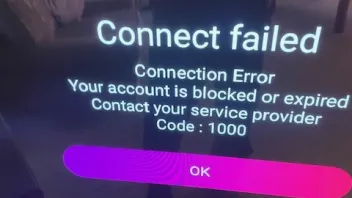
Loved my z12 that much bought another for a different room but when trying to setup I’m getting this error . I’m in the uk not on any vpn or anything
Reset to bootloader and done a factory wipe and get same thing .
Can anyone help with this as I’d rather set it up than have to send it back
This product is not for sale outside EU/UK.
Contact your seller.
Display MoreLoved my z12 that much bought another for a different room but when trying to setup I’m getting this error . I’m in the uk not on any vpn or anything
Reset to bootloader and done a factory wipe and get same thing .
Can anyone help with this as I’d rather set it up than have to send it back
This product is not for sale outside EU/UK.Contact your seller.
Send it back please and ask refund.
And buy one in local store and or european store.
If you buy one on ebay and or amazon you need always to ask seller if it's a European version. If they don't know then don't buy.
In my country are online stores too, who sell Formuler boxes.
Maby you can find an online store in uk?
Goodluck my friend
Here my friend,
https://www.world-of-satellite.co.uk/formuler-z12-ultra
Maby this one? Is that a good seller?
The thing is the error message of it suggests it is a uk / eu device and I’m based in uk so should it not work
I can return it no problem , but just thought rather than all the hassle of that is it not just possible to wipe this and setup again
Not possible after Geoblock, you have to replace.
Good morning friends, I would like to know if the Z12 Ultra works well with the Microsoft Xbox One Digital TV tuner, so that it can capture the channels (RF) that are injected at home via my Vodafone operator's router, if so, does the MOLD3 do this capture work and create its own folder? Thank you to anyone who can give a tip.
Hi Toddy, Did you manage to get the z12 ultra working with the Xbox one digital Tuner? I have just ordered the z12 ultra. I see the xbox tuner very cheap on amazon 15 euro. Want to be sure it works in case i need to buy the more expensive GENIATECH MyGica or Hauppauge WinTV. Thanks
Check and compare data in full before you buy, this one is supported -> Xbox One Digital TV Tuner (045E:02D5)
On Amazon the price for this tuner is temporarily down to $8.99,a 31% advantage![]()
On Amazon the price for this tuner is temporarily down to $8.99,a 31% advantage
I seen it listed on the official documentation but heard reports of it not working. i bought it alright for that price on amazon. At least if doesnt work i wont be too much out of pocket
This is the list of tuners that our friend SAM posted here once and I had saved here.
USB ATSC tuners:
- Hauppauge WinTV-HVR-955Q (2040:b123)
- Hauppauge WinTV-HVR-955Q (2040:b150)
- Hauppauge WinTV-dualHD (2040:026d)
USB DVB-T tuners:
- Hauppauge WinTV-dualHD (2040:8265)
- Geniatech MyGica T230 Black (0572:689A)
- Geniatech OEM T230 White (0572:c68a)
- Xbox One digital TV tuner (045E: 02D5)
Note: Is there an original version of Formula for the Z12 Ultra box?