M3U iptv link not working, cloudflare message "video restricted ......."

We asking all new users to read the articles below, before creating their first posting or thread.

  • 4. Instruction Articles

    • Please note, in this forum are only English threads and postings allowed, without any exception!

      Please follow the forum rules, thank you for your understanding.

  • Hi all,

    I'm new to formuler boxes. the z11 pro max i'm currently using for a few months has been the best box for iptv i have used in several years.

    I have 2 iptv m3u lines that i'm using, one is working fine in MTO3 but the 2nd line shows the cloudflare message below. this 2nd line is working fine in other apps in my box and also on android mobile.

    can you please help me resolve this issue.

    below is the m3u that's failing to connect in MTO3.

    http://xxxxx.xxx:8080/get.php?userna…_plus&output=ts

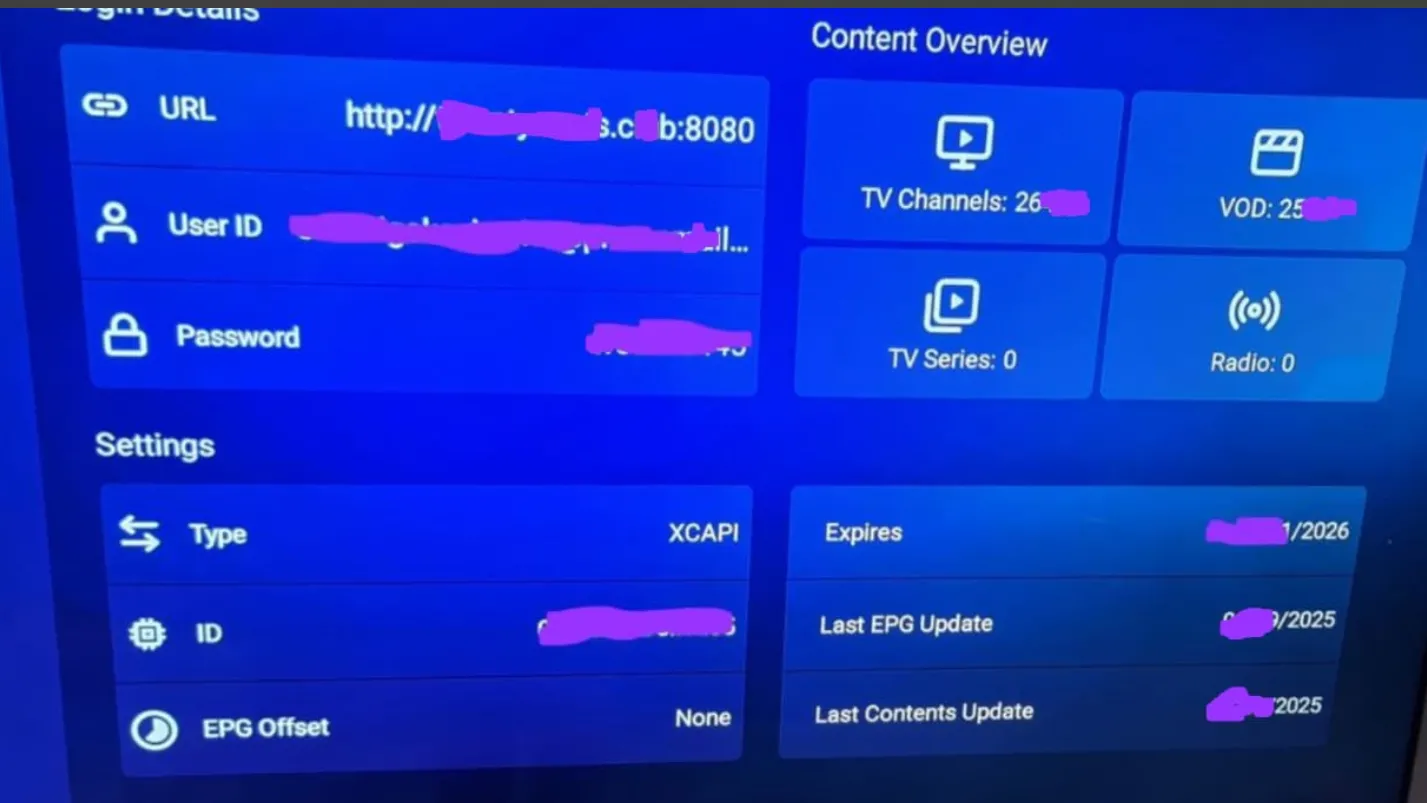
    from the 2nd picture, it appears that the url is connected because it show number of channels and expiration date. But when i select channels to watch, the claudflare message below pops up.

    many thanks in advance



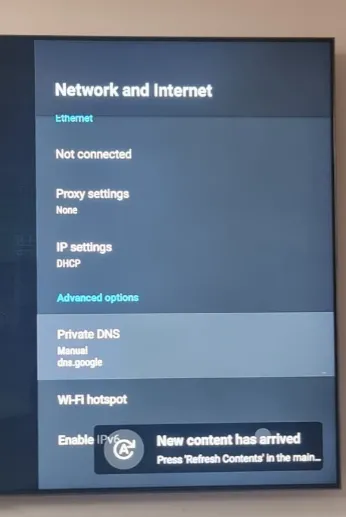
  • I n case of blocking your IPTV by Cloudflare change your private DNS to either Quad9 or Google.

  • Dont worry,its quite simple.

    Press the Homemenu button on you remote,navigate to settings(cog.wheel) go to internet,once youre in menu Network& Internet scroll down to Private DNS and manually set it to Quad9 or Google(thereby excluding Clouflare!):smiling_face:

  • Dont worry,its quite simple.

    Press the Homemenu button on you remote,navigate to settings(cog.wheel) go to internet,once youre in menu Network& Internet scroll down to Private DNS and manually set it to Quad9 or Google(thereby excluding Clouflare!):smiling_face:


    thanks. I have tried both quad9 and google dns but i'm still getting the cloudflare message

    my other url is working fine.

    is there anything else i need to change?

  • What show are you watching,thats giving you problems,so i can check whether i have same problem on XC connection?

  • All channels and VOD from this url are not working, just shows cloudflare message.

    As it is like you say,it might be a Provider issue,did you contact them?

  • Sorry, its already done i see. Maby you can the "private dns set to OFF!"


    Is on your internet provider router maby also cloudfare as dns?

    If so, login on router and change to quad9.


    And contact your iptv seller that you have this problem now.

    Maby there streams are leaded via cloudfare.


    Try a free vpn. Install it and connect to to your homecountry. If it works then it should be buffering maby due a free vpn. But you know then problem is solved.

    Then think about to take a paid vpn like nordvpn. Very good costumer service also.

  • Try for test:

    Settings > Network & Internet > Private DNS > Private DNS provider hostname > Quad9


    Reboot device.

    If after that still the same, then is your provider (temporary) down.

    thanks for the suggestion. please elaborate what this "Private DNS provider hostname > Quad9" should be.

    are you suggesting i do the manual input... something like

    http://xxxxx.xxx:8080/get.php?use

    to confirm, the url is working fine in other apps

  • I use glinet vpn router and have never experienced these issues. surprising my other url is working fine.

  • So on your box mytvonline3 gives you the cloudfare error.


    And on your box iptv smarters gives you NOT that error with the same url as on mytvonline.


    Correct? I have a black-out on the moment. Let me think about it and if you have a reply from your iptv seller. Please write it here what they say.

  • So on your box mytvonline3 gives you the cloudfare error. correct


    And on your box iptv smarters gives you NOT that error with the same url as on mytvonline. correct


    Correct? I have a black-out on the moment. Let me think about it and if you have a reply from your iptv seller. Please write it here what they say.

    below is the response from my supplier

    "that's unfortunate, I believe the XCAPI thing forces traffic over cloudflare servers and that causes cloudflare issues"

  • SAM
    September 14, 2025 at 12:54 PM
  • SAM
    September 14, 2025 at 12:54 PM

    Like i said. But he tried private dns already to quad9 and google.

    Also i say check your router.

    Omukiga you see?


    Please check your router, change dns there if its needed.

    And after change private dns do a refresh in Contentmanager. But you did that right?

    But check all again and try it.


    But the answer from your supplier that they found it strange is for me also strange.

    Just like SAM SAID: if above not works then its provider related. And your iptv seller needs to know if there lines traffic over cloudfare or not.


    Keep us up to date please what you did already like checking router and change private dns and then do refresh etc.

  • thanks Lucky133 & SAM . still no luck. I have changed the dns on the ips router and vpn router to quad9 (9.9.9.9) and the m3u line still won't work in MTO3. Note that even after these changes, the m3u link is working fine in IPTV smarters app in my z11 box.

    M3U is also working fine on other mobile apps on the same network.

  • Im blowed away my friend.

    Same url, same tv provider and in mol3 you get the cloudfare message, and in other app not.

    And what a unF*... believble long username you have 😂😂

    Is the other app (smarters) fully closed when you start mytvonline3?

    can you hold ok button on smarters, and then do "info" and then "force stop".

    So you wont look on both devices at the same time?


    You say you have vpn on your router, is it possible to connect to other country for test? Netherlands, germany, belgium, canada or so?

    And then restart router and then z11 and refresh mol3.

    (Menu, Contentmanager, data sync, contents data, refresh.)

    Edited once, last by Lucky133 (September 15, 2025 at 5:01 PM).

  • I have followed all suggestions above and still not luck. i have even changed the vpn country but no luck.

  • The link is working fine in iptv smarters and other apps. So no issue with the link. I flagged the issue with MTO3 and he said it could be with Xcapi cocausing the cloudflare.

    You have the same IPTV provider as me - I saw those messages on Telegram while trying to find a solution to the same problem the other day - does the same thing on my new Z11 Pro. I think it's something to do with the way the service is set up at the provider end that causes an incompatibility with how MTOL3 does things, hence they only recommend certain players.

    Tivimate is listed as a recommended app in their FAQ. It works ok, so I'm using that. Not ideal - would much rather use MTOL3 given as it's on the box already but the provider otherwise is pretty stable and robust - I've been with it for a few years - so I'd rather use another app than change provider. Using another app might just have to be your solution too.

  • Provider needs something to change at the portal url.

    I had same... contacted them and they have something done at there side with the same url.

    So i didn't got another url, but still the same. They changed something and it was gone.

    What they changed at that portal page i don't no.

    But it works? Yes have still cloudfare as dns.

  • Provider needs something to change at the portal url.

    I had same... contacted them and they have something done at there side with the same url.

    So i didn't got another url, but still the same. They changed something and it was gone.

    What they changed at that portal page i don't no.

    But it works? Yes have still cloudfare as dns.

    Yeah, from the responses from the provider, he ain't changing anything anytime soon - seems to see it as an issue with some players and not all, and just tells people to use 1 of the apps recommended in the FAQ.

  • If such message appear then your Provider use cloudflare routing, they must change this to other DNS otherwise it will stay unsolved.

  • If such message appear then your Provider use cloudflare routing, they must change this to other DNS otherwise it will stay unsolved.

    The provider seemed to suggest it was MTOL3 and XCAPI, not him:

    "that's unfortunate, I believe the XCAPI thing forces traffic over cloudflare servers and that causes cloudflare issues".

    The service works ok with other apps - just not MTOL3. I guess there's some incompatibility with his service and MTOL3.

  • Thats also a solution my friend. Do also a lot of providers or they change something on portalpage you got now.

    Is changing Private DNS on box no longer sufficient,i had Cloudflare restricting this video before few times,changing Private DNS to either Google or Quad9 in most cases solved the issue?

  • Is changing Private DNS on box no longer sufficient,i had Cloudflare restricting this video before few times,changing Private DNS to either Google or Quad9 in most cases solved the issue?

    None of them worked then my friend Henkie.

    I contacted seller and they changed something at portal website and when i got mail nack they said try again.

    Restarted box and connected with vpn and dns as cloudfare and problem solved.

    Was there side. The portal page changed in code and it was fixed.

    Note: i didn't need to change portal url.

    They changed something in the code. Good provider. No new portal url, so i keeped all my favorites

  • There are 2 alternate portal URLs from my provider - neither made a difference, so back to using a different app.

    Do a test trial with other provider:winking_face:

  • One solution that works is to set DNS-OVER-TLS to QUAD9 in your WAN settings in your router.

  • Hi,Lucky133

    On the picture you enclosed is not readable to the end "What to do....."

    Can you elaborate on that,please?