
Z12 ultra - this device is block

We asking all new users to read the articles below, before creating their first posting or thread.

  • 4. Instruction Articles

    • Please note, in this forum are only English threads and postings allowed, without any exception!

      Please follow the forum rules, thank you for your understanding.

  • Goodevening,

    I hope that somebody can help me. I use a z12 ultra since the beginning of februari but since yesterday it says this device is block. I factory reset it and it worked again but today again it says device is block. I already made a ticket to formuler but they are not helping and saying that i need to contact my seller. It is not possible to contact the seller because i bought it on vinted and the seller is not on there anymore. The box was sealed and new.

    Greetings and a nice evening

    Marc

  • Hi,

    Bad move not buying from original retail/seller,because they get their boxes from Distributor,seller has to send box back to manufacturer (formuler) and only they can unblock the device:frowning_face:

  • Goodevening,

    I hope that somebody can help me. I use a z12 ultra since the beginning of februari but since yesterday it says this device is block. I factory reset it and it worked again but today again it says device is block. I already made a ticket to formuler but they are not helping and saying that i need to contact my seller. It is not possible to contact the seller because i bought it on vinted and the seller is not on there anymore. The box was sealed and new.

    Greetings and a nice evening

    Marc
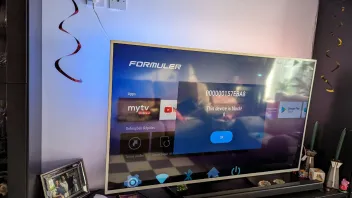
    Do you have installed the portal on more boxes?


    Based on Formuler support forums, the "208793b" error is likely a typo or variation of standard network connection errors.

    Here are the troubleshooting steps to resolve connection and server errors on Formuler devices:

    1. Check Provider and Credentials

    Invalid Credentials/Account Expired: Contact your IPTV provider to verify your subscription is active and that your credentials (username/password) are correct.

    Invalid MAC Address (Code 8): Ensure your provider has the correct MAC address for your device.

    Single Portal Usage: If you have multiple services, ensure you are only connected to one portal at a time, as they may conflict.

    2. Network and Connection Fixes

    Restart Network Equipment: Unplug your modem and router for 60 seconds, then plug them back in.

    Toggle VPN: If you are using a VPN, try turning it off, or conversely, try enabling a VPN to bypass potential ISP blocks.

    Use Ethernet: Switch from Wi-Fi to an Ethernet cable for a more stable connection.

    Disable IPv6: Disable IPv6 in the Android settings, as this can cause connectivity issues.

    3. Application/Device Fixes

    Refresh Content (MYTVOnline): Go to Menu -> Content Manager -> Data Sync to refresh your playlist and EPG data.

    Clear Cache: Clear the cache for the MYTVOnline application.

    Edited 4 times, last by Lucky13 (March 20, 2026 at 10:25 AM).

  • It is a formuler fault, on my z10 i haven't got any problems. The fault starts after mytvonline 3 is installed after reset. At that moment there is still no iptv provider installed. I have used the z12 since februari and there where no problems with it untill yesterday.

  • It is a formuler fault, on my z10 i haven't got any problems. The fault starts after mytvonline 3 is installed after reset. At that moment there is still no iptv provider installed. I have used the z12 since februari and there where no problems with it untill yesterday.

    mytvonline3 installed and the popup block comes up? And no iptv provider added. Strange.

    Did you bought box at a iptv provider or (online)store?


    It's not a geoblock...

  • SrJabardo
    November 2, 2022 at 8:33 PM

    I Think this is the answer to my problem. Think the box is stolen. Hope that formuler can give me some answers.

    When i know the solution i will type and reply it here.

  • SrJabardo
    November 2, 2022 at 8:33 PM

    I Think this is the answer to my problem. Think the box is stolen. Hope that formuler can give me some answers.

    When i know the solution i will type and reply it here.

    Can you find maby in android settings at device Preference and or in system settings something like "configuration update"??


    If yes, select/highlight it and press 10 times on 0(zero)

  • Can't find what you mean. Have you got a screenshot of what you mean?

    The steps should be (if box is blocked by provider):

    Please check following:

    At the home screen open the Command Center by navigating to the "gear icon" in the top right of the screen. The "System Info" is located on the second page of the Command Center. If molcfg installed, you should see "Check for configuration update" -> Highlight without pressing OK -> now press the 0 (zero) button 10 times on your remote (please count). This will perform a factory reset and remove the block.


    If you can't find "check for configuration update" then it's not blocked by a provider.

    Then wait for SAM or someone else for more info about error code.


    What i found i my first post on google should be the error code.


    How are you connected?

    Macid (stalker) or Xtream codes? url, username and password?

    Edited once, last by Lucky13 (March 20, 2026 at 5:18 PM).

  • Please open Formuler support ticket, say what happen and forward picture from label. They will tell you what happen.

    Fact is, after this block you can`t do anything.

    I can only recommend to all, always to buy from known sellers.

  • Give them some time to answer if send on correct address.

    Or go this way: https://support.formuler.tv/home/ -> On right side/bottom click on icon and use Formuler Assistant to create ticket.

  • I know a guy who has a z11 and the tv provider says the Mac adress is not showing up on his panel

    The box tries to connect and gets "Call supplier to unblock or register the device..

    He says it is unblocked...


    S tube works.. Google play works... MOL3 doesnt want to connect via Stalker..


    Any advice?

  • Yes, check macid under the box. That it the right one.

    I bet he given the wrong mac to provider.

    Let provider convert macid to xc codes api for better watch experience.

    Url, user and password.


    I think he has given the wrong macid 00:1A:B8....

    And should be 00:1E:B8.... (i thought)

    In that way. Let provider search on panel for they 00:1A mac and 00:1E MAC.

    Than he finds it.✅️

    And please let it convert by provider to xc api!

    Better performance and functions!

    (Macid is outdated! Please use always XC api/Xtream Codes is my advice)


    Goodday my friend

  • The provider refuses to use "User/PW".... He still thinks those boxes From the Ukraine are the Bee Knees !

    Try it another way.😉

    Ask him to convert the mac to an m3u line...

    ...or that you want to watch via a m3u line. I hope he give it for you


    From that url you can make yourself xtream codes.😉👌🏻

    Come on!!! It's standard on almost 99% of all panels an m3u and Xtream codes... strange provider.