MYTVOnline 4 v14.1.0 BETA 2 for Z12 released

We asking all new users to read the articles below, before creating their first posting or thread.

  • 4. Instruction Articles

    • Please note, in this forum are only English threads and postings allowed, without any exception!

      Please follow the forum rules, thank you for your understanding.

  • Quote

    VOD & TV Series

    This happens randomly:

    • When an episode ends and the next one should start automatically, or
    • When manually selecting another episode,

    the application sometimes returns to the Profile Selection/Login screen instead of starting the selected episode.

    I have the same problem every time. I have to exit the current episode and select the next one. However, I don't have this issue on my second Z12. It only happens on the one that had the first beta version of mytvonline4. The new one, which has just been updated to the latest version, doesn't have this problem.


  • please try turning off the HDMI CEC settings from home screen > settings > device preferences.

    Thanks. I know that, but as I said I like the fact that the television turns on if I turn on the Z12 and the one button turn off possibility. Recording should simply not activate the tv, I think.

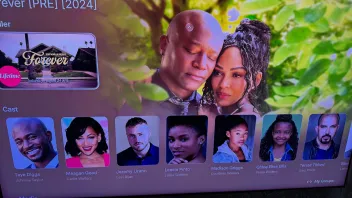
  • I have pictures of the actors. Attached is a photo.


    svejoh

  • The v14.1.0 beta removed and blocked ADB on the Z12, and it wasn't mentioned anywhere in the release notes. That's a real problem for those of us who use these boxes as development / power-user devices — no `adb logcat`, no scripted installs, and tools like atvtools and app-killers are now broken (chaydee raised the same thing a few posts up, still unanswered).

    MYTVOnline 4 itself is genuinely good, so I'll be honest: losing adb with no warning is the kind of change that makes me reconsider staying on the platform, and I doubt I'm the only one. If it was intentional, could you say so directly? And if there's any chance of restoring it — even gated behind Developer Options for advanced users who accept the risk — that would keep a lot of us happy.

    Two straight questions:
    1. Was adb removal intentional, or a side effect of the beta build?
    2. Is there any path to getting it back on the Z12?

    Thanks.

  • The v14.1.0 beta removed and blocked ADB on the Z12, and it wasn't mentioned anywhere in the release notes. That's a real problem for those of us who use these boxes as development / power-user devices — no `adb logcat`, no scripted installs, and tools like atvtools and app-killers are now broken (chaydee raised the same thing a few posts up, still unanswered).

    MYTVOnline 4 itself is genuinely good, so I'll be honest: losing adb with no warning is the kind of change that makes me reconsider staying on the platform, and I doubt I'm the only one. If it was intentional, could you say so directly? And if there's any chance of restoring it — even gated behind Developer Options for advanced users who accept the risk — that would keep a lot of us happy.

    Two straight questions:
    1. Was adb removal intentional, or a side effect of the beta build?
    2. Is there any path to getting it back on the Z12?

    Thanks.

    1: after the very first post of that message, there came direct a answer to turn off developers settings and a message to delete an installed app for removing an adb app or something. So i think they did it by purpose. (If i say i right)


    2: i'm on vacation. I always used adb manager to remove youtube.

    Don't know if i can get it to work on my Z12, cause my holiday.


    Goodday my friend.

    Edited once, last by Lucky133 (July 3, 2026 at 11:58 AM).

  • Wow, I’ve installed MyTVOnline4 Beta 2. The menu is much more organized, the layout looks much better, and the menu navigation is faster. When watching VOD or a series, the "back" button doesn't work if you want to go back; however, if you simply press the "three lines" button on the remote, the menu reappears, allowing you to switch to live TV or series—which works better than in version 3, where you had to exit the menu completely. I can clearly see the cast photos for movies. I’ve been testing it for a while now and haven't encountered a single problem; I’m already very happy with it. I don't use the recording feature, so I have no idea if that works. You can even customize the home screen to choose what launches at startup, and TizenTube now works with MyTVOnline 4 as well 😀. The only thing I’ve noticed is that the EPG doesn't update during the automatic refresh, so I have to do it manually; it would be great if that could be added. For me, it’s stable enough for daily use. Keep up the good work! Thank you.

  • Wow, I’ve installed MyTVOnline4 Beta 2. The menu is much more organized, the layout looks much better, and the menu navigation is faster. When watching VOD or a series, the "back" button doesn't work if you want to go back; however, if you simply press the "three lines" button on the remote, the menu reappears, allowing you to switch to live TV or series—which works better than in version 3, where you had to exit the menu completely. I can clearly see the cast photos for movies. I’ve been testing it for a while now and haven't encountered a single problem; I’m already very happy with it. I don't use the recording feature, so I have no idea if that works. You can even customize the home screen to choose what launches at startup, and TizenTube now works with MyTVOnline 4 as well 😀. The only thing I’ve noticed is that the EPG doesn't update during the automatic refresh, so I have to do it manually; it would be great if that could be added. For me, it’s stable enough for daily use. Keep up the good work! Thank you.

    Hmmm, should be work my friend.

    Cause i saw last week the epg every day. Maby not at your side.

    Boxes are all the same, but everyone has his own problems with it. Strange sometimes, but thrue.


    Anyway, only "big" bug i found is the vod/series. That the back button doesn't work😉

    We need to use the menu button now to go back to live tv.

    And i hope for an refresh button in the mol4 menu in future what refresh all the live tv, epg, vod and series at once.

  • Haha, it doesn't bother me that the back button doesn't work; if I press the three-line button, I just get the menu back. So, not the home button, but the three-line button on the remote. And yes, a refresh button for everything would be great. I haven't experienced any other issues.


    Thanks for youre reply. Have a nice day!

  • Haha, it doesn't bother me that the back button doesn't work; if I press the three-line button, I just get the menu back. So, not the home button, but the three-line button on the remote. And yes, a refresh button for everything would be great. I haven't experienced any other issues.


    Thanks for youre reply. Have a nice day!

    That's the reason i placed the emotion with the blinking eye.:winking_face:

    The rest is almost close to a final version of mol4

    Beta 2 fixed a lot.


    Thank you and a good day to you my friend.

  • That's the reason i placed the emotion with the blinking eye.:winking_face:

    The rest is almost close to a final version of mol4

    Beta 2 fixed a lot.


    Thank you and a good day to you my friend.

    I did find one small error—no idea how it happened—but it says 50fps at the top and 25fps at the bottom. That doesn't match up. It’s not a big deal, but I noticed it. See the photo. The strange thing is that it doesn't happen with all channels.

    20260703 201404 hosted at ImgBB
    Image 20260703 201404 hosted on ImgBB
    ibb.co
  • I did find one small error—no idea how it happened—but it says 50fps at the top and 25fps at the bottom. That doesn't match up. It’s not a big deal, but I noticed it. See the photo. The strange thing is that it doesn't happen with all channels.

    https://ibb.co/35VLTqLC

    It probably depends on whether the channel is offered in 1080i 25fps (interlaced) or 1080p 50fps.

    To verify, one would need to record both channels and play back the recording on a PC to analyze the data with MediaInfo.

    Or via Plex on the box, I think it also displays whether it's 1080i or 1080p.

    But some here have mentioned that the refresh rates do not properly adjust to the correct frame rate for interlaced streams.

    Which is strange because it's more of a problem under Android 14 in general, not android 12 :p

  • It probably depends on whether the channel is offered in 1080i 25fps (interlaced) or 1080p 50fps.

    To verify, one would need to record both channels and play back the recording on a PC to analyze the data with MediaInfo.

    Or via Plex on the box, I think it also displays whether it's 1080i or 1080p.

    But some here have mentioned that the refresh rates do not properly adjust to the correct frame rate for interlaced streams.

    Which is strange because it's more of a problem under Android 14 in general, not android 12 :p

    I’ve noticed that it only shows 50 fps at the top, never 25 fps. So, I think it’s a minor bug.

    Please reported. Thanks

  • Hello, i am new here.

    In mytvonline beta 4, i miss audio delay for catchup.

    Epg is not correct, in tivimate is my epg correct. I tried everything.

    I can’t find my adult channels in the groups. In tivimate i have my adult channels but not in mytvonline 4.

  • Hello, i am new here.

    In mytvonline beta 4, i miss audio delay for catchup.

    Epg is not correct, in tivimate is my epg correct. I tried everything.

    I can’t find my adult channels in the groups. In tivimate i have my adult channels but not in mytvonline 4.

    Hello and welcome on forum newbie😃


    Im on holiday so can't check in catchup if audio delay is there. It's normally find to push arrow up i thought and then avove in the row and or red button..someone can check it for you who is at home.


    Adult is normally showed on bottom of channel groups/list.

    And in mytvonline4 in settings you can lock adult out in profile and or orher setting. Check in mytvonline4 settings and at the profile setting. There is somewhere an adult switch.


    Check if your time is okay in android settings. If time is correct you can find also in mytvonline4 settings at Contentmanager epg offset. There you can set the offsettime if needed. Also there is an Alternate epg time setting. Check that also and don't forget to click on "update" button after changes.


    Like i said, im on holiday so exact steps i don't know. But try it. I think you find it yourself with my steps above. (I hope). Or due other users who are home yet.


    Goodluck my friend.

    Goodday

    Edited once, last by Lucky133 (July 5, 2026 at 8:52 AM).

  • Hello, i am new here.

    In mytvonline beta 4, i miss audio delay for catchup.

    Epg is not correct, in tivimate is my epg correct. I tried everything.

    I can’t find my adult channels in the groups. In tivimate i have my adult channels but not in mytvonline 4.


    Hello, I’ve checked this for you. Audio delay isn't available for catch-up TV; it’s only available for live TV under Info > Settings > Synchronization. That feature might be added in a future update. The EPG should work fine, but please check the content sources to see if it has actually updated. If not, update it manually by clicking on your provider and selecting "Refresh content." Also, when viewing the group list for live TV, click the three dots (...), select "Show/Hide Groups," and check if the "Adult" group is listed there. Have a nice evening.

  • Hello, I’ve checked this for you. Audio delay isn't available for catch-up TV; it’s only available for live TV under Info > Settings > Synchronization. That feature might be added in a future update. The EPG should work fine, but please check the content sources to see if it has actually updated. If not, update it manually by clicking on your provider and selecting "Refresh content." Also, when viewing the group list for live TV, click the three dots (...), select "Show/Hide Groups," and check if the "Adult" group is listed there. Have a nice evening.

    If the Adult Group is in "Show Hide Groups" as stated above the other thing to do is look in the Profile.

    3 Lines button, top left is Switch Profiles. Click OK and you get Choose Profile. Whatever Profile you are on highlight the Edit button above the Avatar. Go down to Sensitive Categories and see if Hide Sensitive Categories is on. If it is on turn it off.

  • Hello,

    I set the epg offset to -2h and now the houres are correct but when i click on a catchup he played a file from 2h before.


    For the adult channel, its fixed. Thanks everybody for that solution.


    @developers:

    Is it possible to ad audio delay for catchup and also forword and rewind 10,20,30 seconds for catchuo?

  • Hello,

    I set the epg offset to -2h and now the houres are correct but when i click on a catchup he played a file from 2h before.


    For the adult channel, its fixed. Thanks everybody for that solution.


    @developers:

    Is it possible to ad audio delay for catchup and also forword and rewind 10,20,30 seconds for catchuo?

    Try refresh live tv and after refresh you get an popup to push ok button to apply refresh.

    Then try refresh epg.

    Hope it helps.

  • Still the same problem. In tivimate epg is normaal and correct. In mytvoline4, i tried everything and still have the same problem. For my it is an issue in mytvonline4

  • Still the same problem. In tivimate epg is normaal and correct. In mytvoline4, i tried everything and still have the same problem. For my it is an issue in mytvonline4

    Can you set epg offset back to zero

    And check in android settings your time(zone).

    Try first isp provider time and or set it manual to you country and capitalcity. Other user fixed it that way. Hopefully it worked also for mol4.

  • Epg offset zero

    Timezone belgium +2 so it is correct

    Isp time is correct


    Still same problem but why is it in tivimate correct with the same settings?

    Mol4 is in beta. It's not bugless and no final version.

    Al my providers are working fine. Time is good.

    So a bug can't be, cause i got it then too right?


    You live in same time zone. Try in android settings in at timezone Amsterdam or Berlin IF possible, cause im on holiday and can't check it if it's possible.

    Reboot box and refresh live tv.

    Then at your sub in mol4 try to set epg offset again to 0 and click on bottom on update button.

    Then remove epg data in mol4.

    And renew epg due update.


    Maby it's then fixed?