Official Z12 Ultra Questions and Discussion thread.

We asking all new users to read the articles below, before creating their first posting or thread.

  • 4. Instruction Articles

    • Please note, in this forum are only English threads and postings allowed, without any exception!

      Please follow the forum rules, thank you for your understanding.

  • Hi everyone,

    I’m fairly new to the Formuler ecosystem and I’m hoping someone here can help clarify a few HDR quirks I’m still trying to understand, especially with the Philips 55OLED935/12.

    I’ve got the Z12 Ultra mostly stable now after a lot of trial and error, but HDR behaviour is still inconsistent compared to the TV’s native apps. SDR looks great—no complaints there—but HDR via the Formuler sometimes appears noticeably darker/duller than expected, especially in YouTube and other streaming apps.

    So far I’ve tried:

    • Latest firmware on both Formuler and the TV
    • Full shutdown + power-cycle after every update
    • Factory resets (TV + Formuler)
    • HDMI port swaps (this often temporarily restores proper 4K/HDR capability)
    • Verified HDMI cables + ports
    • Ensured HDMI mode is set correctly (where available) - I've checked as many guides online as I could.

    Interestingly, switching HDMI ports on the Philips seems to force the TV to “re-handshake,” and after that, the Formuler’s Display/HDMI menu finally shows all the options again (4K60, HDR, AUTO, etc.). After a crash or app freeze, though, it sometimes reverts to basic 1080p/no-HDR mode until I repeat the process.

    My main questions for anyone with similar setups:

    1. Does the Philips OLED line (especially the 935/12) require specific HDMI settings for Stable HDR10/HDR10+ with external boxes like the Z12?
      I’ve checked settings like:
      • HDMI Mode / Enhanced Format
      • Ultra HD settings per port
      • HDR tone mapping
      • Colour space control
      • Automatic vs forced “HDR Always On”
    2. Is there a recommended HDMI cable spec for the Z12 Ultra to avoid handshake resets?
      (I’m using 48Gbps certified cables which usually work flawlessly with PS5, so I don’t think cable bandwidth is the issue.)
    3. Does the Z12 Ultra output YouTube HDR properly?
      Sometimes it looks like SDR flagged as HDR—black levels lose detail, whites dim out, overall picture goes darker. On the native Philips YouTube app, HDR looks better. I'll try to get pics later on.
    4. Could this be an issue with Formuler’s HDR tone-mapping vs Philips' dynamic tone-mapping?
      The TV’s own processor (P5) is usually very aggressive in adjusting HDR brightness/contrast, so I’m wondering if the Z12 Ultra is sending metadata the TV isn’t interpreting correctly.

    If anyone with a Philips OLED or similar Z12 setup has found the “magic combination” of HDMI and HDR settings that keep everything stable (no resets, no handshake loss, consistent HDR), I’d really appreciate your insight.

    Thanks in advance!

  • I have nowhere near your analytic capabilities which are admirable. I have a Philips 936/12 65" version and a Formuler Z12 ultra and find the picture with HDR etc to be excellent. I have not noticed the picture to be deficient in any noticable ways, but will now take on board your observations. I did use what I believed was a high quality HDMI cable.

  • I stumbled (accidently) across the Formuler Z12 Ultra Pro, whilst trying to find an alternative to my current setup. An Amazon Firestick Pro, which I detest and cant wait to throw out the window. I did look at the Nvidia Shield Pro, but that thing has to be near EOL surely.!! FTR, I have no interest in Google whatsoever, so the Nvidia will be a last resort, with hacks applied, should the Z12 never make it too Australia.

    According to Peter at Formuler, they are aware of the need for the Z12 down here in Australia, but are constrained by internal issues, which they are working through. I cant (actually I can) order a unit on line, but it is more than likely region locked, so that is not an option. I am also aware of the VPN route, but that is no guarantee, the Z12 will register or boot. I have no interest in owning a $300 paper weight.

    If I do eventually get to purchase a Z12, my only loaded apps, would be Kayo and TT. (TT Isle of Man). Been down the Netflix, Stan, Paramount, Foxtel route, sick and tired of adverts and infomercials. Have no interest in live or IPTV etc.

    Several have made suggestions, in getting around YouTube. Thks to Lucky13 for TizenTube.

    SAM also made an interesting comment in passing about recording direct to the box. So is that live TV, IPTV or streaming. My question really is about HDCP protection. So does the Z12, or Z11 for that matter, break any HDCP rules.

  • also made an interesting comment in passing about recording direct to the box. So is that live TV, IPTV or streaming. My question really is about HDCP protection. So does the Z12, or Z11 for that matter, break any HDCP rules.

    It is IPTV stream. Don`t understand what you exactly point to with break HDCP rules, would mean all IPTV Boxes or devices that can stream breaks the rule because they can also record. The Box is made for streaming, over APP, 3th TV App and similar, only question is where the stream comes from legal or illegal source, but this decision have the user.

  • If I do eventually get to purchase a Z12, my only loaded apps, would be Kayo and TT. (TT Isle of Man). Been down the Netflix, Stan, Paramount, Foxtel route, sick and tired of adverts and infomercials. Have no interest in live or IPTV etc.

    Kind of defeats the purpose of a Formuler device then no? If iptv isn’t a concern imo there are multiple devices I would go for before a z11/12.

  • Kind of defeats the purpose of a Formuler device then no? If iptv isn’t a concern imo there are multiple devices I would go for before a z11/12.

    There are multiple devices, but the majority are Google or Apple based. Not what I'm after. Im after a box, that I can sideload apps onto.

  • It is IPTV stream. Don`t understand what you exactly point to with break HDCP rules, would mean all IPTV Boxes or devices that can stream breaks the rule because they can also record. The Box is made for streaming, over APP, 3th TV App and similar, only question is where the stream comes from legal or illegal source, but this decision have the user.

    Let me rephrase the question, a little better. Most HD Streaming or HD Movies, are HDCP protected. This is to protect Copyright, which I have no issue with. I have tried to record many HD Sports events for viewing at a later time, however HDCP kicks in. I either lose the audio, or the video. Depending on the legitimate source, where the stream is coming from, I can aslo lose both. I have tried OSB Software as well, but thats a little trickier. So are you suggesting, that the Formuler can avoid HDCP, or does it have issues. like I have outlined above.. I could choose the Nvidia, as I commented earlier, but that box looks dead in the water.

  • So here can Formuler throws a strike!

    Make a better device then the NVidia box.

    Install AndroidTV 14 on it.

    Let it support all Dolby audio codecs like DOLBY DIGITAL (PLUS), DTS, DTS-HD, DTS-X, DOLBY ATMOS, ATMOS THRUEHD etcetera.

    8 Gigabyte of memory and 128/256 Gigabyte internal memory, Dolby Vision on it, hmdi 2.1b, hdcp 2.6, MyTVonline3 on it and...

    ...the name of the new better box become...

    ...The Formuler GTV 2!🥳🥳🥳

    I pay if need 200 a 250 for it then. Doesn't matter. (Netflix not supported due Netflix itself, but i use it on tv)

    But, it's an idea for Formuler and a dream for me.


    But so long i keep it with my Z12 Ultra😍

    Edited 4 times, last by Lucky13 (January 17, 2026 at 7:09 PM).

  • So are you suggesting, that the Formuler can avoid HDCP, or does it have issues. like I have outlined above.

    I dont see any issue with Formuler Box and HDCP, it can 1.4 and 2.2. You need to buy the box, test and make your own picture if it suits your needs.

  • Install AndroidTV 14 on it.

    Let it support all Dolby audio codecs like DOLBY DIGITAL (PLUS), DTS, DTS-HD, DTS-X, DOLBY ATMOS, ATMOS THRUEHD etcetera.

    8 Gigabyte of memory and 128/256 Gigabyte internal memory, Dolby Vision on it, hmdi 2.1b, hdcp 2.6, MyTVonline3 on it and...

    ...the name of the new better box become...

    ...The Formuler GTV 2!🥳

    LOL Lucky, you are dreaming to much :grinning_face_with_smiling_eyes:

    In the time of ram and flash price explosion, where you need almost as manufacturer to pay for every single license big money and you wrote all sound codecs + new Motherboard and connections would be even 250 to low. This is really no joke, they would need first to sale many, many boxes to start at some point to earn money, so much are the licenses expensive.

  • LOL Lucky, you are dreaming to much :grinning_face_with_smiling_eyes:

    In the time of ram and flash price explosion, where you need almost as manufacturer to pay for every single license big money and you wrote all sound codecs + new Motherboard and connections would be even 250 to low. This is really no joke, they would need first to sale many, many boxes to start at some point to earn money, so much are the licenses expensive.

    Its always is good to have dreams,even if it are wet ones:winking_face:

  • I dont see any issue with Formuler Box and HDCP, it can 1.4 and 2.2. You need to buy the box, test and make your own picture if it suits your needs.

    Cheers, got it all sorted. HDCP on both the Formuler and Nvidia, really only apply, when you have apps installed like, Netflix, Stan, Binge, Disney, or Paramount etc. I don't use them, so they wont really affect me.

    I only use two sports apps, like Kayo and TT, both of which can have HDCP bypassed, as long as I dont replay or broadcast, recorded copyright protected content. Now it's a matter of waiting for the Formuler to be released in Aus. In the meantime I might play with an Nvidia and tweak it, via ADB.

    Appreciate the input.

  • LOL Lucky, you are dreaming to much :grinning_face_with_smiling_eyes:

    In the time of ram and flash price explosion, where you need almost as manufacturer to pay for every single license big money and you wrote all sound codecs + new Motherboard and connections would be even 250 to low. This is really no joke, they would need first to sale many, many boxes to start at some point to earn money, so much are the licenses expensive.

    300 also fine. You can years forward.

  • So, this week i bought me a Z12 ultra, first impressions..surely better image and dolby atmos working at last, and faster respons and handling than the z11 pro max. Very happy with that..:smiling_face:

    Just one thing, the remote..i spend some time with it but i can't seem to control the tv-soundbar with the volume control on the remote, just with the right side buttons wich i found uncomfortable to use. The remote from the Z11 pro max works perfectly with the z12, but i can't seem to adjust the hotkeys etc..as the remote is in the remote app shown as disconnected..but works as it should.

    Is there a way to use the volume buttons on the z12 remote to control the soundsystem and not only the z12 volume control?

    How can i the Z11 pro max remote to be connected in the remote app and adjust the settings, hotkeys, etc..? How do i perform a reset on the z11 pro max remote, tried several times with instructions i found online, press ok and 0 for 5 sec, etc but with no luck.

  • Just notice yesterday that the issue i had by selecting subtitles from opensubtitles sometimes the Z12 ulta restarts again just like theZ11 pro max i have..

    The same problem for the Z11 was recognized by "F_Peter" and he told me a fix is coming for the Z11 pro max, but sad to see the Z12 ultra suffers from the same issue still..

  • They working on major update for Z11 and MOL3 (will still take some time) so the fixes from this MOL3 update should also adapted to Z12.

  • Just notice yesterday that the issue i had by selecting subtitles from opensubtitles sometimes the Z12 ulta restarts again just like theZ11 pro max i have..

    The same problem for the Z11 was recognized by "F_Peter" and he told me a fix is coming for the Z11 pro max, but sad to see the Z12 ultra suffers from the same issue still..

    I have the same problem (Formuler Z12 Ultra).When selecting a subtitle from Opensubtitles,then box restarts.Not often,but lrts say 2 of 10 times.Really annoying.

  • Hi everyone, I’m having a problem with my Formuler Z12. I have DolbyVision set in the settings of the forumer but for some reason it keeps reverting to Adaptive which is not what I want …. Anyone havin the same issue

  • Dear Formuler Support Team,

    I am experiencing an issue on my **Formuler Z12** where the **official YouTube app reads video titles aloud** while browsing.

    **Details:**

    * Device: Formuler Z12
    * Firmware: Latest available (auto-updated)
    * App: Official YouTube for Android TV (from Play Store)
    * Language: English
    * Issue occurs: Only inside YouTube
    * Issue does NOT occur: Anywhere else on the system

    **What happens:**
    When browsing videos in YouTube, a voice reads the video titles aloud.
    This happens immediately when navigating the YouTube interface.

    **What I have already tried:**

    * Disabled Android Accessibility / TalkBack (system-wide)
    * Checked YouTube Accessibility settings (Screen Reader / Narration not visible)
    * Cleared YouTube cache and data
    * Forced stop of YouTube
    * Restarted the device
    * Uninstalled YouTube updates and tested older version

    The issue persists after all these steps and appears to be a **YouTube app compatibility or accessibility bug on Formuler Z12**.

    I use the official YouTube app due to an active subscription, so I cannot switch to a third-party alternative.

    Could you please confirm if this issue is known and whether a fix is planned in a future firmware or compatibility update?

    Thank you for your support.

    Kind regards,
    Khalil

  • I got the same problem as above, the Voice in the YouTube app.


    Gr Keuter

    Could you let me know the version of your YouTube app?

    If you haven't already please make sure that the talkback setting is disabled on the device as well.

    Home screen > Settings > Device preferences > Accessibility > Talkback

  • Thanks for your help and suggestion. Version 5.30.304 which is on the z12 home page. The talkback setting is off. If it is on, the whole system will talk. If you have any other suggestions, please help me, maybe it will be fixed. Thanks again for your suggestion.

  • I have multiple portals.

    I had an issue today with updating DNS and credentials for a couple of portals.

    I edited the information and tried to reload the portals but they gave me the error 'Unkown source' and refused to load.

    The solution was to delete both portals and add them again...not ideal.

    Has anybody else experienced similar behaviour?

  • My IPTV provider often changes server address (portal address) other account settings same as before. Easy to go in and edit the portal, but then I go to the wizard and everything loads as new again. My favorites etc. must be redone. Is there an easier way such as exporting everything before and in the export file editing the portal and loading it again. Of course no problem to redo favorites but it takes a while. Advice on this?


    svejoh

  • Did you make a backup,so that you can easily restore Favorites etc?

  • henkie.

    Yes, I have made a backup, but then you back up everything again, including the old server address.


    svejoh

    Hi,svejoh


    Have you read thread "How to use backup &restore function?"

    Do you make backup to ext.device.mol3 menu>settings>backup & restore?

  • henkie

    Yes, I know how to take a backup and how to read again. Saw that the file ends up on my SD card. It's called molxyz_xxxx but I thought I could open it in some program like notepad. But it didn't help. I simply have to set favorites etc. manually if there is a new server address.


    svejoh

  • henkie

    Yes, I know how to take a backup and how to read again. Saw that the file ends up on my SD card. It's called molxyz_xxxx but I thought I could open it in some program like notepad. But it didn't help. I simply have to set favorites etc. manually if there is a new server address.


    svejoh

    Unfortunately this is what's required when changing URL

  • Hi.

    I have a Formuler Z12 Ultra. A question: I have unmarked all countries i dont use+channels from my proider.Then suddenly all countrys are marked again.Is there any solution to this?Some of the providers i have has many countries and channels so lots of work to get rid of them again.

    Regards

  • Hi.

    I have a Formuler Z12 Ultra. A question: I have unmarked all countries i dont use+channels from my proider.Then suddenly all countrys are marked again.Is there any solution to this?Some of the providers i have has many countries and channels so lots of work to get rid of them again.

    Regards

    Contact provider and say: remove all my countries please, except belgium and france or so.

    The countries you watch, give them to provider. They select then only that bouquettes.

    And then you need to refresh your sub and remove the rest of the groups.


    Goodday my friend

    Edited once, last by Lucky13 (January 28, 2026 at 10:24 PM).

  • Since the latest software update I have a problem with my bluetooth remote. If I press the return button lightly it operates in its intended manner. But if I press the return button slightly harder (inadvertantly) it will reboot the system, which is not what I wanted. I have to be very careful to avoid this unessesary reboot. This never happened before the update, Any suggestions?

  • Tested on my side, was not able to reproduce (last update). Short press opens last channel and longer press the channel history.

    Try with reinstall of MOL3.

  • They need to change dns at there side on there portal(s)

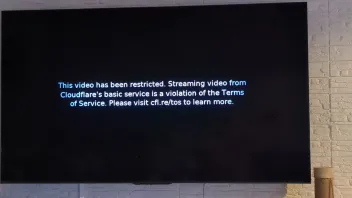
    Thanks Lucky13 my provider gave me more than 10 new portal URL's but no one let me connect again? Told him about the DNS error but he will or cannot understand me. send also screenshots from the errors on the screen. The service was always very goed until the cloudflare error came on. Maybe SAM can help me?

    Edited once, last by Belgiumuser (January 29, 2026 at 9:09 AM).

  • Thanks Lucky13 my provider gave me more than 10 new portal URL's but no one let me connect again? Told him about the DNS error but he will or cannot understand me. send also screenshots from the errors on the screen. The service was always very goed until the cloudflare error came on. Maybe SAM can help me?

    In had it last year. Got also other new portal url first. But didn't work. Changed private dns to quad9. Didn't work also solved not the problem.

    Then they changed something on the portal website and it was fixed.