Z11 Pro/BT1 problems with recording.

We asking all new users to read the articles below, before creating their first posting or thread.

  • 4. Instruction Articles

    • Please note, in this forum are only English threads and postings allowed, without any exception!

      Please follow the forum rules, thank you for your understanding.

  • Good day. So now more Z11 problems for me.

    Sometimes scheduled recordings don't happen.

    Box doesn't shut down after recordings that do occur are finished.

    I have factory reset the box multiple times and restored backup, even setup the box from scratch (portal, channels, recordings, everything) without benefit.

    Just now I set a half hour recording and left the TV on so I could see what's happening. The Z11 powered up a little before at the set recording time, then when the home screen came up the shutdown countdown started, then about 10 seconds later the recording start countdown started. The shutdown finished first so it powered down. Then it powered up again and started the recording countdown again. The program then started recording at 2 minutes after the hour. Did not shut down at end. Help?


    Peder

    Formuler Z11 Pro, Z8, Onkyo TX-NR656, Samsung Q70A, Harmony One, Harmony 880

  • So last night, I had a program set to record. Oddly enough, the program recorded in full, and the Z11 seemed to shut off, but the HDD light was still on. The program I had set for the AM did not start to record. I had to pull power from the Z11 to reset it, as it did not respond to either the BT1 or the IR remote from my Z8.

    Peder

    Formuler Z11 Pro, Z8, Onkyo TX-NR656, Samsung Q70A, Harmony One, Harmony 880

  • So I turned on the box at 1115 AM, it popped up the 60 second prompt to start recording the show I had scheduled for 5 AM as soon as I started MTVO3. I canceled that.

    At 1120, I set a recording for 1130-1200, it powered on, recorded, and powered off.

    I also set a second recording for 1230-1300, it powered on, recorded, and DID NOT power off.

    Time is correct on the box, DNS is working, there is no CEC in use.

    Peder

    Formuler Z11 Pro, Z8, Onkyo TX-NR656, Samsung Q70A, Harmony One, Harmony 880

  • Hi Provels,

    sorry, but we are not on forum able to help you in this case because it is matter of cronjob`s. Please reboot the box once and try to reproduce few scenarios then report problem to Formuler with sending the log. file and posting here the tracking No. So they can look into.

  • More logs sent.

    Overnight recording successful, recorded and powered off.

    Had recording scheduled to 0500. Watched box power on at 0455. Recording did not start until I started manually at 0505 or so.

    Peder

    Formuler Z11 Pro, Z8, Onkyo TX-NR656, Samsung Q70A, Harmony One, Harmony 880

  • More logs sent.

    Overnight recording successful, recorded and DID NOT power off.

    Had recording scheduled to 0500. Recording STARTED and COMPLETED and DID NOT power off.

    My warrantee on this box is up in 2 weeks so there is a time issue. Thank you.

    Peder

    Formuler Z11 Pro, Z8, Onkyo TX-NR656, Samsung Q70A, Harmony One, Harmony 880

  • I forwarded your thread after first posted Tracking. No. Please await replay.

  • For whatever it's worth, my Z11 Pro Max basically now decides randomly to just not record. Just recording error -1. Whether recording live or whether I set overnight. Absolutely lost about what it could be other than maybe a new USB flash drive.

    That's as good a place as any to start, certainly cheap enough. Getting a small one for testing is good enough, you'll always find a use for it later. Might be a problem that requires system patching, though.

    Peder

    Formuler Z11 Pro, Z8, Onkyo TX-NR656, Samsung Q70A, Harmony One, Harmony 880

  • So last night I tried to record 3 shows back to back. Different external HDD, different enclosure.

    First one scheduled for 85 minutes, recorded.

    Second scheduled for 120 minutes, went only a minute and 13 seconds, then exited.

    Third was scheduled for 60 minutes, went for 82 minutes.

    No indication that second or third recording completed in notifications.

    Box remained on afterwards.

    More logs sent, still no response from Formuler.

    Peder

    Formuler Z11 Pro, Z8, Onkyo TX-NR656, Samsung Q70A, Harmony One, Harmony 880

  • Good day. So now more Z11 problems for me.

    Sometimes scheduled recordings don't happen.

    Box doesn't shut down after recordings that do occur are finished.

    I have factory reset the box multiple times and restored backup, even setup the box from scratch (portal, channels, recordings, everything) without benefit.

    Just now I set a half hour recording and left the TV on so I could see what's happening. The Z11 powered up a little before at the set recording time, then when the home screen came up the shutdown countdown started, then about 10 seconds later the recording start countdown started. The shutdown finished first so it powered down. Then it powered up again and started the recording countdown again. The program then started recording at 2 minutes after the hour. Did not shut down at end. Help?

    I've also started having this issue on my z12 ultra out of nowhere. I'm pretty sure it was working fine a few weeks ago but I've set things to be recorded this week and the box comes on to the channel but the recording doesn't start and on the guide you can see the red line for where it was supposed to start recording but for some reason it just never starts. After restarting mytvonline3 you see the prompt that appears when the recording is about to start so I think there might be an issue where the prompt isn't appearing when the box automatically wakes up which is stopping the recording from starting

  • This morning I was up at 7. Box off when I went to bed. Box on, hopefully recording my 5 AM show. At 9 AM it should have shut down. Did not. Turned on TV, 'REC' showing on home screen. Checked with a utility that monitors my WAN, shows no data being used. It's 945 AM now 'REC' still showing, red light showing. 5 AM program recorded only 1 minute and 43 seconds. Logs sent.

    Can't we just agree that this unit is FUBAR and should be returned as warrantied?

    Peder

    Formuler Z11 Pro, Z8, Onkyo TX-NR656, Samsung Q70A, Harmony One, Harmony 880

  • We've talked about this topic quite a lot over the past few months, and I have to say that for you, someone who records a lot and especially works extensively with timers, something else might be better. In all the time I've had to deal with set-top boxes, only the Linux Enigma Sat/Cable boxes were truly reliable in this regard, but unfortunately, their time has also come to an end. I must admit that I can hardly offer any specific advice on what to do next with your problem, even though I'd love to.

  • So I guess it's the warranty route unless you can offer some support from Formuler devs. A dozen logs and no reply.

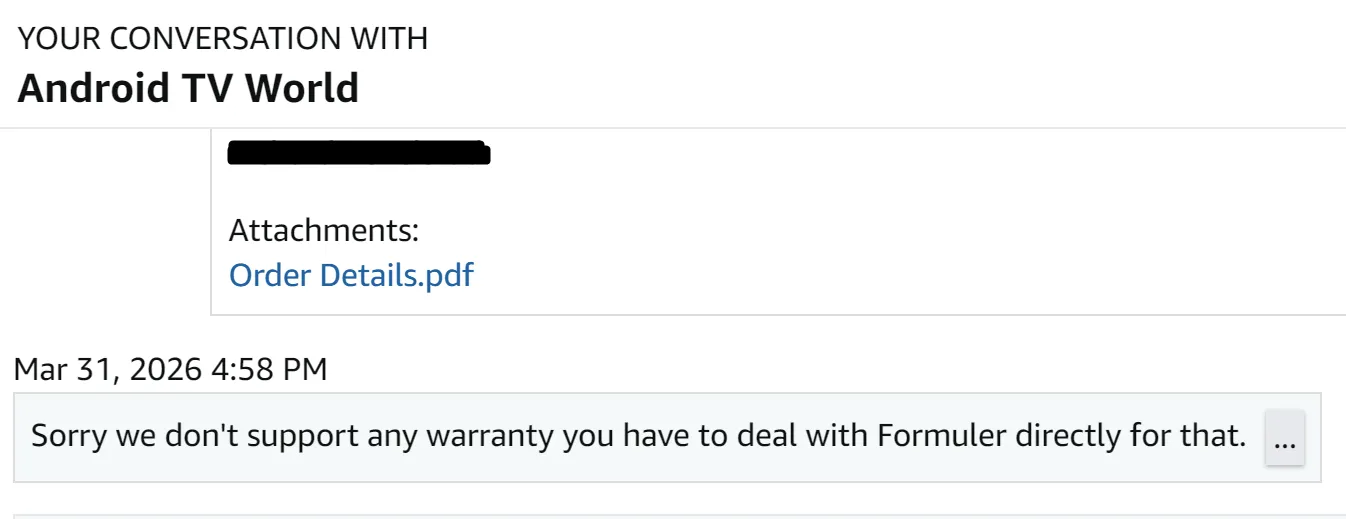
    Note to seller:

    Hello. I ordered this item in April, 2025. Since September, I have been going round and round with the Formuler support forum. Tickets can be referenced
    Here - Z11 Stops Recording Randomly, also Remote Problems
    and here - Z11 Pro/BT1 problems with recording.
    They have not been able to resolved these problems and I believe I simply have a bad unit. I would like to get replacement under warranty. Please advise ASAP. Thanks for reading your reply. Order details are attached. Let me know if you need anything else. Thanks again.

    Peder

    Formuler Z11 Pro, Z8, Onkyo TX-NR656, Samsung Q70A, Harmony One, Harmony 880

    Edited once, last by provels (April 2, 2026 at 10:35 PM).

  • I'm also having a schedule recording issue on my Z11 Pro Max. I have tried different USB sticks as well as a micro SD card (making sure to change the settings appropriately in PVR settings for recording location) I have also confirmed the recording schedule is correctly setup.

    I have my box to go to stand-by when powered off and I can see the box turn on at the appropriate recording time and shut down at the right end time, but when I go into the recordings section, it is empty. I have also confirmed no recording exists using a file browser.

  • I used the format option via the Z11 options. Should I stick it in my PC and format via NTFS?

    Use Rufus tool on your laptop to format to ntfs

  • So here's the response from the vendor.


    Quite dissapointing response of vendor,in your case it would be forthcoming for Formuler to intervene,and switch your z11pro,for a replacement unit:winking_face:

  • So what the deal on warranty replacement? Formuler says vendor, vendor says Formuler.

    I'm sure if the vendor wanted to continue selling Formuler, Formuler could add some leverage if they wished.

    Awaiting your reply.

    Peder

    Formuler Z11 Pro, Z8, Onkyo TX-NR656, Samsung Q70A, Harmony One, Harmony 880

  • Seems here are some misunderstandings about what falls under warranty! So, you think the device is faulty if some schedule doesn`t work correctly? Sorry but no it is not faulty, maybe not bug free or their exist some bug because the box fail on second schedule but this is no warranty issue.

    Second, what did you write to seller when he answer with " we don`t support any warranty you have to deal with Formuler directly for that"?

    For your Info: Formuler is manufacturer and sale to Distributor and Distributor to sellers, from this point are sellers directly responsible for customers, Formuler is out from this step. If you wrote Seller that Formuler told you to send it back for replace ( i don`t remember that someone did this and they would never do this) , then are you wrong.

  • 1. Here's some posts from you folks about warranty: Search - Formuler-Support Forum (English)

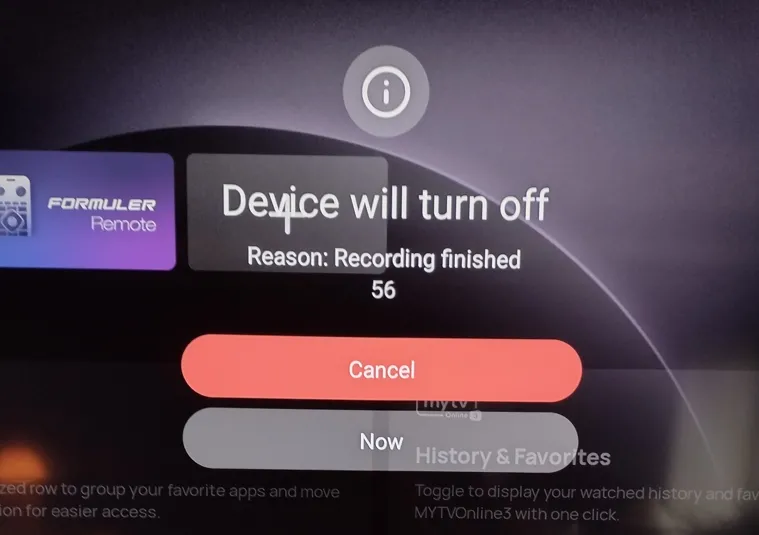
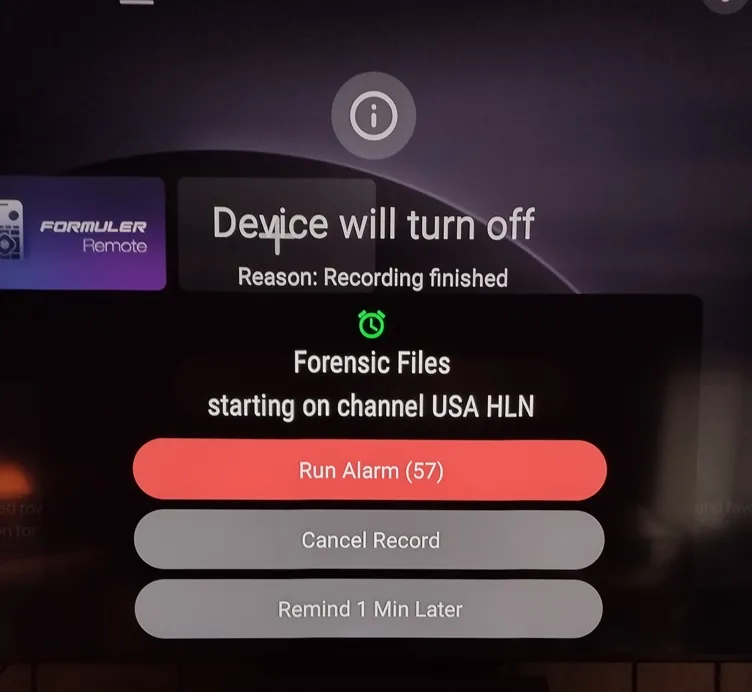
    Because of your lack in being able to assist in resolution, I foolishly assumed the device was faulty. See pics at bottom. I didn't think this was normal to see when the box powers on at 0500 when it was off (this time) and had not recorded anything since 2300 the night before, followed by the second pic 10 seconds later. The turn off wins, the box shuts off then boots again. Normal to have recording schedules complete, or partial, or ignored altogether? To stay powered on when programmed to power off? The box worked great for the first 4 months, same schedules.

    2. Just read Post #19, copy and paste of what I sent.

    I would even be open to some beta if that might fix this. It's the software. While typing this, I had a 30 minute test recording running, I had deleted all scheduled programs, box powered on fine, recorded, did not power off. I turned it off manually.

    Things I've tried, anything I can control.

    Menu Reset/Restore, several times
    Menu Reset/Rebuild from scratch
    Paper Clip Reset/Rebuild, twice
    2 power supplies Z8/Z11
    Uninstall MTVO3/Reinstall, many times
    3 external drives, HDD/SSD in 3 different enclosures, all NTFS, 64KB
    Wired/wireless
    My DNS, Quad 9
    DHCP/Static Address

    Any suggestions?


    Peder

    Formuler Z11 Pro, Z8, Onkyo TX-NR656, Samsung Q70A, Harmony One, Harmony 880

    Edited once, last by provels (April 3, 2026 at 12:23 AM).

  • This morning I turned on the TV to see what adventure awaited! Only a single recording instance programmed, should be easy. When my 0500 recording tried to start, I got the Shutdown prompt, then after 15 seconds I got the Recording Start prompt. As usual the Shutdown reached zero first and the box shutdown. It then rebooted and went through the loop again. It did that 5 times, then finally began the recording about 10 minutes late.

    Totally normal, right?

    Maybe finally starting the recording got it out of its system, but judging from past performance I doubt it.

    Logs sent again, but no holding my breath.

    So if Formuler isn't responsible for warranty, and the seller says same, who do I see? Bob in Budapest? Tim in Thailand?

    Believe me I'm as tired of this as you are. Please advise.

    -------------

    EDIIT - The 0500 program completed at 0900 and box shut off. Let's see what happens tomorrow.

    Peder

    Formuler Z11 Pro, Z8, Onkyo TX-NR656, Samsung Q70A, Harmony One, Harmony 880

    Edited once, last by provels: Addl info (April 3, 2026 at 4:03 PM).

  • Not to high-jack your thread, but I formatted my USB stick to NTFS and it didn't fix it. I also read into the threads you had linked previously and seen SAM recommend shutting off CEC, so I did that and it also didn't fix it. The next thing I will be trying is to switch the power off mode to shut down (I've always had it set to stand-by since owning a Z8) Just thought I'd let you know you are not the only one this issue is happening to.

    I'm pretty disappointed in the Z11 Pro Max and it's ability to have it schedule record. It shouldn't be a hit or miss, especially for the price it is.

  • Not to high-jack your thread, but I formatted my USB stick to NTFS and it didn't fix it. I also read into the threads you had linked previously and seen SAM recommend shutting off CEC, so I did that and it also didn't fix it. The next thing I will be trying is to switch the power off mode to shut down (I've always had it set to stand-by since owning a Z8) Just thought I'd let you know you are not the only one this issue is happening to.

    Try the second USB port if you haven't already. I have always had mine power off since my Z8. Power off will still start a recording (when it works). I always did that because I didn't want my HDD or SSDs powered on 24/7. Good luck.

    Peder

    Formuler Z11 Pro, Z8, Onkyo TX-NR656, Samsung Q70A, Harmony One, Harmony 880

  • Try the second USB port if you haven't already. I have always had mine power off since my Z8. Power off will still start a recording (when it works). I always did that because I didn't want my HDD or SSDs powered on 24/7. Good luck.

    I've tried both USB ports as well as multiple USB sticks and also a Micro SD card without it fixing it. It won't even list any notifications that it recorded or any errors. If I have the box on and set it to record something manually in the next few hours via the EPG and record button, and keep the box powered on, it seems to record fine.

  • I set my power mode to off (from standby) and the box did turn on and record what was set on the schedule and shut off. I won't know until Monday if it will continue to work. Very annoying if this is the fix because having to wait for the boot process every time gets old real quick.

    Edit: Setting my power mode to off seems to have "fixed" it. I have CEC disabled and the box turned on and recorded the program and shut down on Monday. I got the notifications the recording started and stopped in the notifications section.


    Edit #2 While the Z11 did record my show on Monday, it only recorded 37 minutes out of more than an hour.

  • So where do I stand on this?

    Who actually warrants the device, vendor or Formuler? Might make a good stickie for the Forum.

    Who should respond to me from Formuler? What happened to the logs I sent?

    After 35 years in IT, I know all it takes to find bugs is to have someone else run your software. "You're doing it wrong!" LOL

    Like I said, I'm open to a beta if that might solve this, but since this problem started in September and it's now April, I suspect hardware, particularly device/boot media.

    Still waiting. Please, SAM, F_Peter

    Peder

    Formuler Z11 Pro, Z8, Onkyo TX-NR656, Samsung Q70A, Harmony One, Harmony 880

  • Warranty claims must be made with the seller, i told you already in last postings.

    If this is not enough and you want more official Formuler answer, then please open Formuler Support Ticket and ask them.

    https://support.formuler.tv/home/ -> right side chat icon (Formuler Assistant) and let the AI open the ticket.