

Firmware v. 11.3.7 Hotfix Beta and MYTVOnline 3 v 12.1.42 BETA for Z 11 Series released

We asking all new users to read the articles below, before creating their first posting or thread.

  • 4. Instruction Articles

    • Please note, in this forum are only English threads and postings allowed, without any exception!

      Please follow the forum rules, thank you for your understanding.

  • BETA Software Update for Formuler Z11 Series released.


    Firmware Version : 11.3.7 HOTFIX BETA

    MYTVOnline 3 Version : 12.1.42 BETA


    WARNING:

    Software cannot be rolled back after installation.

    If serious errors occur, please do factory reset.


    Please keep in mind, this is Beta and could have also bugs or act unstable, it is for testing and not for productive use 24h with the box.

    If you don`t want to test, please wait until official comes out. No Forum support in other threads if beta in use, beta issues should be discussed only in this thread.

    HowTo Install:

    Home Menu -> Software Update -> press "1339" -> Red Icon and Beta Test SW appear (right corner) -> Press Red Button -> Firmware and Software are now shown, press "OK" button for install.

    The install process and reboot works automatically! Please don`t turn off the box or plug out the power supply, could damage the box. The reboot after update needs always much longer than usual, please be patient and let the box finish the install. If necessary reboot later once again.

    Firmware v. 11.3.7 Hotfix Beta and MYTVOnline 3 v. 12.1.42 Beta discussions only in this thread here! Other open threads with Beta issues will be deleted instantly!

    We need to collect data and feedback's on one place, thank you for your understanding.


    Change Log:


    Firmware Version : 11.3.7 HOTFIX BETA

    • Bug fixes, optimizations, and performance enhancements

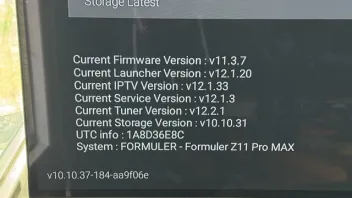
    MYTVOnline 3 : 12.1.42 BETA

    • FIX: Rebooting issue when entering VOD & Series
    • FIX: Connection issues with some Stalker portals
    • FIX: Support for latest Smart Tube player in trailer player
    • Bug fixes, optimizations, and performance enhancements
  • Yes you can..

    Uninstall mytv online(long press on mytvonline from main menu and select uninstall)

    Then go to the market

    And install the mytv online (that's the older official version) and run the audio optimizer

    And the recording function works again... What's wrong with the newer versions(mytvOnline) i don't know

    The firmware cannot rolled back but mytv online can (so long as the older version exsists in the market app)

    And it is easier if you have made a backup with the old version otherwise you must enter your iptv data again

    Edited once, last by Lemmingsbeest (July 2, 2026 at 4:41 PM).

  • WARNING:

    Software cannot be rolled back after installation.

    If serious errors occur, please do factory reset.

  • Belgiumuser

    Lemmingsbeest is right when Beta Firmware allow this and if older version of Mol work correctly all is fine. In some cases new MOL version is coupled with new firmware and older version then doesn`t work correctly but possible to install (Beta time). Depends all from changelog.

    How ever, when official comes out you can not roll back anymore to older version, because then is the last official installed only shown in update app or market.

  • Does anyone know whether in mol3 on XC connection,it is possible to set epg mode to alternate,and thereby have a full epg guide?

    Just like in mol4 beta.

  • It isn't written at the mol3 beta updates changelogs. So i'm almost sure it's not in mytvonline3.

    Goodday my friend

    It also wasnt written in changelog for beta mol4,but it was a coicidental finding by SAM,who was playing around with different settings in content sources,so i was wondering if updates in mol3 for z11 series have similar option,edit.>epg mode>set to alternate>have a full epg guide???:winking_face:

  • It also wasnt written in changelog for beta mol4,but it was a coicidental finding by SAM,who was playing around with different settings in content sources,so i was wondering if updates in mol3 for z11 series have similar option,edit.>epg mode>set to alternate>have a full epg guide???:winking_face:

    Unfortunately not :frowning_face:

    The "alternate" mode still doesn't work in Xtream Codes on the latest MOL3 beta on Z Mini.

    Personally, I only have one day forward and one day back.

    I had sent a message to the developer to see if they could implement this fix on MOL3 as well, but their response was generic and off the mark.

    It would be nice if the search by actor name worked on MOL3 in XC, as it does in Stalker, but that’s not the case either.

    It seems to me that this also works on MOL4... (And on other competing apps...)

    But I no longer have a Z12 to test that.

  • It also wasnt written in changelog for beta mol4,but it was a coicidental finding by SAM,who was playing around with different settings in content sources,so i was wondering if updates in mol3 for z11 series have similar option,edit.>epg mode>set to alternate>have a full epg guide???:winking_face:

    I didn't notice that. Maby it's only a mol4 option yet...

    Edited once, last by Lucky13 (July 6, 2026 at 9:59 AM).

  • It worked I remember at my side on mol4 AFTER the automatic content updater at 16.00 hours what i setup in settings the next day.

    when i did manual epg update (in beta 1 version) it didn't working immediately.

    next day then when the auto content updater did his work, it was updated and a saw then it worked out. The epg some day forward😀

    Maby in beta 2 you need to wait too, till the message on your screen comes "new content found" after apply it's maby there the full epg.

    Edited once, last by Lucky13 (July 6, 2026 at 10:35 AM).

  • The developer option on MOL3 & MOL4 has been removed purposely for security reasons.

    Please let me know more details about your use cases on the developer option. We're looking closely into the feedbacks for now.

    Window/Transition Animation Scales: You can change or turn off system animations (setting them to 0.5x or 0x) to make your device feel faster and more responsive

  • The developer option on MOL3 & MOL4 has been removed purposely for security reasons.

    Please let me know more details about your use cases on the developer option. We're looking closely into the feedbacks for now.

    Performance mode and Window/Transition Animation Scales: You can change or turn off system animations (setting them to 0.5x or 0x) to make your device feel faster and more responsive

  • Post by Formuler All (July 6, 2026 at 7:04 PM).

    This post was deleted by the author themselves (July 7, 2026 at 11:51 AM).
  • It worked I remember at my side on mol4 AFTER the automatic content updater at 16.00 hours what i setup in settings the next day.

    when i did manual epg update (in beta 1 version) it didn't working immediately.

    next day then when the auto content updater did his work, it was updated and a saw then it worked out. The epg some day forward😀

    Maby in beta 2 you need to wait too, till the message on your screen comes "new content found" after apply it's maby there the full epg.

    We speek about MOL3 here, for Z Mini and Z11 serie, not MOL4 beta2.


    Contrary to what I said the other day about MOL3 (one day back, one day forward in the EPG), we actually have several days back (but still only one day forward) if the box is plugged in and configured.

    I no longer remember in Stalker if the EPG is complete from the start without having to leave the box plugged in for several days.

  • We speek about MOL3 here, for Z Mini and Z11 serie, not MOL4 beta2.


    Contrary to what I said the other day about MOL3 (one day back, one day forward in the EPG), we actually have several days back (but still only one day forward) if the box is plugged in and configured.

    I no longer remember in Stalker if the EPG is complete from the start without having to leave the box plugged in for several days.

    Hi,afaik for mol3 on Stalker,you can switch epg mode to alternate,and thereby have full epg guide,several days ahead and back,almost immediately.

  • Hi folks,

    Just for your information, I installed the latest update on my Formuler Z11 Pro yesterday.
    The firmware update to version 11.3.7 went smoothly, as did the MOL3 update to version 12.1.42.

    On my side, everything is working well so far. 👍
    I’m using a Stalker portal, and I have noticed better overall smoothness.
    The interface feels a bit faster and everything is working fine for now.

    Of course, it has only been 24 hours since I updated, so it’s still a bit too early to make a final judgment, but so far everything looks good for me.

    I’ll post another message if I run into any issues.

    Thanks to the development team.

  • We speek about MOL3 here, for Z Mini and Z11 serie, not MOL4 beta2.


    Contrary to what I said the other day about MOL3 (one day back, one day forward in the EPG), we actually have several days back (but still only one day forward) if the box is plugged in and configured.

    I no longer remember in Stalker if the EPG is complete from the start without having to leave the box plugged in for several days.

    Yes you're right.

    I told only that the "alternate" option worked at my side after the automatic refresh/update. (In mol4) not when i refreshed the epg manually.

  • Hi There, I have a friend with a Z11 Pro and I installed his streams (2 of them). The device is brand new and yesterday (with the BETA Firmware installed) MOL3 no longer loads. It attempts to load then crashes back to home screen. Any thoughts?

  • Hi,afaik for mol3 on Stalker,you can switch epg mode to alternate,and thereby have full epg guide,several days ahead and back,almost immediately.

    Okay, thanks for the confirmation that one of the advantages of connecting via Stalker in alternating mode is having several days of programming both past and future in the EPG, along with actor search in VOD :winking_face:

    Are you sure that you have several days available in the past even when adding a new subscription/server without having to wait several days for it to "load"?

    Edited once, last by Myst13 (July 7, 2026 at 7:22 PM).

  • Hi There, I have a friend with a Z11 Pro and I installed his streams (2 of them). The device is brand new and yesterday (with the BETA Firmware installed) MOL3 no longer loads. It attempts to load then crashes back to home screen. Any thoughts?

    Install via market app (green logo and white trolly) the "audio optimizer" app and run in once.

    Try again mytvonline3 after the reboot.

    If still don't work, uninstall mytvonline3 beta, reboot box and install mytvonline3 final via market app. (No beta) and try again. Then you use official version which is stable and no beta. (Maby also run audio optimizer again if needed)

  • Okay, thanks for the confirmation that one of the advantages of connecting via Stalker in alternating mode is having several days of programming both past and future in the EPG, along with actor search in VOD :winking_face:

    Are you sure that you have several days available in the past even when adding a new subscription/server without having to wait several days for it to "load"?

    Its a long time ago i had Stalker connection for Z11/mol3 series,but i am fairly sure the epg guide loaded almost immediately:smiling_face:

