

Hello, I just bought a Z8. I updated to the latest firmware. When connected to wifi, it show no internet. I have reseted and restarted the device. reboot my router and modem but same problem. Internet is available with Ethernet port only.

Connected to Wifi, but no internet
-
moka -
August 18, 2019 at 10:49 PM -
Closed
We asking all new users to read the articles below, before creating their first posting or thread.
- 4. Instruction Articles
Please note, in this forum are only English threads and postings allowed, without any exception!
Please follow the forum rules, thank you for your understanding.
-
-
- Official Post
The symbol change from exclamation mark to normal in most cases in 1min. after restart.
-
- Official Post
Open Youtube to see if it is working.
Some ISPs or your router may be blocking the internet connectivity checking mechanism on the device.
-
I had similar issues with the WiFi dropping out every 20 minutes or so and had I to restart the box to get the WiFi to start to again. However, I installed cloudflare from google play and it’s been fine ever since (touch wood)
Hope this helps !!
-
moka I was having a similar issue. Are you connecting to your 5ghz wifi connection? I was having the issue when I was connected to the 5ghz network, + the Z8 would say connected to internet, but I couldn't use anything. After switching to my normal 2.4ghz connection it works without issue. So if you are on your 5 try connecting to your 2.4 or vice versa.. WiFi Randomly Disconnecting and giving "!" on current network .. that was my original post ... Support definitely tried to help, however our resolution was staying connected to 2.4g or connecting via Ethernet. Not sure if its the same issue, but would be nice if we could find out whats causing it! Just not sure if its the network side or the Z8 side. Definitely not complaining at all, my 5G connection is just quite a bit faster + cant use ethernet as my lovely lady doesn't want a cable running between the two rooms.
-
1. Logged into my Router.
2. Went into the "Wireless 5GHz" tab.
3. Turned off/Unchecked "WMM Power Save Mode"
4. Chose "Apply"
3. Then went + clicked on "Advanced" settings.
4. Under "Wireless Mode" it was originally set to "A/N mixed" ..
5. After switching Wireless Mode to only "N" + apply/saving settings, I have now been connected to the 5GHz WiFi for about a week now + have not received the "!" once.
*knocks on wood*
Hope this helps

-
I am having a similar issue to Op where Z8 is still connected to Wifi but losing internet connection. I can simply either toggle Wifi off/on or switch from 2.4GHz to 5GHz (or either way) and this re-establishes internet connection. I have set a static route for the Z8 with no help. Any tips would be appreciated. I tried a power line adaptor connection but the connection to use ethernet but connection was too slow in my setup and unusable for streaming.
-

I am having a similar issue to Op where Z8 is still connected to Wifi but losing internet connection. I can simply either toggle Wifi off/on or switch from 2.4GHz to 5GHz (or either way) and this re-establishes internet connection. I have set a static route for the Z8 with no help. Any tips would be appreciated. I tried a power line adaptor connection but the connection to use ethernet but connection was too slow in my setup and unusable for streaming.
Do you have access to the wifi router/hub logfiles? Perhaps there is logged why this happens.
-
I took a look at the log files and did not see anything that stood out (to me, I am a novice w/networking); I did notice my time setting on the router was not correct so I have fixed that and will keep monitoring and try to correlate the issue now that the time is correct. It is an intermittent issue so I will report back when I get a better idea of when/how the issue is happening. More info about my hardware: Ubiquiti Edgerouter X using an ap (AP-LR) for wifi.
-
And sometimes not even all the antennas are connected inside the router...
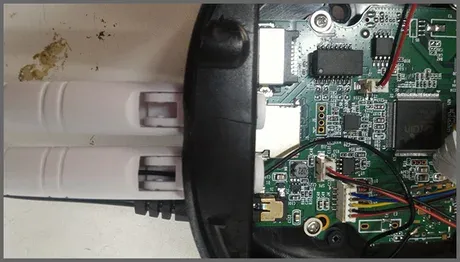
-
Just wanted to report back on the issue I was having. After digging around a bit more (and looking at the AP log files, and not just the router log files) I found that my access point is likely what was causing the issue. I started monitoring both the router and AP and saw that the AP was dropping/disconnecting all clients intermittently - all other clients (phones, laptops, tablets, TVs, Firesticks, etc.) automatically re-connect after a second or two so I had not noticed the issue until I started using the Z8, which does not automatically re-connect. I updated my outdated AP firmware and have not seen the drop/disconnect issues now for 48+ hours. Will report back after I monitor the issue a while longer. Thank you ddd for you responses.