

Hi! Is it possible to record on internal memory on my Z8 pro? Thanks

General Recording Questions
-
- Z8 pro
-
Benbourd -
March 20, 2021 at 8:23 PM -
Closed
We asking all new users to read the articles below, before creating their first posting or thread.
- 4. Instruction Articles
Please note, in this forum are only English threads and postings allowed, without any exception!
Please follow the forum rules, thank you for your understanding.
-
-
How can i delete a recording program on mytvonline2 ? Thanks
-
- Official Post
Hi! Is it possible to record on internal memory on my Z8 pro? Thanks
No.
How can i delete a recording program on mytvonline2 ? Thanks
-
Hi,
I’m trying to delete a recording. I’ve tried following the article ‘How to Delete Recordings in MOL2’, but when I Press “OK” button for longer than 1 second it does not change to ‘Recordings > Delete’. All it does is to playback the recording.
Thanks.
-
1 - Press for 3 seconds on the program to be deleted
2 - Check the program to be deleted
3 - Make trash at the bottom of the page
-
Hi SerGoy,
Tried that, but as I said all it does when I press for at least 3 seconds is that it plays the program. It doesn't give the option to delete.
Timbo
-
- Official Post
Do you have Mol1 or Mol2? Box?
-
Hi Sam,
The box is only a few days old. Here are the specs:
- Model: Formuler Z8 Pro
FCC ID: 2AV9UZ8PRO
- Firmware version: 1.4.92
- MYTVOnline 2 version: 2:7:11.3
- Box connected with: Wifi and Ethernet
Timbo
-
- Official Post
You posted in wrong Forum, this is Z7+ Forum! I see now, others too

Moved last few postings to proper Forum and edited your last post because you was posting important private box infos in public

-
- Official Post
Timbo, do following:
1. Format your USB Stick or hdd with NTFS on PC.
2. Connect with the box and restart the box once.
3. Make some recording and proceed with deleting recordings like on screenshots.
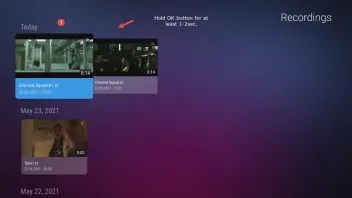
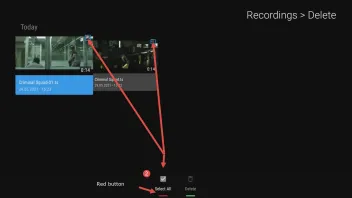
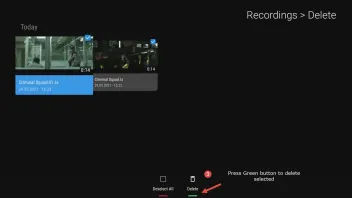
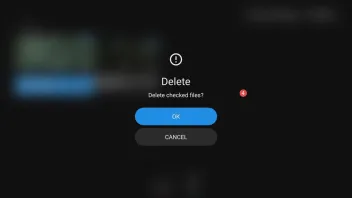
-
Sam,
Thanks. Will do.
Is that the MAC address that I should keep private?
Timbo
-
- Official Post

Is that the MAC address that I should keep private?
Not only, sn too.
-
Sam,
I checked the USB drive that I've got connected to the Formuler Z8 and it's file system is already NTFS.
I powered the Z8 off and on. Recorded another program from Live TV. Went in to 'Recordings'. It showed the recording under 'Today'. I highlighted the recording and held the OK button for > 1 second. It will only go immediately into playback. It does not go into the Recording > Delete mode (as shown in your 2nd screenshot). I've tried every button on the remote control but none of them will get me to that stage.
I'm sure that it's something that I'm not doing correctly but I can't see what I'm doing wrong.
-
- Official Post
Please do step 1-3, because it is not normal to go in playback.
-
Sam,
I decided to start afresh.
- I powered off the Z8.
- I copied my folders (including Recordings) off my (Samsung Portable SSD T5) removable USB drive.
- I reformatted my USB drive (to NTFS) and copied my folders back onto the removable drive.
- I reconnected my USB drive to the Z8.
- I powered on my Z8.
- I went into MOL2 and clicked on Recordings (see attached screenshot Formuler 1).
- It came up with the list of recordings that I’d made yesterday (see attached screenshot Formuler 2).
- I highlighted the first of these recordings (see attached screenshot Formuler 3).
- I pressed the OK button on my IR1 remote control for several seconds.
- It came up with the resume playback option (see attached screenshot Formuler 4).
Still unable to delete recordings.
Timbo
-
- Official Post
Very strange, no matter which rcu i use, old, small, IR1 or BT1 i get always the delete menu after 1sec. holding the OK button.
Please test following.
1. This time use some small USB Stick, formatted with NTFS, connect and reboot once. Test again.
2. If nothing helps, save your MOL2 data, delete MOL2 and install fresh from Formuler Market.
-
Hi Sam,
I thought you might have the weekend off!
Tried with a different, small, USB stick which I first reformatted to NTFS. I then plugged it into the Z8 and recorded a short clip of live TV. Unable to delete.
How do I save MOL2 data? And how do I then delete MOL2?
-
- Official Post
I thought you might have the weekend off!
Nice joke, Admins have never free time. 24/7...
How do I save MOL2 data? And how do I then delete MOL2?
I would say, connect USB stick formatted with FAT32 and reboot your box. After restart from home menu -> settings -> storage & reset -> Backup -> here you can backup full OS on USB with everything from the box. This takes some time, let the box in peace do all alone.
Then factory reset your box (home menu -> settings -> storage & reset -> factory data reset) and set fresh. I guess it is the best way.
-
Sam,
No joy.
Followed your instructions. Went back in and restored the system. Went to Live TV and recorded a short clip but unable to delete.
I thought that maybe the USB stick might be locked so went into File Manager, went into the Recordings folder and was able to delete the three files that were in there that related to the TV clip.
Could it be some kind of restriction that my IPTV provider has put in place? I can't think what but I'm out of ideas.
Timbo

-
- Official Post
No, is not any restriction. It would be very nice if you could make video from tv screen and the rcu when you use this, because this is very strange.
Small mobile video is good enough.
-
Hi Sam,
Took video with my phone but unable to get it below 1MB! Smallest I can get is 48MB. Even as a ZIP file I can't get below 47MB.
Timbo
-
Try dropbox or wetransfer
-
Psychokidd,
The transfer method is up to Sam.
-
- Official Post
(Click Me) https://streamable.com/ > Upload the Image/Video file (please stay under 250MB per file)> Copy link > Paste the link with your reply.
-
Hi Sam,
Took video with my phone so that I could show both the TV screen and the RCU.
- Live TV
- Pressed button with 3 horizontal bars to show main MOL2 menu.
- Went down to Recordings and pressed OK to select.
- Shows Today’s recording. Selected the only TV clip recorded.
- Held down OK button for several seconds. Goes into playback.
Here's the video link:
Timbo
-
- Official Post
Hi Timbo,
on the video you do it wrong, the recording is marked and then you pressed the ok button too short. You need to mark the video file, press the OK button and hold pressed 1-2 sec! Please test again.
-
Sorry Sam, I don't understand what you are saying.
-
- Official Post
1. Choose the recording video
2. Press the OK button and hold pressed 1-2 sec for delete..
-
Sam,
That's what I was doing. I've got another, longer, video which hopefully shows you more clearly.
-
- Official Post
It looks like you are just clicking once on the OK button (the led flashes only once). What we need is to hold OK pressed to activate the delete menu.
Here is video that shows how the led should flash when you hold the OK button.
If the led not flashes with holding OK Button like on video then is something wrong with the Remote and this should be replaced. Please contact your seller.
-
Sam,
Checked the RCU when holding the OK button and it definitely doesn't flash intermittently like yours does in the clip.
I'll get onto the supplier (Amazon) and ask for a replacement.
Hopefully it won't take long and I'll be able to sort things out.
I'll let you know what happens.
Thanks for all your help
Timbo
-
Sam,
Replacement remote control unit (GTV-BT1) arrived this morning. Tried it out on my Z8 and I'm very pleased to say that it is now working properly. I've been able to delete a recording so it is clear that there was a problem with the original RCU.
Thanks,
Timbo
-
- Official Post
Great to hear it is working now with new remote
