BETA update - FW 11.2.0 and MOL3 11.2.10 for Formuler Z11 Series released.

We asking all new users to read the articles below, before creating their first posting or thread.

  • 4. Instruction Articles

    • Please note, in this forum are only English threads and postings allowed, without any exception!

      Please follow the forum rules, thank you for your understanding.

  • Hi i installed the beta version last week and last night when i tried to put the box into stand by mode it rebooted itself.

    This was happening on my old z10 all the time and with the z11 until FW 11.1.41 update last December which fixed the issue.

    Since i updated to the beta version FW 11.20.0 this issue is back again.

    I think it has something to do with the CEC on my TV (Sony bravia) and the formuler box.

    In version 11.1.41 there was a fix for Auto shutdown message after device boots by TV CEC command i think this sorted the issue for me as it did restart or shut down

    when i went to put it into stand by.

    Will this be fixed in the official release???

  • Does the Formuler reboot itself every time you put it into standby mode?

  • Since i updated to v11.2.0 a week ago it has rebooted twice when i tried to put it into stand by mode but not every time no.

    Before i updated to v11.2.0 i was on firmware v11.1.41 it never did this

    Make sure CEC is turned on in the TV settings menu and in the Formuler settings menu.

    Change the Power Mode from "Power off" to "Standby" to see if it makes a difference.

  • Yes i have CEC already turned off on both the TV and in Formuler settings.

    I also have the power mode set to Standby.

    I'm pretty sure this has something to do with the BETA Update as this didn't happen until i updated.

    Plus the previous firmware 11.1.41 had a fix implemented into it for Auto shutdown message after device boots by TV CEC command

    see link

    SAM
    December 13, 2022 at 11:22 AM
  • Yes i have CEC already turned off on both the TV and in Formuler settings.

    I also have the power mode set to Standby.

    I'm pretty sure this has something to do with the BETA Update as this didn't happen until i updated.

    Plus the previous firmware 11.1.41 had a fix implemented into it for Auto shutdown message after device boots by TV CEC command

    see link

    SAM
    December 13, 2022 at 11:22 AM

    What happens if you turn on the CEC settings on the TV and formuler?

    Do you experience the Auto shutdown message on firmware 11.2.0?

  • Hello staff,

    same problem (failed to load vod data, only series not films) here have report you, but no reaction.

    Also an Z11pro max.

    when or what is the solution?

    regards,

    Andries

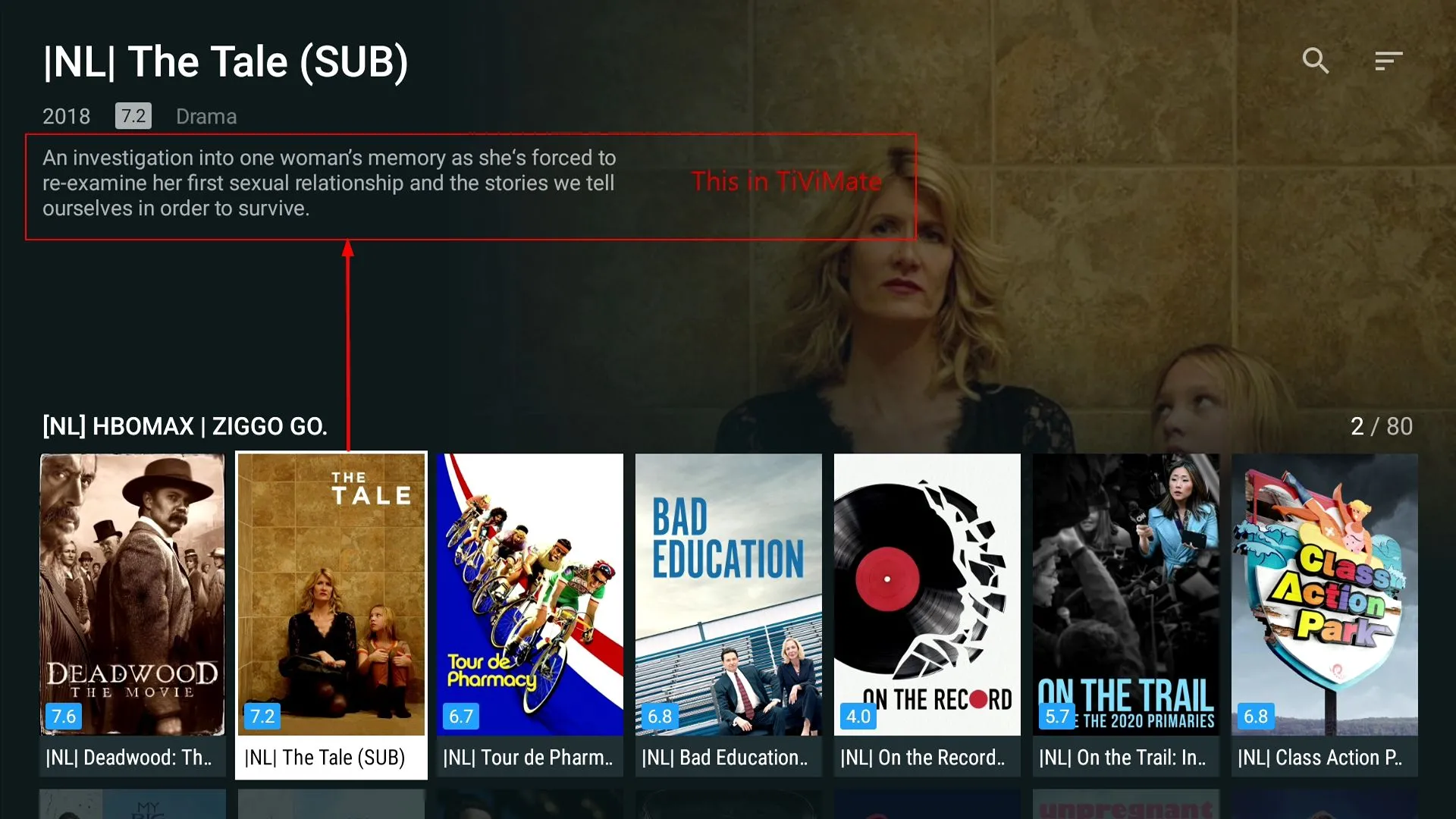
  • Same here, no info for movies in VOD, (series yes). In TiViMate the info is there for both VOD and Series.

    See screenshots for both MOL3 and TiViMate.
    BTW, also EPG issue is still there, I can live with that, as the workaround is working for me :smiling_face:

    Formuler Z11 Pro Max & Z11 Pro Max BT1 | XCAPI portal | Firmware 11.3.3 and MOL 12.1.15

    Location Netherlands GMT +1 (Summer time)

  • Same here, no info for movies in VOD, (series yes). In TiViMate the info is there for both VOD and Series.

    See screenshots for both MOL3 and TiViMate.
    BTW, also EPG issue is still there, I can live with that, as the workaround is working for me :smiling_face:

    "Missing English synopsis when system language is set to a different language" bug is a known issue and will be fixed in the upcoming official update.

    PM me the details of your EPG issue for further analysis.

  • "Missing English synopsis when system language is set to a different language" bug is a known issue and will be fixed in the upcoming official update.

    PM me the details of your EPG issue for further analysis.

    How to PM?
    In fact I, and others have reportyed the EPG issue already some time ago.

    It has to do with time zone settings in BOX settings and EPG offset in MOL3.

    Formuler Z11 Pro Max & Z11 Pro Max BT1 | XCAPI portal | Firmware 11.3.3 and MOL 12.1.15

    Location Netherlands GMT +1 (Summer time)

  • Same here, no info for movies in VOD, (series yes). In TiViMate the info is there for both VOD and Series.

    See screenshots for both MOL3 and TiViMate.
    BTW, also EPG issue is still there, I can live with that, as the workaround is working for me :smiling_face:

    Same problems over here. The most important issues have still not improved.

    Formuler Z11 Pro Max | XC API portal

  • Hello, the epg from the supplier does not work for me, so I gave an additional epg that works on other amplifications but in mytvonline3 it does not work. The epg loads but does not display or can the creator make it so that you can select from the epg list the main ones that fit in because it did not work now.I tried on the official soft and on the beta soft and nothing epg

  • Info:

    Formuler is aware of this EPG Issue and will implement an option soon to improve this issue for sure.

    It looks like some servers can't cope with the new requirements of MOL3. That's why some things in the MOL3 EPG area will be optimized down to MOL2 level.

    No need for new reports in this case, it is known and devs. will work on it. Please be patinate and await the fix. If the fix not come with next official version it will come for sure with update after.

    Thank you for your understanding.

  • Hi,I am still experiencing sudden freezing and loss of sound (so complete standstill),followed by the message Illegal Argument Exception.This is followed by 5 retrys and if streaming does not resume,the message Try again later.

    Most of the times the error is gone after switching channels.What does the error stand for and is it provider related,In Search I found the message also reported,onZ10 and GTV box.

    Will there be a fix in the next or future update?

  • I am not using VPN,my provider has built in VPN in its server!

  • I am not using VPN,my provider has built in VPN in its server!

    Well that's wonderful and all but redundant... Your provider can have a vpn with the incorrect protocol and that protocol sometimes see harmful traffic and blocks it because iptv providers are constantly being attacked by who knows whom...

    Wireguard blocks many stuff, that's why your channels get blocked for 5-10min sometimes and you switch to another channels in the same provider and it works without error... Meaning that live channel link will be blocked for a bit. Open VPN UDP is recommended on this cases, your case, because it uses 2 ports, so when it blocks the live channel link, the traffic will go through the other port, meaning you get small drop instead of network error or the freeze of dead...

    Now random freezes are another story but that's not what you are complaining so...

    If it was me i would tell your provider to put his vpn well you guess and buy a dedicated vpn myself so i can change protocol when i want, but that's just me...If you can contact your provider asking what vpn protocol he's using and if he can change it to open vpn that would be wonderful...

  • Well that's wonderful and all but redundant... Your provider can have a vpn with the incorrect protocol and that protocol sometimes see harmful traffic and blocks it because iptv providers are constantly being attacked by who knows whom...

    Wireguard blocks many stuff, that's why your channels get blocked for 5-10min sometimes and you switch to another channels in the same provider and it works without error... Meaning that live channel link will be blocked for a bit. Open VPN UDP is recommended on this cases, your case, because it uses 2 ports, so when it blocks the live channel link, the traffic will go through the other port, meaning you get small drop instead of network error or the freeze of dead...

    Now random freezes are another story but that's not what you are complaining so...

    If it was me i would tell your provider to put his vpn well you guess and buy a dedicated vpn myself so i can change protocol when i want, but that's just me...If you can contact your provider asking what vpn protocol he's using and if he can change it to open vpn that would be wonderful...

    Thx,for the advice,but main reason for built in VPN is to be untraceable for ISP and other nosy customers.The issue of illegalargumentexception occcurs only sporadically,but is a main issue when recording and youre not aware of the error

    I will take up te matter of open vpn with my provider,as you suggested,and get back to you.

  • Official update when few more issues get fixed, when done it will be announced!

  • No, it was not reproduced yet, not reported or not detailed description of the issue posted. Change protocol and see if it works. Btw, which protocol do you use?

  • No, it was not reproduced yet, not reported or not detailed description of the issue posted. Change protocol and see if it works. Btw, which protocol do you use?

    I tried both xc/ mac still the same number-> missing channels.

    I also tried to quit the app, clear the cache and restart the device, the problem persist.

    Moreover, I ask a friend having a Z11 with same server same issue.

    Thanks

  • You have to install Beta MOL3 from Beta update and not older official MOL3 from last update!

  • Hi,

    I have some issues with this Beta.
    I have VPN wireguard installed on my router.
    Some IPTV providers are disconnecting and I am going to refresh and sometimes it is not connecting. or it connect but it doesnt load all channels and sometimes VOD or Series it load zero, so it load partial content.

    I know you will blame wireguard.... but I have been using it since the release of Formuler z11 and never got this issue.

    For me, this issue appeared with this Beta.

    Is there a way to roll back to the stable version?

  • I can confirm some iptv traffic was affected last night... Wireguard alone is not to blame, wireguard protocol is safe, so when it sees harmful stuff he blocks. Wireguard can't be blamed for iptv provider servers are constantly being attacked by who knows...And it's getting worst, they (iptv providers) need to find a way to get better security so the attacks they suffer won't alert their customers own security aka Wireguard protocol. Like i've said, with open vpn i was able to play all the channels without the black network error, but as iptv providers are being attacked, on their end some channels were freezing all the times and that was on every device i have, not only formuler...

    We customers need to ask providers to upgrade their security protocols and get better firewalls, but this will come at a price, iptv subscriptions will go up and...you guess!!!

  • I too had a server error HTTP 521,yesterday from say 10 pm too 11.30 pm,after that all channels were back on.My provider sent me a picture of the areas affected in Europe and it was mainly UK,NL,Italy and Turkey.

  • Since the beta update there has been an increase in ParserException errors,on several channels.