
The Apps in the yellow area highlighted I used to be able to Hold the OK button down and it would bring up a menu that allowed me to move or remove apps showing here. After the last update or the one before I can add Apps to the main screen, however when holding down the OK button to bring up the menu it no longer works and I can not move or remove apps from the main screen. Is there another way to do this?
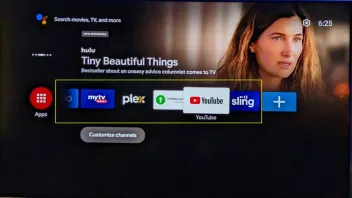
Used to be able to remove and add the apps from the main page
-
- Help
- GTV
-
dpdurst -
April 8, 2023 at 3:31 PM -
Closed
We asking all new users to read the articles below, before creating their first posting or thread.
- 4. Instruction Articles
Please note, in this forum are only English threads and postings allowed, without any exception!
Please follow the forum rules, thank you for your understanding.
-
-
after the android 10 update long pressing ok will no longer remove the apps.
1. remove apps settings>apps(you may have to activate see all apps)
2. if you install an app manager like apk installer you can also remove/install apps.
-
- Official Post
The Apps in the yellow area highlighted I used to be able to Hold the OK button down and it would bring up a menu that allowed me to move or remove apps showing here.
Tested now with latest update and holding 1 sec. Ok button opens pop up menu (Open, Move and Remove). Restart the box once and test again, should work or your Ok button is faulty.
-
What remote are you using then? I have a legacy that the device does not detect and the IR remote that works. Your actually telling me that even though the OK button works, Holding for more than 1 second is broke?
-
Issue resolved - not a restart and not a bad remote either fixed it
-
- Official Post
What remote are you using then? I have a legacy that the device does not detect and the IR remote that works. Your actually telling me that even though the OK button works, Holding for more than 1 second is broke?
You posted in GTV Forum and labelled the thread as GTV, GTV use BT1 Remote and i tested with BT1. How could we know that you use legacy RCU and not BT1 if not wrote in first post? How ever, nice you solved it and point to my text that didn`t help you
It would be better to write how you solve it for others in Community!Btw: Even with small Legacy O2F9 it works fine and opens the menu, with older legacy it doesn`t work at all because the RCU commands are changed and
was never intended that this old RCU works on a GTV!
-
after applying the latest update it was resolved.
-
- Official Post
after applying the latest update it was resolved.
JR, it worked with the last one and the others before that too ! Was never a issue...
-
noted however dpdurst indicated after the update he had the issue could be the different remote he was using.
on a side note, was just saying that someone had a similar issue and I directed them to update the fw on the bt-1 and the formuler remote app and it fix the issue of long pressing to bring up popup menu.
-
just to share if talkback is enabled(accessibility option) long pressing the select key will not bring up popup menu.
It was discovered while helping a person with disability.
In the troubleshooting it is always good to be open minded, expect any thing and have patients.
-
Issue resolved - not a restart and not a bad remote either fixed it
How did you solved? I have the same problem and need help.....
Thanks in advance.
Kimonda.
-
press and keep holding down the ok button for few seconds.
-
Thanks for your answer....Yes I did this but only can move to left or to right. Can not remove. I have the legacy Remote control and my box is Z10 SE with the firmware version: V10.10.46 updated at 23-03-2023.
-
sorry if is z10 i didn't know because this topic is for gtv
however what are you trying to do remove apps or sort in a specific order?
if you wish to remove apps go settings>apps press ok on the app and the remove option is present.
-
I think that GTV is the same as Z10. I do not see any topic for Z10 SE.
What I want is remove from the main menu, these several app icons; I do not uninstall them ..just only remove them from the main menu.
-
there is a z10 section for this so if the admin see it here he could bring down the power and remove it.
the launcher don't allow to remove apps on the z10 but you can:
1. use the app locker feature or group a and b in launcher setting to move the apps into
2. install another launcher and set it to auto start via the launcher settings on the z10 home screen.
-
Upppps I did not find ...could you send me the link, please?
My apologize to the administration for my mistake.....
-
- Official Post
Upppps I did not find ...could you send me the link, please?
My apologize to the administration for my mistake.....
Post questions about Z10 SE in this forum: Formuler Z10 Pro Max, Z10 Pro, Z10, Z10SE