audio passthrough settings in MOL3

We asking all new users to read the articles below, before creating their first posting or thread.

  • 4. Instruction Articles

    • Please note, in this forum are only English threads and postings allowed, without any exception!

      Please follow the forum rules, thank you for your understanding.

  • Hello,

    I ve bought recently the new Z11 pro max and I ve problem with the audio passthrough configuration.I ve read many threads from 2023 talking about audio passthrough and Dolby Atmos issue concerning the Z11 pro max but every time no real solutions were given ...

    I have also the Z8 and I ve absolutely no problem for playing Dolby Atmos true hd or DTS HD on my Pioneer AVR .

    On my Z11 pro max I ve for sure installed and run audio optimizer and put the audio surround to AUTO .I m able to get 5.1 channels for Dolby Digital signal but not from Dolby Atmos,my AVR is showing for the input multi ch 7.1 and not Dolby Atmos.

    So my question is what is the correct setting to have the audio in passthrough mode ?

    Currently I am thinking the Z11 is doing the sound decoding (no passthrough) because all HD signals like Atmos or DTS HD are not correctly send to my AVR.

    Is there something fixed with the new release FW about audio passthrough mode in 2024?

    I m very happy about image quality and fluidity with the Z11 but little bit disappointed about sound management...which is for me a regression compare to the Z8.

    I m sure I m not the only one with this situation.

    Thanks for sharing your experience.
  • Go to Market in home menu and install "Audio Optmizer" and restart the box. Maybe they can do something.

    I think you didn’t read what he said: “On my Z11 pro max I ve for sure installed and run audio optimizer”. My only question is: if this optimizer is so important/necessary why is it not included in the firmware? Or is it a license problem?

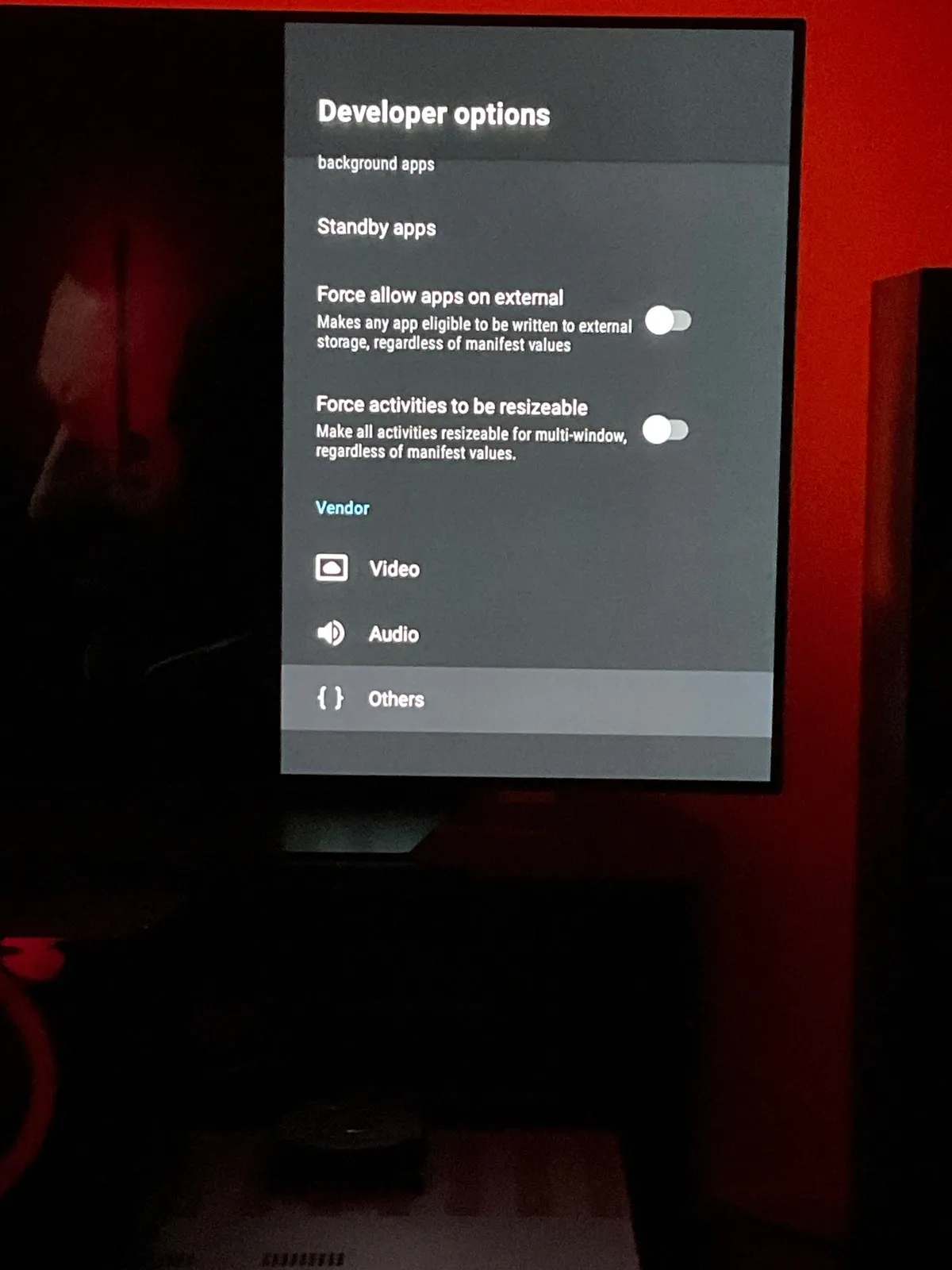
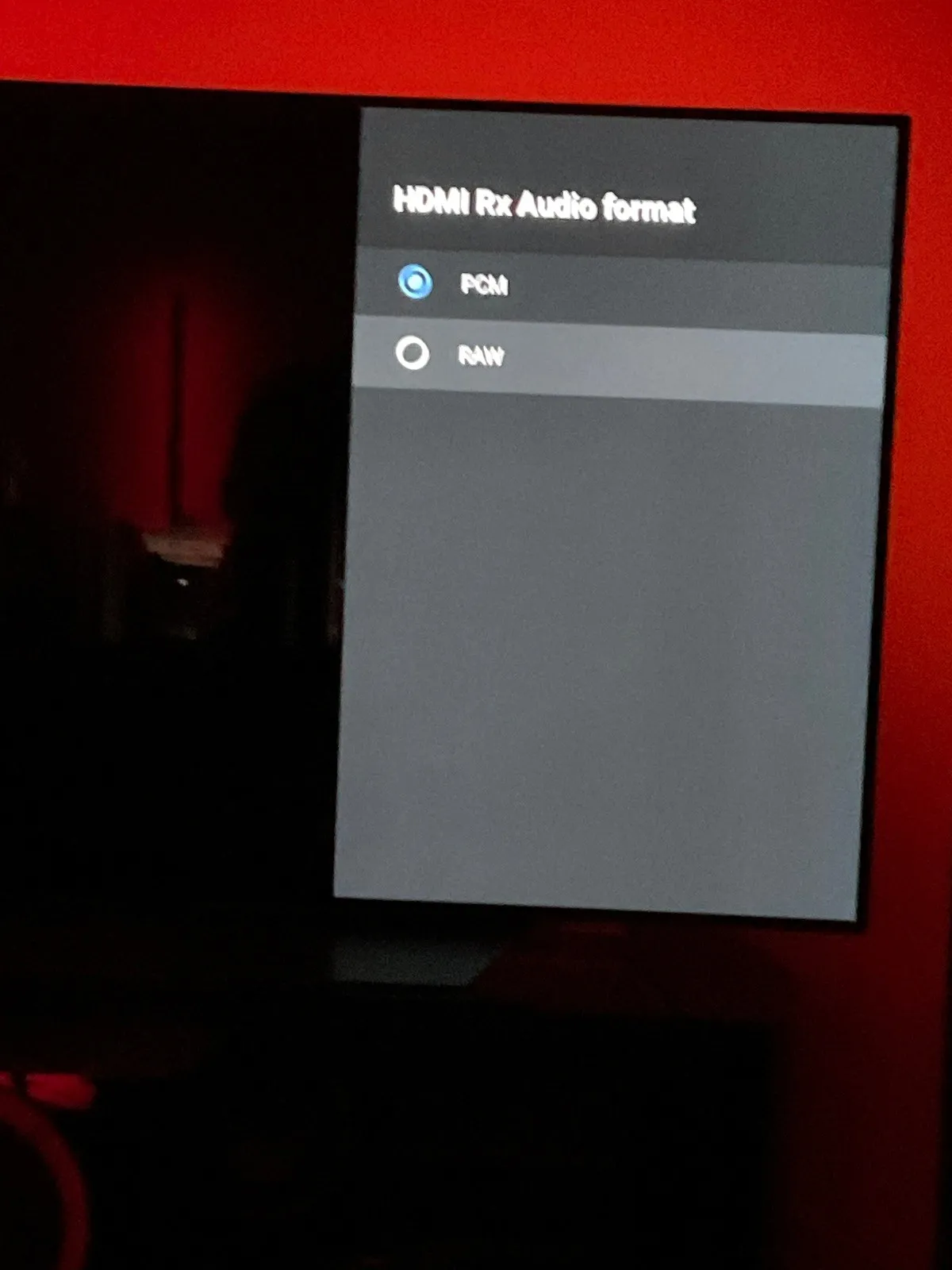
  • To get dtshd ect working it takes a bit of work first,goto to setting/about /press build 6 times to enable developers mode,there is a plethora of extra settings in there like enable maximum cpu frequency,at the bottom youl see video/audio,go into audio and change pcm to raw and enable passthrough,now dtshd will passthrough

  • Thanks for replying.

    I ve already tried but this is not working and I ve heard that the HDMI Rx is HDMI input so this is not used on the Z11.

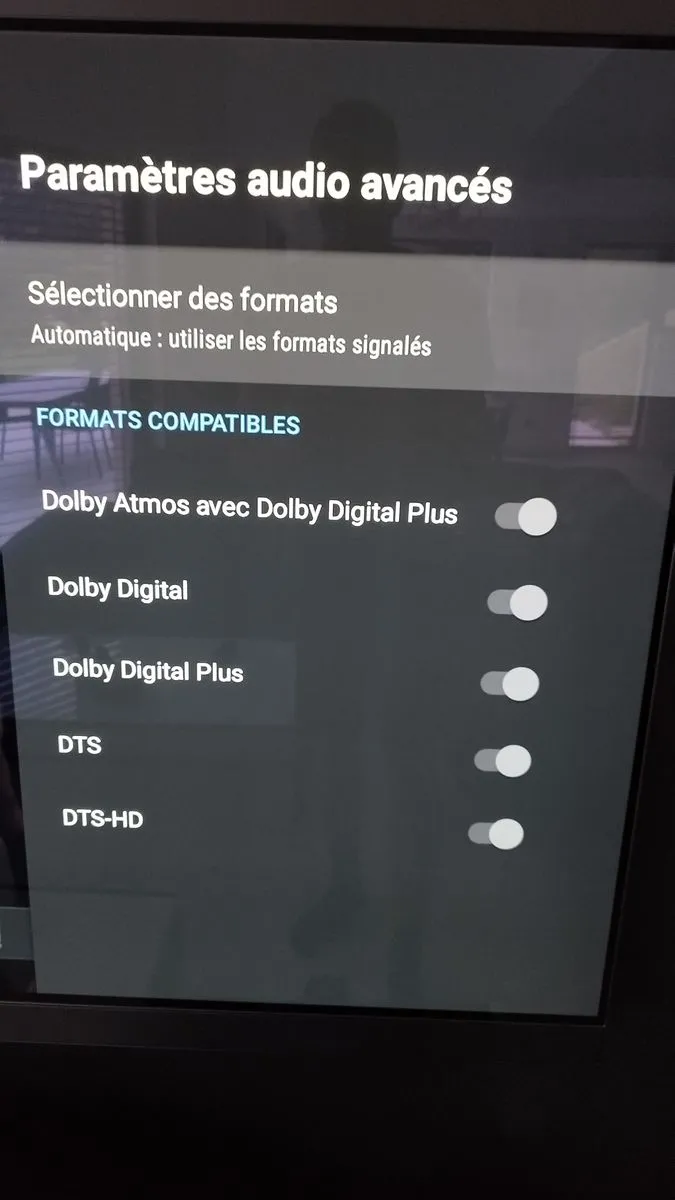
    On the surround sound option I ve no true hd displayed, I put the picture attached of the sound format available.

    Can you share yours ?

  • My surround is the same for some reason truehd isn't supported by the z11 like on the z8,but I'm pretty sure it works in kodi,passthrough is finicky on formuler boxs and takes a bit of work,I only use mines for iptv as I use my nv shield for truehd

  • Ok I m using only MOL3 for watching VOD with DD 5.1 or true hd 7.1 but every time the input signal is true Hd it is converted to Multi ch pcm 7.1. and my AVR is playing only 5.1 signal .

    Anyone else has tried to play Dolby Atmos true hd with MOL3 from VOD?

    thanks for support.

  • To get dtshd ect working it takes a bit of work first,goto to setting/about /press build 6 times to enable developers mode,there is a plethora of extra settings in there like enable maximum cpu frequency,at the bottom youl see video/audio,go into audio and change pcm to raw and enable passthrough,now dtshd will passthrough

    did al steps 2 times and confirm reboot and also tried with out reboot and don't get dts or dts-hd

  • Is there someone from Formuler who could just tell us how to activate the passthrough in order to be usable with MOL3 .

    If it is sill not yet possible please inform us .

    I hope Formuler developers are woking on this topic and it will be solved in the next software release ,if not could you please escalate the case .

    Thanks

  • Passthrough is activated when you chose RAW Modus and forward your Audio to AVR Receiver. Audio setting must then be set as Automatic -Surround Sound.

  • Thanks Sam

    But this is not working on my side for True HD signals , only DD or DTS are working.

    Can you please share some pictures of the Raw setting because there are a lot of options in the menu, just to be sure my settings are correct.

    Have you already tested Dolby Atmos with MOL3?

    Is working for you ?

  • To get dtshd ect working it takes a bit of work first,goto to setting/about /press build 6 times to enable developers mode,there is a plethora of extra settings in there like enable maximum cpu frequency,at the bottom youl see video/audio,go into audio and change pcm to raw and enable passthrough,now dtshd will passthrough

  • I also have this problem, I can’t get pass through of truehd to work on my denon amp. Have just upgraded from a Z8 pro which was working fine. I’ve turned on raw and pass through in developer mode but it’s still not working and I’m only getting pcm audio.

    Is there any thing else I need to do?

    This seems like a common problem. Is this something that can be fixed in a future firmware update?

    Would I be better off returning the z11 and getting a different formuler box?

  • Thanks Tpj for your comment , I hope also the passthrough true hd will be fixed with the next FW update .

    I have play with all settings and it was impossible to play Dolby Atmos true hd 7.1 from the VOD using MOL3.

    SAM please can you forward this information to the developers, the old Z8 is able to play True HD with passthrough, the new Z11 pro max NOT !! This is ridiculous...

  • It is not ridiculus, it works! Surround sound must be activated in Audio menu so the passthrough can work, it was tested today again from dev!

    Audioptimizer should also be installed from Market and executed once (Box will install all needed and reboot).

    And the stream must also have DTS Audio Track!

  • I m sorry SAM but show me the proof the True hd 7.1 is working.

    I m not talking about Dolby digital 5.1 which is working fine for me , I say only the Dolby Atmos True HD 7.1 is not working like the Z8 does.

    I use same material with same provider and same stream .

    Z8 Dolby Atmos true hd 7.1 is correctly decoded by my AVR which is showing Dolby Atmos as input signal .

    With my Z11 pro max the input signal display by my AVR is PCM multi channel and the sound is only dispatched in 5.1

    Here are the facts.

    Why the TRUE HD signal is not supported here ? (See picture) ,for me it should be visible here .

    For sure I ve enabled the surround settings and the audio optimizer has been loaded , I ve even played with the audio developers settings but no changes.

    I have spent a lot of time on this topic and read many threads but the conclusion is always the same and I m apparently not the only one in this case ...

  • Ok, thx. for the detailed explanation, with this we can work better.

    Please give me more info`s, we want to test this again with your config or at least under same conditions.

    1. How is your config at home: Box ->TV -> TV over ARC HDMI to AVR or Box -> AVR ->TV over HDMI ARC?

    2. Dolby Atmos True HD 7.1 from which source, VOD or file? On TV Channels i never seen such audio track, but who knows maybe we have outstanding Provider out there. Let me know where exactly.

    Please test also on your side downloaded atmos file on usb stick and play, let me know the result.

  • If there is anything I can do to help test, I would be definately willing to do that.


    My current setup is Z11 > AVR (denon AVR-X3500H) > TV (LG OLED65C8) via HDMI, arc

    Content is a movie 4k version of 1916 whch has both 5.1 and true Hd audio tracks.

    Pressing info it says 3840*1600 23.976fps H.265/English, TrueHD, 7.1

    I have chosen the 7.1 track with the remote

    Surround sound is enabled in the settings same as in the picture dedelere has posted, the sliders are showing as enabled but seem greyed out and cannot be changed to off. Have tried with HDCP 1.4 and 2.2 which makes no difference.

    In developer options HDMI Rx Audio format is set to RAW

    One thing I've noticed is if you turn on passthough mode in developer options this turns off hdmi output auto, adaptive sink to EDID and visa versa

    Audio optimiser the latest version is installed from the market place.

    What ever I do TrueHd is not passed though to the Amp. This does seem like a firmware issue of some sort as it is working fine with the Z8 pro

  • What ever I do TrueHd is not passed though to the Amp. This does seem like a firmware issue of some sort as it is working fine with the Z8 pro

    We will check it this week in many combinations.

  • Please try also this config: Box (Surround Sound active) -> TV (activated passthrough in Audio setting) -> over HDMI ARC to AVR.

  • Be careful,

    I have other box with Android TV 12 (***** 4k Plus) ans there is no mention on Dolby TrueHD support on Passthrough Android Settings page but that's works without problem.

    You need to try a file with an external Player like Kodi for exemple (with good configuration of Passthrough in that application).

    I'm not at home until thuesday for trying.


    When I try Kodi fast a few weeks ago, I know there is not all the resolutions in white list, so this box is not perfect for that purpose (AFR and native resolution without upscale by the box).

    I have an active serveur on Mytvonline, I can try to find a movie with Dolby TrueHD Atmos and DTS-HD for testing.

    And compare with an other android box the result (****** with Tiv*m***).


    It's better to connect directly the box to TV, if she can decode Dolby TrueHD ans DTS (my LG G3 does for example).

    If you connect on an AVR (i have a Denon x3600h) the black screens when afr is active where more too long.

    Sorry for my Bad english, I speak French. (You too I think, if you need help contact me by mp)

  • Are your TV or amplifier compatible with the DTS signal?

    If not, it's normal for these lines not to appear in Android's audio options

    Hi, yes it is. And by the way I change something in conf. of android so it to appear because z11 didn't know what soundbar output I use?

  • Please try also this config: Box (Surround Sound active) -> TV (activated passthrough in Audio setting) -> over HDMI ARC to AVR.

    I’ve tested this just now with the box connected directly to the Tv and the tv connected to the amp via arc.

    TrueHD is not passed though in this configuration either on my setup.


    DTS 7.1 and DD+ Amos files are working fine in both configurations, but TrueHD is being sent through as PCM

  • DTS 7.1 and DD+ Amos files are working fine in both configurations, but TrueHD is being sent through as PCM

    Thanks for testing too. Is only True HD affected or also some other codec?

  • Hello

    SAM Yes i confirm also , I made some tests yesterday and the True hd is not working using MOL3 in passthrough mode even with the box directly plug to my TV and TV plug to my AVR using Earc HDMI port .Only PCM 7.1 signal IS sent to my AVR (See pic)

    royalo : I did also some tests using app from the market : Kodi (enable audio passthrough) , MX player and internal video player. With all of them i was not able to play surround sound, only 2.1 pcm was shown by my AVR ...

    I have downloaded sone Atmos 7.1 demo and play it from USB stick .

    What did you do to play TrueHD signal with external player ?

  • Thanks for testing too. Is only True HD affected or also some other codec?

    It seemed to be only trueHD at first but I’ve now noticed that on DTS 7.1 audio tracks although the amp is reporting DTS it’s actually showing a 5.1 DTS input on the amp.

    When I plug the Z8 pro back in and test these files the DTS 7.1 displays as DTS X: Master.


    So there is problems with both TrueHD and DTS X Master audio. If I find any more that are not working I will update


    Update : this also seems to be the case for DTS-HD which passes through on the z8 but not working on the Z11

    Edited once, last by Tpj (June 19, 2024 at 9:43 PM).

  • Thanks Tpj for the DTS test , I ve also same behavior with DTS HD and DTS Master signals which are only showing as simple DTS 5.1 signal.

    I think that all HD signals 7.1 are not correctly sent to the AVR using the passthrough mode .

    I hope Formuler dev. will fix this surround issue because I really appreciate the Z11 for picture quality and AFR is working well, much better than Z8 but for the surround sound the Z8 is the best at the moment.

  • Hello.

    I've also done a few tests of my own with the audio tracks on a Formuler Z11 Pro Max.

    The Audio Optimizer app is installed but nothing has been changed in the developer settings.

    No problems on Kodi decoding Dolby TrueHD 7.1 with Atmos track in an .mkv or .ISO file on my NAS server.

    I tested the film Aquaman 1, which has several TrueHD 7.1 Atmos and DTS-HD 5.1 sound tracks.

    Everything's OK on Kodi apart from the fact that you can't select all the video resolutions in the white list like on other boxes, so maybe the box is processing them when you don't want it to.

    And of course the lack of Dolby Vision decoding... All films in this format launch in HDR10.

    For Mytvonline3, I quickly found a film offering true TrueHD 7.1 Atmos from my supplier (which is normally the top of the range Belgian-French supplier).

    It's the film 1917 and the English soundtrack (the French is only TrueHD 7.1).

    And indeed, this film launches in PCM!


    However, if I use an external VOD application on mytvonline (Kodi), it also works. I have Dolby TrueHD Atmos audio format displayed on my amp :winking_face:

    On my other box with an IPTV application, it launches in TrueHD Atmos but only if I launch the film from an external application (Kodi).

    Otherwise most of the other films, including Top Gun Maverick, are Dolby Digital Plus with Atmos track like on Netflix...

    That's why I don't use this system much, you don't always get the best possible quality :frowning_face:

  • It’s interesting that you were able to get truehd working using an external player. I’ve tried to install kodi and mx player but I’m not able to pass though 7.1 audio with either of them on my box.

    You mention nothing was changed in developer options. Does that mean pass through mode has not been turned on?

    Which amp is it you have? Is the amp showing all 7.1 channels are being received ?

    SAM have you had any feedback from the devs on this? Would like to know if this is something that they can fix in future or if it some sort of android 11 limitation.

    Edited once, last by Tpj (July 4, 2024 at 1:27 PM).

  • Hello all i am joining this conversation and problem. I have the same problem but a little bit different.

    My setup

    Samsung tv 75 inch with hdmi 2.1 arc to reviever.

    Denon x1400 works with dolby atmos and dus

    Formuler z11 pro max. 2.1 hdmi cable to tv.


    Now i want to tell you it cost me a very long time to try everything. But nothing works. I have a usb who i put in the formular and watch movies. Good quality. I watch it in kodi.

    But where is dolby atmos. I tried everything. All settings in kodi. Passtrough.. youtuve video's with explainings. I tried it all. And when i see that some one on this forum has dolby atmos on kodi. I believe its possible? But i can tell al the guys who think this formular z11 cant revieve dolby atmos. It can.. i tried all media players. Mx player, vlc player, kodi, kodi is the best one with best quality. When i use the app youtube on formuler and search video dolby atmos. It works.. the denon reciever changes from surround to dolby atmos.

    Why formuler hasnt an own media player? When i play from the usb direct, it doesnt play the music.

    My question: why is youtube working, and why are the movie players not working?

    And can people check of youtube is working with them?

    Kind regards

    Dennis:waving_hand: