

Hi,
Is there a way to hide apps from the Apps section on Formuler Z11 Pro BT1?
Is it possible to remove Home screen and leave only Apps screen?
Is it possible in the Home screen to remove EDIT ROW and HISTORY&FAVOURITES?

We asking all new users to read the articles below, before creating their first posting or thread.
Please note, in this forum are only English threads and postings allowed, without any exception!
Please follow the forum rules, thank you for your understanding.
Hi,
Is there a way to hide apps from the Apps section on Formuler Z11 Pro BT1?
Is it possible to remove Home screen and leave only Apps screen?
Is it possible in the Home screen to remove EDIT ROW and HISTORY&FAVOURITES?
Display MoreHi,
Is there a way to hide apps from the Apps section on Formuler Z11 Pro BT1?
Is it possible to remove Home screen and leave only Apps screen?
Is it possible in the Home screen to remove EDIT ROW and HISTORY&FAVOURITES?
So far i know you cant hide apps. Maby with a special app, but at this moment i dont have an idea.
Removing home screen isnt possible.
Its possible to put on your homescreen the apps you want. And you use the homescreen as "homescreen" 😉
In homescreen its possible to remove history and favorites.
I have it done too. I see only the app logo's. I looks a way better so fo me.
I let you know the steps today
On the same theme is it possible to move an app from app screen to home page?

On the same theme is it possible to move an app from app screen to home page?
Move no. You can only "move" it on the apps page.
But you can the app you want also place it on the home screen.
on homescreen click.on the plus + on the right at favorites or your own group and add the app you want.
Is it possible in the Home screen to remove EDIT ROW and HISTORY&FAVOURITES?
Go to the cogwheel in right upper corner.
Select launcher settings
Select history and favorites
Move no. You can only "move" it on the apps page.
But you can the app you want also place it on the home screen.
on homescreen click.on the plus + on the right at favorites or your own group and add the app you want.
Thanks, sorted.
Display MoreHi,
Is there a way to hide apps from the Apps section on Formuler Z11 Pro BT1?
Is it possible to remove Home screen and leave only Apps screen?
Is it possible in the Home screen to remove EDIT ROW and HISTORY&FAVOURITES?
Hello,
I'm not sure to undestand what you really want
If you want hide apps from apps tab (apps that you do not want use anymore) , you can do it with adb
You can use Android TV Tools (from XDA), you have also ADB TV (available on playstore)
You can see on my screen, i hide media browser app, it's not showing anymore in 2nd picture (i used ADB TV app)
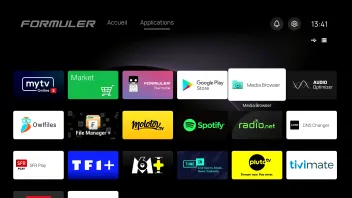

Yes that one i know too. Good app.
I only deleted some apps what i dont use, but i didnt know you can hide apps with it. Long time i used that app. But great to hear. I will install it again.
Had it in my gtv but not used yet on my z11.
Note: be carefull what you delete. Had it before that box didnt started. (I thought some app that was on the box can go away.)
So i had to do factory reset.
Ah great, i had on my gtv an older version. It was long time no updated. So it is now in september 2024 updated. Time to get rid of some apps again😂
 Display More
Hello,
I'm not sure to undestand what you really want
If you want hide apps from apps tab (apps that you do not want use anymore) , you can do it with adb
You can use Android TV Tools (from XDA), you have also ADB TV (available on playstore)
You can see on my screen, i hide media browser app, it's not showing anymore in 2nd picture (i used ADB TV app)
I installed ADB TV and don't see option to hide the app. Only to disable and uninstall. Am I missing something?
Is it possible to hide ADB TV app itself?
I want ot make the screen as clear as possible.
While on the subject of the home screen
Is it also possible to hide the 2 big grey boxes "Edit Row" and "History and Favorites"
I do not like them think they are ugly and I will never use them.
Old home screen was so much better.
I installed ADB TV and don't see option to hide the app. Only to disable and uninstall. Am I missing something?
Is it possible to hide ADB TV app itself?
I want ot make the screen as clear as possible.
What app do you want hide (I would like reproduce if i have the same issue than you)?
After hide apps, you can unstall ADB TV, if you need to activate again your apps you reinstall again ADB TV
I installed ADB TV and don't see option to hide the app. Only to disable and uninstall. Am I missing something?
Is it possible to hide ADB TV app itself?
I want ot make the screen as clear as possible.
You got it right. Hide is not there.
Maby this newer update from adb app has a bug.
But if you use uninstall its gone. And uninstalled apps can be installed again via that adb. Just "activate" it again.
Another app you can manage your AndroidTV apps is atvTools
You install the app on your smartphone and manage your Formuler apps since the smartphone
In my memories you cannot use the kind of feature in free version, but you can request to the dev a trial test (it's the same dev who release TVQuickAction Pro app)

Why would you hide media browser app it’s the best 

Why would you hide media browser app it’s the best
I stay with file manager plus.
Go to the cogwheel in right upper corner.
Select launcher settings
Select history and favorites
It doesnt remove it, cant be removed.

I stay with file manager plus.
Was a joke 


While on the subject of the home screen
Is it also possible to hide the 2 big grey boxes "Edit Row" and "History and Favorites"
I do not like them think they are ugly and I will never use them.
Old home screen was so much better.
You can try to add a couple more app rows to push those two buttons out of sight.


