

I'm having the same problem with last update...Z11 box, tried the network mod ...Go to Network -> Private DNS -> and choose there QUAD9 DNS Server. No Go.... Deleted my portals and added back, nothing! Where to go next?? I'm quite upset as their are 2 boxes down.... same failure! Will a total box reset delete latest firmware?

Official Firmware Update - v. 11.3.6 Hotfix for Formuler Z11 Series released.
-
- Z11 Series
- Update
-
SAM -
February 3, 2026 at 4:31 PM
We asking all new users to read the articles below, before creating their first posting or thread.
- 4. Instruction Articles
Please note, in this forum are only English threads and postings allowed, without any exception!
Please follow the forum rules, thank you for your understanding.
-
-
- Official Post
Factory reset can not delete the Firmware.
Does your Box have internet at all, exclamation mark visible? Test with Youtube.
If internet over Ethernet or Wifi available, please ask Provider to refresh your sub.
-
I have verified both, a number of times.... Provider portal is up, Internet is Up(YouTube) flawless on both boxes. I have been playing with this for the better part of a week! Any other thoughts....? thanks. I have not deleted/re-added the app, but I feel that something is blocking! In the background when refreshing/loading the portal, I see maybe 5% load, then flips to the pic posted? Provider has rebooted their end....
-
- Official Post
Please ask provider to check if the sub. is not blocked from their end.
-

I have verified both, a number of times.... Provider portal is up, Internet is Up(YouTube) flawless on both boxes. I have been playing with this for the better part of a week! Any other thoughts....? thanks. I have not deleted/re-added the app, but I feel that something is blocking! In the background when refreshing/loading the portal, I see maybe 5% load, then flips to the pic posted? Provider has rebooted their end....
Portal is blocked. Ask the provider for new portal (or 1 day free test portal) that enables you to determine it is the portal not the box.
-
Update: found a new provider... back up and running. Old provider was there for 3 years, and insisted it wasn't his portals...well it was, and now he's gone! I thanks all for your help and posts!
-
Good morning everyone.
Will the Formuler Z11 not be updated to Android 12?
Thanks
-

Good morning everyone.
Will the Formuler Z11 not be updated to Android 12?
Thanks
No, all boxes stay always on the Android were they came with.
Only the formuler GTV did had an upgrade cause its the only one with AndroidTV and google certified.
-
Hi, after update the “Refresh Now” option is gone in the menu and VOD content does not update automatically or in a timely manner. I have to manually update now. What happened?
-
Hi,
Make a backup of your mol3favorites etc,then try unstall mol3 and reinstall from Market.
-
Hi Henkie, this did not solve issue. Still no “Refresh Contents” in menu
-

Hi Henkie, this did not solve issue. Still no “Refresh Contents” in menu
Mytvonline3, menu, Contentmanager, sync data, refresh.
-
Hi lucky133, I am aware of how to manually refresh based on your suggestion but has the “ refresh now” button/option been removed directly from the menu? It disappeared after update and content is not automatically being updated even though it has been set to do so.
-
Hi lucky133, I am aware of how to manually refresh based on your suggestion but has the “ refresh now” button/option been removed directly from the menu? It disappeared after update and content is not automatically being updated even though it has been set to do so.
If that's so, make backup of mytvonline3 on usb.
Uninstall mytvonline3
Restart box
Install mytvonline3 via Market app
Restore backup.
The refresh should be back in the Contentmanager.
(Note: refresh was in mytvonline2 menu. In MyTVOnline3 they put in in the Contentmanager section)
-
I tried this as well as per Henkie advice. Did not solve issue . Still not in the menu
-
I tried this as well as per Henkie advice. Did not solve issue . Still not in the menu
Please make a photo my friend
-
-
Hi,
Can you also make a picture of your content sources in content manager/
-
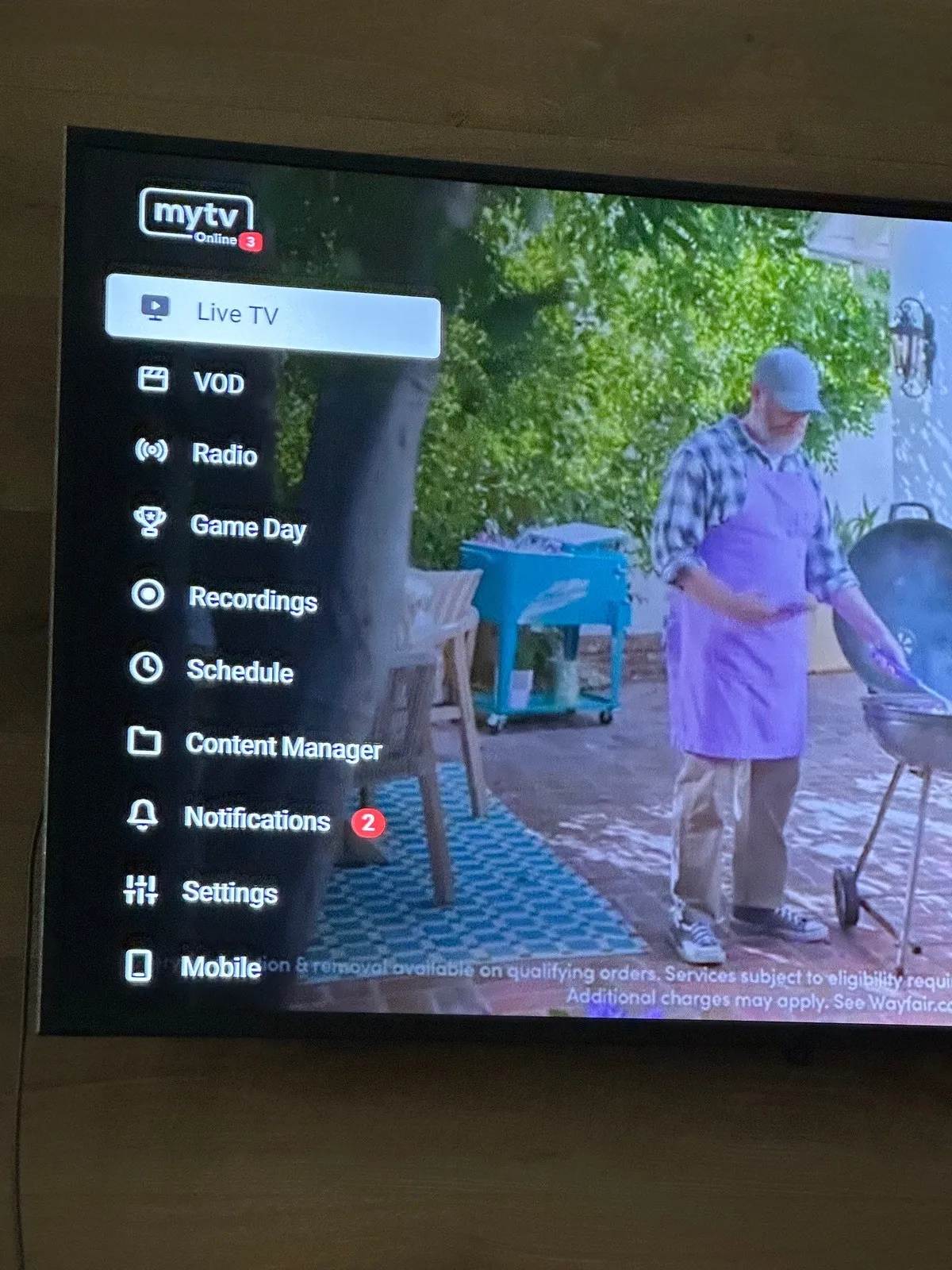
In this menu of mytvonline3 it isn't there the refresh button.
That was only in mytvonline 2!.
In mytvonline3 it's in the menu Contentmanager, data sync.
Not in the menu itself, like mytvonline2.
-
That’s not correct. It was there over the last year on mytvonline3 before the most recent update. It was convenient and worked well which is why I was disappointed to see it disappear with recent update
-
Yes the refresh is available through content manager, sources….
-
That’s not correct. It was there over the last year on mytvonline3 before the most recent update. It was convenient and worked well which is why I was disappointed to see it disappear with recent update
I'm sorry, but i hardly believe "refresh" was in your Mytvonline3 menu.
It was never there, not on mine Z11 pro max bt1 and also not on Z12 ultra.
Only in mytvonline2!
I think you ment mytvonline2 my friend.
(But i hope they add it in future like in mytvonline2)😃
Wish you a goodday.
-
- Official Post
MOL2 have it shown in MOL2 Menu, since MOL3 it was not anymore there and moved directly central to CM Menu.
-
MOL2 have it shown in MOL2 Menu, since MOL3 it was not anymore there and moved directly central to CM Menu.
Saved by the bell
 😉😂😃
😉😂😃 -
It is in the MOL3 menu when there is new content available.Once you refresh it goes away
-
- Official Post

It is in the MOL3 menu when there is new content available.Once you refresh it goes away
That`s right, but it is not constant menu entry only temporally info you can confirm. I understood we speak about constant menu entry.
-
Thanks for confirming Freedom35. I knew I wasn’t crazy!!! lol. My point is then , it doesn’t show up at all . If I refresh through content manager , new content appears in VOD without ever being prompted by the Refresh that was often/daily in the menu.
-
Freedom35 does it still prompt you after most recent update? It has gone away for me.
-
Freedom35 does it still prompt you after most recent update? It has gone away for me.
Menu, Contentmanager, data sync, auto update settings, schedule refresh switch to on.
Time of a day: 16:00 hours or so.
When box is on it will auto refresh between 16 and 17.00 hours mosly.
If box is shutdown it won't work ofcourse😉
-
Ok thanks Lucky133 and everyone for their input and support.
-
Freedom35 does it still prompt you after most recent update? It has gone away for me.
Yes it still does. I have auto update turned on and never turn power off and it still prompts me to refresh. and as I said as soon as the refresh is complete it is gone from the menu.
-
Yes it still does. I have auto update turned on and never turn power off and it still prompts me to refresh. and as I said as soon as the refresh is complete it is gone from the menu.
It does that if your box is on, mytv is open, even if it is in the background when the auto refresh is scheduled, so that it does not interrupt your streams eg. For watching or recording.
If you force close mytv around the same time as the auto refresh you will not see that refresh option. Same if you have the box switched off. -

Download and install OK.
All works fine but I have noticed that my remote does not works as smooth as before.
It looks like every 5 or 6 seconds it does not respond when I press any button. 1 sec later it does respond to repeat this 5 or 6 sec later.
I will test more and will also replace the batteries.
I'm now seeing the same Bluetooth remote issue on 3 different Formuler Z11 Pro BT units.
The remote works fine at first, but after some time it stops responding, even though the white LED on the remote still blinks.At that moment, the box also appears to be frozen, because it no longer responds to the remote at all. The only way to recover it is to disconnect the power and restart the box.
I have re-paired the remote, but that does not permanently solve the issue.
When I disable Bluetooth and use the remote in IR mode instead, the box remains stable and the problem does not return.
So at the moment, switching from Bluetooth to IR seems to be the only reliable workaround.
Is Formuler aware of this issue, and is there a firmware fix planned?
-
 Display More
I'm now seeing the same Bluetooth remote issue on 3 different Formuler Z11 Pro BT units.
The remote works fine at first, but after some time it stops responding, even though the white LED on the remote still blinks.At that moment, the box also appears to be frozen, because it no longer responds to the remote at all. The only way to recover it is to disconnect the power and restart the box.
I have re-paired the remote, but that does not permanently solve the issue.
When I disable Bluetooth and use the remote in IR mode instead, the box remains stable and the problem does not return.
So at the moment, switching from Bluetooth to IR seems to be the only reliable workaround.
Is Formuler aware of this issue, and is there a firmware fix planned?
Ah, so it's not only me! Have the exact same issue!
-

Ah, so it's not only me! Have the exact same issue!
I've seen this as well. Sometimes when it doesn't respond, and I push the button I want a few more times, MTVO3 will crash and exit to the main menu.
-
Ah, so it's not only me! Have the exact same issue!
I have the same problem , z11 goes back to start screen .I use 2 formulers both the same problem.
-
This issue seems to be affecting multiple users. Could you let us know whether it will be included in the next update? That would be much appreciated.
-
- Official Post
I will ask and let you know.
-
- Official Post

I have the same problem , z11 goes back to start screen .I use 2 formulers both the same problem.
This issue seems to be affecting multiple users. Could you let us know whether it will be included in the next update? That would be much appreciated.
Please provide logs of the issue.
💡 HOW TO
- Unplug your power cable and plug the cable back in
- Reproduce the issue with your device
- Go to Home > Settings > Device Preferences > About > Report a Problem > Send logs
Before Sending logs, please write down your Tracking # on the left-side of the screen - Reply to your ticket with the tracking# in step 3
-

Please provide logs of the issue.
💡 HOW TO
- Unplug your power cable and plug the cable back in
- Reproduce the issue with your device
- Go to Home > Settings > Device Preferences > About > Report a Problem > Send logs
Before Sending logs, please write down your Tracking # on the left-side of the screen - Reply to your ticket with the tracking# in step 3
That is a problem, because if the remote control stops working, I can no longer access the menus.
-