MYTVOnline 4 Beta Upgrade now available for Z12 Ultra

We asking all new users to read the articles below, before creating their first posting or thread.

  • 4. Instruction Articles

    • Please note, in this forum are only English threads and postings allowed, without any exception!

      Please follow the forum rules, thank you for your understanding.

  • MOL4 Beta Report


    1. Love the new glass like user interface. Much more modern.

    2. AI search is poorly integrated at present. Quite a few options give a “failed to load data” error.
    I tried searching for instance for “CIA” and it gave me nothing

    3. There is now no option to change the native player to an alternative, eg VLC.
    EDIT. Just found the option in the user settings menu. Not very intuitive.

    4. If you use voice search it doesn’t automatically do the search for you. You have to click into the search bar, scroll down to the search button and click it.

    5. After doing a search on the AI, underneath it says “shuttle all”. This should say shuffle


    6 love the ability to play a currently running program from the start directly from the epg, rather than having to start the program then click cloud shift.

    7. Fast forwarding in catch up is extremely slow. I done a side by side comparison between mol3 on my Z11 pro max, the difference was staggering.

    Edited once, last by Duffyt (April 16, 2026 at 9:25 AM).

  • Quick impressions, seems a little sluggish scrolling down channels.
    Not much of a worthy update for me.
    To be worth the big ‘4’ upgrade, rewinding on live tv with catch up to the beginning of the program is desperately needed. (Like tivimate)

    Could you provide more details of the issue?

    You can already use the local timeshifting feature, and rewind. Make sure to access the MOL4 settings and enable the timeshift in DVR settings.


    Please let me know if you are talking about a different issue.

  • Is it possible to bring back the color themes for the User Interface? For example Tv Guide change from blue to black?


    And is it possible that, when you start watching, in stead of the Home Screen, start watching in the last section that you where watching the last time?

  • This is a great update, thank you! Love the option of home screen previews in particular. Only a couple of things that I see at the moment:

    MOL4 Beta Report:

    1. When I do a voice search, what I say comes up in the text field, but I then have to select and navigate the on-screen keyboard to submit it, and see search results. Would be better if it automatically submitted or at least only required one button press on the remote to submit.

    2. When I leave the app to the main Z12 menu screen, then select the app again, it launches from scratch (i.e. I see the app launch splash screen). Is this intentional?

  • Thank you for the feedback.

    1. We will review if imporvements can be made on this.

    2. I couldn't reproduce this. Could you check if the issue occurs after specific amount of time in the launcher screen before entering the app again?

  • MOL4 beta report

    1. EPG more than 1 day ahead when pressing the guide button is still not fixed sinds MOL3. Using xc connection . I don't understand that friends of me with cheap Chinese boxes using their own My TV app can see 7 or more days ahead. Don't understand me wrong I like my Z12 ultra and MOL.

    2.if I want to delete channel-, series and vod groups I have to mark or unmark one by one. Missing the red button to mark or unmark each list at once. The window is very small it have to be increase size to have a better view.

    3. if I am in vod or series section the back button don't bring me back to live channels. Now you have to press menu button which brings me back to start screen where I have to select live channels.

    4. scrolling through menu and channel list is not so smooth as in MOL3

    That's all so far

  • Mol4beta report

    1/ i completely agree with point 1 &3 of Belgiumuser report.

    2/i have a specific issue one of my providers needs manual epg update,between 14-16 pm.In CM>CS>options the ability to update epg has gone lost,was in mol3 possible.

    3/ iLove the layout of MTOL4 and esp.the app walkthrough<still havent found out how to set colourthemes(But this will come with time)

    4/big compliments for the devs.&F-team,it was defenitely woth the wait:thumbs_up::thumbs_up::thumbs_up:

  • Mol4beta report

    1/ i completely agree with point 1 &3 of Belgiumuser report.

    2/i have a specific issue one of my providers needs manual epg update,between 14-16 pm.In CM>CS>options the ability to update epg has gone lost,was in mol3 possible.

    3/ iLove the layout of MTOL4 and esp.the app walkthrough<still havent found out how to set colourthemes(But this will come with time)

    4/big compliments for the devs.&F-team,it was defenitely woth the wait:thumbs_up::thumbs_up::thumbs_up:

    Hi,

    I searched everything but couldn't find color themes too. I 💬 it is implemented yet.

    Your point 2 a cannot confirm, I am able to set update EPG to 3 hours.

    Have nice day!

  • MOL4 Beta Report:

    1. When Z12 is turned off by Standby, while watching Live TV, it will Refresh Automatically as per the set time (5am). Once the Z12 is turned on it is not on Live TV it is back to the MOL4 Home screen where I have to select Live TV again to watch TV. MOL3 would be still on Live TV.

    2. Similar to #1 above, When you do a refresh manually, and you get the screen thats says New Content has Arrived. Press OK .... It will do the Refresh Contents and finish. However as above it boots me out to MOL4 Home screen where I have to choose Live TV again to watch channels. MOL3 would just stay on Live TV and you would continue watching.

    3. In MOL4 Home screen when you go to Switch User and Manage Profile, there is a choice to Delete Profile. There is no warning that this will delete all associated settings and Favorites for this user. It is common sense that it would but a warning should probably be there to remind users that doing so will remove all that was set up by this user including Favorites set up by this user.

    4. Being able to set Colour/Theme has been removed.

  • Sorry if I sound like a dope... 😊 How do I get to the menu to create a Favorite Category and also, if I have Favorite Categories already setup with channels within the Favorite Category, how to I organize those channels, i.e. move them up or down on the list.

    MOL3 it was as easy as Hitting Favorite button on remote and then arrow to the left to enter add groups etc... Sorry!

    Other than this, I think everything is working great. I am not noticing any glitches or slowness in navigating around the menus etc..

  • MOL4 Beta Report:

    1. OTA/ATSC EPG Data took approximately 36hrs to begin to populate. After data started to populate, it is mostly inaccurate with huge time gaps.

    2. The ability to assign an alternate EPG for sources would be highly beneficial. Some sources do not provide great EPGs and purchasing a separate EPG source corrects this.

    3. Missing ability to change text size, unless I'm overlooking something.

    Edited once, last by robq391: Addendum (April 16, 2026 at 7:21 PM).

  • You can use the left arrow to add groups and press info on the mol4 control to move up and down channels and favorites, delete-add group-reorder-rename and do all the necessary things.

    Thanks, I know how to reorder fav channel list now lol but can you explain how to pin a group or am I missing something in your previous post?

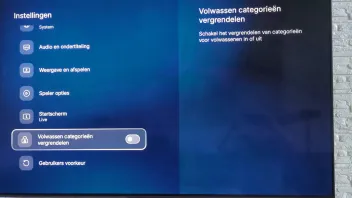
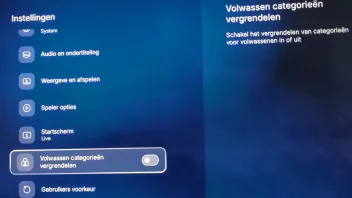
  • I installed MOL4,like it a lot.But i wonder-When i was scrolling in live,In MOL3 you had to insert pin for Adult,now there is no protection for that.I have been searching but cant find where to set a protection for that.Anyone who has a solution?

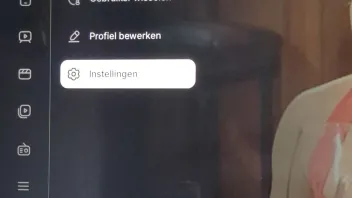
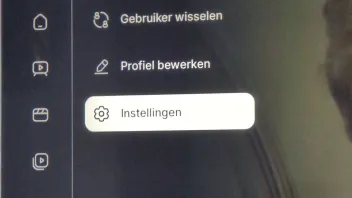
    I saw that too. I found that when in MOL4, hit the menu button and top left there is the user. Use the arrow to go up to the user and and click OK on it. I'm not in front of it right now but I think there is something that says Manage Users. Go into that and each user can be set up to lock Adult Categories as it was before. The default if OFF. I'm not entirely sure but from memory I think that where that is. It then allows you set up each user with their own set up.

  • I saw that too. I found that when in MOL4, hit the menu button and top left there is the user. Use the arrow to go up to the user and and click OK on it. I'm not in front of it right now but I think there is something that says Manage Users. Go into that and each user can be set up to lock Adult Categories as it was before. The default if OFF. I'm not entirely sure but from memory I think that where that is. It then allows you set up each user with their own set up.

  • MOL4 Beta Report:

    1.ASTC caption's display but are gibberish/ unreadable.

    2.As listed before me issues with search in vod and exiting to live tv etc.

    3.Not able to locate framerate controls/ possible framerate issues in vod series

    4.HDR formats shown as 8bit RGB instead of 12bit color. Live tv 1080/720 is shown in 12bit color. this issue is also shown in kodi so more of a box issue than MOL I would think.

    Also would like to see more robust framerate controls instead of just 50/60. Maybe add back option for for 59.94 and 29.97 switching. the box is able to utilize these framerates just not MOL, Also the ability to hide channels.

  • Could you provide more details on how to reproduce the issue? I tried pressing the back button in VOD groups but it is working as expected.

    If possible, please provide a vide of the issue. You can upload the video to streamable.com and send me the link to the video.

    I think I know what he means with the bug.

    When in a series or VOD category, if you keep pressing back button as to exit VOD it keeps you in the menu or so to speak.

    You need to select menu button to select and go back to live TV now.

    On MTOL3, pressing back button a few times, it used to take you back to Live TV which was nice

  • I have an issue where one of my content sources/providers gets stuck on processing at 50%


    You have to leave it until ends or until error appear. Good possible that reconnect to provider doesn`t work currently or they do some maintenance. Please check.

  • Is it possible to bring back the color themes for the User Interface? For example Tv Guide change from blue to black?


    And is it possible that, when you start watching, in stead of the Home Screen, start watching in the last section that you where watching the last time?

    If you want to start on live TV for example, change your initial start to Live TV instead of Home.

    If I’m thinking about the same thing you refer to…

    To change, on a live channel, press menu button

    Select your profile and then settings

    From the menu that appears, now select Start Screen and pick Live.


    If that’s not what you mean and you want MTOL to load on boot, on the Formuler Home Screen go settings (gear icon) then launcher settings and select Mytvonline as the startup app.

    Either way both options above covered. I hope this helps answer your question

  • Did someone already discovered "Alternate EPG" for EPG in Portal Settings with XC Api Portal:winking_face:

  • I notice when you manually refresh contents from content manager or TV / VOD listings, when complete it returns you to MTOL Home Screen even if you are set to Live.


    And also when you select to refresh manually it doesn’t tell you “Refresh Start” like in MTOL3. So you might be unsure if it works until you receive a popup to complete when content pulled through.

    Edited once, last by adrilang (April 16, 2026 at 10:11 PM).

  • Seem to have lost the ability to change the default player for VOD and Series.

    Sorry if someone already replied to this. Still working my way through.

    You can change default player in live TV through the avatar menu but I’m unsure if this acts for VOD aswell? Maybe someone could confirm.

    If not, then yes you are right, the option doesn’t appear in VOD / series menus.