


do you have to re-enter everything like the channels
No, you can migrate MTOL3 portal data during upgrade process.
Works perfectly

We asking all new users to read the articles below, before creating their first posting or thread.
Please note, in this forum are only English threads and postings allowed, without any exception!
Please follow the forum rules, thank you for your understanding.
do you have to re-enter everything like the channels
No, you can migrate MTOL3 portal data during upgrade process.
Works perfectly

Can i seee screeeeens
See Sam’s first post. Lots to see there 

Can anyone confIrm that playlists are preserved after installing MOL4. I have about 8...
Yes if you migrate portal data during MTOL4 upgrade process

I just checked….
Wahooo Alternate provides many days EPG from Main Guide
Sorry to ask.But how do i find this?
I just checked….
Wahooo Alternate provides many days EPG from Main Guide
MOL4 menu -> App Settings -> Content Sources -> click on your portal ->Edit -> Epg Mode and chose Alternate Mode, click on update.
It will take some time to populate, depends from provider.
No, sorry.
So after 2 years its already outdated?
If I’m in live TV channels and then press menu > More > Gameday
If I press back button to exit, it takes you to Home Screen and not back to Live TV section
If I’m in selection, Schedule or Recordings, pressing back button does take me back to live TV.
In the same menus as above, if you select exit, it will exit Mytvonline4. That might be intended but people could think it means exit menu?

So after 2 years its already outdated?
Don’t be silly. Zmini is NOT outdated at all.
Did someone already discovered "Alternate EPG" for EPG in Portal Settings with XC Api Portal
Hi SAM , didn't. How should we know?
So it is know possible to enter "second" EPG source except the one which comes via xc API portal?
Hi SAM , didn't. How should we know?
So it is know possible to enter "second" EPG source except the one which comes via xc API portal?
I think Sam was just having some fun because no one mentioned they found it and usually many days epg is the first thing people hope arrives in new updates
Did someone already discovered "Alternate EPG" for EPG in Portal Settings with XC Api Portal
Why did you mention this in a btw. manner,change to alternate epg mode,on XC connection,produces now 5-7days ahead in grid epg,this is truly BREAKING NEWS,a long criticised shortcoming of mol3
First Post updated:
5 new EPG Screenshots uploaded. XC Api Portal with Alternate EPG Mode and Main EPG + Single EPG Screenshots.
Now you can record, catch up etc. from both EPG`s.
I discovered when i was using show and hide groups-When i hide a group,if i lucky,i can hide 2 groups,then MOL4 restarts.Have tried this several times now. I tried this on the Vod group.
First Post updated:
5 new EPG Screenshots uploaded. XC Api Portal with Alternate EPG Mode and Main EPG + Single EPG Screenshots.
Now you can record, catch up etc. from both EPG`s.
Just wondering,is this finding was by trial&error (or serendipity),like the invention of Viagra,that was intended to be a antihypertension drug,but had some side effects,some men cant do without,or was there a Masterplan by devs.&team ???
???
Many sections are programmed new and existing code overwriten/extended, newer google tv feeling and result is mol4. Use it and be happy For me personaly, the best MOL ever.
Don’t be silly. Zmini is NOT outdated at all.
There is no reason why they can’t also upgrade the app on the Mini 🤷♂️.
Did someone already discovered "Alternate EPG" for EPG in Portal Settings with XC Api Portal
Very great till 10 ahead! You made my day.
I know everyone (almost everyone) can care less about subtitles and even worst, subtitle vertical position but as someone from a country that need subtitles for everything i urge you to please give us the possibility to put subtitles below video for movies with 2:35:1 AR in VOD TV and Movies...
Already asked for Mytv3 but nobody can care less, anyways here we go, i know everyone uses dubbing in eastern europe but give the west something. It's not that hard as thousands of other apps already do, even prime video does it now...
Because i cannot watch a 2:35:1 movie or series with the subtitles in the middle of the screen and it happens 80% of the time making my Mytv VOD experience useless. SO much for opensubtitles and other subtitle settings and you are forgetting the most significant one in the subtitle issue.
Just got my second Z12 Ultra and still can't software update, just says your up to date?
Feature Request (User Agent): Would it be possible to add a custom "User Agent" setting for the player when using M3U playlists? This addition would solve many channel playback issues.
Thanks
First Post updated:
5 new EPG Screenshots uploaded. XC Api Portal with Alternate EPG Mode and Main EPG + Single EPG Screenshots.
Now you can record, catch up etc. from both EPG`s.
This is very good news for the EPG available several days back in XC rather than just on Mac...
Would it be possible to apply this fix to MOL3 now that they know how to do it, as it is not normal at all that it hasn't worked for years...?
Could you please pass that along to them?
Thanks 

MOL4 Beta Report:
1. When Z12 is turned off by Standby, while watching Live TV, it will Refresh Automatically as per the set time (5am). Once the Z12 is turned on it is not on Live TV it is back to the MOL4 Home screen where I have to select Live TV again to watch TV. MOL3 would be still on Live TV.
2. Similar to #1 above, When you do a refresh manually, and you get the screen thats says New Content has Arrived. Press OK .... It will do the Refresh Contents and finish. However as above it boots me out to MOL4 Home screen where I have to choose Live TV again to watch channels. MOL3 would just stay on Live TV and you would continue watching.
3. In MOL4 Home screen when you go to Switch User and Manage Profile, there is a choice to Delete Profile. There is no warning that this will delete all associated settings and Favorites for this user. It is common sense that it would but a warning should probably be there to remind users that doing so will remove all that was set up by this user including Favorites set up by this user.
4. Being able to set Colour/Theme has been removed.
1. Try to access the profile settings > Start Screen. If it is set to Home, please change it to Live.
2. Please follow the steps on #1 and let me know if the issue remains.
3. We will review if this warning will be needed.
4. We're currently aware of the demand for color themes.

I discovered when i was using show and hide groups-When i hide a group,if i lucky,i can hide 2 groups,then MOL4 restarts.Have tried this several times now. I tried this on the Vod group.
I couldn't reproduce the issue on my end.
Is the issue reproducible 100% of the time, or does it only occur occasionally?

Just got my second Z12 Ultra and still can't software update, just says your up to date?
If you are trying to update the MTOL4 then do this:
When you see “software up to date” on you’re remote control press 1339 and then follow onscreen instructions.

1. Try to access the profile settings > Start Screen. If it is set to Home, please change it to Live.
2. Please follow the steps on #1 and let me know if the issue remains.
3. We will review if this warning will be needed.
4. We're currently aware of the demand for color themes.
Thanks for the reply Peter. Yes start Screen is set to Live and I tested again by doing a Refresh. When it finishes and says New Content has Arrived and I click OK. When that is complete the Live Tv program stops and it goes to the MOL4 Home Screen. Also when this happens in background at 5am it also boots the live tv and sends you back to MOL4 Home screen. So every morning when I turn it on it is on the MOL4 home screen and not Live TV as it was when I put it in standby

I know everyone (almost everyone) can care less about subtitles and even worst, subtitle vertical position but as someone from a country that need subtitles for everything i urge you to please give us the possibility to put subtitles below video for movies with 2:35:1 AR in VOD TV and Movies...
Already asked for Mytv3 but nobody can care less, anyways here we go, i know everyone uses dubbing in eastern europe but give the west something. It's not that hard as thousands of other apps already do, even prime video does it now...
Because i cannot watch a 2:35:1 movie or series with the subtitles in the middle of the screen and it happens 80% of the time making my Mytv VOD experience useless. SO much for opensubtitles and other subtitle settings and you are forgetting the most significant one in the subtitle issue.
Eastern Europe? Also in central end west Europe.
Sorry if someone already replied to this. Still working my way through.
You can change default player in live TV through the avatar menu but I’m unsure if this acts for VOD aswell? Maybe someone could confirm.
If not, then yes you are right, the option doesn’t appear in VOD / series menus.
Yes thanks. I updated my post to say I’d found it, but it doesn’t make sense to me as you have to change player for each profile that way.
Is the update only a MOL4 update or have other issues been fixed too, like boxes randomly restarting.. boxes not working with certain sound bars or home cinema ? Some boxes that have no sound ?
Also why are some z12 able to locate ITVx app and some other UK apps in the Google play store, but other Z12 get the message "Not available for this device!
REQUEST.... Can you please swop the Hide/Pin icons..... removing 100 groups now requries 300 clicks where as before it was just 100... Swopping the pin and hide will reduce it to just 200

Yes thanks. I updated my post to say I’d found it, but it doesn’t make sense to me as you have to change player for each profile that way.
Maybe in future updates there’ll be an option to carry certain settings to all profiles?
Just got my second Z12 Ultra and still can't software update, just says your up to date?
When you go to SW update>1339>you will see preparing for update,press immediately OKbutton and update will start.
It worked for me,so dont wait till you get the message your formuler is up to date,but press ok while prepariing forupdate is still visible.
Ok, so here's my MOL4 feedback.
Firstly I think the UI looks great. Super modern. This has really wonderful potential to be really "high end" and premium.
Now my issues with current Beta, most of which has been mentioned by others but will do it anyways:
1. Channel Lists, Favorite Ordering (the old Content Manager in MOL3). Feels like a bit of a step back here. Seems cumbersome and awkward and as others has mentioned there's no option to Select All/None meaning many, many more clicks when making changes or adding new provider etc.
2. Colour schemes not available - though I'm assuming these will come as it's suggested at in the information guide within MOL4.
3. Chanel Name Editing. I found how to do this once, but couldn't find it again . It seemed to suggest you could amend the Prefix or Suffix. Nice, but I think when I tried it, would just let you amend the full name. It would be really, really nice if you could do like a global select of a number of channels and remove a prefix, but might be asking too much here.
4. Agree with other comments when using the AI search feature not bringing back results and the "Shuttle" spelling mistake.
5. Home page looks mega. However I think it would be nice to be able to select some of your favourite live TV channels to appear (or favourite lists/groups etc... e.g. I have an Entertainment List, Sports List, Kids list etc) . When on MOL3 you could do this on the actual home page of the device (not the MOL3 app). This has gone now after updating to MOL4, so maybe a little step back?
6. On home page.... the ability to remove your recently watched history (channels, VOD etc) would be nice. Don't want to, er, leave any incriminating evidence for the mrs to find 
7. EPG stuff - agree with some of the others about not going far enough in to the future. I have it set a 7 days, but when I tired to change to the "Alternate EPG" it didn't download some EPG data for some channels at all.
8. No real bugs noticed - but - after I set something to record, then changed my mind and cancelled it the whole EPG, favourite lists and scrolling through anything was VERY VERY slow and laggy.
Thats it. Please take the above in the spirit that its meant. I think this update has incredible potential. (And as a Z Mini owner too a shame it wont be available on there... though I can see why - you want your flagship expensive model to have the best, exclusive stuff on there)


Potential show-stopper BUG for me.
I upgraded to the version 4 beta (migrated playlists) and now none of the streams I have configured through iptveditor (dot) com will play any videos. No live/vod/series.
The playlists load, the EPG loads, stream details like episodes and such load, but the video always fails with a 404 code.
This was not an issue I was aware of with version 3 of mytvonline. VPN or no VPN makes no difference.
If I enter the credentials for my provider directly into version 4, bypassing iptveditor, it works.
I upgraded to the version 3 beta on my z mini and everything still works as expected with iptveditor.
I also factory reset my z12 and started fresh, but have the same issue.
Is there some sort of CORS issue introduced in v4?
I'm definitely not an expert but will try any tests anyone can suggest and post logs if someone shows me how.
Beta feedback.
1. The pin/group is now horrible with the info button etc, was better and simpler before.
2. If I press the home button to leave the app, the sound stops and then starts playing again on the z12 homescreen. So when I switch to YouTube it is still playing audio from mytvonline4. I have to exit the channel in mytvonline4 to stop the sound now, it wasn't like this before.
Thanks.
Ok, update to earlier post.
When you select groups whislt on EPG the groups take an age to slide on from the left side of the screen, like 15 seconds or so which is not at all pleasing....
Its a nice app, I like it very much, but as long as the ability add alternative/secondary epg sources is not an option, then I will continue to use Tivimate which is alos a great app by the way.
I made an update for channels end EPG earlier today, but now I'm not able to find and remember where I found it in the menu...
Hi,
Try mol4 homemenu>app settings>content sources>options>edit
 Display More
Potential show-stopper BUG for me.
I upgraded to the version 4 beta (migrated playlists) and now none of the streams I have configured through iptveditor (dot) com will play any videos. No live/vod/series.
The playlists load, the EPG loads, stream details like episodes and such load, but the video always fails with a 404 code.
This was not an issue I was aware of with version 3 of mytvonline. VPN or no VPN makes no difference.
If I enter the credentials for my provider directly into version 4, bypassing iptveditor, it works.
I upgraded to the version 3 beta on my z mini and everything still works as expected with iptveditor.
I also factory reset my z12 and started fresh, but have the same issue.
Is there some sort of CORS issue introduced in v4?
I'm definitely not an expert but will try any tests anyone can suggest and post logs if someone shows me how.
UPDATE:
If I load my iptveditor playlist via m3u and xml the streams all work.
The issue is that now I don't have access to the series which is another deal-breaker for me.
Also, when loading a playlist via m3u and not XC, the progress bar goes negative millions of percent, then eventually loading properly.
Weird stuff... (sorry for potato video)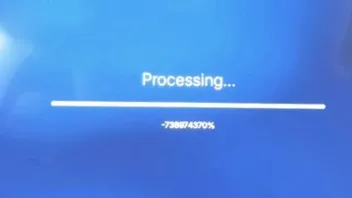
I have several Portals entries on MOL4, and when I search for one piece' series today, the application crashed and restarted every time I did the same search.
I never thought i would write this but i miss Notifications,in order to check whether refresh contents was succesful.
Furthermore, i would like to see reminders/recordings not depicted by a red beam on top of grid epg,but with a fat red dot on the specific channel chosen.
When possible, one refesh contents button for all providers.
Finally make this beta ASAP Official and finetune/tweak it in faster future updates(Great work from the devs )
)

