


Messing around and don't remember how to edit favorite list on MYTVOnline4...
What is it you actually want to do?

We asking all new users to read the articles below, before creating their first posting or thread.
Please note, in this forum are only English threads and postings allowed, without any exception!
Please follow the forum rules, thank you for your understanding.
Messing around and don't remember how to edit favorite list on MYTVOnline4...
What is it you actually want to do?

What is it you actually want to do?
I want to re-arange the list.
I want to re-arange the list.
Press groups on remote, you should then see Favourite group, press info button on remote and you will see options.
When I click on an actor, no movies or series are displayed.
It seems like the app is searching for the actor, so it’s strange that nothing is found. When searching manually, it sometimes works, but not all available titles are shown.
There are no issues with other apps.
Sometimes when I go back into a series, the splash page shows I’m up to one episode, when I’m several episodes past.

When I click on an actor, no movies or series are displayed.
It seems like the app is searching for the actor, so it’s strange that nothing is found. When searching manually, it sometimes works, but not all available titles are shown.
There are no issues with other apps.
Can't speak for this beta, but the actor searching is tied to your provider as far as i'm aware. I have two providers and one is not able to show movies if you look on actors, and another one is, with the same mytvonline3 software.
I have found a bug in MOL4. I live in Sweden and have the menu language set to Swedish. Under VOD and Series if I want to read what the movie or series is about. Then I get the same info regardless of the movie I choose. If I change my menu language to English the information works. I made 2 movies on the error that I upload to my Dropbox Public because I don't think I can insert them in the forum.
svejoh

I have found a bug in MOL4. I live in Sweden and have the menu language set to Swedish. Under VOD and Series if I want to read what the movie or series is about. Then I get the same info regardless of the movie I choose. If I change my menu language to English the information works. I made 2 movies on the error that I upload to my Dropbox Public because I don't think I can insert them in the forum.
svejoh
Hi, no need to use Dropbox.
Wat is the bug? Why are you change the language? You are swedish so what's wrong with synopsis in swedish language.
Have nice Sunday.
Hi, no need to use Dropbox.
Wat is the bug? Why are you change the language? You are swedish so what's wrong with synopsis in swedish language.
Have nice Sunday.
Previously there have been problems uploading movies to the forum so I chose Dropbox to easily see the problem.
My wife wants the information about the movie/series in Swedish so for that reason I have the menu language set to Swedish.
The bug is that the information is the same on all movies/series so you don't know what it's about. The problem doesn't exist if you change the menu language to English.
Take a look at the 2 movies I uploaded and you'll see what I mean.
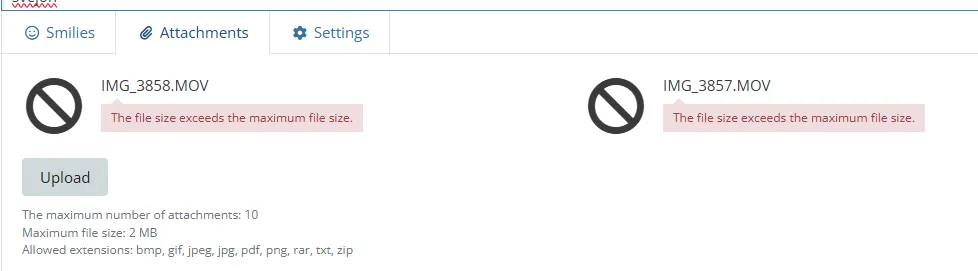
Tried to upload the movies directly to this message, but it didn't work because they were too big, so Dropbox applies.
svejoh
Use streameble or wetransfer for files
Use streameble or wetransfer for files
OK, here it is.
svejoh
I see. It's clear. The box itself (not mytvonline4) is also on Swedish language? Or english?
I had something with an app. (Hbo)
I use vpn. I connected to Poland. And my Z12 interface is in english.
So what you think when you install hbo, in what language it should be? Like the z12 language (english) right?
No! It took my vpn country were i was connected with. Very strange. Only with hbo.
anyway. Do you use vpn? Connected with homecountry or other?
I can reproduce it. It's at the "new added" section. First provider It's all swedish with same text yes.
Second provider first movie is okay.
Ipman is movie and see movie text, but from the seconds movie to the rest it takes over the text from 2nd movie.
Provider 3
All fine.
It changes at every movie, so it's correct.
Provider4
It takes the text ipman movie over from provider 2 and shows it in the newly added row everywhere from provider 4??🤣
when i go Back, to provider 3 and pick a movie the 5thbin the row, and push down to provider 4. It shows at provider 4 the movie info from provider 3 🤣
I see. It's clear. The box itself (not mytvonline4) is also on Swedish language? Or english?
I had something with an app. (Hbo)
I use vpn. I connected to Poland. And my Z12 interface is in english.
So what you think when you install hbo, in what language it should be? Like the z12 language (english) right?
No! It took my vpn country were i was connected with. Very strange. Only with hbo.
anyway. Do you use vpn? Connected with homecountry or other?
No I don't, I have a VPN but use it very rarely.
svejoh
I can reproduce it. It's at the "new added" section. First provider It's all swedish with same text yes.
Second provider first movie is okay.
Ipman is movie and see movie text, but from the seconds movie to the rest it takes over the text from 2nd movie.
Provider 3
All fine.
It changes at every movie, so it's correct.
Provider4
It takes the text ipman movie over from provider 2 and shows it in the newly added row everywhere from provider 4??🤣
when i go Back, to provider 3 and pick a movie the 5thbin the row, and push down to provider 4. It shows at provider 4 the movie info from provider 3 🤣
OK, it doesn't bother me, but my wife likes Swedish. She has her own Formular in the bedroom that I have to deal with.
svejoh
OK, it doesn't bother me, but my wife likes Swedish. She has her own Formular in the bedroom that I have to deal with.
svejoh
Keep in mind, we use still a beta version. Not a Release Candidate version and or final version.
but thanks for the notification of the bug. The devs read it too, so they can fix it for the next version.
Thx. for Reporting. Issue inserted into dev. Bug Report list.

Could you send a video of the issue? Also, please send me the logs after reproucing the issue.
You can upload the video to streamable.com, and send me the link.
For logs, please click here for the guide.
Tracking # is 0000001FF81C6 and streamtable link is https://streamable.com/lh0bto
Mol4 on z12 ultra, bug came across Mol 4 doesnt launch, starts to launch and fails, keeps looping. Cannot watch anything.
I do understand its a Beta but it wasn’t doing this before. Just started to crash today. Anyone else having issues.
Need some work around. Need help.

Mol4 on z12 ultra, bug came across Mol 4 doesnt launch, starts to launch and fails, keeps looping. Cannot watch anything.
I do understand its a Beta but it wasn’t doing this before. Just started to crash today. Anyone else having issues.
Need some work around. Need help.
Does it occur when you enter specific menus?
Z12 gets turned on. I scroll over to select Mol4 and click ok, it starts to launch but crashes.
Can I send u an email attached video clip
Z12 gets turned on. I scroll over to select Mol4 and click ok, it starts to launch but crashes.
Can I send u an email attached video clip
Yes, please send it to [email protected]
Also, please send me the logs after reproducing the issue. https://support.formuler.tv/kb/article/82-…-and-send-logs/
Emailed and Log sent through the z12 box under Help.
Emailed and Log sent through the z12 box under Help.
please let me know the tracking number for the logs
Tracking # :0000001FF60D4
Wish I could re install the Mol 4 but how. Should I perform a factory reset. Any suggestions
Mol4 on z12 ultra, bug came across Mol 4 doesnt launch, starts to launch and fails, keeps looping. Cannot watch anything.
I do understand its a Beta but it wasn’t doing this before. Just started to crash today. Anyone else having issues.
Need some work around. Need help.
I sometimes had this if I started on the home screen of MOL4. Work around: immediately scroll down the second it is in the home screen. You can choose another landing page too, to avoid this from happening. After a while it disappeared for me, BTW. It looks like it has something to do with trending Movies or Series on the top of the screen.

Possible bugreport,
When wachting a serie, i'am watching Season 2 episode 5, in the middle of the episode i stop to go to sleep, turn the box off .(not standby) resume next day, normally it pick up where i left, now it pick up at Season 1 episode 5 in the middle.. select Season 2 enter episode 5 and it pick up where i left yesterday... this happens already a few times, worth to mention anyway.
No response?
Happens once in a while...
Mol4 on z12 ultra, bug came across Mol 4 doesnt launch, starts to launch and fails, keeps looping. Cannot watch anything.
I do understand its a Beta but it wasn’t doing this before. Just started to crash today. Anyone else having issues.
Need some work around. Need help.
Already tried remove cache and or if fails remove data from mol4?
MOL4 CRASHING / STUCK IN A LOOP
Everything has been working just fine since I loaded the BETA when it came out. Last night, mysteriously I turned on my Z12 and when trying to open MOL4 it got stuck in a loop. It would try to open, the screen would flash and then the MOL4 logo screen comes up, tries to open, flash and keep repeating itself. I tried everything to get it to stop. I was able to hit the Home Button and all other apps works fine.
I had to wipe the unit to factory, reinstalled MOL4 and after I setup my first PORTAL, it asked me to select my startup screen, I selected the first one that appears in the menu and then the screen flashed, MOL4 crashed and it went right back into the loop issue.
I reset the unit again to factory and after I loaded my first PORTAL, this time I selected the second screen option with the "CLOWN FISH" picture. It worked and I was then able to load my second PORTAL. I was up all night getting this to work properly and I want to know, has this been a problem? When do we think a final version is coming. I would now consider MOL4 BETA to be a mess 😒

MOL4 CRASHING / STUCK IN A LOOP
Everything has been working just fine since I loaded the BETA when it came out. Last night, mysteriously I turned on my Z12 and when trying to open MOL4 it got stuck in a loop. It would try to open, the screen would flash and then the MOL4 logo screen comes up, tries to open, flash and keep repeating itself. I tried everything to get it to stop. I was able to hit the Home Button and all other apps works fine.
I had to wipe the unit to factory, reinstalled MOL4 and after I setup my first PORTAL, it asked me to select my startup screen, I selected the first one that appears in the menu and then the screen flashed, MOL4 crashed and it went right back into the loop issue.
I reset the unit again to factory and after I loaded my first PORTAL, this time I selected the second screen option with the "CLOWN FISH" picture. It worked and I was then able to load my second PORTAL. I was up all night getting this to work properly and I want to know, has this been a problem? When do we think a final version is coming. I would now consider MOL4 BETA to be a mess 😒
I can't find a clown fish logo. Only whale.
Anyway you can make backup with usb stick from mol4 after setting up portals.
Mol4 menu, app settings, backup & restore. Then you don't need to type all your portals.
Just restore it after a reset with the usb.
Yes, i have sometimes crashes too. It's close itself while watching live channels and or scrolling in groups.
But It's a beta.
I remove data and cache from mol4 and restore backup via usb. Then often it work for some days.
I can't find a clown fish logo. Only whale.
Anyway you can make backup with usb stick from mol4 after setting up portals.
Mol4 menu, app settings, backup & restore. Then you don't need to type all your portals.
Just restore it after a reset with the usb.
Yes, i have sometimes crashes too. It's close itself while watching live channels and or scrolling in groups.
But It's a beta.
I remove data and cache from mol4 and restore backup via usb. Then often it work for some days.
Hi Lucky, appreciate the response and yes of course, I know it is a Beta, but this was an infinite loop situation. The Clown Fish screen I referenced is the second option to your right after it asks to select a startup screen. Right now, I have it all working again  When I reset to Factory, I thought I would be able to still use MOL3 but I guess because of the firmware update, it only allowed me to reinstall MOL4
Hi Lucky, appreciate the response and yes of course, I know it is a Beta, but this was an infinite loop situation. The Clown Fish screen I referenced is the second option to your right after it asks to select a startup screen. Right now, I have it all working again
So far i know is mol4 beta offline. (Correct me if im wrong)
So if you make an backup and do factory reset, then you are able to install mol3 so far i know.
Beta mol4 was temporary online.
So far i know is mol4 beta offline. (Correct me if im wrong)
So if you make an backup and do factory reset, then you are able to install mol3 so far i know.
Beta mol4 was temporary online.
That is what I thought as well... I might be wrong, but I believe it is tied to the Firmware. After Factory reset, MOL3 was not showingi in "Market" So the only way I was able to get MOL back on was doing a 1-3-3-9 in Software update. It automatically loaded MOL4 with no other option.
Also, the CLOWN FISH I was referring to is in your setup settings not the user profile. I saw the whale icon in user profile
I started having similar issue with Mol4 just crashing, wont open at all, loops around.
This is Crazy bug with Bets Mol 4. This wasn’t happening before just started a day ago.
Same issue with me on both my boxes, very dissatisfied with this Beta version I have uninstalled it on both and using a different App till they get a working MTVOL4 app, wish I had never updated to MTVOL4 from MTVOL3
A little patience, everything will be fixed and will run like a Swiss watch. The development team is doing everything possible to resolve these issues.
Feedback on the new beta app – Issues encountered so far
Hi team,
I’ve been testing the new beta app and wanted to share some issues I’ve encountered so far:

Audio issue after normal shutdown
Every time I shut down the box normally and turn it back on, the sound is gone. A full restart seems to restore the audio.
Is the audio gone for all apps? or are you just not getting it on MYTVOnline 4?
Am I correct that doing a factory reset from MYTVOline 4 will still leave you with MOL4? Asking because my old backup iptv box on MOL3 is having issues.
