


Cause when i created account i had one "3" to much😂

MYTVOnline 4 v14.1.0 BETA 2 for Z12 released
-
- Update
- Z12 Ultra
-
SAM -
June 24, 2026 at 6:23 AM
We asking all new users to read the articles below, before creating their first posting or thread.
- 4. Instruction Articles
Please note, in this forum are only English threads and postings allowed, without any exception!
Please follow the forum rules, thank you for your understanding.
-
-
 Display More
Hey guys,
I'm running the latest version of the MOL4 Beta.
I've noticed a bug with TV shows. When I finish an episode and it's supposed to start the next one, I'm kicked back to the main menu where I choose between the different profiles.
It doesn't matter whether I let the next episode start automatically or select it myself with the remote—it happens either way.
The only workaround is to go back before the current episode finishes and manually start the next episode. Then it works.
Is anyone else experiencing this issue right now?
See post 81 & 116

-
Hi, i have set start screen as live tv, but when you open z12 ultra it doesnt go to live, it open as home screen.
Any other have same issue on beta?
-
Hi,i had the same on beta1 update,on beta2 i dont know,because updating failed.
-

Hi, i have set start screen as live tv, but when you open z12 ultra it doesnt go to live, it open as home screen.
Any other have same issue on beta?
Yes I have the same issue in beta 2.
-
Hi, i have set start screen as live tv, but when you open z12 ultra it doesnt go to live, it open as home screen.
Any other have same issue on beta?
There is an issue, when the Automatic Refresh is done at the set time it defaults back to the Live Screen instead of staying on LIVE. So if your Refresh is done overnight or early morning, when you power up the Z12 it will be on the Home Screen. It also does this when you do a Refresh manually while on LIVE TV. Peter at Formuler has already stated that they know about it. If this is not what you mean...then I don't know.
-

There is an issue, when the Automatic Refresh is done at the set time it defaults back to the Live Screen instead of staying on LIVE. So if your Refresh is done overnight or early morning, when you power up the Z12 it will be on the Home Screen. It also does this when you do a Refresh manually while on LIVE TV. Peter at Formuler has already stated that they know about it. If this is not what you mean...then I don't know.
Hi, yes you're right. Very good explanation of that bug. Exactly the same behavior on my site.
Have a nice weekend 😀🌞☀️
-
Latest beta.
Now when you pause VOD/Series. When resuming picture freezes but audio resumes for a couple of seconds. Before it works perfect.
-

That one should work. I don't use it, so i can't help you.
did you search forum already for how to search and or set it up?
Works perfectly fine on MOTV3 & Z11 box. Must be an issue with the Z12 or MOTV4. Hoping the error will be resolved in an update.
-
- Official Post
Hi, i have set start screen as live tv, but when you open z12 ultra it doesnt go to live, it open as home screen.
Any other have same issue on beta?
Could you try turning off auto refresh and check again?
Please let me know your results.
-
- Official Post

Latest beta.
Now when you pause VOD/Series. When resuming picture freezes but audio resumes for a couple of seconds. Before it works perfect.
couldn't reproduce this issue on my end. Does it happen to all contents? Which portal type are you using? (XCAPI or Stalker)?
-

couldn't reproduce this issue on my end. Does it happen to all contents? Which portal type are you using? (XCAPI or Stalker)?
Hello, I’m having the same problem with series and VOD. I turned off AFR, but that didn't help. I cleared the cache, but that didn't help either. It only lasts a few seconds. If you watch the video with the sound on, you can hear it. I am using Xtream Codes (portal).
Short movie from it:
And it happen with all series or movies
-
Hello, I've been testing the beta for several months now. Today, while browsing the forum, I saw that a new beta update was available.
I just installed it, but unfortunately, after restarting, I got this message: "Warning
MYTVOnline4 is exclusively available on select Formuler devices." Has anyone else had a similar problem? Do you have a solution I haven’t thought of?My box : Formuler Z12 Ultra
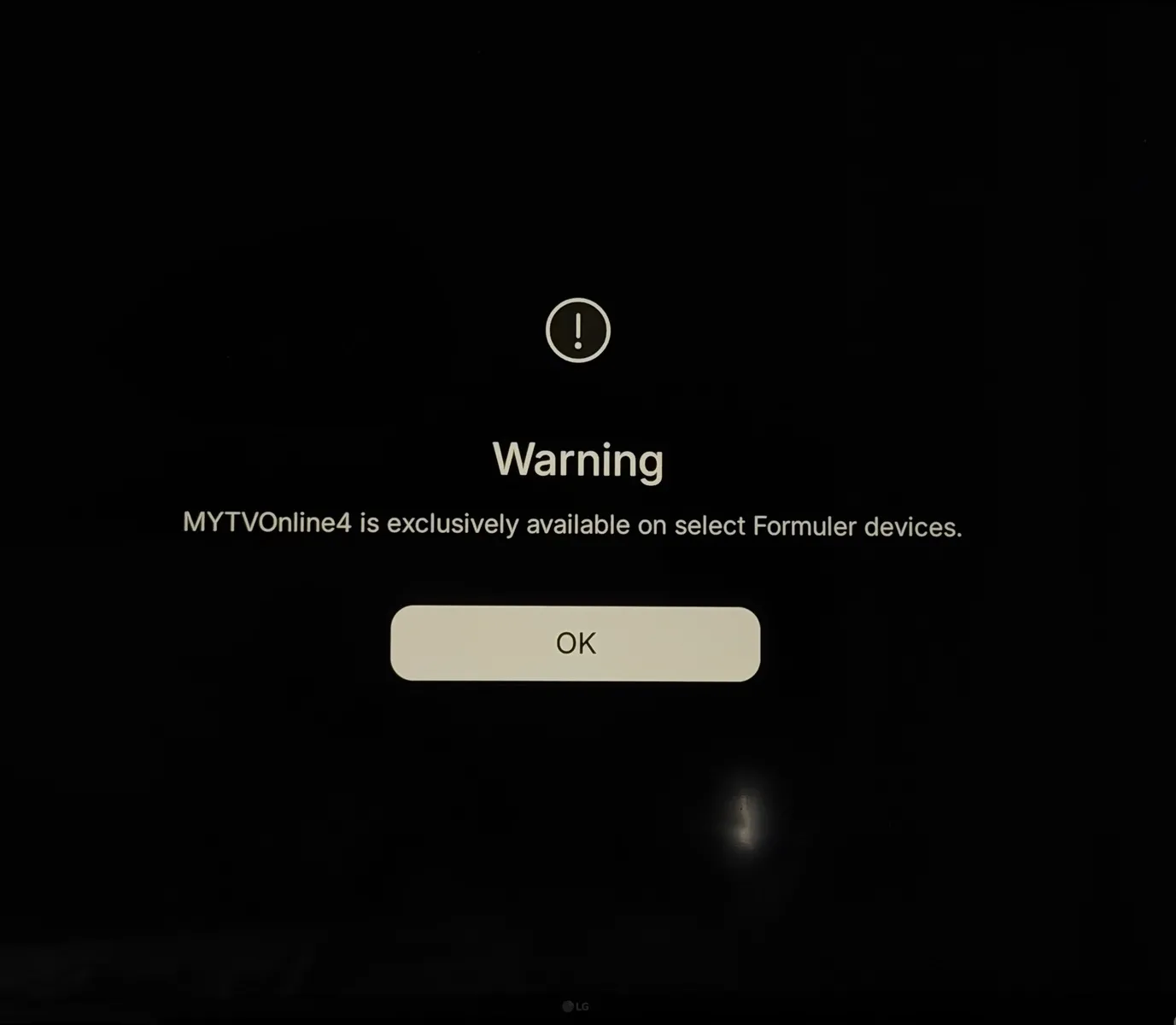
I want to try everything before doing a factory reset, which will make me reinstall everything without any guarantee that it’ll work...(Yes, I know it’s a beta—I’m not complaining; I’m aware of the issues that can arise—but if anyone has a solution, I’m all ears 😉)
Thanks in advance to everyone for your help!
-
 Display More
Hello, I've been testing the beta for several months now. Today, while browsing the forum, I saw that a new beta update was available.
I just installed it, but unfortunately, after restarting, I got this message: "MYTVOnline 4 is available only on certain Formuler devices" Has anyone else had a similar problem? Do you have a solution I haven’t thought of?
My box : Formuler Z12 Ultra
The content cannot be displayed because it is no longer available. I want to try everything before doing a factory reset, which will make me reinstall everything without any guarantee that it’ll work...
(Yes, I know it’s a beta—I’m not complaining; I’m aware of the issues that can arise—but if anyone has a solution, I’m all ears 😉)
Thanks in advance to everyone for your help!
Update :
I just performed a Wipe Data / Factory Reset on my set-top box. After it restarted, I updated to the beta version again (because the app wasn’t installed after the first boot).
Then, after the installation and the set-top box restarted, I’m back to having exactly the same problem.
When I follow these steps: Home screen > Software Update > enter 1339 using the remote control. I am, of course, taken to the beta page that offers the update, but I don't see a red dot, and when I press the red button on the remote control, nothing happens either.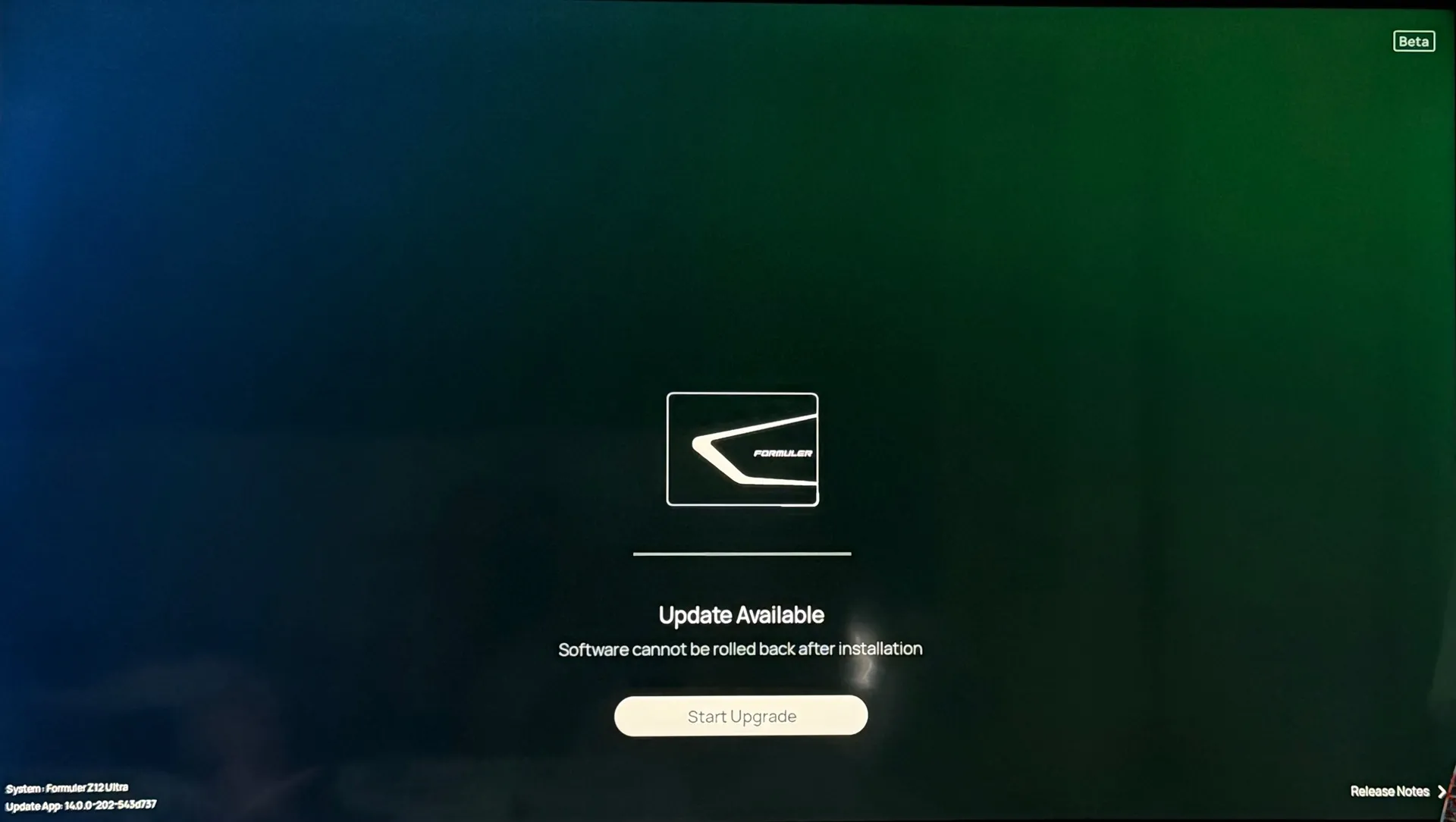
My Formuler set-top box is now completely unusable because MyTVOnline 3 cannot be installed, and I’m getting this error with MyTVOnline 4.
SAM F_Peter Do you have any feedback regarding a similar case?
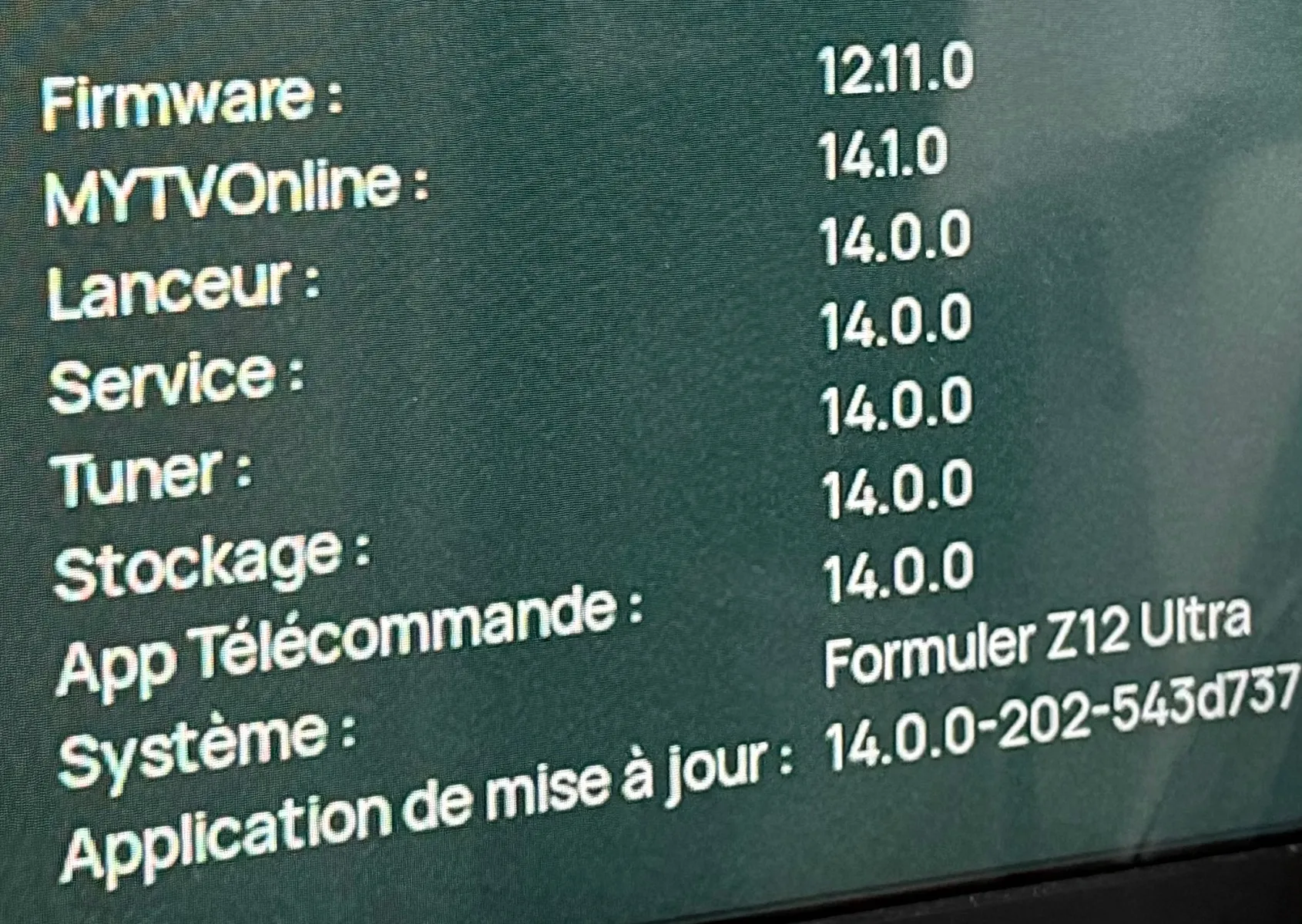
I’m sending logs : #0000001FE07F2Thank you in advance for your help.
-
Display More
Update :
I just performed a Wipe Data / Factory Reset on my set-top box. After it restarted, I updated to the beta version again (because the app wasn’t installed after the first boot).
Then, after the installation and the set-top box restarted, I’m back to having exactly the same problem.
When I follow these steps: Home screen > Software Update > enter 1339 using the remote control. I am, of course, taken to the beta page that offers the update, but I don't see a red dot, and when I press the red button on the remote control, nothing happens either.
My Formuler set-top box is now completely unusable because MyTVOnline 3 cannot be installed, and I’m getting this error with MyTVOnline 4.
SAM F_Peter Do you have any feedback regarding a similar case?
I’m sending logs : #0000001FE07F2Thank you in advance for your help.
Hi, what happened if you chose the upgrade now button?
-
Hi, what happened if you chose the upgrade now button?
Hi,
When I click "Upgrade," the download starts, then the set-top box restarts fairly quickly, and the MyTvOnline 4 app appears. But when I launch it, I get the same error message that appears for a few seconds, and then the app closes.
I did update to the latest version, but I’ve included as many screenshots as possible to try to provide as much information as I can.
-
Hi,
When I click "Upgrade," the download starts, then the set-top box restarts fairly quickly, and the MyTvOnline 4 app appears. But when I launch it, I get the same error message that appears for a few seconds, and then the app closes.
I did update to the latest version, but I’ve included as many screenshots as possible to try to provide as much information as I can.
Very strange behavior. Maybe Lucky13 can help?
Sorry that cannot help you right now.
But anyway I wish you a nice evening!
-
Very strange behavior. Maybe Lucky13 can help?
Sorry that cannot help you right now.
But anyway I wish you a nice evening!
Thanks anyway! I appreciate you trying to help.
Have a good evening, too!
-
First time i see this too.
Did you have maby developers options on, in android settings my friend? If so, turn it off please.
Before you startup mol4, can you first delete the cache? and if problem exist, please delete data then.
F_Peter never seen this message before? Can you please help him out? If my options do not work?
-
Display More
First time i see this too.
Did you have maby developers options on, in android settings my friend? If so, turn it off please.
Before you startup mol4, can you first delete the cache? and if problem exist, please delete data then.
F_Peter never seen this message before? Can you please help him out? If my options do not work?
As for developer mode, it’s not enabled, and I also did a factory reset, so technically, isn’t developer mode disabled after a reset?
I’ve also tried several times to clear the cache and delete the app’s data, but that didn’t yield any conclusive results.
What puzzles me is that the instructions say:
“Home Menu -> Software Update -> press ‘1339’ -> Red Icon and Beta Test SW appear (right corner) -> Press Red Button -> Firmware and Software are now shown, press ‘OK’ button to install”
But after entering the code 1339, I do indeed get to the beta page. However, I don’t see a red icon in the right corner anywhere, and when I press the red button on the remote, nothing happens. The only thing I see is the “Start Upgrade” button right in the middle of the page. And the result is that when I install it, what happens is exactly what I described in my previous messages.
By the way, in the instructions, SAM mentions that the restart can take quite a while, but for me, it’s actually pretty fast.Wasn’t there a glitch or a suspension of the MyTVOnline 4 Beta 2 download? That could be causing this bug.
I’m completely lost—I work in IT support, so I’m used to solving a lot of problems, but this one is pretty complex.
Too bad it happened to me today…….. 😅
-
Thanks anyway! I appreciate you trying to help.
Have a good evening, too!
Turn box off with remote and try switching box of at power plug for a few minutes and reboot.
-
Turn box off with remote and try switching box of at power plug for a few minutes and reboot.
That was obviously the first thing I tried, but performing a factory reset several times proves that it's not just a matter of restarting the device 😉
-
FYI ,there was a suspension and taken offline for the MOL4 beta 1 update,there is definitely some issue with beta2 update,on my side i was not able to install it,havent seen any postings that beta 2 is suspended or offline,however
 Any how you at least got to the beta 4 update page,on my side nothing happend at all!
 -

FYI ,there was a suspension and taken offline for the MOL4 beta 1 update,there is definitely some issue with beta2 update,on my side i was not able to install it,havent seen any postings that beta 2 is suspended or offline,however
Any how you at least got to the beta 4 update page,on my side nothing happend at all!For my part, I had already installed Beta 1 of MyTvOnline 4 and have been using it for several months. That’s why I’m surprised to find myself in this situation—and on top of that, it unfortunately makes my Z12 unusable…
-
For my part, I had already installed Beta 1 of MyTvOnline 4 and have been using it for several months. That’s why I’m surprised to find myself in this situation—and on top of that, it unfortunately makes my Z12 unusable…
Same for me,several months on beta 1 update,even if beta2 update would work,i wont do it,considering the situation you are now in;I will go for the save route and wait for the Official update,btw very few probs. with beta 1,nothing in changelog of beta2 was applicable.
-
Same for me,several months on beta 1 update,even if beta2 update would work,i wont do it,considering the situation you are now in;I will go for the save route and wait for the Official update,btw very few probs. with beta 1,nothing in changelog of beta2 was applicable.
Yes, I got ahead of myself and decided to update even though I was doing just fine with Beta 1.
But I felt confident because I read all the comments here before updating, and I didn’t see anyone else with such a major problem.
I hope someone can help me because my device is about as useful as a rock right now… and what worries me is that there was a gap of more than three months between the first beta and the second beta. If my device, which cost over 200€, is useless to me for that long, I’m going to be really upset 😔 -
- Official Post
Please await Peter`s replay after internal check why this happen. I contacted him already, because the error message is for me also new.
What puzzles me is that the instructions say:
“Home Menu -> Software Update -> press ‘1339’ -> Red Icon and Beta Test SW appear (right corner) -> Press Red Button -> Firmware and Software are now shown, press ‘OK’ button to install”
But after entering the code 1339, I do indeed get to the beta page. However, I don’t see a red icon in the right corner anywhere, and when I press the red button on the remote, nothing happens. The only thing I see is the “Start Upgrade” button right in the middle of the page. And the result is that when I install it, what happens is exactly what I described in my previous messages.Please ignore this part after 1339, it is from Mol3. With Mol4 you have upgrade and new message update available.
-
Please await Peter`s replay after internal check why this happen. I contacted him already, because the error message is for me also new.
Please ignore this part after 1339, it is from Mol3. With Mol4 you have upgrade and new message update available.
Thanks, SAM, for your feedback!
I'm glad you're taking charge of this and waiting for Peter's response.
As for the part after code 1339, I understand better now why I never saw it appear.
Thanks again for your help. While we wait for the issue to be investigated, I'm available if you need to run any tests.
-