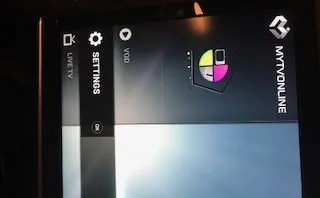
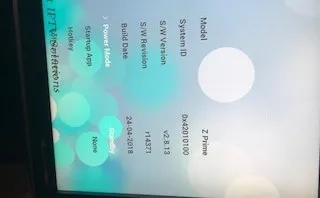
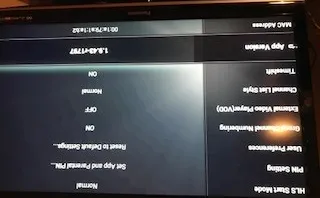
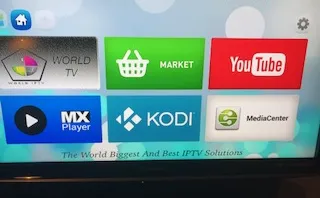
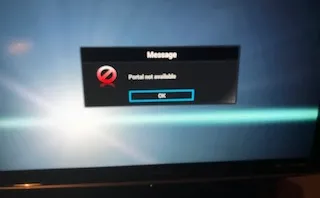
Hi, i just swop iptv provider but cant find the section to add the portal? Very strange. Hope anyone can help

Molcfg clearing tool.
-
- MYTVOnline1
-
Rene -
August 3, 2018 at 11:42 PM -
Closed
We asking all new users to read the articles below, before creating their first posting or thread.
- 4. Instruction Articles
Please note, in this forum are only English threads and postings allowed, without any exception!
Please follow the forum rules, thank you for your understanding.
-
-
Enter the MOL, menu key, service option, edit list and enter the nickname, url and inform the provider the MAC address.
-
Problem I have no service option? I have live tv, vod, settings. It says reload portal, yes but dont see where it can put the urls down...

-
Hi,
Ttry to put a new mytvonline link on start screen and open it, then you will see service option, after enter Menu. -
How to add a new mytvobline link?
What happens if I do a hard reset?
-
Hard reset= box goes back to state it was when left factory. You can do it. Then try loading portal info
Send us pictures of what you’re seeing because to be honest, it’s very self explanatory about how to add a new IPTV link to a portal.
-
Sorry. - Attached some photos, absolute no clue how to add a new iptv link or a new portal??
-
I deleted the mytvonline app and downloaded again but same problem. An other ways I can watch my iptv? Other app??
-
-
-
Menu then select portals then edit portal
-
So what freedom35 said is correct.
That is unless you have a ‘provider’ box and not a retail box. Far majority of us have retail box. ie it’s straight from the factory so to speak, running the original software and what not. Provider boxes are modified slightly, and not as ‘open’. In that first pic where it shows live tv, VOD, and settings, so you not also have something called portals? I suspect not.
Does your IPTV provider come from the dude who sold you the box?
So to fix, a few things could work. Get in contact with the guy who sold you box and ask him for a code/pin to change box from provider to retail. I suspect you’ll need this code to do a factory reset (I think).
Another option could be, do you have an app installed call market or market place? If so, go there and try to download MYTVONLINE. Maybe you can download the ‘retail’ version of the app. Not sure about this though
-
Thanks, got this box 2 years ago from that guy, so not sure if this is a provider box but it could be.
I have no portal on the main screen and I have deleted and upload my tvonline app again, see below but nothing is changed.
Any advise for a new box and where to buy?
Thanks
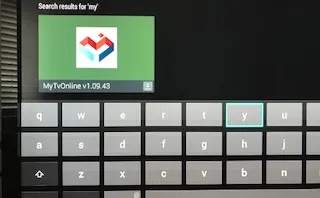
-
That ‘guy’ provided iptv for 2 years but he stopped last month so found another iptv provider but struggling as above.
Shall I get a new box, formuler again? Or is another brand good as well?
-
Formuler Z7+ is best box out there for IPTV in my opinion. I got mine from amazon
-
Hello i have the same pb i want to unlock the provider thing i can't edit my portal please mr sam may i have the config tool to fix it thank you
-
- Official Post
Do you have same problem like Rene? No way to edit or insert new portal? Something else also closed?
-
yes mr sam the same pb as rene no acces to edit the portal or insert a new server
-
- Official Post
Ok, will upload later one file for execution and get the box into factory state.
-
- Official Post
- Unzip molcfg folder in USB root. (formatted fat32)
- Insert USB containing molcfg folder into STB and wait for confirmation popup.
or
- Unzip "clear molcfg" and copy subfolder "molcfg" into formatted FAT32 and empty USB root.
- Insert USB containing "molcfg folder" into STB and restart your box.
Info: Files are already set for clearing.
-
thank you mr sam youre the man i will test it later
-
hello it's working thank you mr sam for your great and quick help one more question please
i need to buy a portal or server whish server to buy and where thanks again
-

hello it's working thank you mr sam for your great and quick help one more question please
i need to buy a portal or server whish server to buy and where thanks again
Not the best place to ask here google a bit.
-
Detalhes queria colocar a box formuler nano em estado de fábrica, como faço ao certo?? N sei o pin
-
Tenho uma caixa formuladora z nano em consigo fazer a resposiçao de fabrica porque tinha uma lista mas em vez de ter contato com o fornecedor. . Como posso fazer uma resposisao? Uma questão é que n sei o pin.
ObrigadoDetalhes
-
- Official Post
Use English
-
Hello,
I have the same issue, i don't have any possibility to edit a portal. I'm blocked on current portal so impossible to add a new one,
i tried to dl this : clear molcfg.zip
but it says i don't have rights, can someone help me for this ?
thx in advance !!
-
- Official Post

i tried to dl this : clear molcfg.zip
but it says i don't have rights, can someone help me for this ?
Who say this, the forum? Are you logged in when you try to download?
-
i could downloaded it after receive a mail, it's ok, i will try this solution now and keep you updated ! thx a lot !
-
well, i put the folder in the root of USB device, but dont have any popup as you said.And when i try to reboot the box, myiptvonline is still installed but I don't see the "classic" logo, it's IPTV logo and my older portal is still configured, can't change. I think the older supplier did something to prevent me to add a new portal other than his ...Well it works !! i just had the pop up, and now i can access to portal end edit them ! THANK YOU -

● Unzip molcfg folder in USB root. (formatted fat32)
● Insert USB containing molcfg folder into STB and wait for confirmation popup.
Info: Files are already set for clearing.
Thank you very much bro. My seller was not responding and i already bought another 12 months. Everything fixed now! I can insert whatever portal i want.
-
Hello, I have the same problem. I download the file but wen I try open the box answer it is not possible open the file, it is necessary to download same app to unzip the file? Thanks
-
- Official Post
Unzipp first on pc and copy unzipped folder into root of your usb stick (stick should be empty and formatted with fat32) and then plug in the usb stick into the box.
-
I tried to run molcfg but give me an error (file type is not supported)
-
- Official Post

I tried to run molcfg but give me an error (file type is not supported)
Give you where the error? Please specify what and how did you exactly done the extraction, usb format and copy..
-
put the file in the unzipped usb plugged in the formuler and open and gave the format error
-
- Official Post
Try following:
1. Unzip "clear molcfg" and copy subfolder "molcfg" into formatted FAT32 and empty USB root.
2. Insert USB containing "molcfg folder" into STB and restart your box.
Tested few min. ago and tool loaded successful, see picture.
-
worked after reboot 😆 thanks Sam
-
Thank you alot SAM!!!!!!!! it worked on mine
-
It worked. Great job. Thank you
-