

Ok. Please explain me how to do that on Mol2, for instance set-up a recording on a channel in 10 days from now.

Scheduled Recording Questions
-
- MYTVOnline2
-
gva1dym -
November 10, 2019 at 2:09 PM
We asking all new users to read the articles below, before creating their first posting or thread.
- 4. Instruction Articles
Please note, in this forum are only English threads and postings allowed, without any exception!
Please follow the forum rules, thank you for your understanding.
-
-
...Please explain me how to do that on Mol2, for instance set-up a recording on a channel in 10 days from now...
1. Open MOL2
2. Open the EPG
3. Select the channel you want to record from
4. Use the blue button (= +1 day) until you have the date on which you want to create a recording
5. Select program in the future (if not available > select "No information") > Press "OK" on RCU
6. Edit the fields in the "Create New Schedule" screen that appears.
7. Select "Save" on the screen.
-
How to with scheduled recording with 11 days in future.
1. Open EPG
- Select channel for recording
- (1) Press (today is 10.11) exactly 11x times on blue button to get 21.11.
- (2) Select "No Information"
- (3) Press "record"
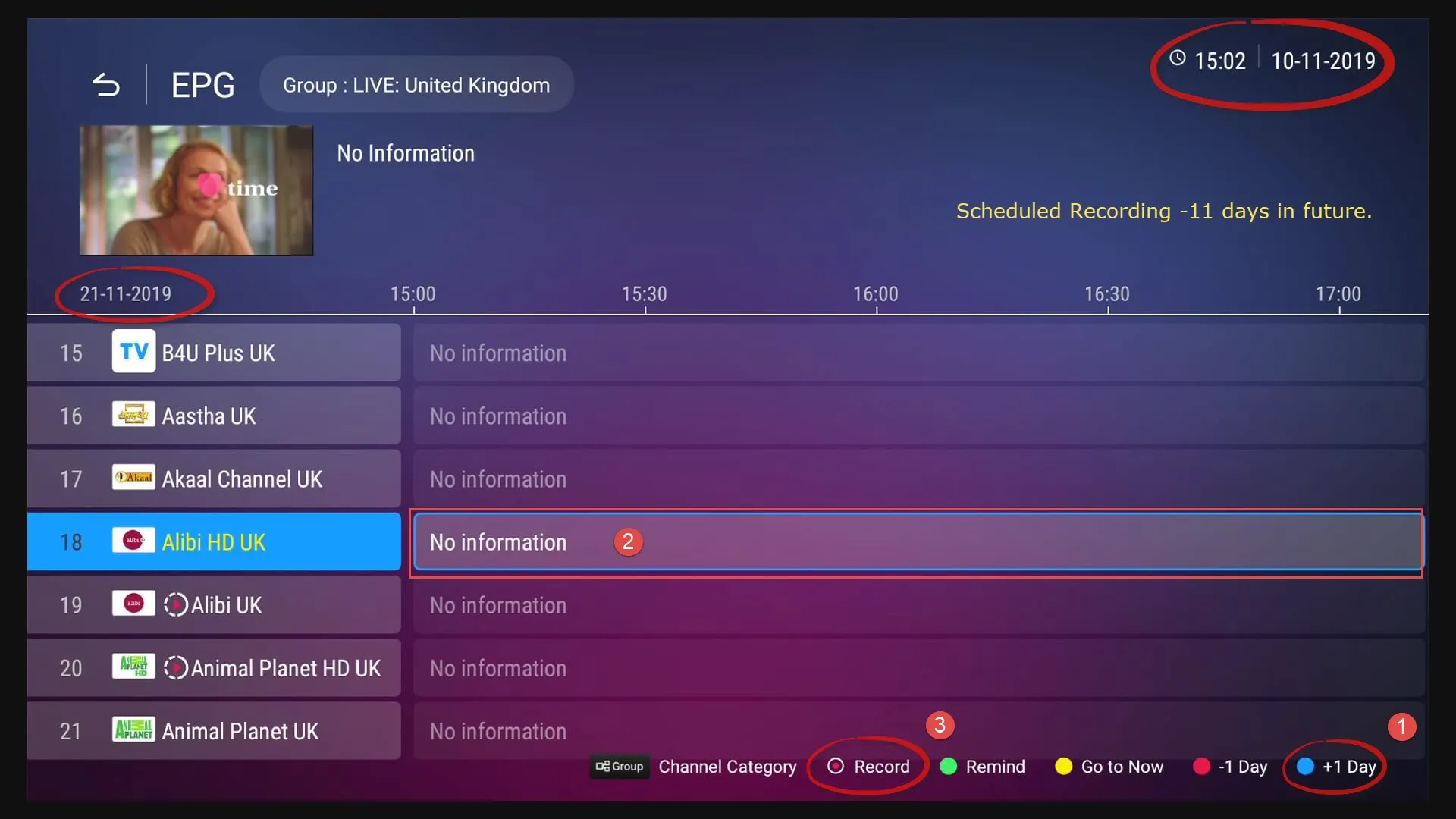
2. Edit scheduled recording

3. Set Daily or Weekly if you need.

4. Check in MOL2 -> Menu -> Schedule, your scheduled recording.
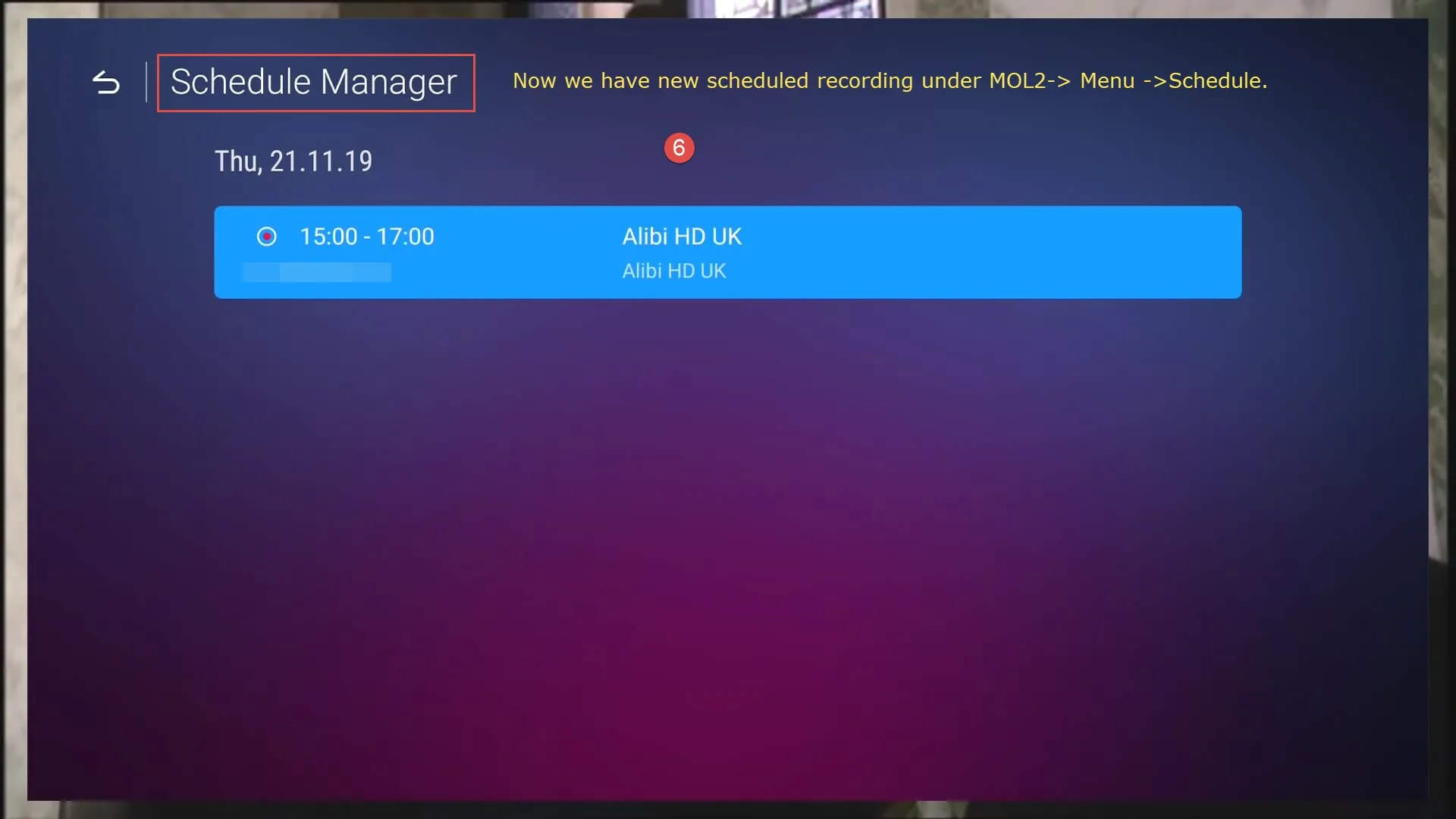
5. If needed you can there edit your scheduled recording again.

-
Brilliant, thanks a lot !
-
Hi all. I’m having the issue that the mol2 is recording but not to the right station. Help
-

Hi all. I’m having the issue that the mol2 is recording but not to the right station. Help
Did you tried SAM's post #3?
-
SAM
for eg tomorrow i will have a program that i want to record and it gives another episode on next Saturday only ( i think it will be 5 episodes in total) how can i save them all ? using that tutorial above will work?
i thin will be easier if we can do long press ok on tomorrow event and it open a sub menu like save episodes. , then appear frequency menu...
i dont nderstand image 3 it says weekly and then it appear a image with Monday to Sunday option?
if i try that option it will appear any icon in epg like future record just the make sure it will record on correct time ? -

for eg tomorrow i will have a program that i want to record and it gives another episode on next Saturday only ( i think it will be 5 episodes in total) how can i save them all ? using that tutorial above will work?
Sure, generate for each episode schedule, edit with correct data, start/end time and save.
i dont nderstand image 3 it says weekly and then it appear a image with Monday to Sunday option?
I included this picture only to show that Daily and Weekly options can be chosen, that's all. Can be used , let me say for example on each Monday to record specific series.
if i try that option it will appear any icon in epg like future record just the make sure it will record on correct time ?
Yes, record icon.
-
SAM
is not much simpler on the epg click Ok on the serie and click record is not the same as this, your guides has much more steps
i've send you a PM with that info and some images -
PM answered, please send your idea as ticket with detailed text and images to Formuler.
-
One Question again. For example i didnt have any EPG data... is it possible to set up a record manually? It means the Formuler is on the right channel and i switch it on in the morning as in the afternoon starts the record by my setting. If i go to manually to the Schedue Manager i can´t set up a record...
-
Then you click in field with no information and manually set your scheduled recording. See how to.
-
Thanks I will check it this evening

-
Thanks for your request it works...
-
How come my z8 cannot schedule record? I follow the above but it doesn’t save my entry. I seen an earlier post/question asking the same , back in 2019. An administrator I believe said a follow up update would fix this issue. The system says I have latest software version .I am using m3u, I can manually record but just not schedule record. I was able to do so with my z7+. Please advise.
-

How come my z8 cannot schedule record? I follow the above but it doesn’t save my entry
Works great with m3u, just choose any future program in EPG, press ok, make your changes and save. In Schedule Manager you can see now new entry.
-
I have tried that , I am able to get “create new schedule”,edit whatever changes but after I click save, nothing happens.
-
Wait, I notice schedule recording only works when I record something 8 hours or more in advance. Any way to alter that ?
-
I created a new schedule recording (8 hours in advance). I verify my entry by going into schedule manager where I see it’s in que. I then put my z.8 in standby mode. However, after a few hours my schedule recording is no longer there when I access my schedule manager. Any insight to fixing this issue?
-
After schedule recording finishes, I go to playlist to watch, I click on the particular recording, but I get a blank black screen. Manual recording works fine
-
What kind of provider connection are you using for this? Stalker ID/MAC, XC or m3u? Did you done factory reset, if not please do this and set your box fresh? I was not able to reproduce reported from you, not even on two different boxes with different software releases.
-
My provider is *****, I use m3u. I’ve had them for long time. No recording issues with my previous z7+. . I will try doing factory reset. Thanks
-
No provider names, read forum rules!
Yes please, do factory reset, set fresh again and since you use M3U with long url, you should maybe with this data create XC Api Portal.
-
I just performed factory reset. Manual recording works once again, however, exact same issues still persist with scheduling recording . No change.
-
FYI , Firmware version v1.4.65 is running on my z8. MyTvOnline2 is utilizing Version 7.8.5-2487-7bc13558
-
The recording run great... it's important to be sure that your usb device is correctly initialized
-
Usb storage device properly formatted, it properly records just manually, but scheduled recordings don’t work . It supposedly schedule records programs greater than 8 hours whereas anything earlier does not allow to save. When I go to view in playlist after schedule recording is finished , it has recorded a black screen session . My previous z7+ works fine.
-
Since last update, if I set something for recording, and turn off the device watching on a different program than the set recording, then formuler z8 turns on the last viewed, records on another, and since I have only one line, the image and voice lag is recorded. In my opinion, the formuler should switch itself to the recorded channel, because having one line from the iptv provider nothing will be recorded in this way.
-

Since last update, if I set something for recording, and turn off the device watching on a different program than the set recording, then formuler z8 turns on the last viewed, records on another, and since I have only one line, the image and voice lag is recorded. In my opinion, the formuler should switch itself to the recorded channel, because having one line from the iptv provider nothing will be recorded in this way.
What are you using exactly for connect with your provider, registered MAC /ID Stalker portal, XC Api with login portal or m3u playlist?
-
It will be soon recording replay programs ?
-

What are you using exactly for connect with your provider, registered MAC /ID Stalker portal, XC Api with login portal or m3u playlist?
m3u and portal. I do not record often, but recently I noticed that after turning off the z8 does not turn on the programmed recording channel, only on the last viewed. When it starts recording, then there is a conflict, because I have one line from the provider and lag is recorded. Before the last update, the formuler switched from the last viewed channel to the recorded channel when was off.
Best wishes.
-
Ok, thx. Will try to reproduce reported.
-
m3u and portal. I do not record often, but recently I noticed that after turning off the z8 does not turn on the programmed recording channel, only on the last viewed. When it starts recording, then there is a conflict, because I have one line from the provider and lag is recorded. Before the last update, the formuler switched from the last viewed channel to the recorded channel when was off.
Best wishes.
Same problem for me!
I have also noticed that if I'm recording and hit the standby button the recording stops without asking if I really want to stop it.
Thanks for nice support!
-

Same problem for me!
I have also noticed that if I'm recording and hit the standby button the recording stops without asking if I really want to stop it.
Thanks for nice support!
Yes and it's a hard habit to break when you have done it for years on other devices.
leave it on it goes off when record finishes
-
I have also noticed that if I'm recording and hit the standby button the recording stops without asking if I really want to stop it.
Yes. This (unintentional stopping of the recording) is a real p. i. t. a. I am using a multi purpose remote controller (Logitech Harmony), which has the capability of using macros i. e. powering on/shutting down equipment (e. g several home cinema equipment) by one command. Now, even during active recording, if I want to go to sleep and press off button to shut down everything, the Formuler shuts down as well, without asking if the recording should be stopped. There should be such a confirmation (like there is the confirmation required if you want to stop the recording) , just not to unintentionally break the recording.
There is a ticket pending.. let's hope this will be corrected.
-
Ok, thx. Will try to reproduce reported.

Yes. This (unintentional stopping of the recording) is a real p. i. t. a. I am using a multi purpose remote controller (Logitech Harmony), which has the capability of using macros i. e. powering on/shutting down equipment (e. g several home cinema equipment) by one command. Now, even during active recording, if I want to go to sleep and press off button to shut down everything, the Formuler shuts down as well, without asking if the recording should be stopped. There should be such a confirmation (like there is the confirmation required if you want to stop the recording) , just not to unintentionally break the recording.
There is a ticket pending.. let's hope this will be corrected.
Hey SAM, I have the same issue that khu is having.
Any updates on if this is planned to be fixed?
Thanks
-
Hi,
Can the Z8 Pro play back recordings made on a NAS server by a Z8 ???
-
Should work if all set correctly (path).
-
I seem to be having the same issue as Sam, except mine is the Z10 Pro, which I just got the other day. It seems for some reason it's not recording scheduled recordings, I too can push manually and it records no problem, then I go to recordings and it plays. It just seems for some reason that it's not recording when it's on standby. I am not sure what the firmware version is, but it's the latest one that just got updated, same as MTOL. I also did a factory reset, but still having the same issues.
Any help you could offer would be greatly appreciated, or should I just request a replacement unit?
-
Should work if all set correctly (pa
I have doubled and triple checked All the settings, and everything is correct. I'm just not sure why I can record manually but when I use scheduled recording when the box is asleep, it doesn't wake up to do the recording.
It's just weird cuz when I have my z8 Pro, I had no issues at all, so I'm not sure if this problem is caused by the firmware update, or a fault with the Android box.
Any help you could offer would be greatly appreciated.
-