

in another post, there is the answer, the chipset in the Formuler can´t dolby true. With the z8, there are no Problems with True HD

audio passthrough settings in MOL3
-
- Z11 Pro MAX
- MYTVOnline3
-
dedelere -
May 17, 2024 at 1:25 PM
We asking all new users to read the articles below, before creating their first posting or thread.
- 4. Instruction Articles
Please note, in this forum are only English threads and postings allowed, without any exception!
Please follow the forum rules, thank you for your understanding.
-
-
And why youtube works? App on formuler)
-
The Dolby Atmos on YouTube must be the same as on the official Netflix platform for example, it's actually Dolby Digital Plus with "fake" Atmos.
Whereas your multimedia files that don't play are probably with real Dolby Atmos, encapsulated in a Dolby TrueHD sound track.What I find surprising is that it seems to me that during my tests a month or two ago, the results of which I posted here, I managed to output sound in Dolby TrueHD and Atmos track with Kodi on a Z11 Pro Max...
But Sam says that the developers have informed him that the chipset doesn't support this format...And that other people here can't play this format either.
I'll have to try again...
-

The Dolby Atmos on YouTube must be the same as on the official Netflix platform for example, it's actually Dolby Digital Plus with "fake" Atmos.
Whereas your multimedia files that don't play are probably with real Dolby Atmos, encapsulated in a Dolby TrueHD sound track.What I find surprising is that it seems to me that during my tests a month or two ago, the results of which I posted here, I managed to output sound in Dolby TrueHD and Atmos track with Kodi on a Z11 Pro Max...
But Sam says that the developers have informed him that the chipset doesn't support this format...And that other people here can't play this format either.
I'll have to try again...
Yes please, can you try again and keep us informed because it seems there is no way to play Dolby Atmos true HD even with external player like Kodi or others ...
Only DD+ Atmos ( low bite rate ) is possible like from streaming platform
-
I juste made tests, no problem for TrueHD 7.1 with Atmos on Kodi 21.0.1 (Aquaman 1, .ISO UHD on my NAS by SMB) :
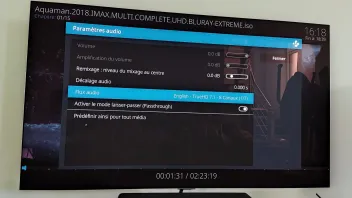
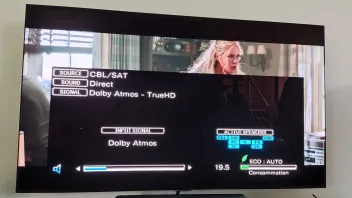
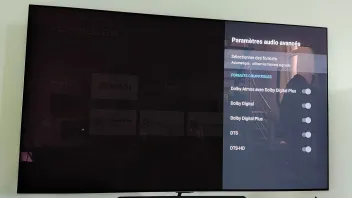
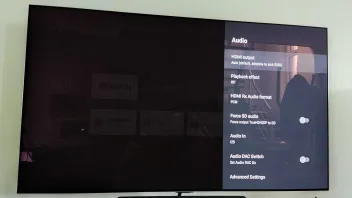
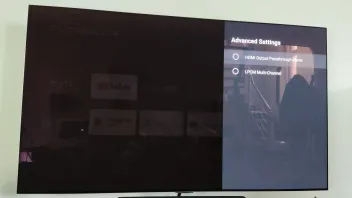
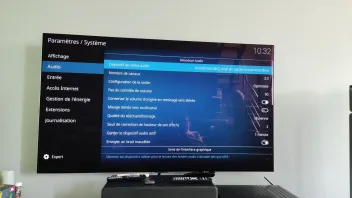
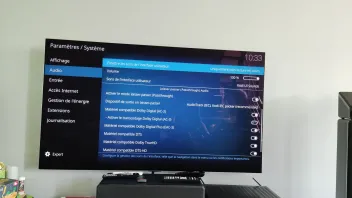
Kodi 21 installed with .apk or Google play store i don't remember because on the Formuler Market it's Kodi 20 5.
AVR : Denon x3600h
Audio system : 5.1.2
However, like last time on Mytvonline3, I've also tried a film available on my server which is in Dolby TrueHD Atmos and it does come out in PCM.
If I put in an external player like Kodi it launches in TrueHD Atmos.
But you lose the advantages of MOL3, such as history, resuming at the point where you left off and general ergonomics.
In conclusion, I'm not sure that the Realtek SoC is really at fault here, in my opinion it decodes TrueHD well. It's just that MOL3 isn't optimised for...
-
Please forward this important information from Myst13 to Formuler developers.
We have the proof here that the Dolby true HD signals are working well with Z11 in passthrough mode using Kodi as external player.
So MOL3 player SHOULD DO THE SAME !
The chipset can read the true HD audio signals.
Thanks for your help
-
Hi everyone,
Myst13 curious why on this photo you provided you've selected:
HDMI Rx Audio format = PCM
Audio IN = I2SI have a Denon 960H but it appears my source for IPTV doesn't provide HQ audio (i.e. Dolby), only mostly AAC/Stereo. When I attempt some VOD 5.1 content (that is Dolby 5.1) I only get multi-channel and I get a sync delay of about 1 second after a few seconds of play as other threads have noted who also use Denon.
Physically, I have the Formuler Z11 Max Pro connected to an HDMI port on the Denon, I then connect the Denon via HDMI3 / eARC to a Sony TV. BTW, if I move the Formuler to HDMI on the TV instead of the Denon the VOD audio sync issue disappears (this was also noted on a different post here).
However I've been using Kodi v21 playing from NAS and although I am only 5.1 I can play DTS/DTS-HD no problem. In my audio settings I have mine different as follows:
HDMI Rx Audio format = RAW
Audio IN = HDMII also noticed you use "DIRECT" in the Denon screen. Wondering if I should change mine too. I also have Audio Optimizer installed and running.
Thanks, this is an interesting post to follow !
ADDED : Here's an old post I made about Denon and Formuler, some things have changed of course (i.e. Formuler version)
bonggo -
 Display More
Hi everyone,
Myst13 curious why on this photo you provided you've selected:
HDMI Rx Audio format = PCM
Audio IN = I2SI have a Denon 960H but it appears my source for IPTV doesn't provide HQ audio (i.e. Dolby), only mostly AAC/Stereo. When I attempt some VOD 5.1 content (that is Dolby 5.1) I only get multi-channel and I get a sync delay of about 1 second after a few seconds of play as other threads have noted who also use Denon.
Physically, I have the Formuler Z11 Max Pro connected to an HDMI port on the Denon, I then connect the Denon via HDMI3 / eARC to a Sony TV. BTW, if I move the Formuler to HDMI on the TV instead of the Denon the VOD audio sync issue disappears (this was also noted on a different post here).
However I've been using Kodi v21 playing from NAS and although I am only 5.1 I can play DTS/DTS-HD no problem. In my audio settings I have mine different as follows:
HDMI Rx Audio format = RAW
Audio IN = I2S = HDMII also noticed you use "DIRECT" in the Denon screen. Wondering if I should change mine too. I also have Audio Optimizer installed and running.
Thanks, this is an interesting post to follow !
ADDED : Here's an old post I made about Denon and Formuler, some things have changed of course (i.e. Formuler version)
bonggoThis is the standard configuration for me in the developer options, I haven't touched a thing

Sure it's better to connect the Formuler to the TV, as this way the black screens are shorter when changing frequency/resolution.
One less intermediary... but it's clear that the avr is less interesting...
And if the TV doesn't accept all audio formats in passthrough mode, it's even more annoying...
I use the "Direct" mode to really get the original signal and show that the avr doesn't do audio upscaling
If you want to use Denon's Audissey functions, it doesn't work with Direct mode.
-
If you want to use Denon's Audissey functions, it doesn't work with Direct mode.
I wasn't aware of this as I do use Audyssey. Thanks very much for your feedback.
-
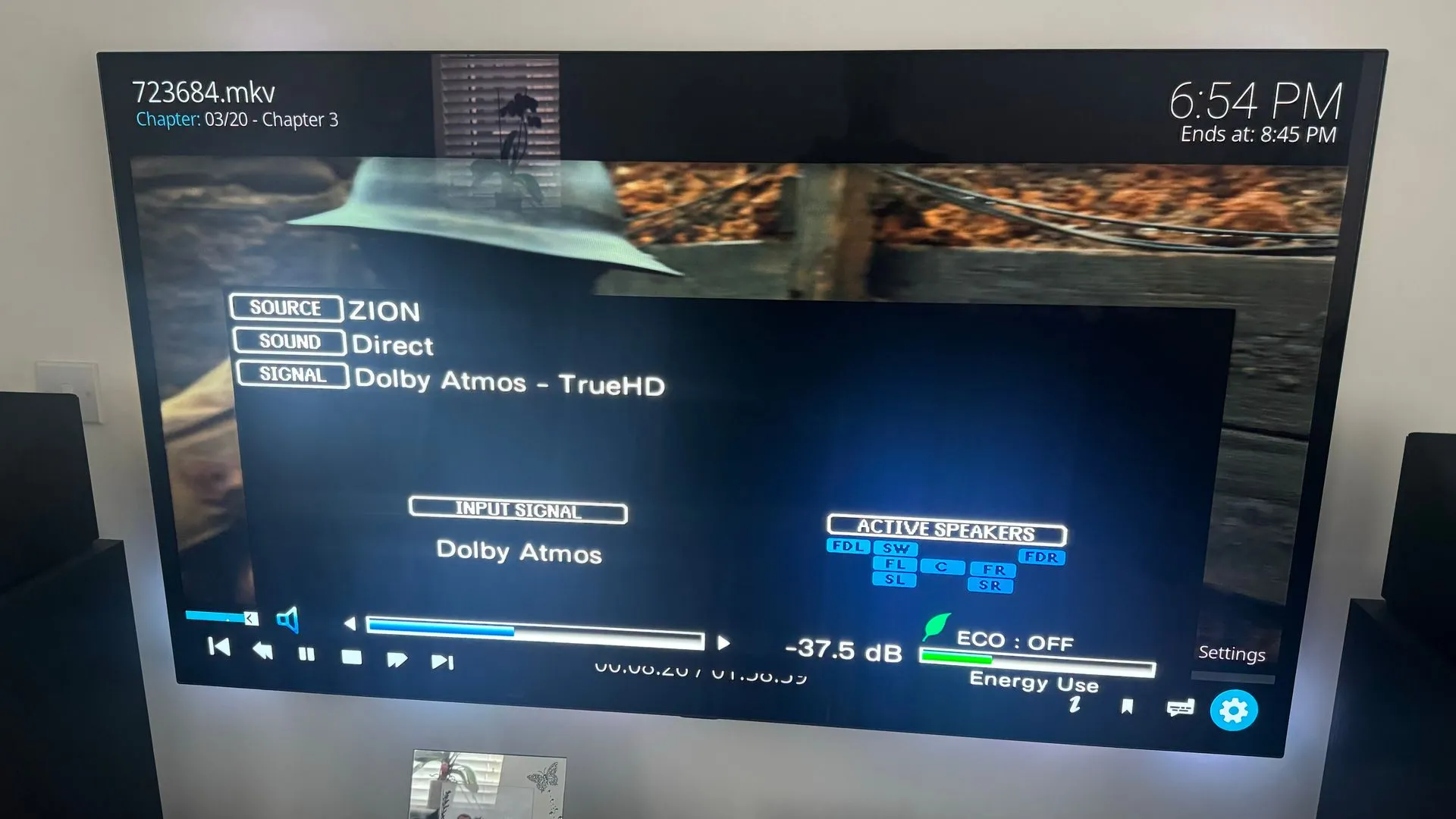
I can confirm this actually works on my setup as well! Using the exact same settigns as Myst13, Kodi as player and amp on direct mode. Same video as before. SAM please can you ask the devs to have another look at? The hardware is definately capable of doing this
edit: amp doest need to be on direct, its working in all modes using kodi. Problem is though the video is not as smooth as with using MOL3 and sound is out of sync
-
Ive noticed that the Dolby Atmos light does not illuminate on my Onkyo Sound System when watching Dolby Atmos content ive also noticed there doesnt seem to be support for Dolby True HD Atmos only Dolby Digital+ i find this quite suprising for such an expensive newish box is there a reason for this?
-
- Official Post
It is MOL3 player (Exoplayer) and Realtek Chipset combination. Kodi and few other player ignore this and forward Atmos, try it. See also similar open thread in this case.
How ever, last days this is under investigation and will be tested from devs. When i get some info it will be posted in forum.
-
Brilliant... is it possible to use a different player in MOL3. Ive notices Disney+ & Prime also dont passthrough Atmos correctly ill look forward to seeing the progression on a fix.
-
- Official Post
For VOD + Series you can chose other player, for live TV only MOL3 but also no need for other player because i never seen any atmos content in live tv yet.
-

For VOD + Series you can chose other player, for live TV only MOL3 but also no need for other player because i never seen any atmos content in live tv yet.
Sky sport UHD have dolby atmos
-
- Official Post
Thx. for the Info, but sport in Atmos, not real game changer to be honest if available only on one channel. How ever, can understand people when they want to use it even on such channel. As we all know, tastes are always different.
-
Thx. for the Info, but sport in Atmos, not real game changer to be honest if available only on one channel. How ever, can understand people when they want to use it even on such channel.
Sky have more than one UHD channel with atmos
-
I have Sky Sports Main Event UHD, Sky Sports F1 UHD & TNT Sports Ultimate all with Dolby Atmos on my sub. F1 in Atmos sounds amazing

-
I did manage to get True HD to passthrough with Kodi so its promising that the box is capable hopefuly the devs will find away to get this working in MTOL3 to get TrueHD Atmos
-

I did manage to get True HD to passthrough with Kodi so its promising that the box is capable hopefuly the devs will find away to get this working in MTOL3 to get TrueHD Atmos
Thanks for saying.
Can you also post screens of the settings on your Z11Thanks
this is the other thread
Threadaudio passthrough settings in MOL3
Hello,
I ve bought recently the new Z11 pro max and I ve problem with the audio passthrough configuration.I ve read many threads from 2023 talking about audio passthrough and Dolby Atmos issue concerning the Z11 pro max but every time no real solutions were given ...
I have also the Z8 and I ve absolutely no problem for playing Dolby Atmos true hd or DTS HD on my Pioneer AVR .
On my Z11 pro max I ve for sure installed and run audio optimizer and put the audio surround to AUTO .I m able to get 5.1…Z11 Pro MAX MYTVOnline3 dedelereMay 17, 2024 at 1:25 PM -
Do you want me to post them here or on that thread?
-
Maybe sam can combine them. Would be great on the other thread
-
- Official Post
Two threads merged now.
-
For VOD + Series you can chose other player, for live TV only MOL3 but also no need for other player because i never seen any atmos content in live tv yet.
Yes, that's the backup solution I suggested : using an external player like Kodi that accepts Dolby TrueHD Atmos passthrough
But there are drawbacks: resuming playback doesn't work and launching a video is slower.Perhaps developers could look into this too?
In any case, thank you very much for passing on this information to the developers
Brilliant... is it possible to use a different player in MOL3. Ive notices Disney+ & Prime also dont passthrough Atmos correctly ill look forward to seeing the progression on a fix.
Is there content on Prime and Disney + that is in true Dolby TrueHD Atmos, or is it simple Dolby digital Plus Atmos that doesn't play on its Formuler-installed apps either?
I know that the problem is similar with Disney+ on another Android TV 12 box and that you have to install the "Firestick" version for it to work (with the highest Disney subscription because below that no Atmos), but I didn't know it was the same for Prime.
I only have Prime to test...Do you have a very old TV without its built-in apps on it?
Edit :
I just tried Amazon Prime on my Z11 Pro Max.
Indeed, there's no Dolby Digital Atmos coming out, just Dolby Digital Plus on compatible movies/series.
What's more, the information displays just the "HDR" thumbnail, but not the "UHD" thumbnail like on the TV's built-in app.
A bit like Kodi, in fact, which only whitelists 1080p resolution and not those above.
So it's the box and not the TV that does the upscaling I think.
I'm afraid the picture quality isn't the best either, so beware.
Formulators aren't really designed for these applications...
Just good for MOL3 (when there's no TrueHD sound of course ^^)
-
I saw it too.
When i open disney+ on my z11 pro max.
And open the movie avengers endgame
Its 4k ultra, imax and 5.1.
When i open disney+ on my tv.
And open the movie avengers endgame
Its 4k ultra, imax, dolby vison and dolby atmos.
In short: why not on formuler the dolby atmos/vision.
Is it the chipset? But atmos its on on my device.
-
Does anyone know if formuler z11 pro max will pick up dolby truehd atmos if connected to hdmi port. My soundbar is connected to my earc port, i also have a shield connected to andifferent hdmi port and that is picking up truehd atmos.
I’ve noticed someone on this thread using kodi as external player it’s still not working. -
Try the settings above from users
-
Hello ,
Using MOL3 the true HD Atmos signals is not possible for the moment, also DTS-HD signals (Master Audio)
I hope devs will fix this issue soon...
Only using external player like Kodi should works but you need version from the Play store , it seems Kodi from the market Formuler is also not working for Atmos.
You can test on your side and keep us informed.
-
Hello,
I have tried the above settings however this is still not working -
Another thing to note even on kodi under audio settings dolby truehd is not there listed to passthrough. So the box isnt picking it up where as the nvidia sheild is.
My setup soundbar > earc port on tv > z11 pro max -

Another thing to note even on kodi under audio settings dolby truehd is not there listed to passthrough. So the box isnt picking it up where as the nvidia sheild is.
My setup soundbar > earc port on tv > z11 pro maxYou have a problem with your installation or configuration, look my pictures on this post : RE: audio passthrough settings in MOL3
I have Dolby TrueHD on Kodi 21 settings... (Expert mode)
-
Probably the box doesn’t support pass through dolby truehd as my box is connected into my tv hdmi and my soumbsr connected via earc port.
By the looks of your setup your box is connected directly into your soundbar -
Probably the box doesn’t support pass through dolby truehd as my box is connected into my tv hdmi and my soumbsr connected via earc port.
By the looks of your setup your box is connected directly into your soundbarFor me it's working on passthrough...
What's your TV and audio system ?
-
Probably the box doesn’t support pass through dolby truehd as my box is connected into my tv hdmi and my soumbsr connected via earc port.
By the looks of your setup your box is connected directly into your soundbarFormuler official setup advies is:
Formuler ~ soundbar(if has HDMI in + out ~ TV
-
Anyone if hd fury arcana would help my situation?
-
My tv is Samsung s95c and Sonos arc
-
My tv is Samsung s95c and Sonos arc
Is eARC enabled in the options of your Samsung TV because it is disabled by default?
(In theory, press the "Home" button on the remote control, go to Settings, Sound, Expert settings, HDMI e-ARC mode)
And you also need to have the Anynet+ (HDMI CEC) option enabled according to your TV manual.
I don't see why it wouldn't work for you when it works for me... You need to apply the exact same settings on the Formuler box in the sound settings as well as in Kodi.
-
Yes all settings on my Samsung tv are enabled correctly as my shield is able to pass through truehd to Sonos arc via the tvs earc port.
Tried multiple times factory resetting the z11 box and configuring the settings but still kodi doesn’t play Dolby truehd as pass through option, so I’m scratching my head at it now
-
Hello ,
Using MOL3 the true HD Atmos signals is not possible for the moment, also DTS-HD signals (Master Audio)
I hope devs will fix this issue soon...
Only using external player like Kodi should works but you need version from the Play store , it seems Kodi from the market Formuler is also not working for Atmos.
You can test on your side and keep us informed.
The marketplace place version does infact work, I’m using this version on my system
-
Yes all settings on my Samsung tv are enabled correctly as my shield is able to pass through truehd to Sonos arc via the tvs earc port.
Tried multiple times factory resetting the z11 box and configuring the settings but still kodi doesn’t play Dolby truehd as pass through option, so I’m scratching my head at it now
In player settings - video have you disabled ‘sync playback to display’? It won’t pass through if this is turned on
-