

How get epg on mytvonline 4 ?
Janne

We asking all new users to read the articles below, before creating their first posting or thread.
Please note, in this forum are only English threads and postings allowed, without any exception!
Please follow the forum rules, thank you for your understanding.
How get epg on mytvonline 4 ?
Janne

That happens to our box and we haven't upgraded to MTVOL 4 beta, we're still on 3. So it might me a box issue rather than the beta update.
Yes- I get this too!
I actually changed the HDMI cable and it seemed to work better 

6. On home page.... the ability to remove your recently watched history (channels, VOD etc) would be nice. Don't want to, er, leave any incriminating evidence for the mrs to find

On home screen, go to the very bottom and click on the 'Edit Row.'
From here, you can get the option to hide watch history.
We will, however, review if improvements can be made on this to have a more user-friendly UX.

How get epg on mytvonline 4 ?
Janne
Hi, on Homescreen chose profile, chose content manager, chose content source, change and jump down to EPG mode then change from normal to alternate.
Hope ik could help you,
have a nice day🙋🏼♂️
Press Fav button on remote then info button on remote.
and to erase a string in a favorite list that no longer works? thanks

and to erase a string in a favorite list that no longer works? thanks
Press ok button on channel what don't work.
You see channel list and channel what not work is already selected.
Press blue button on remote my friend...
...and it’s gone.
Personnally, i find Mol 4 less intuitive, and some of the steps involved aren't obvious in order to get a result that suits everyone.
That happens to our box and we haven't upgraded to MTVOL 4 beta, we're still on 3. So it might me a box issue rather than the beta update.
Same here for before and after the beta update. I thought it was my TV playing up !
 Display More
Potential show-stopper BUG for me.
I upgraded to the version 4 beta (migrated playlists) and now none of the streams I have configured through iptveditor (dot) com will play any videos. No live/vod/series.
The playlists load, the EPG loads, stream details like episodes and such load, but the video always fails with a 404 code.
This was not an issue I was aware of with version 3 of mytvonline. VPN or no VPN makes no difference.
If I enter the credentials for my provider directly into version 4, bypassing iptveditor, it works.
I upgraded to the version 3 beta on my z mini and everything still works as expected with iptveditor.
I also factory reset my z12 and started fresh, but have the same issue.
Is there some sort of CORS issue introduced in v4?
I'm definitely not an expert but will try any tests anyone can suggest and post logs if someone shows me how.
sent you a chat to get more info on the issue. Please check your inbox.
 […]
[…]
Could you provide a video of the issue? You can upload the Image/Video file here: https://streamable.com/ > Upload file > Copy link > Paste the link with your reply.
Also, please send logs following the next instructions: How to send logs
Ok, update to earlier post.
When you select groups whislt on EPG the groups take an age to slide on from the left side of the screen, like 15 seconds or so which is not at all pleasing....
Could you provide a video of the issue? You can upload the Image/Video file here: https://streamable.com/ > Upload file > Copy link > Paste the link with your reply.
Also, please send logs following the next instructions: How to send logs

I have several Portals entries on MOL4, and when I search for one piece' series today, the application crashed and restarted every time I did the same search.
Does the issue only occur when you search for that specific series?
If the issue remains, please send logs following the next instructions: How to send logs
Agree with other comments when using the AI search feature not bringing back results
could you provide more details on the AI search issue?
If you are getting any specific error messages, please let me know which.
Display MoreHello team,
Here is my feedback after testing the new MOL4 beta.
Overall, it looks great, but there are a few issues and missing features I'd like to point out:
* **Design & UI:** Beautiful design and an engaging home menu. However, it seems to be missing a setting to customize TMDB preferences.
* **Favorites Management:** It is currently impossible to properly edit favorite lists. I cannot delete offline/dead channels; I am only able to move them around.
* **Channel Reordering:** When reorganizing channels within a list, we can only shift them one by one. It is impossible to move them in blocks/bulk using the "P+" key, which makes rearranging tedious.
* **Catch-up / Replay:** Channel replay (Catch-up) is very slow to load and respond.
* **PIP / Multiscreen:** The feature remains identical to previous versions. It's a shame we can't do a true multi-screen setup like in Tivimate.
* **VOD Playback:** The playback speed adjustment in VOD does not work when using Dolby audio tracks.
* **AI Search:** The AI search function isn't working very well for me; it keeps returning a "data issue" or "data error" message.
Thank you for your work on this, looking forward to the next updates!
Please provide a picture of the error message you are getting when the AI search fails.

AI search is poorly integrated at present. Quite a few options give a “failed to load data” error
Could you provide a picture of the error message you get when AI search fails?

Extern player not working just play, vlc,
Nova player.
All not working.
Mytvonline 4 reboot the app if you try the play a serie.
It seems like this is reproducible. We're looking into this.
Hi,
I successfully installed the beta and was using it quite happily until yesterday. Unfortunately it seems to be stuck in a startup loop which I can't get past. It shows the mytvonline 4 screen then momentarily shows the home screen before looping back to the startup. I've tried deleting the cache to no effect. I also tried without internet and I get an error message but no further.
What can I do to restore the app?

Hi,
I successfully installed the beta and was using it quite happily until yesterday. Unfortunately it seems to be stuck in a startup loop which I can't get past. It shows the mytvonline 4 screen then momentarily shows the home screen before looping back to the startup. I've tried deleting the cache to no effect. I also tried without internet and I get an error message but no further.
What can I do to restore the app?
Hello my friend,
You can't make an backup anynore. Cause it won't start i read.
Reboot box first and try again.
If not work? Press twice (2x) on home button (house) and then on the red button. (You close all open apps now)
Try again mol4.
If problem still exist...
You can try only 1 thing: clear the cache and then clear data from mol4.
Reboot system and try again to start mol4.
Goodday and Goodluck my friend.
Please give me feedback
Hi,
Cleared cache and data and now all good.
Thanks
EdiG
Hi,
Cleared cache and data and now all good.
Thanks
EdiG
Good job, well done!
Goodday my friend. Have fun with Mol4!

Press ok button on channel what don't work.
You see channel list and channel what not work is already selected.
Press blue button on remote my friend...
...and it’s gone.
Thank you for your response, but it only works for the channels still available on the server. When they are greyed out and deleted by the provider, they cannot be deleted.
List management is less fluid with MOL4 for the momet

Can anyone confIrm that playlists are preserved after installing MOL4. I have about 8...
Yes is preserved

Could you provide a video of the issue? You can upload the Image/Video file here: https://streamable.com/ > Upload file > Copy link > Paste the link with your reply.
Also, please send logs following the next instructions: How to send logs
Sorry, can't get this to reproduce now. Its nice and slick atm.
EDIT - after me trying to recreate it, getting MOL4 stuck on one TV channel, multiple restarts of the box (I thought I'd bricked it!) I did manage to re-create. Not quite as slow as the other day, but, you get whats happening.....
could you provide more details on the AI search issue?
If you are getting any specific error messages, please let me know which.
There you go sir. An example of "Failed to Load Data"
On home screen, go to the very bottom and click on the 'Edit Row.'
From here, you can get the option to hide watch history.
We will, however, review if improvements can be made on this to have a more user-friendly UX.
Great, thanks. I get this, you can "hide" the watched list, but can't delete your history. It still shows, just hidden
The image resolution on my Z12 is very erratic. I want to set it to 4K 50Hz, I'm in France, but the very next day it switches to a different resolution every time. How can I fix this? I had this issue with MOL3 and I thought MOL4 would, but it doesn't. (See the example in the photos below where the automatic resolution is 480p 60Hz and the desired resolution is 4K 50Hz.)

The image resolution on my Z12 is very erratic. I want to set it to 4K 50Hz, I'm in France, but the very next day it switches to a different resolution every time. How can I fix this? I had this issue with MOL3 and I thought MOL4 would, but it doesn't. (See the example in the photos below where the automatic resolution is 480p 60Hz and the desired resolution is 4K 50Hz.)
What is the model/brand of your TV?
Have you enabled in your TV's settings the HDMI Enhanced/Ultra Deep Color/Mode 2 (the name varies by brand, to unlock the HDMI port so it can accept 4K at 60Hz)?
Is your box connected directly to the TV or to the soundbar?
Ideally, it’s better to connect it directly to the TV to rule out any issues coming from the soundbar.
And use a good certified HDMI 2.1 cable.
The TV is a Philips 650 OLED 806, the soundbar is a Polk Magnific AX SR 7.1.2, and the Z12 is connected to the soundbar with a certified HDMI 2.1 cable.
Before the Z12, in the same setup, I had a Z11 without ever having this resolution problem.
In France the Tv resolution is 50Hz
The TV is a Philips 650 OLED 806, the soundbar is a Polk Magnific AX SR 7.1.2, and the Z12 is connected to the soundbar with a certified HDMI 2.1 cable.
Before the Z12, in the same setup, I had a Z11 without ever having this resolution problem.
In France the Tv resolution is 50Hz
I am in Belgium and speak French, I know that the channels are at 25/50Hz
You have the autoframerate option in the Mytvonline settings that you can activate so that the channels (and movies/series) sync to the correct frequency.
The problem when you set your box to 50Hz is that it feels a bit less smooth in the menus compared to automatic 60Hz...
The revision of the chip and the HDMI port is no longer the same as on the Z11; you absolutely need to have the extended HDMI option activated in both the TV settings and the soundbar if you want to keep your box connected to it.
On your Philips TV, you need to activate the ultra HD HDMI option to "optimal" according to the manual :
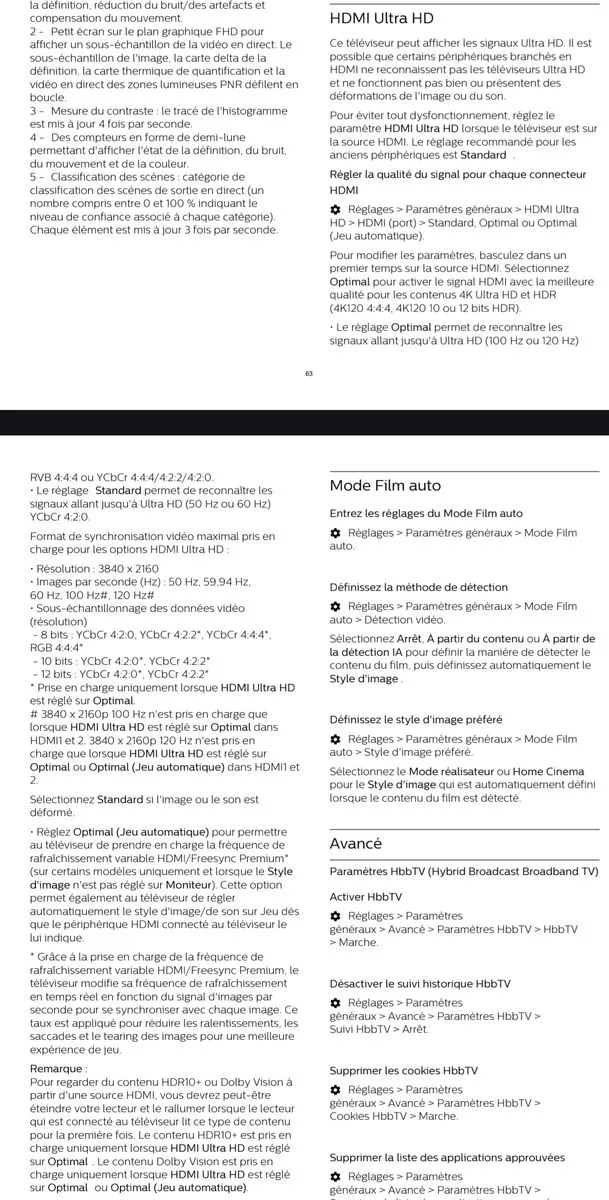
For your soundbar, I haven't yet checked which menu to go into.
The ideal would be to test directly on the TV and leave your soundbar connected solely to the eARC port of the TV to see if you experience the same phenomenon.
In any case, the latest generation devices do not support passthrough of audio formats or HD audio formats, so theoretically, there’s no benefit to connecting your box to the soundbar.
The black screens during frequency changes and video format shifts will be even shorter when connecting directly to the TV.
Sorry, can't get this to reproduce now. Its nice and slick atm.
EDIT - after me trying to recreate it, getting MOL4 stuck on one TV channel, multiple restarts of the box (I thought I'd bricked it!) I did manage to re-create. Not quite as slow as the other day, but, you get whats happening.....
Update on this. It's rendered the box almost unusable. To even get the box to boot back up now I have to remove the power cable for a minute before turning back on, otherwise box wont turn on.
Edit: More bollocks with it.
After complete power off then back on, managed to get box working again. Noticed DV had gone off. Went to settings to turn back on and box just went blank again as if its off.
Edit again. Turns off when you switch it to any of HDR/Adaptave/DV.
Absolutely rubbish.
 Display More
I am in Belgium and speak French, I know that the channels are at 25/50Hz
You have the autoframerate option in the Mytvonline settings that you can activate so that the channels (and movies/series) sync to the correct frequency.
The problem when you set your box to 50Hz is that it feels a bit less smooth in the menus compared to automatic 60Hz...
The revision of the chip and the HDMI port is no longer the same as on the Z11; you absolutely need to have the extended HDMI option activated in both the TV settings and the soundbar if you want to keep your box connected to it.
On your Philips TV, you need to activate the ultra HD HDMI option to "optimal" according to the manual :
For your soundbar, I haven't yet checked which menu to go into.
The ideal would be to test directly on the TV and leave your soundbar connected solely to the eARC port of the TV to see if you experience the same phenomenon.
In any case, the latest generation devices do not support passthrough of audio formats or HD audio formats, so theoretically, there’s no benefit to connecting your box to the soundbar.
The black screens during frequency changes and video format shifts will be even shorter when connecting directly to the TV.
Thanks a lot, i will have a look
the Z12 is connected to the soundbar
As the other user said, temporarily connect the z12 directly to the TV using the HDMI cable to check if the strange resolution behavior goes away or not.
Sorry, can't get this to reproduce now. Its nice and slick atm.
EDIT - after me trying to recreate it, getting MOL4 stuck on one TV channel, multiple restarts of the box (I thought I'd bricked it!) I did manage to re-create. Not quite as slow as the other day, but, you get whats happening.....
Thanks for the video.
You did mention that the issue occurs when you are on EPG, but I want to make sure.
Could you confirm if the issue only occurs when you open the menu bar from Grid EPG? Please check by opening the menu bar while on other pages like single epg, channel list, etc.
Also please send me the logs and let me know the tracking number after reproducing the issue.
Does the issue only occur when you search for that specific series?
If the issue remains, please send logs following the next instructions: How to send logs
I only encountered this problem when searching for this series, as it's available in multiple versions on my different portals. Each time, it freezes and MOL4 restarts on its own.
Catch up/cloud is extremely temperamental, it loads fine but if you try to fast forward I just get the spinning circle and nothing happens. Thought it was provider issue but tried 3-4 and all the same.
Also voice search is a little annoying, my03 used to search instantly. My04 just inputs the text in the box, then you have to manually navigate to the text box and click enter to search. Just a longer process and less convenient.
Bug report.
Sometimes when putting the Z12 in standby wachting live tv, putting out of standby its going to homescreen vod.
Homescreen live tv is selected at settings.
Hi - hdr output mode consistently turns off from adaptive when returning from standby for some reason.
Have tried setting it to different modes and testing cycling power, restarting, etc to see if it will stay but always turns itself off from standby.
Any idea what's happening here? Im on latest myo4 beta firmware (was also happening on stable myo3), hdmi CEC on, have a LG C1 and Yamaha YSP 2700 soundbar. Box is connected to hdmi input on soundbar, and soundbar connected to tv via arc. Thanks!

Bug report.
Sometimes when putting the Z12 in standby wachting live tv, putting out of standby its going to homescreen vod.
Homescreen live tv is selected at settings.
Does this occur frequently?
I've tested a few times and couldn't reproduce it.
If the issue occurs again, please send the logs and let me know the tracking number.

