Speedtest Z8 vs iphone/Laptop

We asking all new users to read the articles below, before creating their first posting or thread.

  • 4. Instruction Articles

    • Please note, in this forum are only English threads and postings allowed, without any exception!

      Please follow the forum rules, thank you for your understanding.

  • Hi Guys,

    here is my problem:

    My Z8 is connectet via 5Ghz with my WIFI. According Speedtest I have 15-20Mbit download.

    Connecting my Iphone or Laptop to the same WIFI i get about 50Mbit according speedtest.

    Do you have any idea or suggestions?

    Thank you!

    Bob
  • Probably your iPhone and laptop has better WiFi.

    I suggest to use cable instead of WiFi because you will get better and faster connectivity.

  • HI everyone why in formuler z8 in 5g before i have on speedtest 180 and now i have 80 of download and in telephone works great 180 download, my question is why this happens,?! thanks.....

  • Probably your iPhone and laptop has better WiFi.

    I suggest to use cable instead of WiFi because you will get better and faster connectivity.

    My z8 pro with external antenna has the best wifi reception of any device in my house. Usually when we run our microwave in our kitchen (kitchen is between our router and our living room TV) the wifi reception is significantly impacted and a lot of my devices lose connection (just while microwave is running). The z8 run strong and never misses a beat - no buffering or any issues at all while microwave runs. I have been VERY impressed with the quality of the wifi connection on my z8 pro.

  • FWIW, I only need about 6-7 Mbps to stream IPTV FHD, so I think you're not being hurt. I downgraded from 400/25 to 25/2, plenty of bandwidth for this single user (no gaming). Plenty left for surfing and email, etc. All I gave up was bragging rights and a big bill.

    Peder

    Formuler Z11 Pro, Z8, Onkyo TX-NR656, Samsung Q70A, Harmony One, Harmony 880

  • 6-7 Mbps to stream IPTV FHD - this propably depends form provider to provider

    with my 15-20Mbit i have freezing and buffering from time to time so i thought with 50Mbit it should be better

    I changed from DHCP to static - buit with static i cant watch series, even youtube is not working - so I changed back to DHCP

  • I changed from DHCP to static - built with static i cant watch series, even YouTube is not working - so I changed back to DHCP

    Shouldn't make a difference, but I found wireless choppy even when on 400Mb and G wireless and now run mine static, wired, and Wi-Fi disabled via Settings.

    Peder

    Formuler Z11 Pro, Z8, Onkyo TX-NR656, Samsung Q70A, Harmony One, Harmony 880

  • I have now wired and static, wifi disabled

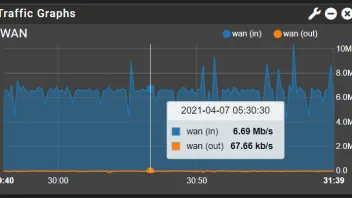
    You set correctly but i must say you have also specific issue with your Network, when i look on bitrates from your pic. To find ad hoc some fast solution is not easy.

    1. This can be your Router and settings on them. Firewall, some filters in use etc. Restart also your router, power off then on.

    2. Install Trial VPN and test if the connection is better. ( ISP can also block provider or throttle IPTV in general).

  • Every time this happens ( every 2-5min) buffering starts

    I see that (0) on occasion, but I don't get buffering. Right now I have a 1920/1080/30fps movie on and it's cycling to 0 fairly often, but no buffering. It just goes back up next time the indicator loops.

    Now on a 1920/1080/60fps movie. Just dropped to 0, but again no buffer. What kind of Internet connection do you have? Cable/PPPoE/Speed/Modem? Many other users/devices? Something that could hog the bandwidth? Has the wired/static network improved things at all? Try to reseat all your cables, maybe swap them around, reboot everything (especially modem). My Comcast line will run clean for weeks, then go to heck all at once and takes a reboot to clear the errors. HTH

    Peder

    Formuler Z11 Pro, Z8, Onkyo TX-NR656, Samsung Q70A, Harmony One, Harmony 880

  • Did you use the official Speedtest App to perform the test? or did you use some other method like web browser?

  • Hey Guys,

    I really appriciate your support!

    I have a router called B47E manufacturer is ZTE or Huawei ..see picture

    Firewall is disabled

    wired connection to Z8 - maybe a too old ethernet cable? Have ordered a Cat 7 one - waiting to be delivered

    Only Z8 is useing this router and sometimes I connect my laptop via WIFI for testing

    I use Surfshark VPN

    I´m not sure if it is a router issue - because speedtest rigth now on Z8 shows me 11,3Mbps down and 16,4 Mbps up

    It´s similar if I turn of VPN. No big change

    Speedtest on my laptop: 71 Mbps !

    If you say wired connection is better so could that big difference came from the old ethernet cable?

    What reason could be when I change to static IP that youtube is not working?

    Because of that I use DHCP


    By the way what i additionaly recognized is the signal strength u see when wathchin live TV.

    I always have one or none indication - never two or three! -> see second picture

    Hope you can help !!!

    Thanks

    Bob


  • Are you using VPN for everything or just TV? Try w/o VPN. Try the new cable. I suggest staying wired if only 3 feet.

    Is it a cable router, PPPoE, 4g/5g? I'm not seeing anything with that model # at ZTE or Huawei. Is it a gateway that includes the modem or is there a separate modem?

    1 bar is a pretty good indication that the Z8 is seeing a crappy signal. If another unused port on the router, swap to it.

    With firewall disabled, you could be being bombed by port scanners. I would enable.

    Peder

    Formuler Z11 Pro, Z8, Onkyo TX-NR656, Samsung Q70A, Harmony One, Harmony 880

    Edited once, last by provels (April 8, 2021 at 9:37 PM).

  • The bars shown in the top left of the TV viewing screen are the "buffer health"

    If there are no bars or only 1 bar it means the player is consuming contents at a faster pace than what can be downloaded through the network.

    Turn off your VPN and try again.

    Unsolicited PMs for support will be ignored.

    Duplicate support requests to the forums and helpdesk will be ignored.

  • Hi again,

    Thank you for the support.

    I have done following: took a new IPTV provider without VPN. Get 3 bars and no buffering or freezing.

    When turned on VPN I only get 1 bar or no bar and watching is almost impossible

    So it seems to be The VPN service but it is a well known VPN provider so i am still wondering

    Additional: it is a router, with a built in Sim -4g. Have not found the original Model from ZTE.

    Speedtest without VPN: 30Mbit

    Speedtest with VPN: 12Mbit

    What would you suggest: to buy a new router or use an other VPN service?

    Thank you!

    Bob

  • .Hello, I'll hang in here. I have the same problem with the buffer, after a certain time the three bars turn gray, then they slowly go up again. I still haven't found the perfect setting for the Fritz Box router. Formuler Z8 buffer on 10th internet line stable at 100 mbits. Please help

  • I have played around a little bit with the VPN settings.

    Have changed the protocol from automatic to manual

    Here are the diferent results:

    IKEv2: 25Mbit

    OPENVPN/UDP: 18Mbit

    OPENVPN/TCP: 14Mbit

    Shadowsocks: 23Mbit

    Wireguard: 31 Mbit

    Without VPN: 42 Mbit

    So I will try with Wireguard and see if there is any difference when watching

  • I'm a rookie to what some of you have to go through, and I've lots more bandwidth (and it's fiber), so we're not really apples to apples however I've 30 years of networking so....

    Xhumeka:

    When your microwave runs it should not, really can't, affect 5ghz wifi. Water excites at 2.4, so 2.4 Wi-Fi is affected, but not 5ghz.

    Xagentx:

    I too get some buffering, and it's sure as heck not my network. My provider seems to have problems on some servers. I say this as moving to another channel always seems to give me a rock solid picture. Going back to the problem channel and problems return. My point then is that buffering issues "may" not have anything to do with you.

    As so why DCHP and static give you different results, the most likely is you aren't setting static up correctly. The most common mistake there is the router is deliverying (via DHCP) a DNS server different to the one you are stipulating when you set up the static IP address.

    Next, was I you'd I've be hooking a hardwired laptop up and checking to confirm I was getting solid performance to the jac you are using. You should pretty consistently double your Wi-Fi peformance when directly connected. Wi-Fi, no matter what, simply has performance limitations that directly connected don't have.

    Personally, when I "cut the cable" i upgraded my wi-fi routers. I run a relatively fast one at the ISP hand-off, drop to hard-wired immediately, and pass hard-wired out to other Wif-Ruters in the house. My point then is this: You need to be sure whatever your "services" router is has enough power. I'm using a simple Asus RT-AC86U, and it's more than fast enough.

    If you're hard-wired connections isn't truly fast consider replacing the connecing cables, maybe even punching down the wires to the wall jacks again. Push comes to shove you want to make sure your router/switch and your Forumler (as well as anything else in the path) are correctly negotiating power speed and duplex. When in doubt set them manually to 100/full.

    As to VPN's if you don't have a need due to regulatory or ISP interference, their very nature adds over-head. I wouldn't use it if I didn't have too.

    As a closing thought, if there is any chance your bandwidth is being used by others I'd correct that such that I either had excessive bandwidth or I'd prioritized IPTV traffic at my root router.