

The Formuler Z11 pro max device does not work well live it works frame by frame the image freezes and with the remote control even if I want to exit the device does not respond it looks like a RAM problem. it's my 6 formulate device but my dealer no longer answers me he blocked me and he didn't give me an invoice I bought it when it was launched in November 2022 

Z11 pro max problem RAM
-
- Z11 Pro MAX
- Help
-
fenixx5458 -
February 22, 2023 at 12:42 PM -
Closed
We asking all new users to read the articles below, before creating their first posting or thread.
- 4. Instruction Articles
Please note, in this forum are only English threads and postings allowed, without any exception!
Please follow the forum rules, thank you for your understanding.
-
-
Come on dude, 6 formulers? Your dealer changed your formuler z11 6 times because you think you have RAM problems only because you have freezes and sometimes you want to turn it off and it doesn't let you?
I mean, i had those problems on every android box, nvidia shield, mi box s... FFS we learn with them, on my case it was never a RAM issue. When it's RAM you have Kodi to see if you have free RAM or you are using it all because you have tons of open apps...Either way, can be iptv provider issues, MOL3 issues (it's on BETA ffs), can be isp blocking IPTV, can be VPN blocking IPTV (it happens, don't lauugh...), can be your own internet connection...So many stuff... And the box not turning off is because like anyother device it can run out of memory and you just need to cut the power and turn it on again and see what kind of app is eating your memory... If it's MOL, just reset...
To know if your device has RAM problems there are other ways, just reset your box (if you have one now), reset everything, then install Kodi and if you have lan SMB, NFS or plex server just test it there. Build and advancedsettings.xml with big cache size and then you will see if you have RAM problems...
Now when you have IPTV freezing there are "n" reasons and RAM isn't on the TOP5 or even TOP 10. I'm almost sure it's not RAM!!! lol
And you say it happens in the live tv streaming? Not on VOD? Can you watch a movie on VOD? If you can then it's not RAM because guess what? VOD also relays on RAM, everything you stream, from disney+ app to netflix app to plex app relays on RAM...I would be more kind to accept an internal storage issue than RAM...
Your dealer is a saint, got you 6 new formulers...i mea^n, give me their contact... i want to buy them stuff

-
 Display More
Come on dude, 6 formulers? Your dealer changed your formuler z11 6 times because you think you have RAM problems only because you have freezes and sometimes you want to turn it off and it doesn't let you?
I mean, i had those problems on every android box, nvidia shield, mi box s... FFS we learn with them, on my case it was never a RAM issue. When it's RAM you have Kodi to see if you have free RAM or you are using it all because you have tons of open apps...Either way, can be iptv provider issues, MOL3 issues (it's on BETA ffs), can be isp blocking IPTV, can be VPN blocking IPTV (it happens, don't lauugh...), can be your own internet connection...So many stuff... And the box not turning off is because like anyother device it can run out of memory and you just need to cut the power and turn it on again and see what kind of app is eating your memory... If it's MOL, just reset...
To know if your device has RAM problems there are other ways, just reset your box (if you have one now), reset everything, then install Kodi and if you have lan SMB, NFS or plex server just test it there. Build and advancedsettings.xml with big cache size and then you will see if you have RAM problems...
Now when you have IPTV freezing there are "n" reasons and RAM isn't on the TOP5 or even TOP 10. I'm almost sure it's not RAM!!! lol
And you say it happens in the live tv streaming? Not on VOD? Can you watch a movie on VOD? If you can then it's not RAM because guess what? VOD also relays on RAM, everything you stream, from disney+ app to netflix app to plex app relays on RAM...I would be more kind to accept an internal storage issue than RAM...
Your dealer is a saint, got you 6 new formulers...i mea^n, give me their contact... i want to buy them stuff
Bro you are a savage, funny as hell though 😂. But it’s all facts ! Talking about vpn blocking IPTV, you are definitely right. This happens to me on 3 different fire stick devices connected to Nordvpn. After few minutes (4…5) it will start buffering eternally specially with VOD. It won’t play anymore, not speed issue because the speed was too good (150mb…on vpn and 800mb without). For almost one week I tried many options and solutions without success. One day something tells to try and change the Protocol. Eh voila. Issue fixed, no more buffering, everything plays hours without stop.
So anyone having this issue should change the protocol (recommended: NordLynx to OpenVPN(UDP).
fenixx5458 should try this if using vpn…
-
- Official Post
The Formuler Z11 pro max device does not work well live it works frame by frame the image freezes and with the remote control even if I want to exit the device does not respond it looks like a RAM problem. it's my 6 formulate device but my dealer no longer answers me he blocked me and he didn't give me an invoice I bought it when it was launched in November 2022
Does Youtube play videos without issues?
Remove the IR extender cable from the Formuler device and try again.
-

Lighting up ffs,no need to slaughter the guy
Bro, the issue he's relating i had it on several devices with other apps and even on Z11 once, everything stops, and you can only restart by cutting the power off. The next restarts you probably lost your favorites or more, on my case i lost favorites and pinned groups, so i did what they say here, reset MOL3 and it was solved, it was after the last BETA update. After that everything is working fine...
If resetting MOL3 didn't fix it you need to reset android to factory defaults, but on my case i didn't need to do it...Saying it's a RAM issue? Maybe...probably run out of RAM and blocked...but RAM is fine.The best way to test if your RAM is fine is installing KODI and stream from it because it uses RAM to cache...It's not because iptv is freezing or giving frame by frame...lol...that happens all the time on every device i have...sometimes just switching channel when you see it and problem solved, if you let it there maybe it will recover, maybe not...my dad always leave the channel freezing, i tell him to switch back and forward once freeze starts, he doesn't listen and sometimes the device recovers, others it will freeze forever or worst - reboot!!!!
Don't tell me no one had the sound problem where the image freezes and sound keeps popping loud...That's not RAM!! Or device issue, that's in most cases a software related issue aka ROM incompatibility of some kind, bad codecs mostly...Formuler Devs or better explained any device DEVS just need to find the best tweaks and settings to make their customers free of those bugs,but they will come for everyone...
I never returned a device just because i had iptv freezes or bad sound, or HDMI interference...I mean...90% of time isn't the device's fault. You will know when the device has RAM issues, because it won't start at all...
Returning devices because iptv is freezing, i mean i clap because i know once returned the dealer will probably sell the device anyways but refurbished with lower price and i for once want to know their name (dealer) so i can buy one of those formulers myself...depending on dealer's country and stuff...
-
I expressed myself badly I wanted to say that it is my 6 box of the brand and I never had a problem.
but tell me how I should proceed to send you a short video of the problem it's not the apps that bug it's all the apps even kodi and even after factory reset it's the same
-
I expressed myself badly I wanted to say that it is my 6 box of the brand and I never had a problem.
but tell me how I should proceed to send you a short video of the problem it's not the apps that bug it's all the apps even kodi and even after factory reset it's the same
Well if that's the case i have to apologize.
Ok, first things first, you bought it in November 2022 and only now you're getting that behavior? And which version of ROM and MOL3 do you have now? You have to explain how that behavior started because from what you're saying now it sounds like it worked fine and then the issue appeared suddenly? Wasn't it good when you bought it?! meaning did it came with that problem?
And you say you don't have an invoice? I'm not aware of the warranty needs but i'm pretty sure the invoice is needed somewhere along the process...
And after factory reset you can't power off the device through the menus? You can't start MOL3 and add a portal to test vod (without installing anything else or changing settings)? Because to test if it's RAM issue factory reset alone don't do anything if you are going to install everything like you had before.
Or you can just install Kodi after factory reset, add Samba/NFS server or just install youtube addon and watch a video... Don't even install MOL3 at first...because if you install kodi or plex and you are able to stream it's not RAM...
And are you using ethernet or wifi? Change cables, check power supply... Before RAM those are the most common issues you need to fix...
-
Code
1) after factory reset it starts and it installs the update I have no possibility to stop the process. 2) I am connected to the Internet by cable I tested in WiFi and by cable it is always the same problem. 3) after updating it installs mol3 direct. 4) I bought it at least November 2022 but only used it for 15 days. 5) as explained on my first message I bought it on the internet but in the delivery box there was no invoice and suddenly my seller does not answer my calls. 6) the power supply was changed by another one from a friend who has the Z11 and still the same problem nothing changes. 7) I've used youtube and disney+ and also amazon and the image it streams as if it's super slow motion. -
Code
1) after factory reset it starts and it installs the update I have no possibility to stop the process.
2) I am connected to the Internet by cable
I tested in WiFi and by cable it is always the same problem.
3) after updating it installs mol3 direct.
4) I bought it at least November 2022 but only used it for 15 days.
5) as explained on my first message I bought it on the internet but in the delivery box there was no invoice and suddenly my seller does not answer my calls.
6) the power supply was changed by another one from a friend who has the Z11 and still the same problem nothing changes.
7) I've used youtube and disney+ and also amazon and the image it streams as if it's super slow motion.
What's the resolution in settings on your tv? Do you have AFR enabled on MOL3? If not, enable just in case. But just try to see what resolution do you have in settings, and if you can, change it to 1080p 60HZ and color to Ycbcr 444 or 422...
Did you change your HDMI cable? Did you try other device on the same TV? Did you try formuler on another TV with different HDMI cable? List goes on, but i still think if it's on every video you watch it could probably be video connection related...i'm still not convinced that's RAM, because it can start the box, it can load and install apps like you said, so RAM is also needed in that process, RAM is not only used to cache video, it's also used on app installation and other stuff...
I would test that formuler on another TV or PC Monitor with a different HDMI cable also... But it's weird...the seller stuff...Didn't you buy it from a legit online store?
-
What's the resolution in settings on your tv? Do you have AFR enabled on MOL3? If not, enable just in case. But just try to see what resolution do you have in settings, and if you can, change it to 1080p 60HZ and color to Ycbcr 444 or 422...
Did you change your HDMI cable? Did you try other device on the same TV? Did you try formuler on another TV with different HDMI cable? List goes on, but i still think if it's on every video you watch it could probably be video connection related...i'm still not convinced that's RAM, because it can start the box, it can load and install apps like you said, so RAM is also needed in that process, RAM is not only used to cache video, it's also used on app installation and other stuff...
I would test that formuler on another TV or PC Monitor with a different HDMI cable also... But it's weird...the seller stuff...Didn't you buy it from a legit online store?
Thats why i suggested that it may be a case for formuler,to have a look at,in case of warranty issue,if it is bought off a non legit online store.I guess formuler has all the product data such as serial number etc and the names of legit (re-)sellers?
-
hello I have already tried on another tv and also on a computer to change the HDMI port and cable and also to go to a friend's house we tried that too it's still the same problem.
as far as formuler is concerned, they send me to their Exclusive importer for the Benelux but he asks for the invoice and that posed a problem, I have no invoice and without that they don't want to do anything.
sincerely friend
-
How did you paid?
-
PayPal between relatives
-
fenixx5458 I don't know if this could help explain your issue. Did you purchase the device from where you live? I remember Sam advising that if you are in Europe you cannot purchase a formuler device meant for North America and vice versa. He was saying formuler devices are limited to certain defined geographical areas. If the afore mentioned is the case that might explain your issues. I may be wrong. If am wrong please ignore my post.
Sam can you through light on this issue? Is the issue because of power plug difference or formuler devices can be used everywhere irrespective of where you purchase it from.
-
I bought it in the country where I live
-
I found and solved my problem by the way I had used a remote control with USB key to be able to use the mouse and this remote control which blocked the image flow I removed it and like magic it works correctly
-
- Official Post

I don't know if this could help explain your issue. Did you purchase the device from where you live? I remember Sam advising that if you are in Europe you cannot purchase a formuler device meant for North America and vice versa. He was saying formuler devices are limited to certain defined geographical areas. If the afore mentioned is the case that might explain your issues. I may be wrong. If am wrong please ignore my post.
Sam can you through light on this issue? Is the issue because of power plug difference or formuler devices can be used everywhere irrespective of where you purchase it from.
No, is not same issue. In case of Geo. use the error message is shown in clear words.
I found and solved my problem by the way I had used a remote control with USB key to be able to use the mouse and this remote control which blocked the image flow I removed it and like magic it works correctly
Just for understanding, you took other rcu and did what exactly?
-
1. from his statement he used a wireless controller(mouse/remote) with a usb receiver.
this device was causing the issue(looks like the usb device was defective and causing some short)
That is why it is recommended when doing test after resetting it should be done as bearbone(no aditional accessories connected) in order to efficiently isolate the issues.
2. regarding the geo/region usage I believe a message is displayed during setup informming the user.
-
- Official Post

That is why it is recommended when doing test after resetting it should be done as bearbone(no aditional accessories connected) in order to efficiently isolate the issues.
2. regarding the geo/region usage I believe a message is displayed during setup informming the user.
Correct for both.
-
That's something you should have said in the first comment, as i said , to get help you need to tell everything and you told the story with huge holes on it. How could anyone have helped you? Imagine if someone opened the box to see if the ram was OK...LOL
-
he thought it was ram because the box has Alzheimer's? lol
Glad it work out positively.
-
I had a remote control that connects with a USB key I inserted it into the rear USB port to be able to use the mouse on the remote control but it came into a hardware conflict and it froze the image when I removed it the latter from the USB port everything is back to normal
-
- Official Post
Ok, such device incompatibility can happen. Nice you solved your issue.
-
- Official Post
I had a remote control that connects with a USB key I inserted it into the rear USB port to be able to use the mouse on the remote control but it came into a hardware conflict and it froze the image when I removed it the latter from the USB port everything is back to normal
Can you share a photo of the USB remote for future reference?
-
glad it work out.
1. if the usb wireless receiver is defective it can freeze up the device or cause startup issues.
This is also true for usb flash and mem cards.
2. alternatively an unsupported usb hardware can also cause issue.
-
- Official Post
I had a remote control that connects with a USB key I inserted it into the rear USB port to be able to use the mouse on the remote control but it came into a hardware conflict and it froze the image when I removed it the latter from the USB port everything is back to normal
Please share a photo of the front and back of the remote and usb dongle
-
I think this was my issue as well. Mine would work great for a few days then freeze. Tried everything and sent the unit back and got a new one. Next one, SAME exact issue. Had a friend take it to work on it who has had Formulers forever and when he plugged it in it worked fine. Then, that same unit at my house within a week, froze again, and that was today. Unplugged for 30 minutes, cleared cache etc...nothing. Then I stumbled on this exact post/comment with the USB and remembered that when I gave it to my friend he had the power supply, box and original remote. Nothing else. I pulled the USB for the air mouse/keyboard remote, plugged it in and it works fine, for now so stay tuned.
I have a different air mouse remote I can try. I think I can set a button ON the Formuler remote to be a mouse if I remember correctly. Right?
This came with the unit. Here's the pic from amazon.
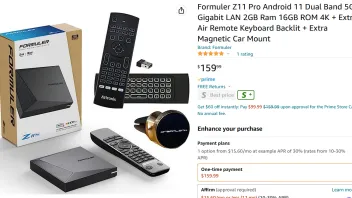
Hope it helps someone else because MOL3 and F11Pro rock!! -
- Official Post
Yes, some seller combine with the Box optional and unknown RCU`s that can produce issues. Only original remote is guarantee for smooth work.
-
- Official Post

I think this was my issue as well. Mine would work great for a few days then freeze. Tried everything and sent the unit back and got a new one. Next one, SAME exact issue. Had a friend take it to work on it who has had Formulers forever and when he plugged it in it worked fine. Then, that same unit at my house within a week, froze again, and that was today. Unplugged for 30 minutes, cleared cache etc...nothing. Then I stumbled on this exact post/comment with the USB and remembered that when I gave it to my friend he had the power supply, box and original remote. Nothing else. I pulled the USB for the air mouse/keyboard remote, plugged it in and it works fine, for now so stay tuned.
I have a different air mouse remote I can try. I think I can set a button ON the Formuler remote to be a mouse if I remember correctly. Right?
This came with the unit. Here's the pic from amazon.
Hope it helps someone else because MOL3 and F11Pro rock Opened a conversation regarding this issue. Please check it and reply.