


Am I correct that doing a factory reset from MYTVOline 4 will still leave you with MOL4? Asking because my old backup iptv box on MOL3 is having issues.
I thought the beta was temporary.
Not anymore online. That's my latest info.

We asking all new users to read the articles below, before creating their first posting or thread.
Please note, in this forum are only English threads and postings allowed, without any exception!
Please follow the forum rules, thank you for your understanding.
Am I correct that doing a factory reset from MYTVOline 4 will still leave you with MOL4? Asking because my old backup iptv box on MOL3 is having issues.
I thought the beta was temporary.
Not anymore online. That's my latest info.
Am I correct that doing a factory reset from MYTVOline 4 will still leave you with MOL4? Asking because my old backup iptv box on MOL3 is having issues.
My bad. I see on the launch screen that you cannot roll back to MOL3
My bad. I see on the launch screen that you cannot roll back to MOL3
Make backup of mol4 on usb.
Go to desktop
Hold ok button on mytvonline4
Select Info
Then click on delete data.
Then you have mytvonline4 fresh and can import/restore the portal(s) and favs via usb my friend.

Is the audio gone for all apps? or are you just not getting it on MYTVOnline 4?
This occurs for me as well but found it is because I am using a soundbar and I have to be certain audio system is chosen as the audio source in my Sony Bravia Tv. This happens on MOL3 as well. May want to check your TV sound settings.
Guys MOL4 is down again?!
Is the audio gone for all apps? or are you just not getting it on MYTVOnline 4?
all apps ( tested youtube )

Guys MOL4 is down again?!
To download as beta version it's down yes.
If you ment yesterday that it shutdown itself when using mol4 with live tv etc. Can be yes, end afternoon i had it too that it closed when i go from live tv channels to refresh live channels and or searching other channel.
I disabled meta api again. And let it be.
It's fault from tmdb. Not mytvonline4.
In the past couple of weeks, I’ve started to receive Config Error 100 when I boot the box from power off.
Mytvonline 4 is set to auto start on boot.
I’m not using a config in the general terms.
I thought it might have been a migration of portal issue between MTOL3 and MTOL4 so I manually inputted portal details again and still the same issue.
I check WiFi connection and all is good.
Checked the same via MTOL3 on Z11 Pro Max and the issue is not present. this is strictly isolated to MTOL4 in my case.
When I press OK to the warning message, it does away and starts at Formuler Home Screen. When I select MTOL4 manually, it works no issue at all.
When I select none as the startup app, the issue does not occur.
I expect error 100 is network related, so MTOL4 is trying to connect too fast for the network to catchup, so I wonder, in MTOL3 is there some sort of 10 second delay compared to MTOL4 and I ask because as I mentioned, the same situation is not present on MTOL3.
Here’s the error message:
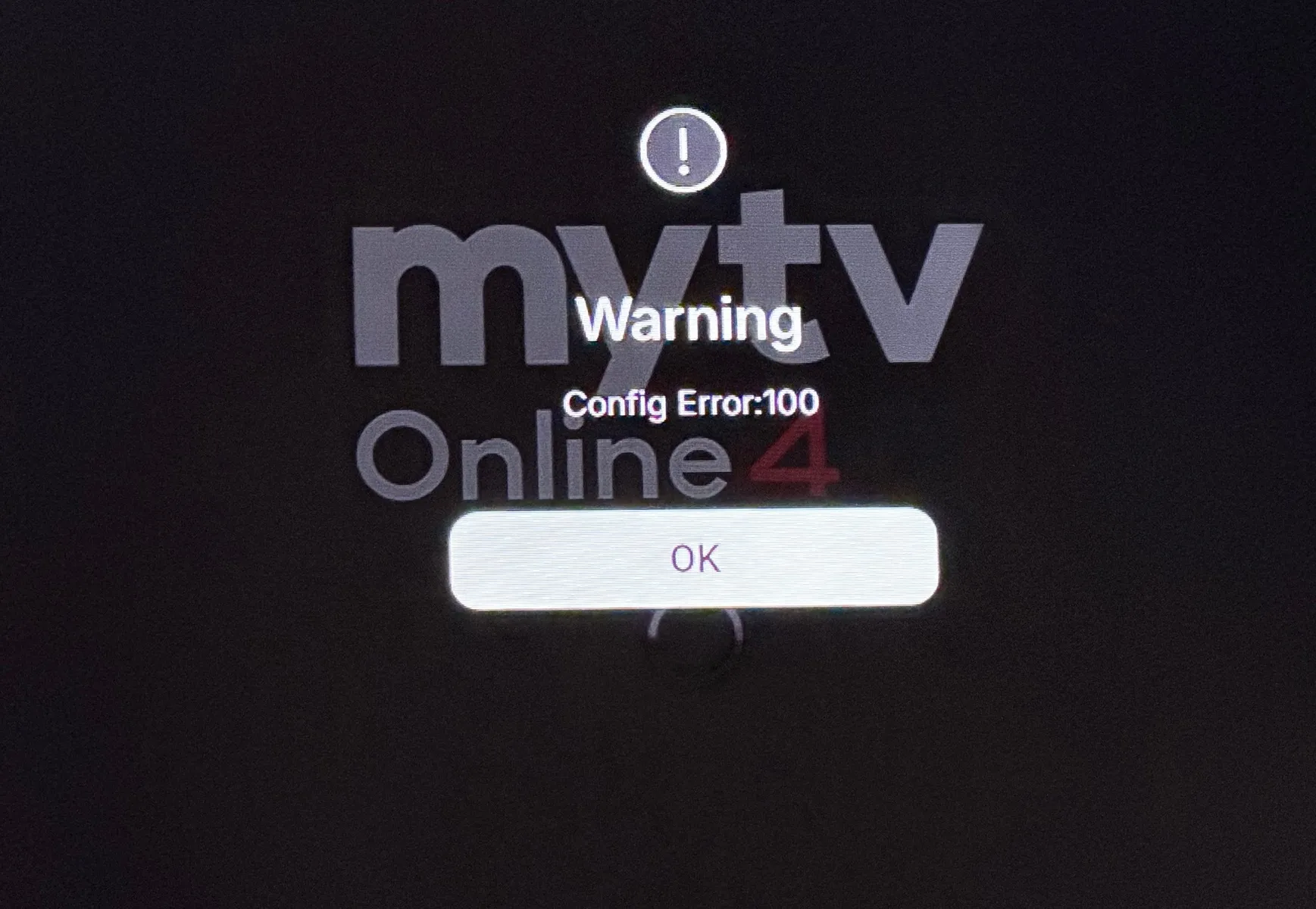
Thank you for reporting, will include into MOL4 Database.
To download as beta version it's down yes.
If you ment yesterdatcthat it shutdown itself when using mol4 with live tv etc. Can be yes, end afternoon i had it too that it closed when i go from live tv channels to refresh live channels and or searching other channel.
I disabled meta api again. And let it be.
It's fault from tmdb. Not mytvonline4.
The problem is that the application reopens itself after 3-4 seconds, and I can't change anything!
Please fix this problem because the Champions League final is in less than a week.
I 'solved' it by quickly scrolling down. Looks like a TMDB problem in the first rows of the home screen. You can change to another homescreen too, to avoid the issue. Somehow the issue disappeared for me by itself.
My Formuler Z12 with MOL4 has been working fine for several weeks until today. I have 2 profiles, main is (Svenne) and secondary is (Maud) my wife.
So today when starting up I choose Svenne but then it restarts immediately. If I instead choose the other profile Maud I get in and everything works according to her settings.
Then I try to go back to my own profile Svenne but it just restarts. Logged out completely and also restarted the entire Formuler. The big problem for me is all the settings I have such as favorites etc. on my profile.
I can see everything via my wife's profile but would love to receive tips on what I can do. Made a movie that I attach here.
svejoh


I started having similar issue with Mol4 just crashing, wont open at all, loops around.
This is Crazy bug with Bets Mol 4. This wasn’t happening before just started a day ago.
Hi, Sorry you are having trouble. My only solution was to reset device to factory default. Once it clears, you have to go into software update... It won't find anything so you must press 1-3-3-9 to get MOL4 to reload. Once you go through the setup and it prompts you to select a startup screen for MOL4 I selected the second option to the right which shows a Clown Fish. I ended up resetting the box twice because when I tried to setup the first time. I selected the first startup screen option, and OMG, it began to go into a loop again! I did this last week and it is has been fine ever since.
 Display More
In the past couple of weeks, I’ve started to receive Config Error 100 when I boot the box from power off.
Mytvonline 4 is set to auto start on boot.
I’m not using a config in the general terms.I thought it might have been a migration of portal issue between MTOL3 and MTOL4 so I manually inputted portal details again and still the same issue.
I check WiFi connection and all is good.
Checked the same via MTOL3 on Z11 Pro Max and the issue is not present. this is strictly isolated to MTOL4 in my case.
When I press OK to the warning message, it does away and starts at Formuler Home Screen. When I select MTOL4 manually, it works no issue at all.
When I select none as the startup app, the issue does not occur.I expect error 100 is network related, so MTOL4 is trying to connect too fast for the network to catchup, so I wonder, in MTOL3 is there some sort of 10 second delay compared to MTOL4 and I ask because as I mentioned, the same situation is not present on MTOL3.
Here’s the error message:
I have found this issue to be tied directly to internet issues. When my device began to go into an infinite loop by crashing and trying to reopen MOL4, I unplugged my ethernet cable and this error began. I then accessed my WIFI and the error disappeared. I did this several times in a row between ethernet unplugged, leaving the box with no internet connection and the error continued.
I know you are convinced your WIFI was working, but is it possible your ISP was offline briefly?
I too have the app loop problem.
Open the app and after a few seconds in continually re-opens so I can’t watch anything.
Has anyone found a solution?

I too have the app loop problem.
Open the app and after a few seconds in continually re-opens so I can’t watch anything.
Has anyone found a solution?
Clear cache and then in mytvonline4 in settings at your profile, turn off
"meta api".
 Display More
My Formuler Z12 with MOL4 has been working fine for several weeks until today. I have 2 profiles, main is (Svenne) and secondary is (Maud) my wife.
So today when starting up I choose Svenne but then it restarts immediately. If I instead choose the other profile Maud I get in and everything works according to her settings.
Then I try to go back to my own profile Svenne but it just restarts. Logged out completely and also restarted the entire Formuler. The big problem for me is all the settings I have such as favorites etc. on my profile.
I can see everything via my wife's profile but would love to receive tips on what I can do. Made a movie that I attach here.
svejoh
Could you send the logs after reproducing the issue?
Also, please let me know which setting your start-screen is set to. If it is set to Live or VOD, please try changing it to Home and let me know your results.
Could you send the logs after reproducing the issue?
Also, please let me know which setting your start-screen is set to. If it is set to Live or VOD, please try changing it to Home and let me know your results.
I can't change the home screen on the profile that is incorrect as it restarts immediately. I have now created a new profile for myself (Svenne 2) and started adding favorites etc. But the corrupt profile (Svenne) is still there if anyone comes up with a solution. I have sent log 0000002008098.
svejoh
I can't change the home screen on the profile that is incorrect as it restarts immediately. I have now created a new profile for myself (Svenne 2) and started adding favorites etc. But the corrupt profile (Svenne) is still there if anyone comes up with a solution. I have sent log 0000002008098.
svejoh
Thanks for the info.
Will check this with devs, and update you.
Meta api is OFF in mytvonline4.
I turned box on. I push favorite button.
I select my own created favorite folder.
And then selected channel 1 and i got image and direct back to homescreen.
Logfile: 00 00 00 1F E6 A4 1

I have found this issue to be tied directly to internet issues. When my device began to go into an infinite loop by crashing and trying to reopen MOL4, I unplugged my ethernet cable and this error began. I then accessed my WIFI and the error disappeared. I did this several times in a row between ethernet unplugged, leaving the box with no internet connection and the error continued.
I know you are convinced your WIFI was working, but is it possible your ISP was offline briefly?
Hi, thanks for your detailed information, very much appreciated.
I can’t say for sure it’s not network related other than the issue is not present when I use MTOL3 on Z11 nor was ever an issue with MTOL3 on Z12.
It isn’t always present on MTOL4, maybe 70% of the time.
I turned on earlier and didn’t receive the error so it is plausible a network error, however if that’s the case I expect MTOL4 is trying to connect too fast for the network to catchup. Remember this only occurs on power up, not from standby.
If I power up Z11 and Z12 at the same time, z11 never shows the error so without me knowing the full internals of MTOL4 it is plausible there’s a slight delay from one version to the other?
I’m sure it’ll correct eventually (with formuler team reviewing all bugs)
Hi, I'm thinking of buying a Z12 ultra and I would like to ask about the auto frame rate match on this box.
Does it automatically switch resolution (to 1080p for example) as well as frame rate or is it frame rate only?
Thanks

Hi, I'm thinking of buying a Z12 ultra and I would like to ask about the auto frame rate match on this box.
Does it automatically switch resolution (to 1080p for example) as well as frame rate or is it frame rate only?
Thanks
This depends,whether your tv set supports QMS(Quick Media Switching) feature.Most recent tvsets from LG do,other older Tv Brands dont.
Meta api is OFF in mytvonline4.
I turned box on. I push favorite button.
I select my own created favorite folder.
And then selected channel 1 and i got image and direct back to homescreen.
Logfile: 00 00 00 1F E6 A4 1
Is this reproducible?
What happens if you enable the metadata?
I tried to reproduce it on my end, but it is working fine. Maybe it was a one off?
Is this reproducible?
What happens if you enable the metadata?
I tried to reproduce it on my end, but it is working fine. Maybe it was a one off?
It happens often, with media api on or off. Im at pinned groups mostly and bam! Then it happens.
Next time i make movie
Hello, is there already a prospect when it will officially come out or is there still many problems that need to be solved?

This depends,whether your tv set supports QMS(Quick Media Switching) feature.Most recent tvsets from LG do,other older Tv Brands dont.
Thanks for your response, I have have a Sony tv which doesn't support QMS. Does this mean that everyone (except LG owners) is using the Formuler to upscale 1080p material to 4K?
Thanks for your response, I have have a Sony tv which doesn't support QMS. Does this mean that everyone (except LG owners) is using the Formuler to upscale 1080p material to 4K?
Hi,i have a SONY tv as well,most channels are upscaled to 1920*1040 (FHD),except for some iptv streams that deliver real 4 K
Hi,i have a SONY tv as well,most channels are upscaled to 1920*1040 (FHD),except for some iptv streams that deliver real 4 K
Thanks for your response.
Perhaps I am not making myself clear, I use tivimate and kodi /coreelec at the moment on a homatics box.
Both tivimate and kodi will switch the output resolution to 1080p for 1080p streams and switch the output resolution to 4K for 4K streams.
I am trying to understand if the MYTVOnline 4 on the Formuler z12 ultra will do the same thing?
Thanks
Tbh i do not have any experience with Tivimte,KODI or other than Formuler boxes,,you can check the resolution on a z 12 ultra by pressing the info button,once or twice,it will give you the info you want.
Tbh i do not have any experience with Tivimte,KODI or other than Formuler boxes,,you can check the resolution on a z 12 ultra by pressing the info button,once or twice,it will give you the info you want.
OK thanks. Can you please check what output resolution your Formuler is set to? The info button on the Sony TV should tell you this.
Anybody else's plex been really slow/laggy since the update? Was fine before and still ok on z11 pro max
OK thanks. Can you please check what output resolution your Formuler is set to? The info button on the Sony TV should tell you this.
OK thanks. Can you please check what output resolution your Formuler is set to? The info button on the Sony TV should tell you this.
Sorry for the late reply,i missed your last question, the best way to gather all the info(before you buy a z12 ultra) is to use AI (GEMINI,CHAT GPT etc) and ask the question "How to set up the connection between a formuler z 12 ultra and a SONY tv(your specific model!),settings on box and tv"
You will get an extensive reply,and you can add further questions,note SONY produces so many models,one about every year,so its essential that you mention your specific model and release date,to get the most adequate answer
Thanks for the suggestion, I think I have found the answer by watching a YouTube video. Unfortunately it appears that this device or software does not support resolution switching so it is not for me.
Best regards
I started having similar issue with Mol4 just crashing, wont open at all, loops around.
This is Crazy bug with Bets Mol 4. This wasn’t happening before just started a day ago.
Have you managed to sort it?
The same is happening with mine.
App comes on for a few seconds the just keeps going to Home Screen.
Have you managed to sort it?
The same is happening with mine.
App comes on for a few seconds the just keeps going to Home Screen.
Try to go fast to your username icon and then settings.
Somewhere you find "meta api". Turn that off.
If it won't help at all clear cache and above cache clear data. Then fill in your portal and at the username icon you find settings. There you find the meta api option. Tuen that off then.
Have you managed to sort it?
The same is happening with mine.
App comes on for a few seconds the just keeps going to Home Screen.
Hi, Yes... I firmly believe it has something to do with the initial startup screen you chose when installing MOTV4. I think like most, I chose the very first one in the menu. I wiped the box and started over.... You cannot reinstall MOL3 and once the box is reset to factory, you have to go into update and it won't find MOL4 so you must reenter 1-3-3-9 and it will begin the download.
The reason why I believe it has something to do with the home screen, is because, I had to wipe my device two times. The first time, I chose the first home screen and it started looping and crashing all over again. The second time I set it up, I chose the second home screen to the right. It has a clown fish on it. Since this update, my box has been back to stable. I hope this helps and I am praying for a final version of MOL4 very soon!
Hi, Yes... I firmly believe it has something to do with the initial startup screen you chose when installing MOTV4. I think like most, I chose the very first one in the menu. I wiped the box and started over.... You cannot reinstall MOL3 and once the box is reset to factory, you have to go into update and it won't find MOL4 so you must reenter 1-3-3-9 and it will begin the download.
The reason why I believe it has something to do with the home screen, is because, I had to wipe my device two times. The first time, I chose the first home screen and it started looping and crashing all over again. The second time I set it up, I chose the second home screen to the right. It has a clown fish on it. Since this update, my box has been back to stable. I hope this helps and I am praying for a final version of MOL4 very soon!
I think you should make the homepage with the movies and series invisible.
Maby it helps too. See pictures. That's also changeble. Turn all off with "personalize your home" and then "edit row" and then you can make the TMBD movies and series unvisible. Click on the left on the "eyes" to disable it.
Maby it help too.
I think you should make the homepage with the movies and series invisible.
Maby it helps too. See pictures. That's also changeble. Turn all off with "personalize your home" and then "edit row" and then you can make the TMBD movies and series unvisible. Maby it help too.
You know what? You might be on to something, because the second home screen I was referring to does not have all the movie info etc.... displayed. It is pretty much a blank screen 😊
