In which directory are the recordings saved.
Can't find any files that are saved.
The files are available for playback.
recordings are in android>data
We asking all new users to read the articles below, before creating their first posting or thread.
Please note, in this forum are only English threads and postings allowed, without any exception!
Please follow the forum rules, thank you for your understanding.
In which directory are the recordings saved.
Can't find any files that are saved.
The files are available for playback.
recordings are in android>data
first ensure in mol settings>dvr that the storage is set to the external storage:
1. try formatting on the box it will default to fat32
2. format on pc using ntfs if above don't work.
3. try using a class6 and up memory card
4. use a usb3 flash drive on the usb3 port
The USB I was using was fat32 but now after reading this I went back and had the box do the formatting.
Hopefully that will be the cure.
I'll let you know, thanks.
first ensure in mol settings>dvr that the storage is set to the external storage:
1. try formatting on the box it will default to fat32
2. format on pc using ntfs if above don't work.
3. try using a class6 and up memory card
4. use a usb3 flash drive on the usb3 port
Thanks JR. Letting the box do the formatting did the trick for me.
cool mate; glad it worked out.
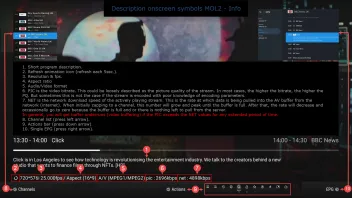
For info, two symbols are displayed at the top right.
Do they matter?
Second to the right - wifi signal strength?
Far right - signal quality for the channel?
In which directory are the recordings saved.
Can't find any files that are saved.
The files are available for playback.
Your USB Stick or HDD: \Android\data\tv.formuler.mol3.real\Recordings
How do I delete notifications?
You can’t at this time.
You can clear the notification marker after a notification has appeared but they cannot be deleted just yet
Change HDR Output Mode
Off
Adaptive
HDR10
I chose Off and then received on my TV LG Oled that I should restart the TV.
Then went into HDR Output Mode and then there was an additional option HLG10.
Knew Z11 what TV I have and added the optimal for my TV.
Can other video players be used to play recordings made with MytvOnline3?
Anyone have good alternatives?
yes example vlc, mx player.
you will have to load the .ts files into the player of choice.
yes example vlc, mx player.
you will have to load the .ts files into the player of choice.
I have VLC but can't find any movie recording.
when i say load manual it means point vlc to:
Android\data\tv.formuler.mol3.real\Recordings
or do a library refresh in vlc to auto scan for the media on the sd/usb storage
When will the next update available?
the admin don't allow users to make any announcement about update release so monitor the forum for admin update posting.
or check the formuler telegram announcement.
When will the next update available?
Please note, there is no schedule that say on day x will come new update. Update goes OTA when the devs. decide its time and they finished with some fixes.
When released, new thread will be always open and community informed about new update.
if you require an estimate base on patterns of release it is usually every 1-2 months
once the devs release the updates the admin will make the announcement on this forum(users are not allowed to make update announcement)
You should monitor the telegram announcement as well for update notifications because the telegram can have notice before forum posting.
also the software app will show update when official version is ready to install.
thanks a lot. Hope it will solve the EPG issue, a major issue...
How do I change subtitles in VOD?
Wrong area to post this question mate. *whispers* press okay and look at top icons that show up..
I got the message An error occurred:MediaCodecVideoDecoderException on a couple of 4k channels in Mol3 using Xc,but the same channels will also not work on another apps I am using on the Formuler Z11 Promax.
The Strange thing is that the same channels are working on the Nvidia Shield 🤔
I got the message An error occurred:MediaCodecVideoDecoderException on a couple of 4k channels in Mol3 using Xc,but the same channels will also not work on another apps I am using on the Formuler Z11 Promax.
The Strange thing is that the same channels are working on the Nvidia Shield 🤔
Fix for this issue will come with next update this month.
Do you have more details about the date of this long-awaited update?
This Month, means this Month, would i have info about some specific day of release, then i would post it!
Await release, it will be announced from me in new thread.
Hello,
I have some bugs or improvements to mention or suggest:
Radio stations from a particular IPTV supplyer don't play at all on Z11 PM, but play very well on Z10, and android iptv smarters phone app, other radio stations from 2 other provider though work very good on Z11PM. It must be due maybe to a codec for the sound (Audio optimizer is installed already)
About the initial portal config assistant : a possibility to skip/ ignore changing the groups would be very helpfull to gain time for a majority of ppl because unwanted groups are already removed by the supplyer and for those who often have to configure boxes.
When you configure the box with some apps installed on a particular usb stick let's say "Intenso", and after you put another NTFS usd flash drive , contrary to Z8 and Z10 even after reboot, it looks like the Z11 does not recognize your new flash drive, it keeps in memory the name of the 1st usb drive that you put ("Intenso") ...it can be confusing and time consuming, I found out that you have many more steps to do to use the new drive: go down on the name of the drive used for timeshift, press ok, confirm the new one and once again the same steps for the usb drive that you want for recording...so if, the new flash drive could be recognized automatically or after reboot, it would be better.
About groups pinning:
If you have more than 1 supplyer and never pinned groups on the 1st one, when you want to pin groups for the 1st after having intalled a 2nd supplyer and pinned groups on the 2nd, the only way I found to pin groups on the 1st, was to deactivate the 2nd supplyer.(maybe there is a way though ?)
Also, a very important thing, when you have several supplyers, pinned groups for every supplyer and you want to reorganize them (rearrange), as many pinned groups have the same or almost the same name, it is impossible to know from what supplyer a group is, so next to each pinned group should be mentionned ("supplyer name")
I apreciate the new search feature but if you make a search on let's say "nba", it would be apreciated when you browse through the results, in the channels to see from which supplyer they are...
In this version, would be apreciated also to put back from MOL2 the field "Date Added" for the VOD and series.
Already asked since MOL2: A possibility to scroll and read the full the synopsis of each episode of a season in the series when there are more than 3 lines.
Thank you for the good work, I hope to have been helpful.
Do you have more details about the date of this long-awaited update?
he is not the dev so the admin can only give an estimated time.
I would estimate mid april to end of april base on previous pattern of release.
the long wait is because it is not easy to fix an issue without simulating and understanding it first.
the limitation of formuler devs is:
1. unlike iptv client app, formuler has many source trees to support for the various hardware.
when i go to history in vod or series z11 starts to toggle by it self so i canr chose what to see in history or favvs
an update should be out next week so maybe it would be fix.
Hello. Do you expect to resolve this issue?
КWhen the device is rebooted and there is an adapter from the air mouse in it, the console does not work correctly (the image remains stationary). You have to remove the adapter each time it overloads.
пThe problem has been known for a long time but for some reason has not yet been resolved.
Do you expect to resolve this issue?
КWhen the device is rebooted and there is an adapter from the air mouse in it, the console does not work correctly (the image remains stationary). You have to remove the adapter each time it overloads.
пThe problem has been known for a long time but for some reason has not yet been resolved.
Please, in this case open a new support ticket at https://support.formuler.tv , use the orange button on right side and let the bot create one.
In Ticket:
1. Provide a detailed issue description for the devs.
2. Include screenshots from your Air Mouse and dongle + Name and Manufacturer.
3. Reboot your device once with inserted dongle/adapter from your Mouse to reproduce the issue, then disconnect the adapter and go instantly into main menu -> settings ->Device Preferences -> About -> Report problem -> Send Logs. Note your Tracking No. : xxxxxx and include into the Ticket.
The devs need first to check the log files and if they do not help, they have to buy such Air Mouse and test to fix the issue.Thank You.
Thanks for the quick reply.
I found it The solution to this problem is here on the forum (I think even you helped me). So it's not just me and maybe mark mouse doesn't matter. By the way, I used two different mouse - the effect is the same. Of course, I will try to send a report to the developers but, as I understood, you have a good connection with them and they will listen to your opinion faster.
Interesting how do other users have this problem?
When is the next update? (how often they do updates?) thanks in advance
1. beta update is out 11.2.2
2. average update release 1-2 months depending on the list of fixes.
Hello. Do you expect to resolve this issue?
КWhen the device is rebooted and there is an adapter from the air mouse in it, the console does not work correctly (the image remains stationary). You have to remove the adapter each time it overloads.
пThe problem has been known for a long time but for some reason has not yet been resolved.
This issue was already fixed in the current beta firmware.
moved to the right thread
try the new beta update 11.2.2 or wait for the final release in a few days.
Yes, i see my mistake, i have the BETA already, the issue is only with this new BETA 11.2.2, sorry!!
Do backup from MOL3, factory reset and install after reboot again Beta MOL3. See if the issue is gone.
Can't find a shortcut for the scheduler remote.
Only finds shortcuts to recorded.
Good if they are in the next update.