


I think the mute is enable , I already had such issue .
So disable mute with the remote controller, you had to configure the shortcut with the app.
How do i do this

We asking all new users to read the articles below, before creating their first posting or thread.
Please note, in this forum are only English threads and postings allowed, without any exception!
Please follow the forum rules, thank you for your understanding.
I think the mute is enable , I already had such issue .
So disable mute with the remote controller, you had to configure the shortcut with the app.
How do i do this

How do i do this
bottom right on remote, 4 dots, on mine was already setup as a mute button.
Next time it happens press it, should unmute as mine does this from time to time on wake up
I’m having issues with aspect ratio Original being broken since the update. Original has the same behaviour as Full it seems. Movie in 1920x808 gets stetched to full screen for example. So now I need to manually change each time which is not very convenient
I see a lot of people factory reset with each update, is that officially recommended? Surely it’s better to not factory reset and make sure there are no issues with the updating process for everyone?
I think the mute is enable , I already had such issue .
So disable mute with the remote controller, you had to configure the shortcut with the app.
Lets see i did that now
I did the last update.
Rename apps rows is not working.
Apps names apear with a very annoying outline .
Any sugestions ?

I did the last update.
Rename apps rows is not working.
Apps names apear with a very annoying outline .
Any sugestions ?
I let it standard. Its called custom. No problems here.
I gonna test it with other names
I did the last update.
Rename apps rows is not working.
Apps names apear with a very annoying outline .
Any sugestions ?
Hmmm, not here. I typed a long text but nothing.
Just let it custom otherwise.
Rename apps rows is not working.
Apps names apear with a very annoying outline .
Tested rename and it works fine. New entry is saved.
Please upload screenshot from annoying outline.
Only getting barely 12hr epg on stalker now after update? When we had around 4 days when switched to alternate! So we now have same problem as epg for xcapi? Also having problems with aspect ratio?
Hi,did you try setting update interval to 3hours (Content Manager>content sources>sub>edit>set update interval epg to 3 hours)?
Tested rename and it works fine. New entry is saved.
Please upload screenshot from annoying outline.
Like i said. I couldnt also not reproduce 🤷🏻♂️😉

Hi,did you try setting update interval to 3hours (Content Manager>content sources>sub>edit>set update interval epg to 3 hours)?
Hi Henkie. Yes. Tried everything pal. Actually won't allow update interval to 3 hrs while on Alternate. But tried 3 hrs also on default. Same issue. Getting around 5hr epg on stalker now after the update. Been banging on about the fix on xcapi for a year now! Still not fixed bud. Looking like we have same issue on stalker now? Unless its my provider which i don't think it is.
Hello! Became the owner Z11 Pro max. In the mol3 application, I noticed that in the infobar on the right side, when you click epg, the window is empty, although epg is on all channels.

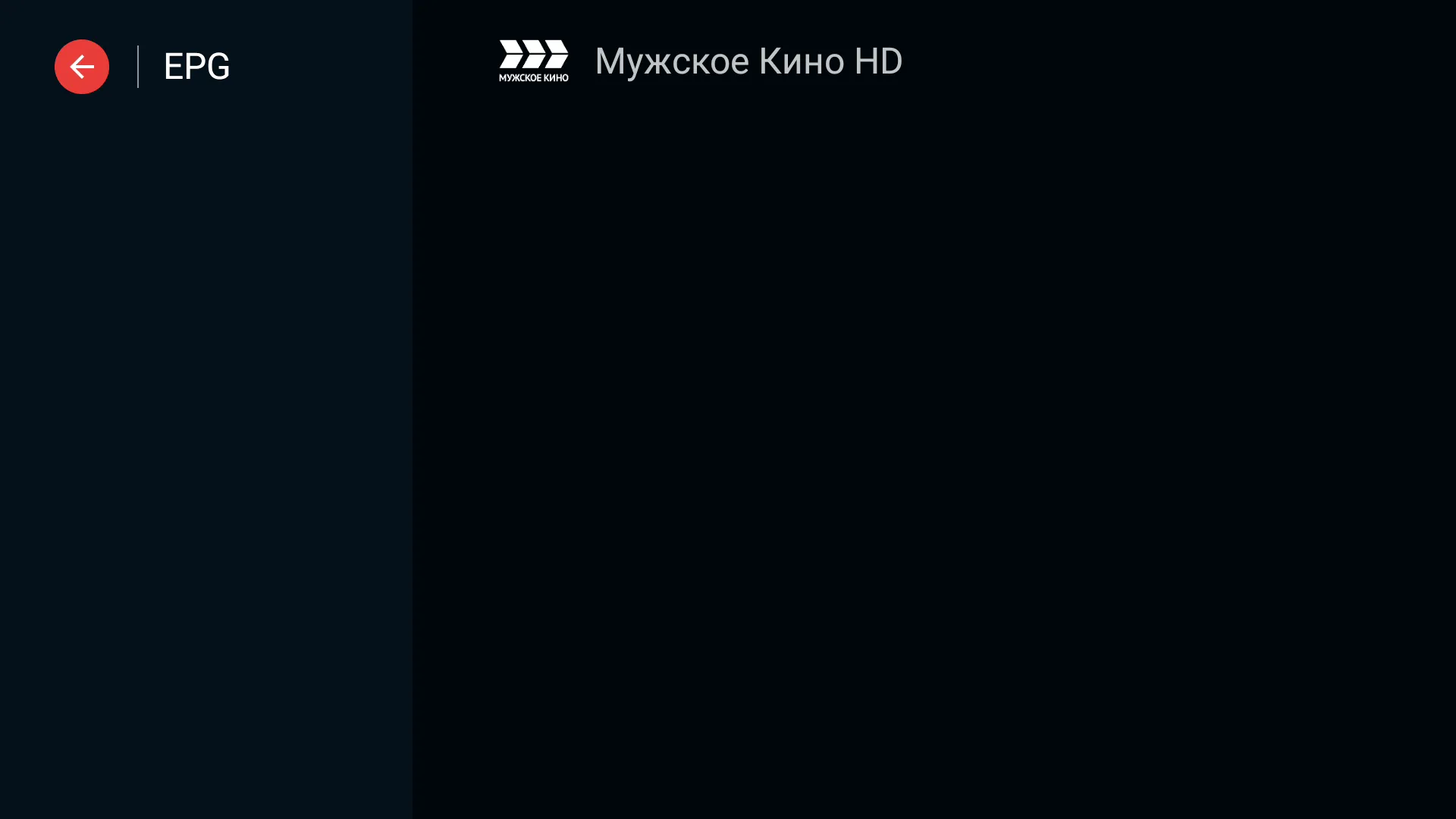

Hello! Became the owner Z11 Pro max. In the mol3 application, I noticed that in the infobar on the right side, when you click epg, the window is empty, although epg is on all channels.
Display Spoiler
I checked it.
When i click on info bar and the epg on the right with the arrow button i see epg.
so it works on my side.


It's clear. This means that this is not an EPG, but a viewing of archived broadcasts
It’s a shame that this doesn’t work for playlists that also have a catchup function. Tiwi Mate so far the best in this regard.
It's clear. This means that this is not an EPG, but a viewing of archived broadcasts
It works on my side. Sow thats all i know.
And its not archived. Its the epg.
Epg you can also best check when you are on a channel and push the guide button.
Then i got the same for the channel i checked

Only getting barely 12hr epg on stalker now after update?
When did you update? The update was released on July 1st. If it was working well for you and then suddenly it is not working, your IPTV service provider (who provides the EPG data) could be the source of the issue.
Also having problems with aspect ratio?
Issue description too vague.
And its not archived. Its the epg.
Please can you check this by turning on the broadcast by selecting the past program a couple of hours above? Will it play or not?
Please can you check this by turning on the broadcast by selecting the past program a couple of hours above? Will it play or not?
You mean catchup?
My head provider has 24 hour catchup only.
Other 2 providers have longer than 24h i thought.
I will check it later. But if it not play a selected program, its 99% iptv provider problem.
My provider plays archived broadcasts for 7 days, I will repeat on Tiwi Mate there are no problems with this. I wanted to clarify, it just reproduces mol3 archived programs or not?
Hi,did you try setting update interval to 3hours (Content Manager>content sources>sub>edit>set update interval epg to 3 hours)?
Hi Henkie. Just to let you know. & who ever read my/our posts about epg on stalker being around 5 hrs after update. It's 5 days going forward as from this morning 🤷🏼♂️ so looking fixed. Maybe devs done something over night. 👍🏼
Your Provider changed something not the devs., devs. can only change something in update.
Your Provider changed something not the devs., devs. can only change something in update.

What color is the LED on your Formuler device when you turn off the TV screen?
Also, please check 'Home screen > Settings > HDMI CEC' and see if HDMI control is enabled.
Thank you for your response. The LED on the Formuler device is white - after I turn off the TV Screen and when I turn on the TV screen again it's blank. I had also had and rechecked it and the HDMI CEC enabled. No change - still can't wake up the device after I close the TV - white light on- so have to reboot the Formuler to see anything again.
I just downloaded the update last night for my z11 pro max and to my disappointment the timeshift is worse now.
Before update timeshift would show zero on time bar and not work. I would cycle power off on on unit and timeshift would then work, now timeshift shows it's working, and if I rewind that's OK but when I ffwd it freezes and start over to 0.
The timeshift after this update is useless to me now. Please fix this

I just downloaded the update last night for my z11 pro max and to my disappointment the timeshift is worse now.
Local timeshift on recording device or Catch up/ server timeshift? Both tested, works fine on my side.
Using a flash drive and I wish I could say the same. The timeshift fails when ffwd, freezes and loses data and starts over at 0. This started after update.
Doesn't matter if I try on server timeshift or atsc same result. Not using catchup
Disconnect and reformat with NTFS on PC (if possible with Rufus tool), connect again with box and restart once. In MOL3 menu DVR check if drive recognised for recording and timeshift.
Disconnect and reformat with NTFS on PC (if possible with Rufus tool), connect again with box and restart once. In MOL3 menu DVR check if drive recognised for recording and timeshift.
Did exactly as you said using Rufus formatted non Bootable ntfs and it has a line thru it under dvr options. It allows me to turn on and line goes away but no timeshift at all now. Record works

Thank you for your response. The LED on the Formuler device is white - after I turn off the TV Screen and when I turn on the TV screen again it's blank. I had also had and rechecked it and the HDMI CEC enabled. No change - still can't wake up the device after I close the TV - white light on- so have to reboot the Formuler to see anything again.
The device should be on if the LED light is white.
Please make sure you have selected the correct HDMI channel on your TV.
Also, please let me know how you are rebooting the Formuler device if you are not able to see anything.
Are you unplugging and replugging the device?
I updated firmware and my box is having problems: After completing the download/install, I updated the start menu with favorites and added a new line of apps per the update. After couple days the start menu reverted back to original seen following the update and I can not access settings tab. I scroll the curser across the selections at top of page (Home, Apps, Something, Settings), click settings, it flashes settings menu fraction of a second and goes back to "Home"
Please advise what I need do to get it back to normal??

I updated firmware and my box is having problems: After completing the download/install, I updated the start menu with favorites and added a new line of apps per the update. After couple days the start menu reverted back to original seen following the update and I can not access settings tab. I scroll the curser across the selections at top of page (Home, Apps, Something, Settings), click settings, it flashes settings menu fraction of a second and goes back to "Home"
Please advise what I need do to get it back to normal??
The devs are currently looking into this issue.
Meanwhile, please access the Formuler Remote app to setup a hotkey for Android Settings.
Please use the hotkey to access the android settings and disable the IPv6 in the Network & Internet settings.
Also, please follow the guide below to send logs:
Make sure to let me know the tracking number for the logs.
I updated firmware and my box is having problems: After completing the download/install, I updated the start menu with favorites and added a new line of apps per the update. After couple days the start menu reverted back to original seen following the update and I can not access settings tab. I scroll the curser across the selections at top of page (Home, Apps, Something, Settings), click settings, it flashes settings menu fraction of a second and goes back to "Home"
Please advise what I need do to get it back to normal??
Maby try also to hold on off button on remote.
Then select restart and hold ok button.
Restart in safe mode.
Maby you can now change settings in menu again and do factory reset.
Display MoreThe devs are currently looking into this issue.
Meanwhile, please access the Formuler Remote app to setup a hotkey for Android Settings.
Please use the hotkey to access the android settings and disable the IPv6 in the Network & Internet settings.
Also, please follow the guide below to send logs:
Make sure to let me know the tracking number for the logs.
Thank you very much for the qwik reply.
I am at office but will try tonight. Again Thank You! and have great day!
The device should be on if the LED light is white.
Please make sure you have selected the correct HDMI channel on your TV.
Also, please let me know how you are rebooting the Formuler device if you are not able to see anything.
Are you unplugging and replugging the device?
Thanks for your response. I reverified and I do have the correct HDMI Channel on my TV. No, not unplugging and replugging the device when the screen is blank. I am pressing the power button off on the remote and shutting it down. Then I repress the power button on the remote to reopen the formuler device. I hate this as don't want to close and reopen the box- not to damage it without properly shutting down. Before this July 1 2024 update, I used to press either the VOD or Live button on the remote (or even the home button) and some seconds later the device would reawaken. Not any more.
Did exactly as you said using Rufus formatted non Bootable ntfs and it has a line thru it under dvr options. It allows me to turn on and line goes away but no timeshift at all now. Record works
Please try with other device or use for timeshift sd card and for recording current device.
Please try with other device or use for timeshift sd card and for recording current device.
Thanks for the reply. Unfortunately I have tried an SD card and 3 flash drives. They all give same result. When I actually get the timeshift for live TV to work no matter server or atsc ota TV the timeshift is bad. Rwd it may freeze, same with ffwd and if you go to ffwd to live TV it starts the timeshift counter over.
I have verified by setting a hotkey to live TV and doing that does same result resets the timeshift counter.
Thanks
Forgot to add I did a factory reset on my unit today and same as above. No apps and only 2 servers running and hauppauge atsc tuner