Of course, playback must continue in standby mode.
Is a programming mistake.
Has a satellite receiver that works perfectly. 

We asking all new users to read the articles below, before creating their first posting or thread.
Please note, in this forum are only English threads and postings allowed, without any exception!
Please follow the forum rules, thank you for your understanding.
Of course, playback must continue in standby mode.
Is a programming mistake.
Has a satellite receiver that works perfectly.

Not always; if the programming is okay, you get a messagebox that Windows/IOS is prevented to shutdown or go into standby….. Office does that for instance 😉
correct some apps can prevent standby or give a message or in your example office will give the message to save before hardware shutdown/standby
but the thing is i was trying to say nothing will continue to run/execute when standby occur due to the hardware power state.
even ios previous versions you couldn't run multiple process, only the active foreground will take precedence.
Is there any way to set manual recording on Z11 Max Pro? Need to do this for channels where there is no EPG.
1. ?? How to schedule a recording when no information is displayed in the EPG
-Press the EPG button on the remote
-Move the cursor to the approximate desired recording time slot
-press ok
2. manual recording:
-press recording on the channel
-press recording again to access the time start and end and make time adjustment.

Of course, playback must continue in standby mode.
Is a programming mistake.
Has a satellite receiver that works perfectly.
Yep, I have a Samsung SMT-C7140 and does the job perfectly, even when the device is put in standby manually.
Jumping Rabbit; I’m not trying to convince anyone, just letting people know that other devices can deal with such kind of features ;-).
Hopefully the devs see the advantages of these features so other people can benefit such feature's after been implemented. It helps making the Z11 more value for money….
Not always; if the programming is okay, you get a messagebox that Windows/IOS is prevented to shutdown or go into standby….. Office does that for instance
Yo are right Tom. even the Z11 must act like Z8 and others when you still recording and hit on standby. Other Formuler Boxes give you warning to stop the recording and go into standby or continue and dismiss standby.
This issue was bespoken this morning with Formuler and the devs. will be informed about this to fix it in future.
Thanks all for reporting this issue.

standby will suspend processes so recording will stop it is not like the phone that will turn off display and still run apps example whatsapp voice conversation or simcard talking.
It is strange. I reckon before last update, the Z11 would wakeup automatically from standby for an upcoming scheduled recording. This does not seem to be the case anymore. When the Z11 is woke up from standby afterwards, the "reminder" popup shows up (asking you to add a reminder, wait 1 minute, etc.), then records about 2-3 seconds then exit.
you mean the beta update 11.2.2?
hi guys
Yestarday during a scheduled recording, someone accidentally pushed the 'off' button -> recording finished ... This is really something that should be looked at.
it was submitted as a feature request to implement a dialog to cancel power off/standby when an active recording is in progress.
Hi Sam, I have lately a problem he shows me
UnexpectedloaderExeption I didn’t have before what can that be the problem?

Hi Sam, I have lately a problem he shows me
UnexpectedloaderExeption I didn’t have before what can that be the problem?
Hi,
Try with deleting MOL3 cache and restart.

Yestarday during a scheduled recording, someone accidentally pushed the 'off' button -> recording finished ... This is really something that should be looked at.
Is bespoken and forwarded to the devs.
you mean the beta update 11.2.2?
No, 11.2.1. Haven't tried 11.2.2 yet.
review the fixes and try if it applies to you.
Timeshift only works If I go back 5 days? If I try to watch something from yesterday or a couple of days ago I get message
Timeshift Error can't play this video?. Any idea's
Thanks in advance.
Formuler Z11 pro max.
did you try updating to the beta 11.2.2?
It has a media playback fix.

Timeshift only works If I go back 5 days? If I try to watch something from yesterday or a couple of days ago I get message
Timeshift Error can't play this video?. Any idea's
Thanks in advance.
Formuler Z11 pro max.
Ik think, first connect your iptv provider.
I believe the timedhift issue is related to streams needing to be set to HLS. Sam had told me the only way to do this is via m3u connection (not xpi or Mac). Is this correct?

I believe the timedhift issue is related to streams needing to be set to HLS. Sam had told me the only way to do this is via m3u connection (not xpi or Mac). Is this correct?
Apps on alternative devices such as “sticks” have the ability to switch between stream formats such as HLS and Mpegts as and when required but Formuler doesn’t have that ability for this task.
I trust that if Sam said it’s only possible in M3U then it’s likely that is the only way when using Formuler.
Even installing alternative external players on Formuler won’t help because that’s used for movies and series and nothing live tv-wise.
Hope that info makes things a little clearer
I have no such issue while scrolling through VOD or Tv Series on both MAC and XC. And that's not timeshift, timeshift is the ability to kinda record live streaming so you can go back watching something you missed, it records to the same place as normal records are stored (i use SMB local share), but when we change channel it deletes what was recorded, something like that and for me it works also on MAC and XC, while i don't use it because my provider have EPG, so when i want to watch something i've missed i go to EPG and select the live stream, it will begin the live event and then i can scroll to where i want...
On VOD when i open any movie i can scroll to whatever timestamp i want in a matter of seconds. When i can't do that is because i need to refresh stuff, that's what my provider told me, either that or change VPN ip address...
I believe the timedhift issue is related to streams needing to be set to HLS. Sam had told me the only way to do this is via m3u connection (not xpi or Mac). Is this correct?
you could change the mpegts to hls(adapting to network conditions) format using the m3u url end parameter
MPEGTS:
&type=m3u_plus&output=ts
hls:
&type=m3u_plus&output=m3u8
mol will give the option to convert to xtreamcode api

Is it true that this issue hasn't been resolved yet?
It is resolved (Stalker) with latest Beta and Alternative EPG Mode. For more Informations read Beta thread.
Will epg issues ,on XC connection,likely be resolved in the next upcoming update?
In the past I have switched from stalker to XCAPI for better EPG......maybe now I have to switch back again 
First I need to find out if my provider was able to solve their EPG issues.
It is resolved (Stalker) with latest Beta and Alternative EPG Mode. For more Informations read Beta thread.
My box uses XCAPI.
Will this issue resolved in next update? And when?
Thanks
hello everyone, for two or three weeks my formulate z11 pro max while I watch TV marks me you are not connected to the network, yet my internet works nickel, I change cable and the same
Hi
How to explain...
Z11 Pro Max / Stalker
I have created my favorites bookmarks and enabled auto numerating (1, 2, 3, etc...)
When I program a recording, I do it with my favorites...
When the recording ends, the schedule has left my favorites to be placed in the group corresponding to the recorded channel...
Is it possible that at the end of the recording that my favorites are displayed and not back in the groups???
If favorites category was last active then yes.
Recently upgraded to Z11 Pro Max from my trusty CC. I have two questions:
1. Is there a better option than the Z11PM's Media Browser that's similar to what the CC and Z8 has? The new Media Browser isn't as user friendly and you can't delete files like you could before.
2. Can I assign VLC Player as the default video player from within Media Browser? The MOL3 default video player is still unable to play all my video types such as AVI even after updating to the latest firmware.
hello everyone, for two or three weeks my formulate z11 pro max while I watch TV marks me you are not connected to the network, yet my internet works nickel, I change cable and the same

hello everyone, for two or three weeks my formulate z11 pro max while I watch TV marks me you are not connected to the network, yet my internet works nickel, I change cable and the same
1. in network setting try switching to dhcp if on static
2. wait about 2mins when the box start up because with some routers it will take longer to show connected.
3. update the formuler to the latest firmware by using the software update on the home screen.
4. power cycle router
5. disconnect wifi when onn lan cable

Recently upgraded to Z11 Pro Max from my trusty CC. I have two questions:
1. Is there a better option than the Z11PM's Media Browser that's similar to what the CC and Z8 has? The new Media Browser isn't as user friendly and you can't delete files like you could before.
2. Can I assign VLC Player as the default video player from within Media Browser? The MOL3 default video player is still unable to play all my video types such as AVI even after updating to the latest firmware.
1. android 10 and up has a restriction so you can't delete files.
you will have to brute-force try file managers or use tv file commander or the adb extention for windows explorer(if running windows)
2. open vlc and let it scan for new media then use vlc interface to play them because the media browser don't have any option to set external player.
thank you, I'll look at that, the update was already done not long ago with the latest version
Is it possible to install MOL2 on Z11 Pro Max? MOL3 does not have the ALL channel feature and I need this as I am visual and don't remember every Movie?TV Series title in the world. You cannot use Universal Search to find a movie with a yellow car on the poster or with a picture of a fire on the poster. But with ALL feature enabled we could scroll until we find it.
I also wish we were able to use MOL2 on Z11...i personally dont like the Universal Search, Searching in MOL2 was so much easier you could choose ALL and select Year to search for newest available in VOD and it would search...so easy....then they changed it to this ....hopefully they either change the Search features OR at least give an option to users to choose between MOL2 or MOL3 for the Z11's

I also wish we were able to use MOL2 on Z11...i personally dont like the Universal Search, Searching in MOL2 was so much easier you could choose ALL and select Year to search for newest available in VOD and it would search...so easy....then they changed it to this ....hopefully they either change the Search features OR at least give an option to users to choose between MOL2 or MOL3 for the Z11's
But you can just go to the “newly Added” section and treat that as “ALL” and then search from there and it will search everything anyway….
hello everyone, I have a z11 pro max.
Refreshing the content is set daily and that works well, but the EPG update is not automatic and I have to do this manually. is there a solution for this? When I explore through the vods, the device sometimes loses the connection to the vods I get the message: no vods found. I only have this problem when exploring the vods. when watching a channel or movie I have no problems. And if I scroll up and down quickly, the connection sometimes comes back. This looks like a bug and is this a known issue? I'd love to hear from you, thanks in advance
Hi all.
I’m using MOL3 on Z11 Pro Max box.
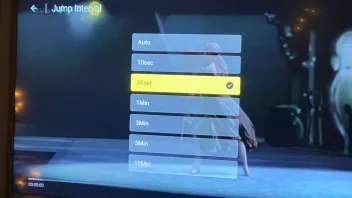
I’m having an issue with the Jump Interval.
I know an external player can’t be used for Timeshift/Catchup (which is a shame, hopefully a feature that can be added soon).
For timeshift I have all options to choose from on Jump Interval (AUTO, 10sec, 30sec, 1min, 3min, 5min, 10min). However on Catch-up it only gives me the option of Auto, 1min, 3min, 5min, 10min.
Why is there no options for smaller jump intervals on Catchup?
Any help would be appreciated!