

is there a way to hid the other languages or groups on this z8.
just to thin the clutter.
when we go back to the categories I just want to show English groups not the foreign ones
thanks

We asking all new users to read the articles below, before creating their first posting or thread.
Please note, in this forum are only English threads and postings allowed, without any exception!
Please follow the forum rules, thank you for your understanding.
is there a way to hid the other languages or groups on this z8.
just to thin the clutter.
when we go back to the categories I just want to show English groups not the foreign ones
thanks
Connection should be active. MOL2 -> Menu -> Connections -> your sub-> edit groups -> uncheck all what you not need.
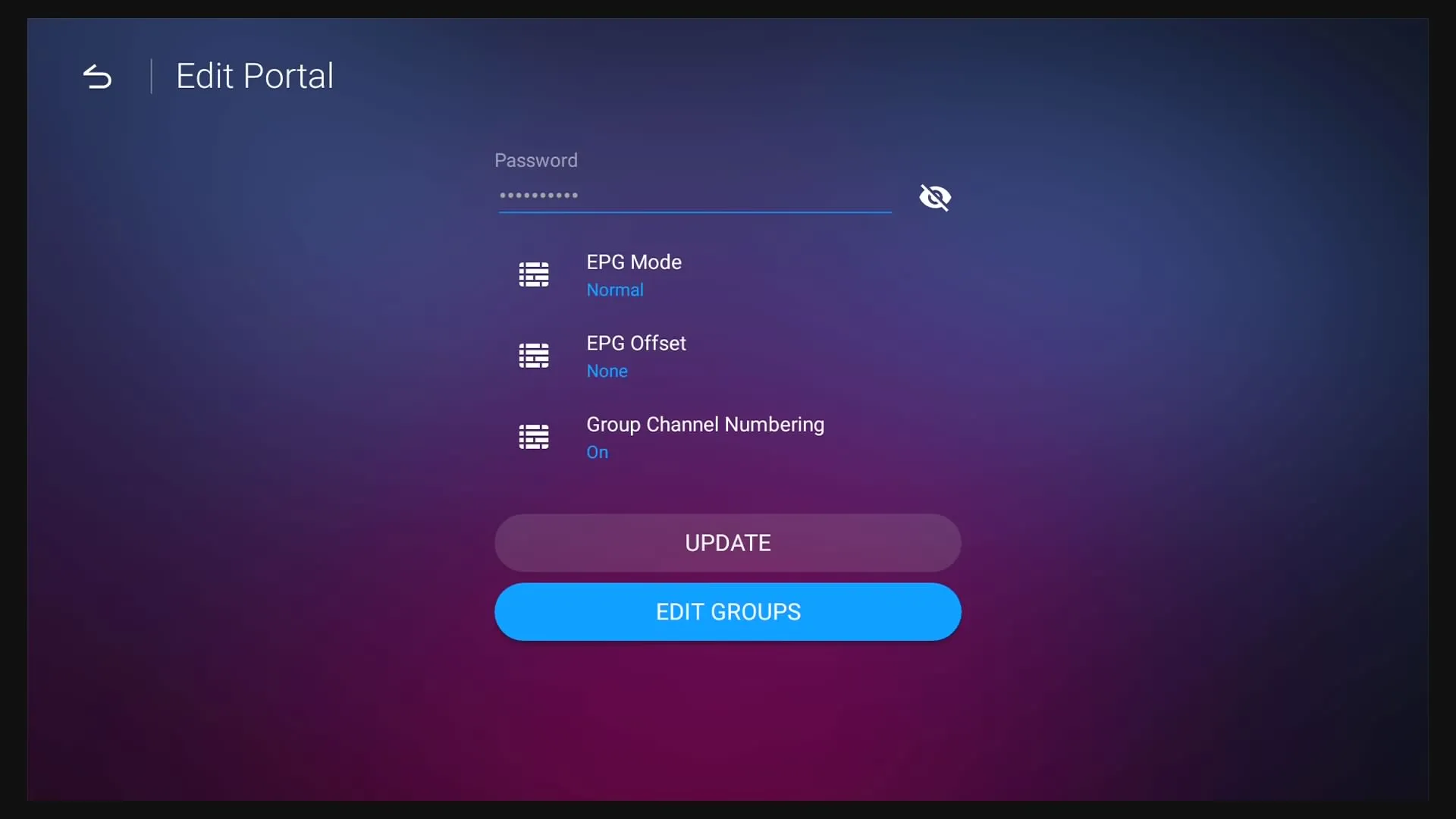
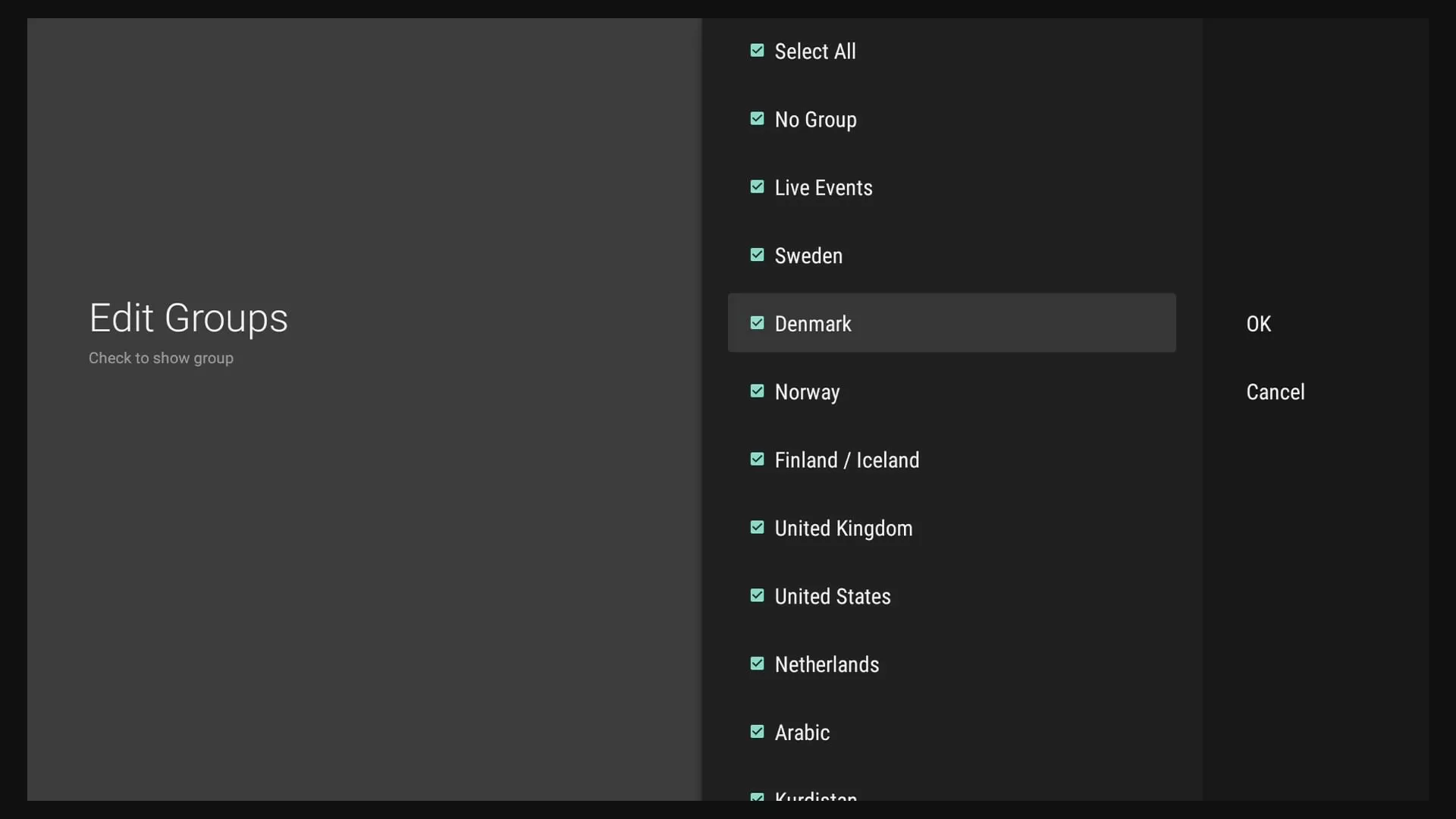
Confirm with Ok and restart the connection again.
Hello SAM,
It is also possible to hide groups / category on a Z7+ ?
Moreover, a possibility to move channels ?
If not do you it will be an update where we will be able to do so ?
Thanks

Hello SAM,
It is also possible to hide groups / category on a Z7+ ?
Moreover, a possibility to move channels ?
If not do you it will be an update where we will be able to do so ?
Thanks
MOL1 > Live TV > Press GROUPS on the remote > press the RED hotkey on the remote
Moving channels is not possible.
sorry the pictures never came up
I don't know where I see that. thanks
SAM FYI: After moving the thread the links to the pics are broken.

After moving the thread the links to the pics are broken.
What is broken? I see the pictures in post #2.
Images look broken on my side:
Found the Bug. Should work now and be visible for everyone.

Found the Bug. Should work now and be visible for everyone.
Confirmed! Works again. 
I see it now to that is awesome thanks so much
I have edited my groups several time. Hide and unhide groups that i dont want to see. Now my groups wont load at all. A little window briefly pops up that says "empty groups". How do i get my groups back so I can edit them? Thank you

I have edited my groups several time. Hide and unhide groups that i dont want to see. Now my groups wont load at all. A little window briefly pops up that says "empty groups". How do i get my groups back so I can edit them? Thank you
I have edited my groups several time. Hide and unhide groups that i dont want to see. Now my groups wont load at all. A little window briefly pops up that says "empty groups". How do i get my groups back so I can edit them? Thank you
I had the same issue after last update. I tried maybe 10 times and always the same bug.
And after having the "empty groups" issue, I lost ALL TV channels!
Radio, VOD were okay but Live TV disappeared.
My only solution was to reset Z8 from scratch, then to reinstall all apps, etc.
Do you have the same issue with TV Live after failing editing groups?
Since theses failed attempts, I gave it up until, I hope, the next update.
I know that we can « manually » hide categories as described previously in this thread but for your information empty categories for Series are still visible when connected XC/Api (not visible when connected MAC/id)
What is the No Group category? I have the same on my Z8 Pro but if I uncheck it nothing changes.
It will just be an entry in providers list
Post screenshot Please to confirm
Its the same as in post #2 above. I thought it was some kind of hidden group and didn't know what its purpose was.
 Display More
I had the same issue after last update. I tried maybe 10 times and always the same bug.
And after having the "empty groups" issue, I lost ALL TV channels!
Radio, VOD were okay but Live TV disappeared.
My only solution was to reset Z8 from scratch, then to reinstall all apps, etc.
Do you have the same issue with TV Live after failing editing groups?
Since theses failed attempts, I gave it up until, I hope, the next update.
I am now having the same issue. I am able to hide groups in VOD and TV Series, yet Live Tv states "empty group" when I pursue hiding many foreign countries. And like stated above, I lose live tv and only back arrow into Tv Series and Vod. I have to reload the connection in order to get live Tv. Any thoughts are appreciated. Thanks

I am now having the same issue. I am able to hide groups in VOD and TV Series, yet Live Tv states "empty group" when I pursue hiding many foreign countries. And like stated above, I lose live tv and only back arrow into Tv Series and Vod. I have to reload the connection in order to get live Tv. Any thoughts are appreciated. Thanks
I have the exact same thing. Anyone has a solution for it?
Hide groups in vod/serie is not a problem. But hiding groups from live tv, results in an 'empty group' popup and live tv is empty. Only a reconnect helps bringing the channels from live tv back. But still I cant edit the live tv group. Ive done a complete factory reset, but the problem remains..

I have the exact same thing. Anyone has a solution for it?
Hide groups in vod/serie is not a problem. But hiding groups from live tv, results in an 'empty group' popup and live tv is empty. Only a reconnect helps bringing the channels from live tv back. But still I cant edit the live tv group. Ive done a complete factory reset, but the problem remains..
Please send logs right after the issue reappears following the next instructions: How to send logs
Also, upload the Image/Video file here: https://streamable.com/ > Upload file > Copy link > Paste the link with your reply.
BOP. Problem still persists, thiught I was the only one. Running XC API, this problem is still relevant and seem to be a Formuler problem, not a provider.
Something goes wrong when parsing LIVE TV groups when trying to change them.
Only "Empty Group" error for Live TV, VOD and TV Show works fine.
Ticket has been sent when reproducing the problem: 71C00E
I know this is very old but was there ever a fix for this bug? I have recently started using my Z10 Pro Max again and this bug still exists. I can hide VOD or Series groups but TV groups spins and then says empty groups. I suspect it has to do with loading the groups into memory as I have 2 different providers and one provider has few groups and it works fine. However, the 2nd provider has many many different groups and it comes back with the error empty group. Both providers are Xcapi.

I know this is very old but was there ever a fix for this bug? I have recently started using my Z10 Pro Max again and this bug still exists. I can hide VOD or Series groups but TV groups spins and then says empty groups. I suspect it has to do with loading the groups into memory as I have 2 different providers and one provider has few groups and it works fine. However, the 2nd provider has many many different groups and it comes back with the error empty group. Both providers are Xcapi.
I've created a conversation with you. Please check the notification on the top right.

I've created a conversation with you. Please check the notification on the top right.
I have replied to your conversation as requested.
Same problem here. Why do people get the solution bij private message ( i think). I see Banderso has this problem and he gets a private message.
I would love to get this fixed too, but shouldnt the solution be available for all users?
Erik
To clarify, the PM was not a fix. The PM was asking me to recreate it for them and provide logs and screenshots and video of the issues so the developers can look at it. I did all that and provided what I could to the requester. The PM response after doing that was that it had been received and sent to the developers for analysis. There hasn't been a software update since on the Z10 Pro Max to see if it has been corrected. Just want to clarify for you.
Thanks for the clarification Banderso. I thought there was a solution already, because you're nit the first to mention this issue.
Erik

Thanks for the clarification Banderso. I thought there was a solution already, because you're nit the first to mention this issue.
Erik
I eagerly await a fix to this, as I am sure many other do as well. I am hopeful the next update will have something. My providers service is big with lots of categories I don't want to display everyday.
My providers service is big with lots of categories I don't want to display everyday.
Do you have login for your sub. dashboard on Provider site? If yes, you can there deactivate all not needed category`s and save. The Box will load everything faster!
If not, contact them and tell to deactivate unused category`s.
Do you have login for your sub. dashboard on Provider site? If yes, you can there deactivate all not needed category`s and save. The Box will load everything faster!
If not, contact them and tell to deactivate unused category`s.
Thanks. I don't have access to what you mentioned. I would prefer the Formuler Z10 PM works as designed and how it works for other providers I have. That's why I provided the info to the developers to be able to fix the issue rather than a work around.
I agree. It worked before so it should work now too. My GTV has no problems with this.
Erik
It is only other possibility to deactivate category`s, i didn`t wrote it should not be fixed!
Hello. I got a similar issue with my Z8. When i edit groups and hide countries i dont want, all seems ok atm.
Then when i restart (shutdown/close software (mol2) some of the countries comes back and are ticked again.
Countries are adding up to my list by it self if i let it be. But not more then 10 or so.
I have created my own groups aswell in Live-TV.
I thought MyTvOnline2 was overriding the XC.
Best regards 
 Display More
Hello. I got a similar issue with my Z8. When i edit groups and hide countries i dont want, all seems ok atm.
Then when i restart (shutdown/close software (mol2) some of the countries comes back and are ticked again.
Countries are adding up to my list by it self if i let it be. But not more then 10 or so.
I have created my own groups aswell in Live-TV.
I thought MyTvOnline2 was overriding the XC.
Best regards
From my experience I have found that when I am able to disable them they never come back. However, if your Service Provider changes the category or adds a specific country category , it will then show up when you do a refresh or in your case a shutdown and restart. Nothing can be done with the existing software to block a specific country, only a specific category. I had it one time when the Provider changed the spelling of the group/category name and of course this comes back. Every once in a while if I see them I will then go back and disable them if they are not wanted.
I tried to reproduce it today on the Z10.
Three categories disabled and in MOL2 it stays deactivated. Closed MOL2 and restarted, stays deactivated. Then cut the power for 10 minutes and restarted again, the categories that were switched off remain deactivated in MOL2.
What did you else so it can be reproduced? How ever i forwarded this reports again to Formuler and wait for reply.
However, if your Service Provider changes the category or adds a specific country category , it will then show up when you do a refresh or in your case a shutdown and restart. Nothing can be done with the existing software to block a specific country, only a specific category. I had it one time when the Provider changed the spelling of the group/category name and of course this comes back. Every once in a while if I see them I will then go back and disable them if they are not wanted.
That is correct.
The problem is, that we want to remove channels that we dont use. Thats not working anymore. Maybe the returning of some channels is something the provider is doing because there is a small change in the channel. I had this before, when the Hidding of the channels still worked too.
Erik
Hope there will be a fix soon
It's being looked into by the devs.
